• Skip to primary navigation
  • Skip to main content

frankdenneman.nl

  • AI/ML
  • NUMA
  • About Me
  • Privacy Policy

vSphere 5.1 update 1 release fixes Storage vMotion rename "bug"

April 26, 2013 by frankdenneman

vSphere 5.1 update 1 is released today which contains several updates and bug fixes for both ESXi and vCenter Server 5.1.
This release contains the return of the much requested functionality of renaming VM files by using Storage vMotion. Renaming a virtual machine within vCenter did not automatically rename the files, but in previous versions Storage vMotion renamed the files and folder to match the virtual machine name. A nice trick to keep the file structure aligned with the vCenter inventory. However engineers considered it a bug and “fixed” the problem. Duncan and I pushed hard for this fix, but the strong voice of the community lead (thanks for all who submitted a feature request) helped the engineers and product managers understand that this bug was actually considered to be a very useful feature. The engineers introduced the “bugfix” in 5.0 update 2 end of last year and now the fix is included in this update for vSphere 5.1
Here’s the details of the bugfix:

vSphere 5 Storage vMotion is unable to rename virtual machine files on completing migration
In vCenter Server , when you rename a virtual machine in the vSphere Client, the VMDK disks are not renamed following a successful Storage vMotion task. When you perform a Storage vMotion task for the virtual machine to have its folder and associated files renamed to match the new name, the virtual machine folder name changes, but the virtual machine file names do not change.
This issue is resolved in this release. To enable this renaming feature, you need to configure the advanced settings in vCenter Server and set the value of the provisioning.relocate.enableRename parameter to true.

Read the rest of the vCenter 5.1 update 1release notes and ESXi 5.1 update 1 release notes to discover other bugfixes
Filed Under: vMotion, VMware

Awesome read: Storage Performance And Testing Best Practices

April 24, 2013 by frankdenneman

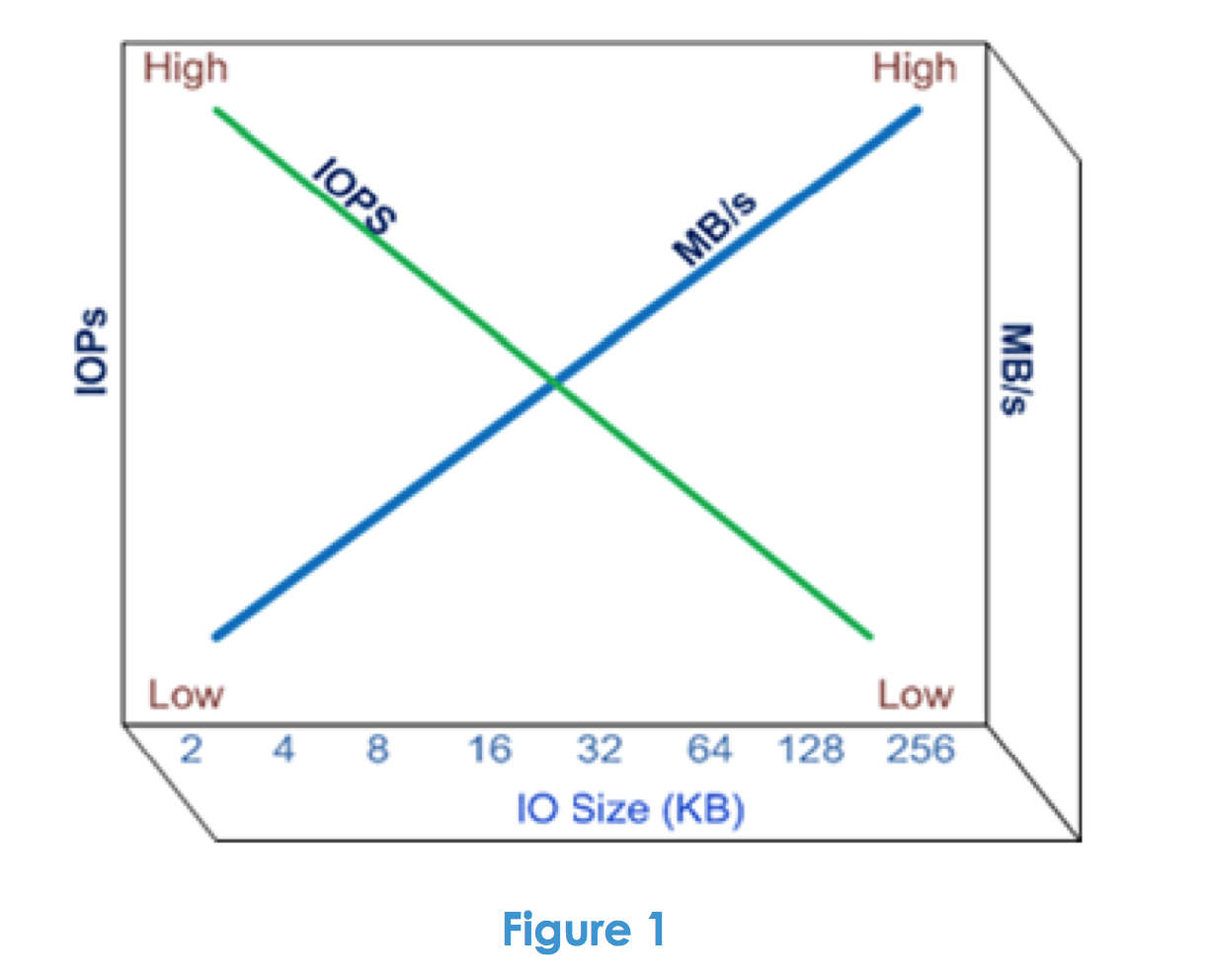
The last couple of days I’ve been reading up on EMC VPLEX technology as I’m testing VPLEX metro with SIOC and Storage DRS. Yesterday I discovered a technical paper called “EMC VPLEX: Elements Of Performance And Testing Best Practices Defined” and I think this paper should be read by anyone who is interested in testing storage or even wanting to understand the difference between workloads. Even if you do not plan to use EMC VPLEX the paper delivers some great insights about IOPS versus MB/s. What to expect when testing for transactional-based workloads and throughput-based workload? Here’s a little snippet:
“Let’s begin our discussion of VPLEX performance by considering performance in general terms. What is good performance anyway? Performance can be considered to be a measure of the amount of work that is being accomplished in a specific time period. Storage resource performance is frequently quoted in terms of IOPS (IO per second) and/or throughput (MB/s). While IOPS and throughput are both measures of performance, they are not synonymous and are actually inversely related – meaning if you want high IOPS, you typically get low MB/s. This is driven in large part by the size of the IO buffers used by each storage product and the time it takes to load and unload each of them. This produces a relationship between IOPS and throughput as shown in Figure 1 below.”
01-IOversusMB
Although it’s primarily focused on VPLEX, the paper helps you understand the different layers of a storage solution and how each layer affects performance. Another useful section is the overview of good benchmark software which describes the basic operation of each listed benchmark program. The paper is very well written and I bet even a joy to read for both the beginner as well as the the most hardened storage geek.
Download the paper here.

Filed Under: Miscellaneous, VMware

Elastic vDC and how to span a provider vDC across multiple DRS clusters

March 29, 2013 by frankdenneman

vCloud director 5.1 provides the ability to create elastic vDC which allows an organization vDC to consume resources from multiple DRS clusters. By having the provider vDC abstract the resources from multiple DRS clusters, its simpler to grow capacity when needed. Before elastic vDC, a new provider vDC and Org vDCs needed to be created when an org vDC wanted to grow beyond the capacity of the provider vDC. With Elastic vDC you just add new clusters when needed and allow the Provider vDC to manage initial placement of vApps.
During research of elastic vDCs I discovered that the way to span a provider vDC isn’t that intuitive. In order to save you some time, here are the steps to create a provider vDC that spans multiple DRS clusters.
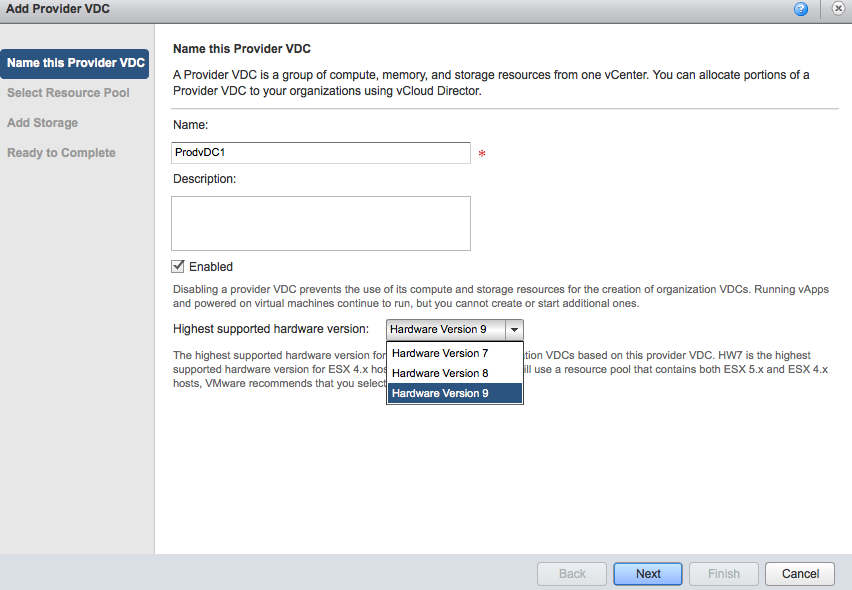
Create a Provider vDC, give it a name and select the highest supported hardware version. If you run a homogenous environment with solely 5.1 ESX hosts I highly recommend changing it to Hardware Version 9. If the clusters run different ESX versions, lower the hardware version to the appropriate supported level.
00-hardware-version-provider-vdc
Please note that the provider vDC is responsible for initial placement of the vApp. It will place the vApp on the cluster that contains the most available “unreserved” compute resources and storage resources. It is possible that vApps of the same organization run on different ESX versions.
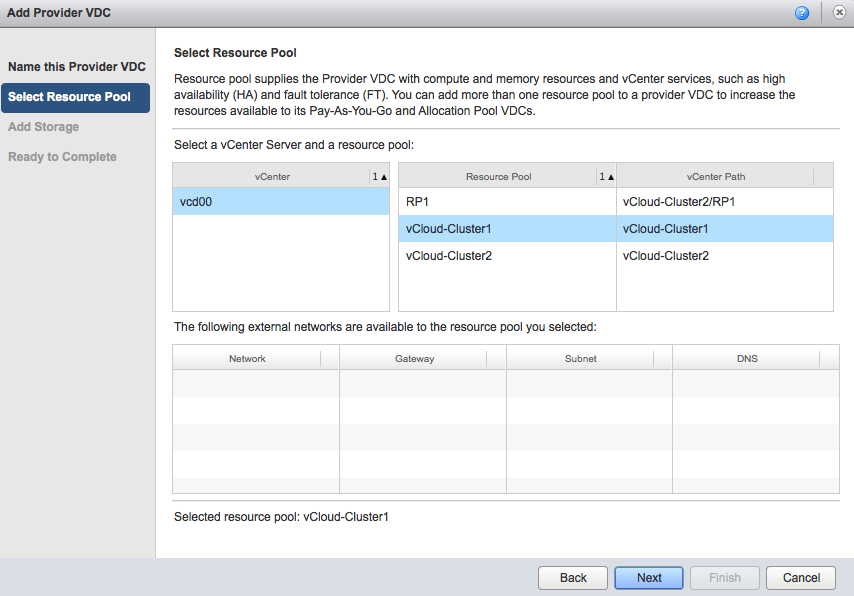
Select Resource pool. This screen is a little bit ambiguous. The user interface “talks” about resource pools, but that doesn’t mean you cannot select a complete DRS cluster for consumption by the provider vDC. A DRS cluster is in essence a resource pool, the root resource pool for all its child resource pools. So don’t worry if you want to select an entire cluster, in matter of fact, when you select the vCenter it shows the DRS clusters as well as the resource pools.
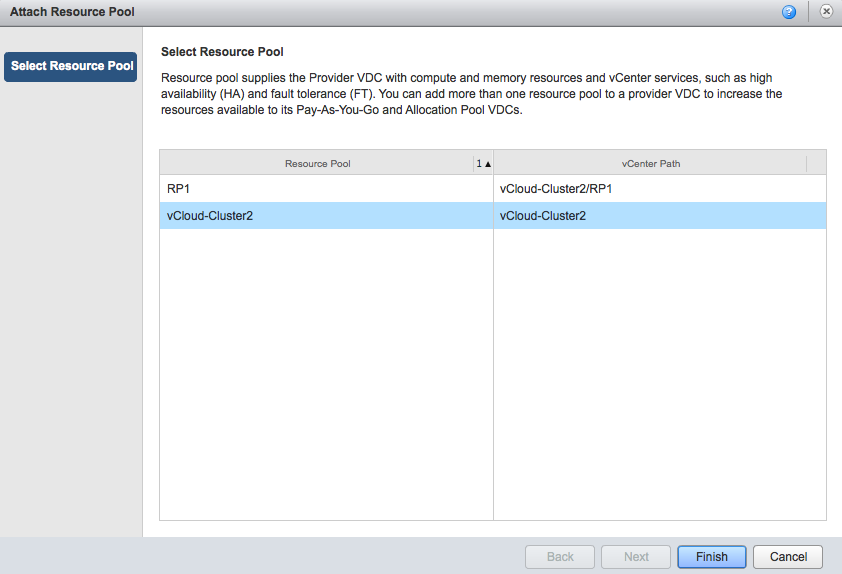
In this example, the vCenter contains two DRS clusters; vCloud-Cluster1 and vCloud-Cluster2. The DRS cluster vCloud-Cluster2 contains a resource pool called RP1. Unfortunately the user interface does not use any icons to differentiate between clusters and resource pools, but shows a vCenter path notation. As RP1 is the child resource pool of vCloud-Cluster2, the vCenter path is as follows: vCloud-Cluster2/RP1.
Unfortunately the interface only allows to select a single resource pool or cluster, therefor I select the vCloud-Cluster1 and select next.
01-select-drs-cluster
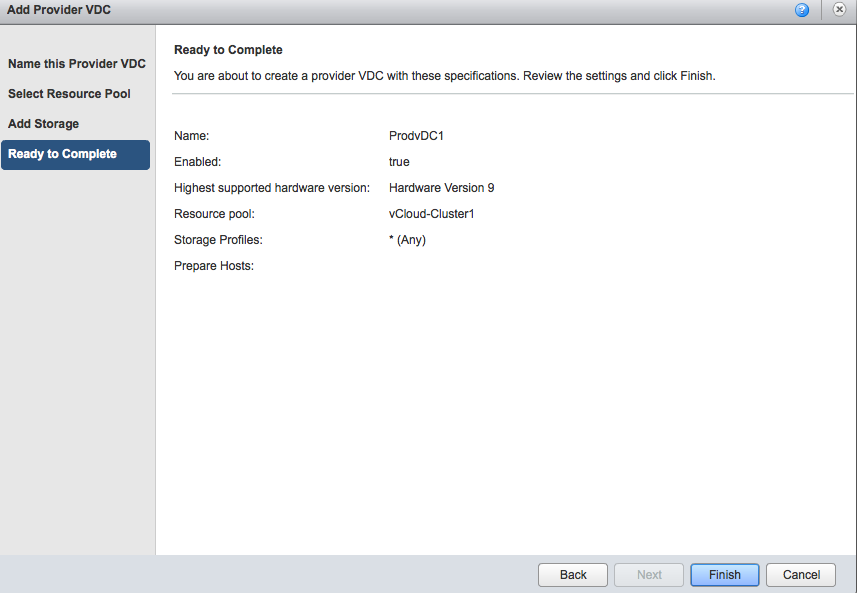
Select an appropriate Storage profile and click on next. The ready to complete screen displays an overview of your selected configuration. Click on Finish to create the Provider vDC.
02-Ready-to-Complete-Provider-vDC
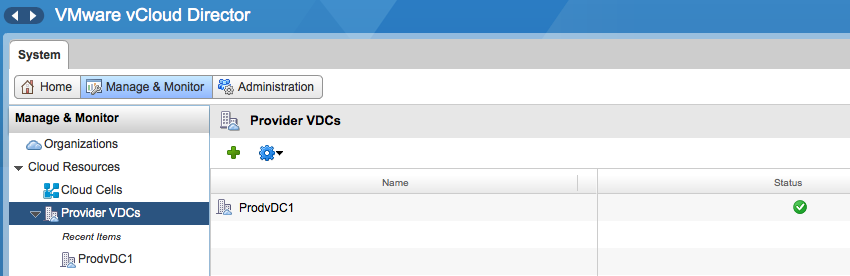
At this point in time, the provider vDC maps to only one DRS cluster. To add additional clusters, go to the Manage and Monitor tab and select Provider vDCs.
03-Provider-vDCs-overview
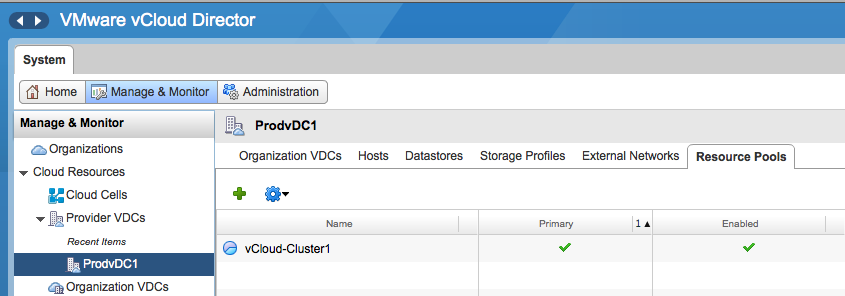
Click on the provider vDC and select the resource pools tab
04-Provider-vDC-menu
Click on the green plus icon to add another DRS cluster. The attach resource pool window is displayed and you can select another cluster from the same vCenter as the primary cluster. Please note that a provider vDC can only span clusters managed by the same vCenter server. Click on Finish to add the DRS cluster to the provider vDC.
05-Select-resource-pool
The Provider vDC is now able to provider resources from multiple DRS clusters. In vCloud Director 5.1 both the Pay-as-You-Go and Allocation Pool model org vCD are able to consume resources from an elastic vDC. In order to allow the Allocation Pool model to leverage an Elastic vDC changes needed to be made. Massimo Re Ferrè wrote an extensive post about the changes of the different allocation models in vCloud director 5.1.

Filed Under: VMware

Would you be interested in Storage-level reservations?

March 26, 2013 by frankdenneman

In todays world it’s quite common to virtualize higher priority / tier-1 applications and services. These applications and services are usually subject to service level agreements that typically include requirements for strong performance guarantees. For the compute resources (CPU and Memory) we are relying on the virtualization layer to give us that resource allocation solution by setting reservation, shares and limits. You might want to ensure that the storage requirements of these virtual machines are met and when contention for storage resources occurs these workloads are not impacted.
Today vSphere offers Storage I/O Control (SIOC) to allocates I/O resources based on the virtual machine priority if datastore latency is exceeded. Shares identify priority while limits restrict the amount of IOPS for a virtual machine. Although these are useful controls it does not provide a method to define a minimum amount of IOPS that is available all the time to the application. Providing lots of shares to these virtual machines can solve help to meet the SLA, however continuously calculating the correct share value in a highly dynamic virtual datacenter is cumbersome and complex job.
Storage level reservations
Therefore we are working on Storage level reservations. A storage reservation allows you to specify a minimum number of IOPS that should be available to the virtual machine at all times. This allows the virtual machine to make minimum progress in order to comply with the service level agreement.
In a relative closed environment such as the compute layer its fairly easy to guarantee a minimum level of resource availability, but when it comes to a shared storage platform new challenges arise. The hypervisor owns the computes resource and distributes it to the virtual machine it’s hosting. In a shared storage environment we are dealing with multiple layers of infrastructure, each susceptible to congestion and contention. And then there is the possibility of multiple external storage resource consumers such as non-virtualized workloads using the same array impacting the availability of resources and the control of distributing the resources. These challenges must be taken into account when developing storage reservations and we must understand how stringent you want the guarantee to be.
One of the questions we are dealing with is whether you would like a strict admission control or a relaxed admission control. With strict admission control, a virtual machine power-on operation is denied when vSphere cannot guarantee the storage reservation (similar to compute reservations). Relaxed admission control turns storage reservations into a share-like construct, defining relative priority at times where not enough IOPS are available at power-on. For example: Storage reservation on VM1 = 800 and VM2 = 200. At boot 600 IOPS are available; therefore VM1 gets 80% of 600 = 480, while VM2 gets 20%, i.e. 120 IOPS. When the array is able to provide more IOPS the correct number of IOPS are distributed to the virtual machines in order to to satisfy the storage reservation.
In order to decide which features to include and define the behavior of storage reservation we are very interested in your opinion. We have created a short list of questions and by answering you can help us define our priorities during the development process. I intentionally kept the question to a minimum so that it would not take more than 5 minutes of your time to complete the survey.
Disclaimer
As always, this article provides information about a feature that is currently under development. This means this feature is subject to change and nor VMware nor I in no way promises to deliver on any features mentioned in this article or survey.
Any other ideas about storage reservations? Please leave a comment below.
The survey is closed, thanks for your interest in participating

Filed Under: VMware Tagged With: Storage reservation

Have you signed up for the Benelux Software Defined Datacenter Roadshow yet?

February 14, 2013 by frankdenneman

In less than 3 weeks time, the Benelux Software Defined Datacenter Roadshow starts. Industry-recognized experts from both IBM and VMware share their vision and insights on how to build a unified datacenter platform that provides automation, flexibility and efficiency to transform the way you deliver IT. Not only can you attend their sessions and learn how to abstract, pool and automate your IT services, the SDDC roadshow provides you to meet the expert, sit down and discus technology.
The speakers and their field of expertise:
VMware
Frank Denneman – Resource Management Expert
Cormac Hogan – Storage Expert
Kamau Wanguhu – Software Defined Networking Expert
Mike Laverick – Cloud Infrastructure Expert
Ton Hermes – End User Computing Expert
IBM
Tikiri Wanduragala – IBM PureSystems Expert
Dennis Lauwers – Converged Systems Expert
Geordy Korte – Software Defined Networking Expert
Andreas Groth – End User Computing Expert
The roadshow is held in three different countries:
Netherlands – IBM forum in Amsterdam – March 5th 2013
Belgium – IBM forum in Brussels – March 7th 2013
Luxembourg – March 8th 2013
The Software Defined Datacenter Roadshow is a full day event and best of all it is free!
Sign up now!

Filed Under: VMware

  • « Go to Previous Page
  • Page 1
  • Interim pages omitted …
  • Page 16
  • Page 17
  • Page 18
  • Page 19
  • Page 20
  • Interim pages omitted …
  • Page 28
  • Go to Next Page »

Copyright © 2026 · SquareOne Theme on Genesis Framework · WordPress · Log in