Although the selection process of the submitted VMworld 2018 sessions is still ongoing, vBrownbag announced their call for papers.
As Duncan mentioned in his Call for paper article ‘Good luck, and remember: if you don’t end up getting selected, submit the proposal to a VMUG near you instead. They are always begging for community sessions.’
Think about signing up for the vBrownbag as well. Since last year all the vBrownbag sessions are published in the content catalog. Thus your session is visible for all 23.000+ attendees. Go right ahead and fill out this form.
The public Shaming of Resource Pool-as-a-Folder User

Yesterday there was some public shaming done of Antony Spiteri. He was outed that he was using vSphere resource pool as folders.
Hey @FrankDenneman having an internal debate with @anthonyspiteri about using resource pools as folders. Everything I say is second hand from you, please tell Anthony why its not a good idea 🙂
— David Hill 🇺🇸🇬🇧 (@davidhill_co) April 24, 2018
A funny thread and he truly deserved all the public shaming by the community members ;). All fun aside, using resource pools as folders are not recommended by VMware. As I described in the new vSphere 6.5 DRS white paper available at vSphere central:
Correct use: Resource pools are an excellent construct to isolate a particular amount of resources for a group of virtual machines without having to micro-manage resource setting for each individual virtual machine. A reservation set at the resource pool level guarantees each virtual machine inside the resource pool access to these resources. Depending on the activity of these virtual machines these virtual machines can operate without any contention.
Incorrect use: Resource pools should not be used as a form of folders within the inventory view of the cluster. Resource pools consume resources from the cluster and distribute these amongst its child objects within the resource pool; this can be additional resource pools and virtual machines. Due to the isolation of resources, using resource pools as folders in a heavily utilized vSphere cluster can lead to an unintended level of performance degradation for some virtual machines inside or outside the resource pool.
Understanding this behavior allows you to design a correct resource pool structure. Currently, I’m working on a new vSphere DRS Resource Pool white paper which sheds some new light on the distribution of resources under normal conditions and under load (the Resource Pool Pie Paradox). I will keep you posted!
Public Speaking Schedule
The VMUG season has started, and I have a few speaking sessions at various events. I thought it might be convenient to list the events and topics:
Date: February, 22
Organization: North East UK VMUG
Location: Newcastle
Topic: VMware Cloud on AWS from a resource management perspective
Date: March, 7
Organization: Swiss-French VMUG
Location: Lausanne Switzerland
Topic: VMware Cloud on AWS from a resource management perspective
Date: March, 8
Organization: Swiss-German VMUG
Location: Zurich Switzerland
Topic: VMware Cloud on AWS from a resource management perspective
Date: March, 20
Organization: Dutch VMUG
Location: Den Bosch Netherlands
Topic: vSphere Resource Kit Double-Hour
Session 1: vSphere 6.5 Host Resource Deep Dive with Niels Hagoort
Session 2: vSphere 6.5 Clustering Deep Dive with Duncan Epping
Date: March 29,
Organization: Virtual VMUG
Location: Online
Topic: VMware Cloud on AWS from a resource management perspective
Date: April 10,
Organization: Turkey VMUG
Location: Istanbul, Turkey
Topic: VMware Cloud on AWS from a resource management perspective
Date: May 24
Organization: Czech Republic VMUG
Location: Prague
Topic: vSphere 6.5 Host Resource Deep Dive with Niels Hagoort
Hope to see you there
Virtually Speaking Podcast #67 Resource Management
Two weeks ago Pete Flecha (a.k.a. Pedro Arrow) and John Nicholson invited me to their always awesome podcast to talk about resource management. During our conversation, we covered both on-prem and the features of VMware Cloud on AWS that help cater the needs of your workload.

Being a guest on this podcast is an honour and times flies talking to these two guys. Hope you enjoy it as much as I did.
vSphere 6.5 DRS and Memory Balancing in Non-Overcommitted Clusters
DRS is over a decade old and is still going strong. DRS is aligned with the premise of virtualization, resource sharing and overcommitment of resources. DRS goal is to provide compute resources to the active workload to improve workload consolidation on a minimal compute footprint. However, virtualization surpassed the original principle of workload consolidation to provide unprecedented workload mobility and availability.
With this change of focus, many customers do not overcommit on memory. A lot of customers design their clusters to contain (just) enough memory capacity to ensure all running virtual machines have their memory backed by physical memory. In this scenario, DRS behavior should be adjusted as it traditionally focusses on active memory use.
vSphere 6.5 provides this option in the DRS cluster settings. By ticking the box “Memory Metric for Load Balancing” DRS uses the VM consumed memory for load-balancing operations.
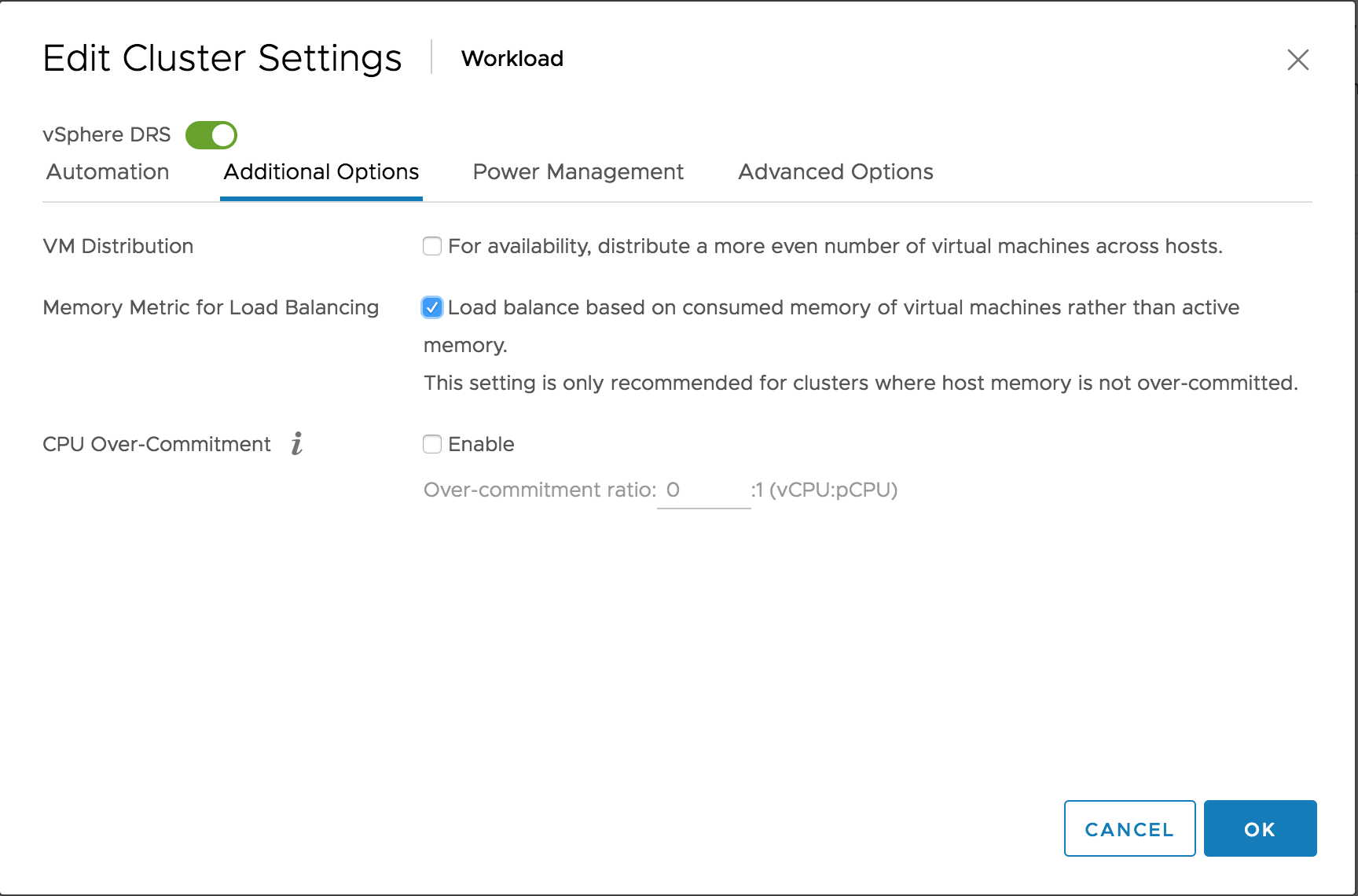
Please note that DRS is focussed on consumed memory, not configured memory! DRS always keeps a close eye on what is happening rather than accepting static configuration. Let’s take a closer look at DRS input metrics of active and consumed memory.
Out-of-the-box DRS Behavior
During load balancing operation, DRS calculates the active memory demand of the virtual machines in the cluster. The active memory represents the working set of the virtual machine, which signifies the number of active pages in RAM. By using the working-set estimation, the memory scheduler determines which of the allocated memory pages are actively used by the virtual machine and which allocated pages are idle. To accommodate a sudden rapid increase of the working set, 25% of idle consumed memory is allowed. Memory demand also includes the virtual machine’s memory overhead.
Let’s use a 16 GB virtual machine as an example of how DRS calculates the memory demand. The guest OS running in this virtual machine has touched 75% of its memory size since it was booted, but only 35% of its memory size is active. This means that the virtual machine has consumed 12288 MB and 5734 MB of this is used as active memory.
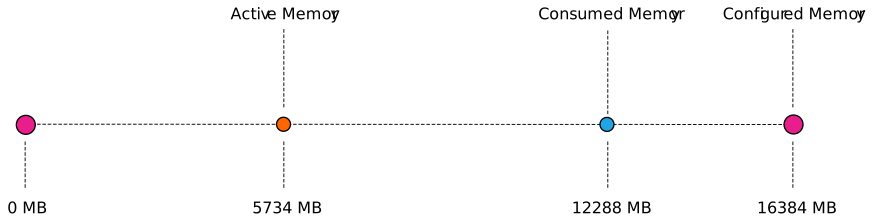
As mentioned, DRS accommodate a percentage of the idle consumed memory to be ready for a sudden increase in memory use. To calculate the idle consumed memory, the active memory 5734 MB is subtracted from the consumed memory, 12288 MB, resulting in a total 6554 MB idle consumed memory. By default, DRS includes 25% of the idle consumed memory, i.e. 6554 * 25% = +/- 1639 MB.
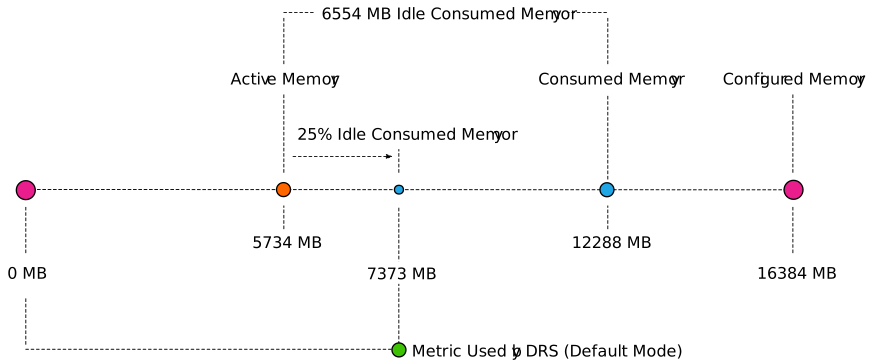
The virtual machine has a memory overhead of 90 MB. The memory demand DRS uses in its load balancing calculation is as follows: 5734 MB + 1639 MB + 90 MB = 7463 MB. As a result, DRS selects a host that has 7463 MB available for this machine if it needs to move this virtual machine to improve the load balance of the cluster.
Memory Metric for Load Balancing Enabled
When enabling the option “Memory Metric for Load Balancing” DRS takes into account the consumed memory + the memory overhead for load balancing operations. In essence, DRS uses the metric Active + 100% IdleConsumedMemory.
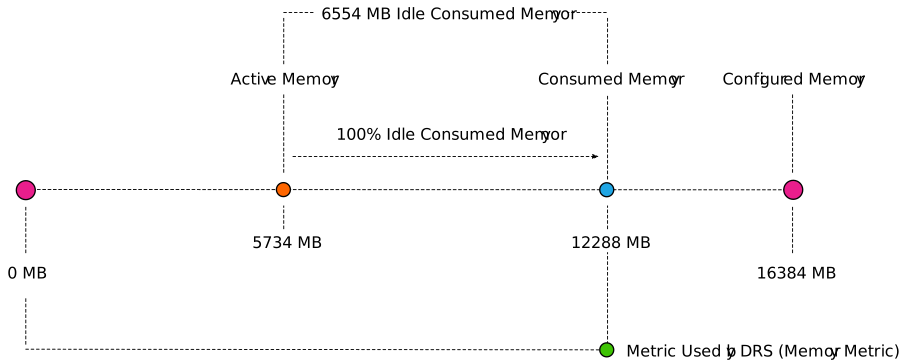
vSphere 6.5 update 1d UI client allows you to get better visibility in the memory usage of the virtual machines in the cluster. The memory utilization view can be toggled between active memory and consumed memory.
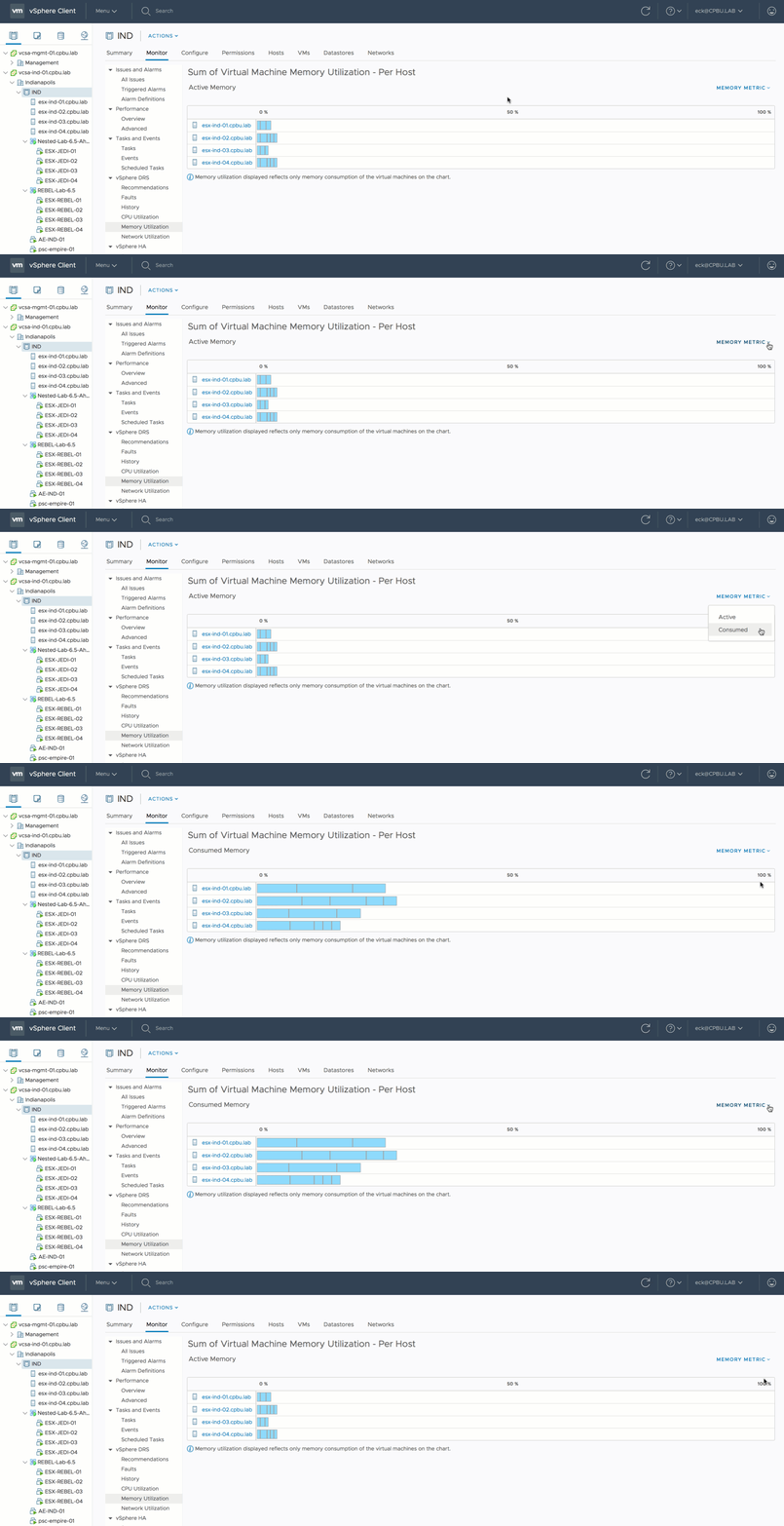
Recently, Adam Eckerle on Twitter published a great article that outlines all the improves of vSphere 6.5 Update 1d. Go check it out. Animated Gif courtesy of Adam.
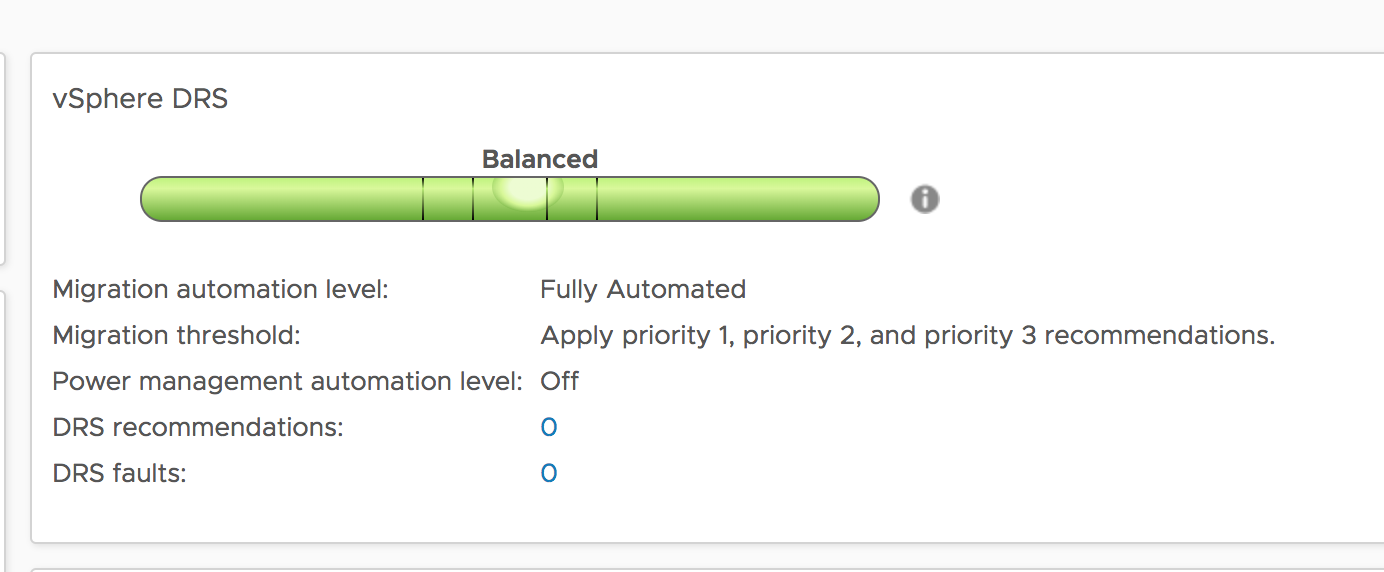
When reviewing the cluster it shows that the cluster is pretty much balanced.
When looking at the default view of the sum of Virtual Machine memory utilization (active memory). It shows that ESXi host ESXi02 is busier than the others.
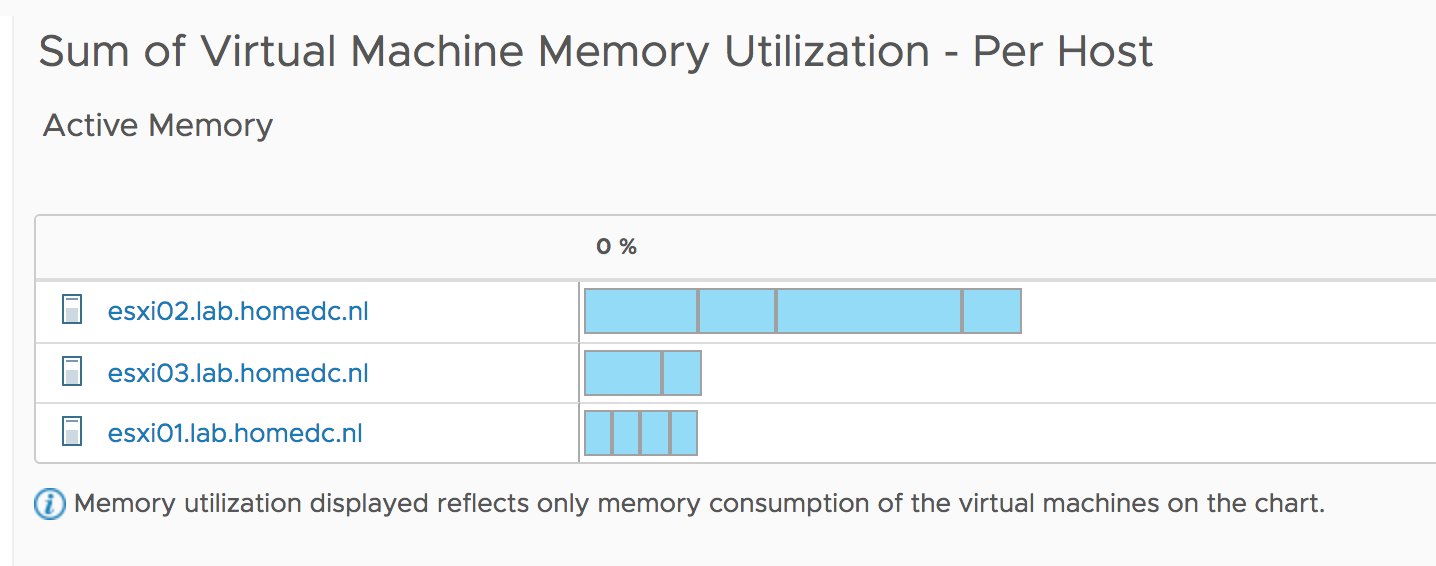
However since the active memory of each host is less than 20% and each virtual machine is receiving the memory they are entitled to, DRS will not move virtual machines around. Remember, DRS is designed to create as little overhead as possible. Moving one virtual machine to another host to make the active usage more balanced, is just a waste of compute cycles and network bandwidth. The virtual machines receive what they want to receive now, so why take the risk of moving VMs?
But a different view of the current situation is when you toggle the graph to use consumed memory.

Now we see a bigger difference in consumed memory utilization. Much more than 20% between ESXi02 and the other two hosts. By default DRS in vSphere 6.5 tries to clear a utilization difference of 20% between hosts. This is called Pair-Wise Balancing. However, since DRS is focused on Active memory usage, Pair-Wise Balancing won’t be activated with regards to the 20% difference in consumed memory utilization. After enabling the option “Memory Metric for Load Balancing” DRS rebalances the cluster with the optimal number of migrations (as few as possible) to reduce overhead and risk.

Active versus Consumed Memory Bias
If you design your cluster with no memory overcommitment as guiding principle, I recommend to test out the vSphere 6.5 DRS option “Memory Metric for Load Balancing”. You might want to switch DRS to manual mode, to verify the recommendations first.