Looking for the “Designing your vMotion network“? Please follow the link.
Last week VMware vCenter Server™ 5.1.0a was released which contains a bugfix for Essential plus license customers. A few readers provided me feedback about being unable to initiate the new vMotion that migrates both host and datastore state of the virtual machine. Due to the feedback and the filed SRs we got to the bottom of the bug pretty quickly and got the bugfix in this release.
vMotion and Storage vMotion
Unable to access the cross-host Storage vMotion feature from the vSphere Web Client with an Essentials Plus license

If you start the migration wizard for a powered on virtual machine with an Essentials Plus license, the Change both host and datastore option in the migration wizard is disabled, and the following error message is displayed:

Storage vMotion is not licensed on this host.

To perform this migration without a license, power off the virtual machine.

This issue is resolved in this release.
https://www.vmware.com/support/vsphere5/doc/vsphere-vcenter-server-510a-release-notes.html
Thanks for the feedback and above all, thanks for filing the SRs providing us useful data. You can download the update here.
HA admission control is not a capacity management tool.
I receive a lot of questions on why HA doesn’t work when virtual machines are not configured with VM-level reservations. If no VM-level reservations are used, the cluster will indicate a fail over capacity of 99%, ignoring the CPU and memory configuration of the virtual machines. Usually my reply is that HA admission control is not a capacity management tool and I noticed I have been using this statement more and more lately. As it doesn’t scale well explaining it on a per customer basis, it might be a good idea to write a blog article about it.
The basics
Sometimes it’s better to review the basics again and understand where the perception of HA and the actual intended purpose of the product part ways.
Let’s start of what HA admission control is designed for. In the availability guide the two following statement can be found: Quote 1:
“vCenter Server uses admission control to ensure that sufficient resources are available in a cluster to provide failover protection and to ensure that virtual machine resource reservations are respected.”
Let’s dive in the first quote and especially this statement: “To ensure that sufficient resources are available in a cluster” is the key element, and in particular the word sufficient (resources). What sufficient means for customer A, does not mean sufficient for customer B. As HA does not have an algorithm decoding the meaning of the word sufficient for each customer, HA relies on the customer to set vSphere resource management allocation settings to indicate the importance of resource availability for the virtual machine during resource contention scenarios.
As we are going back to the basics, lets have a quick look at the resource allocation settings that are used in this case, reservations and shares. A reservation indicates the minimum level of resources available to the virtual machine at all times. This reservation guarantees – or protect might be a better word –the availability of physical resources to the virtual machine regardless of the level of contention. No matter how high the contention in the system is, the reservation restricts the VMkernel from reclaiming that particular CPU cycle or memory page.
This means that when a VM is powered on with a reservation, admission control needs to verify if the host can provide these resources at all times. As the VMkernel cannot reclaim those resources, admission control makes sure that when it lets the virtual machine in, it can hold its promise of providing these resources all the time, but also checks if it won’t introduce problems for the VMkernel itself and other virtual machines with a reservation. This is the reason why I like to call admission control the virtual bouncer.
Besides reservation we have shares and shares indicates the relative priority of resource access during contention. A better word to describe this behavior is “opportunistic access”. As the virtual machine is not configured with a reservation, it provides the VMkernel with a more relaxed approach of resource distribution. When resource contention occurs, VMkernel does not need to provide the configured resources all the time, but can distribute the resources based on the activity and the relative priority based on the shares of the virtual machines requesting the resources. Virtual machines configured only with shares will just receive what they can get; there is no restrictive setting for the VMkernel to worry about when running out of resources. Basically the virtual machines will just get what’s left.
In the case of shares, it’s the VMkernel that decides which VM gets how many resources in a relaxed and very social way, where virtual machines configured with a reservation DEMAND to have the reservations available at all times and do not care about the needs of others.
In other words, the VMkernel MUST provide the resources to the virtual machine with reservation first and then divvy up the rest amongst the virtual machines who opted for a opportunistic distribution (shares).
How does this tie in with HA admission control?
The second quote gives us this insight:
“vSphere HA: Ensures that sufficient resources in the cluster are reserved for virtual machine recovery in the event of host failure.”
We know that admission control checks if there is enough resources are available to satisfy the VM-level reservation without interfering with VMkernel operations or VM-level reservations of other virtual machines running on that host. As HA is designed to provide an automated method of host failure recovery, we need to make sure that once a virtual machine is up and running it can continue to run on another host in the cluster if the current hosts fails. Therefor the purpose of HA admission control is to regulate and check if there are enough resources available in the cluster that can satisfy the virtual machine level reservations after a host failure occurs.
Depending on the admission control policy it calculates the capacity required for a failover based on available resources and still comply with the VMkernel resource management rules. Therefor it only needs to look at VM-level reservations, as shares will follow the opportunistic access method.
Semantics of sufficient resources while using shares-only design
In essence, HA will rely on you to determine if the virtual machine will receive the resources you think are sufficient if you use shares. The VMkernel is designed to allow for memory overcommitment while providing performance. HA is just the virtual bouncer that counts the number of heads before it lets the virtual machine in “the club”. If you are on the list for a table, it will get you that table, if you don’t have a reservation HA does not care if you decide to need to sit at a 4-person table with 10 other people fighting for your drinks and food. HA relies on the waiters (resource management) to get you (enough) food as quickly as possible. If you wanted to have a good service and some room at your table, it’s up to you to reserve.
Get notification of these blogs postings and more DRS and Storage DRS information by following me on Twitter: @frankdenneman
Changing your vCenter logging level using the webclient
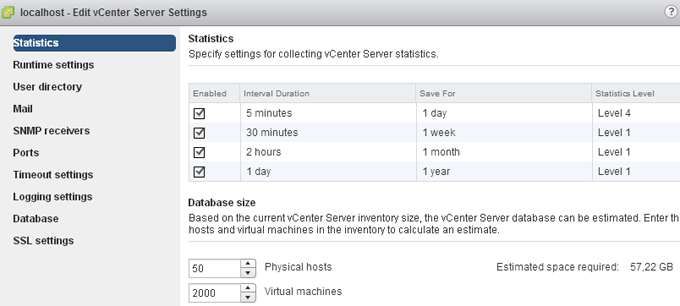
In order to monitor some load behavior I needed to increase the logging level of the vCenter server. The logging level still is included in the vCenter Server Settings, however it takes a few more clicks to get the Statistics option compared to the old vSphere client.
1. In the home screen click on vCenter.
2. click on the vCenter Servers link in the Inventory list.
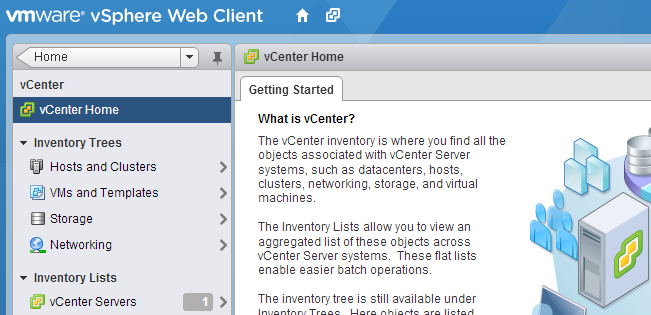
3. Select the vCenter (probably Localhost).
4. Select the Manage tab in the right-pane.
5. Select Setting.
6. Click on the Edit button located on the far end right side of the screen.
7. Change the appropriate Statistic setting.
Get notification of these blogs postings and more DRS and Storage DRS information by following me on Twitter: @frankdenneman
Technical paper: “VMware vCloud Director Resource Allocation Models” available for download
Today the technical paper “VMware vCloud Director Resource Allocation Models” has been made available for download on VMware.com.
This whitepaper covers the allocation models used by vCloud Director 1.5 and how they interact with the vSphere layer. This paper helps you correlate the vCloud allocation model settings with the vSphere resource allocation settings. For example what happens on the vSphere layer when I set a guarantee on an Org VDC configured with the Allocation Pool Model. It provides insight on the distribution of resources on both the vCloud layer and vSphere layer and illustrates the impact of various allocation model settings on vSphere admission control. The paper contains a full chapter about allocation model in practice and demonstrates the effect of using various combinations of allocation models within a single provider vDC.
Please note that this paper is based on vCloud Director 1.5
http://www.vmware.com/resources/techresources/10325
VMworld Europe Sessions
At VMworld Europe I will participate in Meet the Expert sessions, Group discussions and three breakout sessions. Here’s an overview of my public schedule.
I hope to see you all in my sessions or participate in the group discussions. Or schedule a time slot in Meet the Expert if you have a question about Storage DRS or DRS that you want to ask me.
Tuesday 9 October:
11:00 – 12:00: Group Discussion 28 Resource Management
12:30 – 13:30: INF-VSP1168 Architecting a Cloud Infrastructure
14:00 – 15:00: INF-VSP1683 Resource Pool Best Practices
Wednesday 10 October:
11:00 – 12:00: Meet the Experts 05
12:30 – 13:30: Group Discussion 28 Resource Management
15:30 – 16:30: INF-STO1545 Architecting and designing (SDRS) Datastore Clusters
Thursday 11 October:
10:30 – 11:30: Meet the Experts 11