The last two years I enjoyed working as an architect within the PSO organization of VMware, designing and reviewing the most interesting virtual infrastructures in Europe. However today I signed my new contract, accepting a position within the Technical Marketing team.
Starting December I will focus on resource management and disaster avoidance technologies. My new role allows me to collaborate with the Product managers and the R&D organization on products such as DRS, Storage DRS, vMotion, Storage vMotion and FT. My main tasks will be developing best practices, white-papers, documentation and technical presentations, educating field organizations and of course the customers.
Although I enjoyed working within the PSO organization, I can’t wait to get started. Thanks to all the people who made my move possible and offering me such an opportunity!
FDM in mixed ESX and vSphere clusters
Last couple of weeks I’ve been receiving questions about vSphere HA FDM agent in a mixed cluster. When upgrading vCenter to 5.0, each HA cluster will be upgraded to the FDM agent. A new FDM agent will be pushed to each ESX server. The new HA version supports ESX(i) 3.5 through ESXi 5.0 hosts. Mixed clusters will be supported so not all hosts have to be upgraded immediately to take advantage of the new features of FDM. Although mixed environments are supported we do recommend keeping the time you run difference versions in a cluster to a minimum.
The FDM agent will be pushed to each hosts, even if the cluster contains identically configured hosts, for example a cluster containing only vSphere 4.1 update 1 will still be upgraded to the new HA version. The only time vCenter will not push the new FDM agent to a host if the host in question is a 3.5 host without the required patch.
When using clusters containing 3.5 hosts, it is recommended to upgrade the ESX host to ESX350-201012401-SG PATCH (ESX 3.5) or ESXe350-201012401-I-BG PATCH (ESXi) patch first before upgrading vCenter to vCenter 5.0. If you still get the following error message:
Host ‘
Visit the VMware knowledgebase article: 2001833.
VMware vSphere 5 Clustering Technical Deepdive
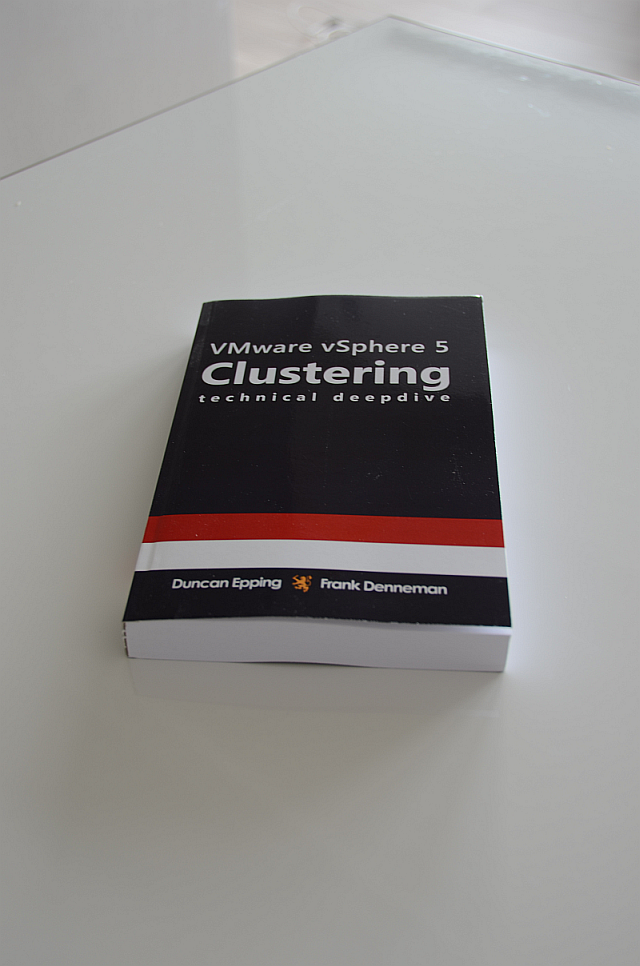 As of today the paperback versions of the VMware vSphere 5 Clustering Technical Deepdive is available at Amazon. We took the feedback into account when creating this book and are offering a Full Color version and a Black and White edition. Initially we planned to release an Ebook and a Full Color version only, but due to the high production cost associated with Full color publishing, we decided to add a Black and White edition to the line-up as well.
At this stage we do not have plans to produce any other formats. As this is self-publishing release we developed, edited and created everything from scratch. Writing and publishing a book based on new technology has serious impact on one’s life, reducing every social contact to a minimum even family life. As of this, our focus is not on releasing additional formats such as ibooks or Nook at this moment. Maybe at a later stage but VMworld is already knocking on our doors, so little time is left to spend some time with our families.
When producing the book, the page count rapidly exceeded 400 pages using the 4.1 HA and DRS layout. As many readers told us they loved the compactness of the book therefor our goal was to keep the page count increase to a minimum. Adjusting the inner margins of the book was the way to increase the amount of space available for the content. A tip for all who want to start publishing, start with getting accustomed to publisher jargon early in the game, this will save you many failed proof prints! We believe we got the right balance between white-space and content in the book, reducing the amount of pages while still offering the best reading experience. Nevertheless the number of pages grew from 219 to 348.
While writing the book, we received a lot of help and although Duncan listed all the people in his initial blog, I want to use take a moment to thank them again.
First of all I want to thank my co-author Duncan for his hard work creating content, but also spending countless hours on communication with engineering and management.
Anne Holler – DRS and SDRS engineer – Anne really went out of her way to help us understand the products. I frequently received long and elaborate replies regardless of time and day. Thanks Anne!
Next up is Doug – its number Frank not amounts! – Baer. I think most of the time Doug’s comments equaled the amount of content inside the documents. Your commitment to improve the book impressed us very much.
Gabriel Tarasuk-Levin for helping me understand the intricacies of vMotion.
A special thanks goes out to our technical reviewers and editors: Keith Farkas and Elisha Ziskind (HA Engineering), Irfan Ahmad and Rajesekar Shanmugam (DRS and SDRS Engineering), Puneet Zaroo (VMkernel scheduling), Ali Mashtizadeh and Doug Fawley and Divya Ranganathan (EVC Engineering). Thanks for keeping us honest and contributing to this book.
I want to thank VMware management team for supporting us on this project. Doug “VEEAM” Hazelman thanks for writing the foreword!
Availability
This weekend Amazon made both the black and white edition and the full color edition available. Amazon list the black and white edition as: VMware vSphere 5 Clustering Technical Deepdive (Volume 2) [Paperback], whereas the full color edition is listed with Full Color in its subtitle.
Or select the following links to go the desired product page:
Black and white paperback $29.95
Full Color paperback $49.95
For people interested in the ebook: VMware vSphere 5 Clustering Technical Deepdive (price might vary based on location)
If you prefer a European distributor, ComputerCollectief has both books available:
Black and White edition: http://www.comcol.nl/detail/74615.htm
Full Color edition: http://www.comcol.nl/detail/74616.htm
Pick it up, leave a comment and of course feel free to make those great mugshots again and ping them over via Facebook or our Twitter accounts! For those looking to buy in bulk (> 20) contact clusteringdeepdive@gmail.com.
Full color version of the new book?
If you are following us on twitter you may have seen some recent tweets regarding our forthcoming book. Duncan (@duncanyb) and I have already started work on a new version of the HA and DRS Technical Deepdive. The new book will cover HA and DRS topics for the upcoming vSphere release. We are also aiming to include information about SIOC and Storage DRS in this version.
We received a lot of feedback about the vSphere 4.1 book, one of the main themes was the lack of color in the diagrams. We plan to use a more suitable grayscale color combination in the next version, but we wondered if our readers would be interested in a full color copy of the upcoming book.
Obviously printing costs increase with full color printing and in addition, low volume cost of color printing can be quite high. We expect the price of the full color version to cost around $50 USD – $55 USD.
[poll id=”1″]
Setting Correct Percentage of Cluster Resources Reserved
vSphere introduced the HA admission control policy “Percentage of Cluster Resources Reserved”. This policy allows the user to specify a percentage of the total amount of available resources that will stay reserved to accommodate host failures. When using vSphere 4.1 this policy is the de facto recommended admission control policy as it avoids the conservative slots calculation method.
Reserved failover capacity
The HA Deepdive page explains in detail how the “percentage resources reserved” policy works, but to summarize; the CPU or memory capacity of the cluster is calculated as followed;The available capacity is the sum of all ESX hosts inside the cluster minus the virtualization overhead, multiplied by (1-percentage value).
For instance; a cluster exists out of 8 ESX hosts, each containing 70GB of available RAM. The percentage of cluster resources reserved is set to 20%. This leads to a cluster memory capacity of 448GB (70GB+70GB+70GB+70GB+70GB+70GB+70GB+70GB) * (1 – 20%). 112GB is reserved as failover capacity. Although the example zooms in on memory, the percentage set applies both CPU and memory resources.
Once a percentage is specified, that percentage of resources will be unavailable for active virtual machines, therefore it makes sense to set the percentage as low as possible. There are multiple approaches for defining a percentage suitable for your needs. One approach, the host-level-approach is to use a percentage that corresponds with the contribution of one or host or a multiplier of that. Another approach is the aggressive approach which sets a percentage that equals less than the contribution of one host. Which approach should be used?
Host-level
In the previous example 20% was used to be reserved for resources in an 8-host cluster. This configuration reserves more resources than a single host contributes to the cluster. High Availability’s main objective is to provide automatic recovery for virtual machines after a physical server failure. For this reason, it is recommended to reserve resource equal to a single host or a multiplier of that.
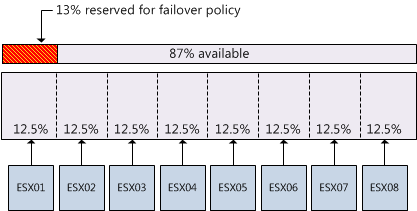
When using the per-host level of granularity in an 8-host cluster (homogeneous configured hosts), the resource contribution per host to the cluster is 12.5%. However, the percentage used must be an integer (whole number). Using a conservative approach it is better to round up to guarantee that the full capacity of one host is protected, in this example, the conservative approach would lead to a percentage of 13%.
Aggressive approach
I have seen recommendations about setting the percentage to a value that is less than the contribution of one host to the cluster. This approach reduces the amount of resources reserved for accommodating host failures and results in higher consolidation ratios. One might argue that this approach can work as most hosts are not fully loaded, however it eliminates the guarantee that after a failure all impacted virtual machines will be recovered.
As datacenters are dynamic, operational procedures must be in place to -avoid or reduce- the impact of a self-inflicted denial of service. Virtual machine restart priorities must be monitored closely to guarantee that mission critical virtual machines will be restarted before virtual machine with a lower operational priority. If reservations are set at virtual machine level, it is necessary to recalculate the failover capacity percentage when virtual machines are added or removed to allow the virtual machine to power on and still preserve the aggressive setting.
Expanding the cluster
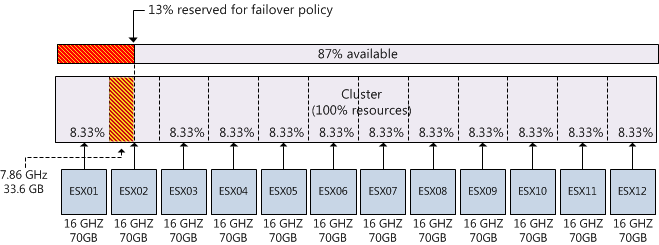
Although the percentage is dynamic and calculates capacity at a cluster-level, when expanding the cluster the contribution per host will decrease. If you decide to continue using the percentage setting after adding hosts to the cluster, the amount of reserved resources for a fail-over might not correspond with the contribution per host and as a result valuable resources are wasted. For example, when adding four hosts to an 8-host cluster while continue using the previously configured admission control policy value of 13% will result in a failover capacity that is equivalent to 1.5 hosts. The following diagram depicts a scenario where an 8 host cluster is expanded to 12 hosts; each with 8 2GHz cores and 70GB memory. The cluster was originally configured with admission control set to 13% which equals to 109.2 GB and 24.96 GHz. If the requirement is to be able to recover from 1 host failure 7,68Ghz and 33.6GB is “wasted”.
Maximum percentage
High availability relies on one primary node to function as the failover coordinator to restart virtual machines after a host failure. If all five primary nodes of an HA cluster fail, automatic recovery of virtual machines is impossible. Although it is possible to set a failover spare capacity percentage of 100%, using a percentage that exceeds the contribution of four hosts is impractical as there is a chance that all primary nodes fail.
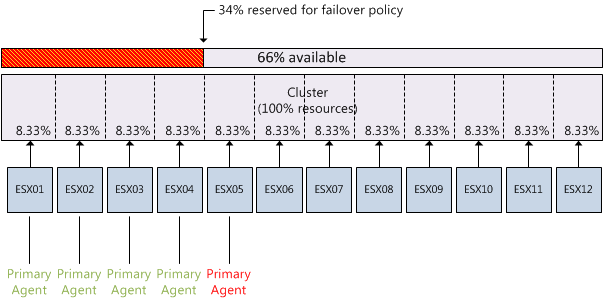
Although configuration of primary agents and configuration of the failover capacity percentage are non-related, they do impact each other. As cluster design focus on host placement and rely on host-level hardware redundancy to reduce this risk of failing all five primary nodes, admission control can play a crucial part by not allowing more virtual machines to be powered on while recovering from a maximum of four host node failure.
This means that maximum allowed percentage needs to be calculated by summing the contribution per host x 4. For example the recommended maximum allowed configured failover capacity of a 12-host cluster is 34%, this will allow the cluster to reserve enough resources during a 4 host failure without over allocating resources that could be used for virtual machines.