Lately I have received a couple of questions about Swap file placement. As I mentioned in the article “Storage DRS and alternative swap file locations”, it is possible to configure the hosts in the DRS cluster to place the virtual machine swapfiles on an alternative datastore. Here are the questions I received and my answer:
Question 1: Will placing a swap file on a local datastore increase my vMotion time?
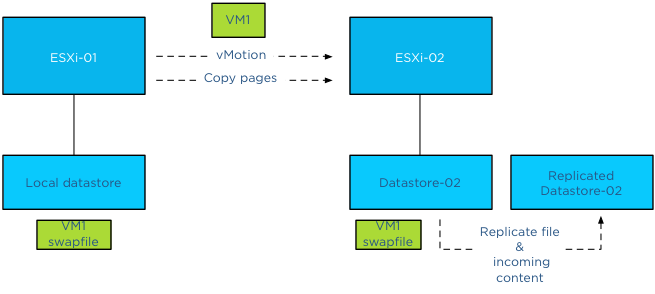
Yes, as the destination ESXi host cannot connect to the local datastore, the file has to be placed on a datastore that is available for the new ESXi host running the incoming VM.Therefor the destination host creates a new swap file in its swap file destination. vMotion time will increase as a new file needs to be created on the local datastore of the destination host and swapped memory pages potentially need to be copied.
Question 2: Is the swap file an empty file during creation or is it zeroed out?
When a swap file is created an empty file equal to the size of the virtual machine memory configuration. This file is empty and does not contain any zeros.
Please note that if the virtual machine is configured with a reservation than the swap file will be an empty file with the size of (virtual machine memory configuration – VM memory reservation). For example, if a 4GB virtual machine is configured with a 1024MB memory reservation, the size of the swap file will be 3072MB.
Question 3: What happens with the swap file placed on a non-shared datastore during vMotion?
During vMotion, the destination host creates a new swap file in its swap file destination. If the source swap file contains swapped out pages, only those pages are copied over to the destination host.
Question 4: What happens if I have an inconsistent ESXi host configuration of local swap file locations in a DRS cluster?
When selecting the option “Datastore specified by host”, an alternative swap file location has to be configured on each host separately. If one host is not configured with an alternative location, then the swap file will be stored in the working directory of the virtual machine. When that virtual machine is moved to another host configured with an alternative swap file location, the contents of the swap file is copied over to the specified location, regardless of the fact that the destination host can connect to the swap file in the working directory.

Question 5: What happens if my specified alternative swap file location is full and I want to power-on a virtual machine?
If the alternative datastore does not have enough space, the VMkernel tries to store the VM swap file in the working directory of the virtual machine. You need to ensure enough free space is available in the working directory otherwise the VM not allowed to be powered up.
Question 6: Should I place my swap file on a replicated datastore?
Its recommended placing the swap file on a datastore that has replication disabled. Replication of files increases vMotion time. When moving the contents of a swap file into a replicated datastore, the swap file and its contents need to replicated to the replica datastore as well. If synchronous replication is used, each block/page copied from the source datastore to the destination datastore, it needs to wait until the destination datastore receives an acknowledgement from its replication partner datastore (the replica datastore).
Question 7: Should I place my swap file on a datastore with snapshots enabled?
To save storage space and design for the most efficient use of storage capacity, it is recommended not to place the swap files on a datastore with snapshot enabled. The VMkernel places pages in a swap file if it’s there is memory pressure, either by an overcommitted state or the virtual machine requires more memory than it’s configured memory limit. It only retrieves memory from the swap file if it requires that particular page. The VMkernel will not transfer all the pages out of the swap file if the memory pressure on the host is resolved. It keeps unused swapped out pages in the swap file, as transferring unused pages is nothing more than creating system overhead. This means that a swapped out page could stay there as long as possible until the virtual machine is powered-off. Having the possibility of snapshotting idle and unused pages on storage could reduce the pools capacity used for snapshotting useful data.
Question 8: Should I place my swap file on a datastore on a thin provisioned datastore (LUN)?
This is a tricky one and it all depends on the maturity of your management processes. As long as thin provisioned datastore is adequately monitored for utilization and free space and controls are in place that ensures sufficient free space is available to cope with bursts of memory use, than it could be a viable possibility.
The reason for the hesitation is the impact a thin provisioned datastores has on the continuity of the virtual machine.
Placement of swap files by VMkernel is done at the logical level. The VMkernel determines if the swap file can be placed on the datastore based on its file size. That means that it checks the free space of a datastore reported by the ESX host, not the storage array. However the datastore could exist in a heavily over-provisioned datapool.
Once the swap file is created the VMkernel assumes it can store pages in the entire swap file, see question 2 for swap file calculation. As the swap file is just an empty file until the VMkernel places a page in the swap file, the swap file itself takes up a little space on the thin disk datastore. Now this can go on for a long time and nothing will happen. But what if the total reservation consumed, memory overcommit-level and workload spikes on the ESXi host layer are not correlated with the available space in the thin provisioning storage pool? Understand how much space the datastore could possibly obtain and calculate the maximum configured size of all existing swap files on the datastore to avoid an Out-of space condition.
(Alternative) VM swap file locations Q&A – part 2
Get notification of these blogs postings and more DRS and Storage DRS information by following me on Twitter: @frankdenneman
VMware feature request
During presentations I always stress to submit a feature request if you have an idea how to enhance the product or if you feel you are missing a vital product feature. VMware is very interested to hear how the products can be enhanced and improved.
Although it’s always good to talk to your local VMware rep or your favorite VMware blogger, submitted feedback might not reach the correct person on time. In order to have the feedback routed to the correct person using the shortest path available, it is best to submit a feature request via the VMware website.
Unfortunately VMware.com doesn’t have an action button on the front-page, therefor I thought it might be a good idea to publish a short article with the link included. If you have any feedback go to the feature request page and submit your comments.
Thanks!
VAAI hw offload and Storage vMotion between two Storage Arrays
Recently I received a question about migrating virtual machines with Storage vMotion between two Storage Arrays. More specifically if VAAI is leveraged by Storage vMotion in this process. Unfortunately VAAI is an internal array based feature, the Clone Blocks VAAI feature Storage vMotion leverages is only used to copy and migrate data within the same physical array.
Datamovers
How does Storage vMotion work between two arrays? Storage vMotion uses a VMkernel component called the datamover. This component is moves the blocks from the source to the destination datastore, to be more precise; it handles the read and write blocks I/O from and to the source and destination datastores.
The VMkernel used in vSphere 4.1 and up contains 2 different datamovers, software datamovers (FSDM and FS3DM) and a hardware offloading datamover (FS3DM-hardware offloading). The most efficient datamover is the FS3DM-hardware offload, followed by the FS3DM and as last the legacy datamover FSDM. FS3DM operates at kernel level, while the FSDM operates at the application level, the shorter the communication path the faster the operation. In essence Storage vMotion is travelling up to the stack of datamovers, trying the most efficient first, before reverting to a less optimal choice. To get an idea of difference in performance, please read the article “Storage vMotion performance difference” on Yellow-Bricks.com
Traversing the datamover stack
When a data movement operation is invoked (I.E. Storage vMotion) and the VAAI hardware offload operation is enabled, the data mover will first attempt to use the hardware offload. If the hardware offload operation fails, the data mover reverts to the software datamovers, first FS3DM, then FSDM. As you are migrating between arrays, hardware offloading will fail and the VMkernel selects a software datamover FS3DM. If the block-sizes of the datastore are not identical, then Storage vMotion has to revert to the FSDM datamover. If you are migrating data between NFS datastores than Storage vMotion immediately revert to the FSDM datamover.
Impact on Storage DRS datastore cluster design
Keep this in mind when designing Storage DRS datastore clusters. Storage DRS does not keep historical data of storage vMotion lead times, and thus it cannot incorporate these metrics when generating migration recommendations. Although no performance loss will occur within the virtual machine, migrating between arrays can create overhead on the supporting infrastructure. If possible design your datastores to contain datastores within the same array and use identical blocksizes (if VMFS is used)
vSphere 5.1 Storage DRS Multi-VM provisioning improvement
When a virtual machine is provisioned to the datastore cluster, Storage DRS algorithm runs to determine the best placement of the virtual machine. The interesting part of this process is the method Storage DRS determines the free space of a datastore or to be more precise the improvement made in vSphere 5.1 regarding free space calculation and the method of finding the optimal destination datastore.
vSphere 5.0 Storage DRS behavior
Storage DRS is designed to balance the utilization of the datastore cluster, it selects the datastore with the highest free space value to balance the space utilization of the datastores in the datastore cluster and avoids out-of-space situations.
During the deployment of a virtual machine, Storage DRS initiates a simulation to generate an initial placement operation. This process is an isolated process and retrieves the current datastore free space values. However, when a virtual machine is deployed, the space usage of the datastore is updated once the virtual machine deployment is completed and the virtual machine is ready to power-on. This means that the initial placement process is unaware of any ongoing initial placement recommendations and pending storage space allocations. Let’s use an example that explains this behavior.
In this scenario the datastore cluster contains 3 datastores, the size of each datastore is 1TB, no virtual machines are deployed yet, and therefor they each report a 100% free space. When deploying a 500GB virtual machine, storage DRS selects the datastore with the highest reported number of free space and as all three datastores are equal it will pick the first datastore, Datastore-01. Until the deployment process is complete the datastore remains reporting 1000GB of free space.
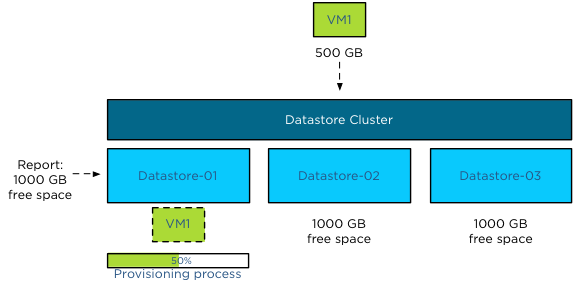
When deploying single virtual machines this behavior is not a problem, however when deploying multiple virtual machines this might result in an unbalanced distribution of virtual machine across the datastores.
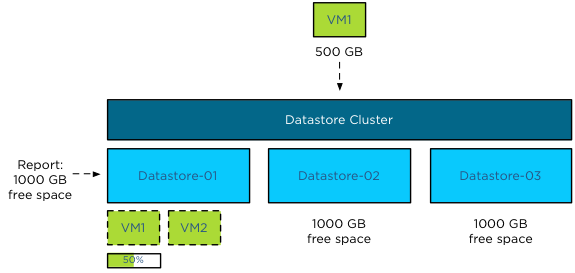
As the available space is not updated during the deployment process, Storage DRS might select the same datastore, until one (or more) of the provisioning operations complete and the available free space is updated. Using the previous scenario, Storage DRS in vSphere 5.0 is likely to pick Datastore-01 again when deploying VM2 before the provisioning process of VM1 is complete, as all three datastore report the same free space value and Datastore-01 is the first datastore it detected.
vSphere 5.1 Storage DRS behavior
Storage DRS in vSphere 5.1 behaves differently and because Storage DRS in vSphere 5.1 supports vCloud Director, it was vital to support the provisioning process of a vApp that contains multiple virtual machines.
Enter the storage lease
Storage DRS in vSphere 5.1 applies a storage lease when deploying a virtual machine on a datastore. This lease “reserves” the space and making deployments aware of each other, thus avoiding suboptimal/invalid placement recommendations. Let’s use the deployment of a vApp as an example.
The same datastore cluster configuration is used, each datastore if empty, reporting 1000GB free space. The vApp exists of 3 virtual machines, VM1, VM2 and VM3. Respectively they are 100GB, 200GB and 400GB in size. During the provisioning process, Storage DRS needs to select a datastore for each virtual machine. As the main goal of Storage DRS is to balance the utilization of the datastore cluster, it determines which datastore has the highest free space value after each placement during the simulation.
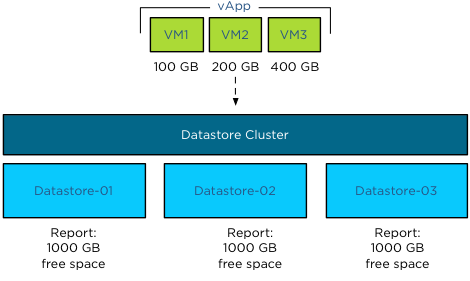
During the simulation VM1 is placed on Datastore-01, as all three datastores report an equal value of free space. Storage DRS then applies the lease of 100GB and reduces the available free space to 900GB.
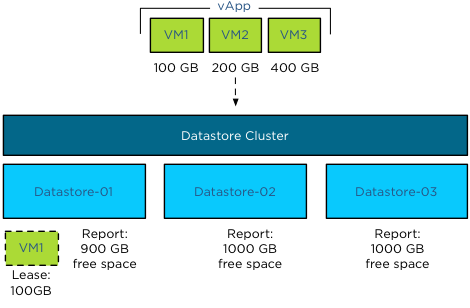
When Storage DRS simulates the placement of VM2, it checks the free space and determines that Datastore-02 and Datastore-03 each have 1000GB of free space, while Datastore-01 reports 900GB. Although VM2 can be placed on Datastore-01 as it does not violate the space utilization threshold, Storage DRS prefers to select the datastore with the highest free space value. Storage DRS will choose Datastore-02 in this scenario as it picks the first datastore if multiple datastores report the same free space value.
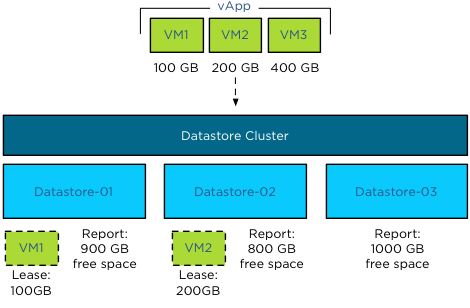
The simulations determines that the optimal destination for VM3 is Datastore-03, as this reports a free space value of 1000GB, while Datastore-02 reports 800 free space and Datastore-01 reports 900GB of space.
This lease is applied during the simulation of placement for the generation of the initial placement recommendation and remains applied until the placement process of the virtual machine is completed or when the operation times out. This means that not only a vApp deployment is aware of the storage resource lease but also other deployment processes.
Update to vSphere 5.1
This new behavior is extremely useful when deploying multiple virtual machines in batches such as vApp deployment or vHadoop environments with the use of Serengeti.
Get notification of these blogs postings and more DRS and Storage DRS information by following me on Twitter: @frankdenneman
Add DRS cluster to existing Storage DRS Datastore Cluster?
Lately I have seen the following question popping up at multiple places: “How can I add hosts of a DRS cluster to a Storage DRS datastore cluster after the datastore cluster is created?”
This is an intriguing question as it gives insight to how datastore cluster construct is perceived and that a step in the “create datastore cluster” workflow in the user interface might be the culprit of this.
The workflow:
During the create datastore cluster, step 4 requires the use to connect the datastore cluster to a DRS cluster or stand-alone hosts.
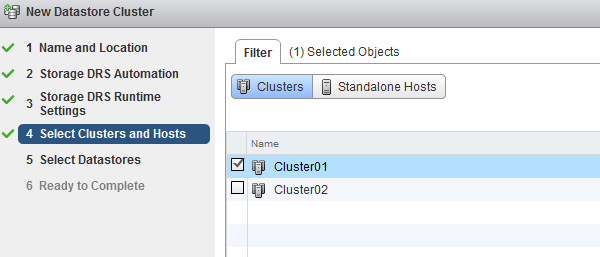
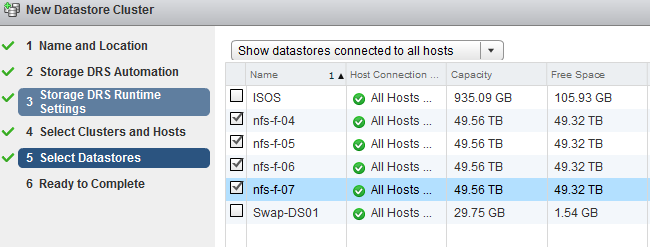
The reason for incorporating the step of selecting clusters and stand-alone hosts is to help narrow down the list of datastores that are presented in step 5. This way, one can create a datastore cluster that consists of datastores that are connected to all the hosts in a particular DRS cluster. The article “Partially connected datastore clusters” provide more information on the impact partially connected datastores on Storage DRS load balancing. In short, the screen “Select Clusters and Hosts” is just a filter, no host to datastore connectivity is altered by this step.
To prove this theory, I attached the datastores nfs-f-04, nfs-f-05, nfs-f-06 and nfs-f-07 to all the hosts in Cluster01 and Cluster02. However I selected the Cluster 01 in step 4. Step 5 provides the following overview, indicating that all the available datastores are connected to the hosts in Cluster01.
When you review the “Ready to Complete” screen, scroll down to the “Cluster and Host” overview, this screen shows that all the datastores are connected to Cluster01 and Cluster02, but only Cluster01 is selected. In my opinion this screen doesn’t make sense and I’m already working with the User Interface team and engineering to see if we can make some adjustments. (No promises though)!
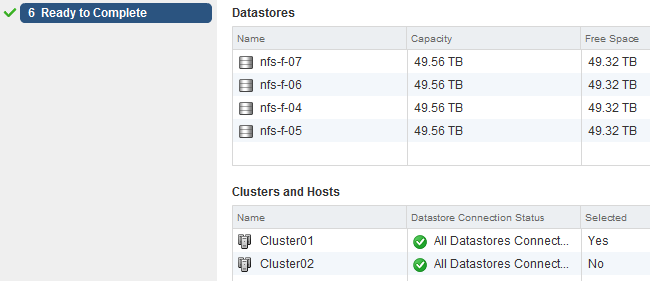
Although this Selected column can make this screen a little confusing, in essence it displays the user selection during the configuration process. The “Datastore Connection Status” is the key message of this view.
Once complete, select the Storage view, select the new datastore cluster and select the Cluster tab. This view shows that both clusters are connected and can utilize the datastore cluster as destination for virtual machine placement.
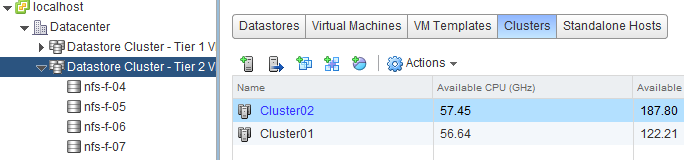
Another check is the “Standalone Hosts” tab. This displays the connectivity state of the hosts to the datastore cluster. Host *h09* and *h10* are part of Cluster01, host *h11* and *h12* are part of Cluster02.
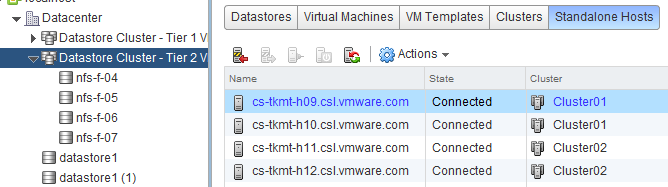
In essence
Remember I didn’t select Cluster02 during the datastore cluster configuration, yet Cluster02 and its hosts are still connected. Long story short: DRS Cluster and Storage DRS Datastore clusters are independent load balancing domain constructs. In the end it drills down to the host to datastore connectivity, remember partially connected datastores can still be a part of a datastore cluster. DRS and Storage DRS take the connectivity of hosts and datastores into account during the initial placement and load balancing process, not the cluster constructs.
Before creating a datastore cluster, ensure the following:
• Check Storage adapter settings
• Check Array configuration (masking, LUN ID, exports)
• Check zoning
• Rescan hosts that are going to use the datastores inside the datastore cluster.
Get notification of these blogs postings and more DRS and Storage DRS information by following me on Twitter: @frankdenneman