This article is a part of the series on architecture and design on datastore clusters. This article zooms in on why it’s recommended to use similar type disks in a datastore cluster.
In-tier balancing solution
SDRS can be considered as an “in-tier” balancing solution, suggesting that a datastore cluster should be populated with datastores that provide similar performance, continuity, capacity or service level. Although it’s not a technical requirement to have similar configured datastores, using heterogeneous configurations in a datastore cluster can lead to unexpected results. Understanding the SDRS’ main goal and the load balancing process can assist you in architecting your datastore cluster.
SDRS load balancing goal
The main focus of SDRS is to correct imbalance from both a space utilization and latency perspective on the datastore level. SDRS determines the imbalance level (space or latency) of the datastore cluster and migrates one or multiple virtual machine disk to solve the imbalance.
In order to select an appropriate migration candidate (virtual machine) SDRS relies on device and workload modeling to understand the impact of a workload on the latency of the datastore, SDRS uses virtual machine statistics and datastore utilization to understand the impact of virtual machine placement on the space utilization of a datastore.
Modeling
Let’s take a closer look at modeling. SDRS captures device performance to create a performance model; by using the SIOC injector and a reference workload it understands and learns the performance of each device. This way SDRS gets a clear picture of the datastores inside the datastore cluster. Workload modeling is used by SDRS to understand and learn the virtual machine workloads inside the datastore cluster. The workload modeling process creates a workload metric of each virtual disk and analyzes the impact of the data points on latency.
SDRS combines and correlates the outcome of device and workload modeling and space utilization into a unified recommendation. This means that when SDRS decides to migrate a specific VMDK, it considers the workload metric of the virtual disk and analyzes the impact of that specific workload on the latency of the destination datastore. If both IO metric and space utilization functions are enabled on the datastore cluster, SDRS combines the outcome of device modeling, workload modeling and space utilization and weights them regarding to violated threshold. Interesting enough, even when you disable IO load balancing, SDRS attempts to take overall IO statistics into account when finding a suitable datastore.
Impact of load balancing construct on datastore cluster configuration
Although SDRS analyzes devices and each virtual machines’ workload it’s is key to understand that SDRS’ main priority is to correct the threshold violation of datastore. Although it tries to find the best suitable datastore for a specific workload, modeling is still used as a metric to understand and achieve the goal of getting the best overall performance out of the datastore cluster.
In other words, modeling is used for balancing the load on the datastores and not to respect specific wishes of a virtual machine disk. In one way you can argue that SDRS load balancing has somewhat of a socialistic nature. Benefit for the society (datastores inside a datastore cluster) outweighs the individual need (single virtual machine performance). Let’s look at an example to better understand this concept.
Example scenario
VM1 is running on a datastore1. SDRS determined that the normalized load* is 5ms latency. VM2 and VM3 are running on a datastore2. SDRS considers datastore2 to have a normalized load of 20ms latency, violating the default threshold of 15ms.
Normalized load: SDRS aggregates the device modeling and workload modeling into a metric called normalized load.
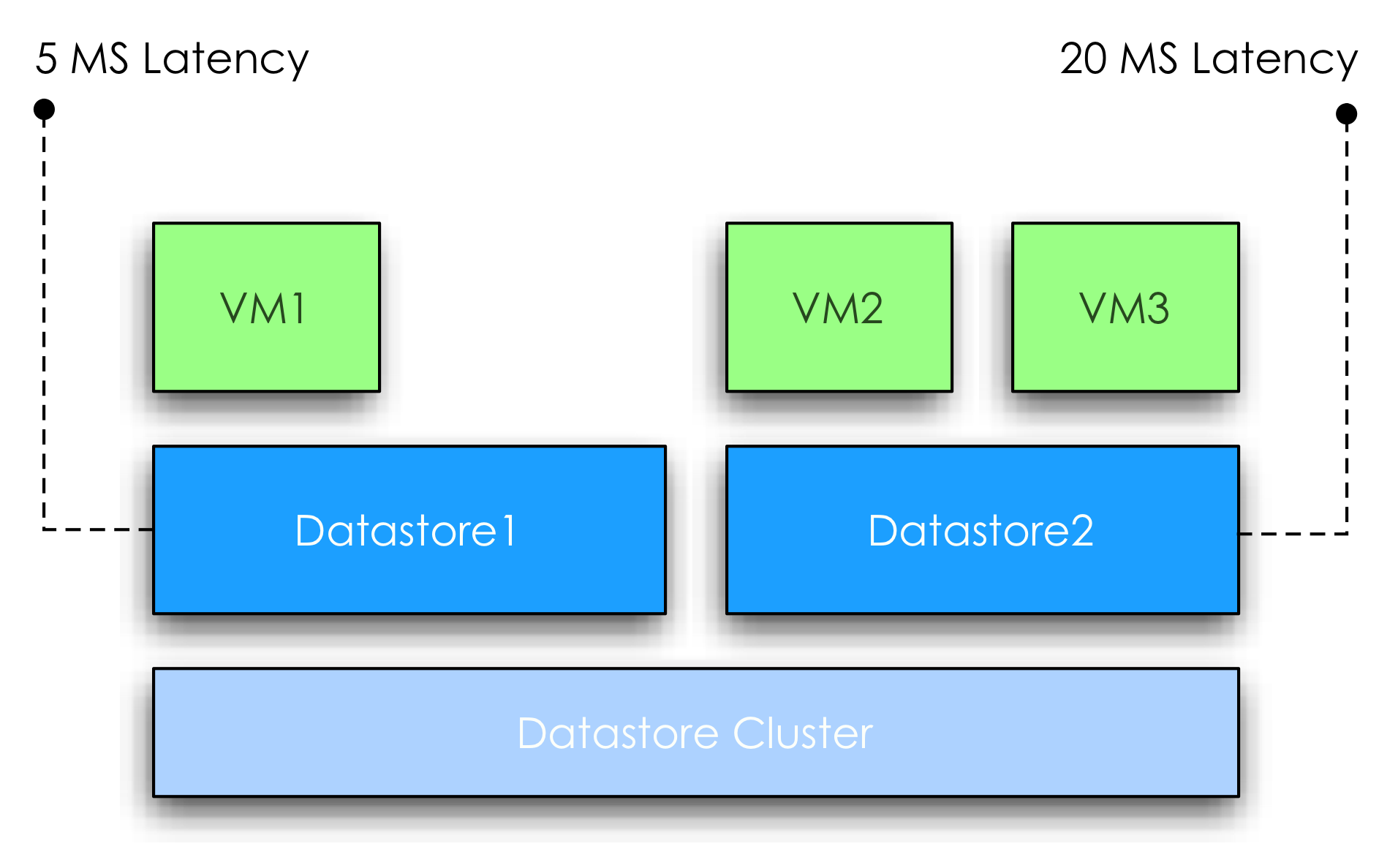
SDRS moves VM3 to datastore1; at this point the overall latency of the datastore2 is reduced 13ms. However due to moving VM3 to datastore1, the latency is increased from 5ms to 12ms. At this point the increase in latency will impact the workload of VM1, however the “society” benefits from the move because after the move no datastore is violating the latency threshold of the SDRS cluster anymore.

In this scenario the overall IOPS will be higher, which aligns with the goal of SDRS utilizing overall capacity and performance.
Note: As this subject is complex enough, I used a very simple example. In this scenario the latency “moved” with the VM. In real life this is not necessarily the fact, when a virtual machine is moved the latency will go up with the same amount at which the latency went down on the source.
Load Balancing in a Heterogeneous configuration
What if the datastore cluster contains a mix of datastores that are backed by different types of disks? For a moment, let’s focus on the performance impact of a heterogeneous configuration.
As mentioned before, device and workload modeling helps SDRS to find the most suitable datastore for a specific workload, however when combining different types of disk, for example, SSD, FC and SATA, it is not uncommon to see the fastest datastore fill up first.
If one of the smaller SSD’s run out of space, SDRS is required to solve the space utilization threshold violation and will migrate a workload from a faster datastore to a slower datastore, prioritizing space utilization over IO utilization. Although future invocations of the SDRS algorithm might solve the problem by moving VMDK’s around to find a more optimal balance, no priority or guarantees can be assigned to a specific virtual disk avoiding potential decrease in performance of a specific VMDK.
Now at this point most of you wonder if VASA and storage profiles can be used in such a configuration to associate specific profiles to virtual machines and make these VMs compliant to specific datastores. SDRS does not incorporate storage profiles compliancy in the load balancing algorithms and unfortunately not every storage vendor offers VASA providers of their arrays. Some excellent articles about VASA and Profile driven storage can be found at Yellow Bricks.com and blogs.vmware.com/vSphere/storage
VASA: http://blogs.vmware.com/vsphere/2011/08/vsphere-50-storage-features-part-10-vasa-vsphere-storage-apis-storage-awareness.html
Profile driven storage: http://www.yellow-bricks.com/2011/07/13/vsphere-5-0-profile-driven-storage-what-is-it-good-for/
To guarantee specific performance to virtual machines it is recommended to uses similar type disks to back the datastores of a datastore cluster. This configuration offers a stable and predictable service level to the virtual infrastructure. If multiple types of disks are available, it is recommended to split and create multiple datastore clusters each containing groups of identical types of disks.
Previous articles in the SDRS short series Architecture and design of Datastore clusters:
Part1: Architecture and design of datastore clusters
Part2: Partially connected datastore clusters
Cyber Monday deal!
We are long time fascinated by the whole Black Friday and Cyber Monday craze in the USA. Unfortunately we do not celebrate Thanksgiving in the Netherlands and none of the shops are participating in something similar as Black Friday.
This year we thought it was a great idea to participate in some form and what better than to offer our vSphere 5 Clustering Technical Deepdive e-book for a price you cannot resist. We just changed the price of the vSphere 5 Clustering Technical Deepdive to $ 4.99 and 3.99 for our European friends. Yes that is correct…. Less than 5 dollars for over 350 pages of deepdive material.
What better way than recover from the madness of Black Friday and just sit back and relax reading this amazing piece of work? This is most definitely the deal of the year for all virtualization fanatics! Keep in mind that this is a limited offer, Tuesday the 29th the price will be back to “normal” again.
US – ebook – $ 4.99
UK – ebook – £ 3.99
DE – ebook – € 3.99
FR – ebook – € 3.99
Pick it up, tell your friends / colleagues / family about it… Here are some snippets from Amazon reviews, but with 15 extremely positive reviews, all of them 5 out of 5, you know you can’t go wrong:
“If you’re serious about VMware virtualization this book is a must have. Regardless of you responsibilities with a virtual infrastructure administrative, or from a architecture design stand point this book is for you. The level of knowledge and depth which Frank and Duncan cover in this book about the new clustering changes in vSphere 5 is priceless. The design tips and illustrations through the book are truly invaluable. There is no other book that gets into the core of all the different vSphere 5 cluster technologies like this one, ”
“Whether you are longing to know about the transition from AAM to FDM, best practices for DRS and DPM, or are just curious to know what those acronyms are this is a great book! The technical detail, practical advice, and comparative analysis throughout make this book one of the most thorough yet concise technical books available.”
“The book is clearly written, a special emphasis has been made on making it understandable even for professionals like me who use vSphere daily yet do not manage huge production environments. The book goes to great lengths to explain all possible scenarios and I found answers to all my questions. Not only sections cover HOW the technology works, but the authors go as far as explaining the way the algorithms are working, which will satisfy the curiosity of everyone.”
“The complete explanations provide the reader all of the information needed to make informed decisions about their environment with excellent diagrams to provide strong visual reinforcements.”
Please remember that we are offering the book for the price listed above, depending on your location Amazon might charge an additional cost!
New job role
The last two years I enjoyed working as an architect within the PSO organization of VMware, designing and reviewing the most interesting virtual infrastructures in Europe. However today I signed my new contract, accepting a position within the Technical Marketing team.
Starting December I will focus on resource management and disaster avoidance technologies. My new role allows me to collaborate with the Product managers and the R&D organization on products such as DRS, Storage DRS, vMotion, Storage vMotion and FT. My main tasks will be developing best practices, white-papers, documentation and technical presentations, educating field organizations and of course the customers.
Although I enjoyed working within the PSO organization, I can’t wait to get started. Thanks to all the people who made my move possible and offering me such an opportunity!
FDM in mixed ESX and vSphere clusters
Last couple of weeks I’ve been receiving questions about vSphere HA FDM agent in a mixed cluster. When upgrading vCenter to 5.0, each HA cluster will be upgraded to the FDM agent. A new FDM agent will be pushed to each ESX server. The new HA version supports ESX(i) 3.5 through ESXi 5.0 hosts. Mixed clusters will be supported so not all hosts have to be upgraded immediately to take advantage of the new features of FDM. Although mixed environments are supported we do recommend keeping the time you run difference versions in a cluster to a minimum.
The FDM agent will be pushed to each hosts, even if the cluster contains identically configured hosts, for example a cluster containing only vSphere 4.1 update 1 will still be upgraded to the new HA version. The only time vCenter will not push the new FDM agent to a host if the host in question is a 3.5 host without the required patch.
When using clusters containing 3.5 hosts, it is recommended to upgrade the ESX host to ESX350-201012401-SG PATCH (ESX 3.5) or ESXe350-201012401-I-BG PATCH (ESXi) patch first before upgrading vCenter to vCenter 5.0. If you still get the following error message:
Host ‘
Visit the VMware knowledgebase article: 2001833.
Partially connected datastore clusters
The first article in the series about architecture and design decisions series focuses on the connectivity of the datastores within the datastore cluster. Connectivity between ESXi hosts and datastores in the datastore cluster affects initial placement and load balancing decisions made by DRS and Storage DRS. Although connecting a datastore to all ESXi hosts inside a cluster is a common practice, we still come across partially connected datastores in virtual environments.
What is the impact of a partially connected datastore, member of a datastore cluster, connected to a DRS cluster? What interoperability problems can you expect and what is the impact of this design on DRS load balancing operations and SDRS load balancing operations?
Let’s start with the basic terminology.
Fully connected datastore clusters
A fully connected datastore cluster is when the storage is attached to all ESX servers in a cluster. This is a recommendation, but it is not enforced.
Partially connected datastore clusters
If a datastore is connected to a subset of ESXi hosts inside the DRS cluster, the datastore cluster is treated as a partially connected datastore cluster.
Now what happens if the DRS cluster is connected to partially connected datastores? It’s important to understand that the goal of both DRS and SDRS is resource availability, key to offering resource availability is to provide or have as much as mobility as possible. SDRS will not generate any migration recommendations that will reduce the compatibility of a virtual machine regarding datastore connections. Virtual machine to host compatibility are captured in compatibility lists.
Compatibility list
Inside the cluster a vm-host compatibility list is generated for each virtual machine. The compatibility list determines which ESXi host in the cluster have network and storage configurations that allow the virtual machine to successfully come online. Membership of a Mandatory VM to host affinity rules are also listed in the compatibility list.If the network portgroup or datastore is not available on the host, or the host is not listed in the host group of the mandatory affinity rule, the ESXi server is deemed incompatible to host that virtual machine.
As mentioned, both DRS and SDRS focus on resource availability and resource outage avoidance, therefore SDRS prefers a datastore that is connected to all hosts rather than selecting a datastore that is partially connected. Connecting datastores to a subset of hosts reduce the compatibility list impacting the mobility of the virtual machine reducing the efficiency of DRS and SDRS.
Finding a suitable location or the ability to load balance becomes more challenging when the cluster and datastore cluster are partially connected. During initial placement a selection of a datastore may impact the mobility of the virtual machine amongst the hosts, while selecting a host impacts the mobility of a virtual machines amongst the datastores in the datastore cluster.
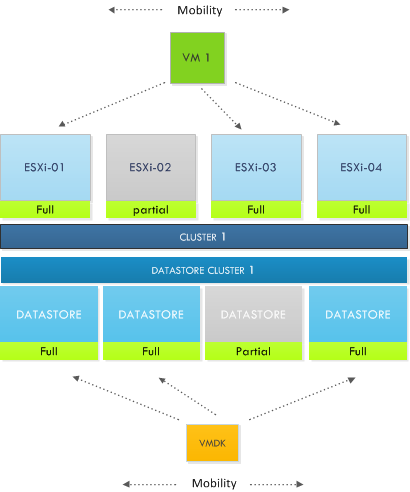
Let’s explore this impact a little bit further. During the process of migration recommendations, DRS selects a host for a virtual machine that can provide enough resources to satisfy the virtual machines resource entitlement, while lowering the imbalance of the cluster. DRS might come across a low utilized host; other hosts inside the cluster are highly utilized. Unfortunately the lightly utilized host is not connected to the datastore containing the virtual machine files (it might even be lowly utilized due to the poor connection state) and therefore DRS will not consider the host due to the incompatibility. While from a DRS resource load balancing perspective this host might be very attractive option to solve resource imbalance. Also keep in mind the impact of this behavior on VM-Host affinity rules, DRS will not migrate the virtual machine to the partially connected host inside the host group.
Similar happens with SDRS load balancing. Partially connected datastores are not recommended when fully connected datastores are available that do not violate the space SDRS threshold. You might wonder why the space SDRS threshold is explicitly mentioned and not the IO load balanced but that’s because IO load balancing is disabled when a partially connected datastore is detected in the datastore cluster.
IO load balancing
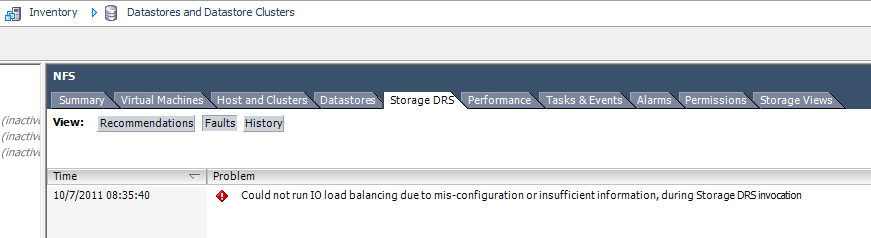
It is important to understand the impact a single partially connected datastore has on the service level of an entire datastore cluster. As SDRS detects a partially connected datastore it will disable the IO load balancing on the entire datastore cluster. Not only on that single partially connected datastore, but the entire cluster. Effectively degrading a complete feature set of your virtual infrastructure.
Temporary partially connectivity – a real threat?
The connectivity status is important when the SDRS interval expires; during the migration recommendation calculation is checks the connectivity. A temporary all-paths-down status or a rezoning procedure might not have effect on SDRS load-balancing behavior, but what if good old murphy decides to give you a visit during the invocation period? Keep this behavior in mind when scheduling maintenance on the storage platform.
Warning messages
SDRS generates a warning and displays it at the SDRS faults tab in the datastores and datastore cluster view
Benefits of partially connected
We cannot identify any direct benefit of partially connecting a datastore of a cluster. Partially connected datastores impact initial placement, disable IO load-balancing and will affect DRS load balancing as well as SDRS space balancing. Therefore a basic design decision would be connect all datastores to all host in the cluster connected to the datastore cluster. If anyone has got a good reason for not connecting a datastore to all the hosts, please leave a comment.