• Skip to primary navigation
  • Skip to main content

frankdenneman.nl

  • AI/ML
  • NUMA
  • About Me
  • Privacy Policy

CPU pinning is not an exclusive right to a CPU core!

June 11, 2021 by frankdenneman

People who configure CPU Affinity deserve a special place in hell.. pic.twitter.com/wIIZ0dHDRw

— Katarina Brookfield (@MrsBrookfield) June 10, 2021

Katarina tweeted a very expressive tweet about her love/hate (mostly hate) relation with CPU pinning, and lately I have been in conversations with customers contemplating whether they should use CPU pinning.

The analogy that I typically use to describe CPU pinning is the story of the favorite parking space at your office parking lot. CPU pinning limits the compliant CPU “slots” for that vCPU to be scheduled on. So think about that CPU slot as the parking spot closest to the entrance of your office. You have decided that you only want to park in that spot. Every day of the year, that’s your spot and no other place else. The problem is, this is not a company-wide directive. Anyone can park in that spot, but you just limited yourself to that spot only. So it can happen that Bob arrives at the office first and lazy as he is, he will park to the office entrance as close as he can. Right in your spot. Now the problem with your self-imposed rule is that you cannot and will not park anywhere else. So when you show up (late to the party), you notice that Bob’s car is in YOUR parking spot, and the only thing you can do is to drive circles in some holding pattern until Bob leaves the office again. The stupidest thing. It’s Sunday, and you and Bob are the only ones doing some work. You’re out there on the parking lot, driving circles waiting until Bob leaves again, while Bob is inside in the empty building waiting on you to get started.

CPU pinning is not an exclusive right for that vCPU to use that particular CPU slot (Core or HT). It’s just a self-imposed limitation. If you want exclusive rights to a full core, check out the setting Latency Sensitivity
Filed Under: Uncategorized

VM Service – Help Developers by Aligning Their Kubernetes Nodes to the Physical Infrastructure

May 3, 2021 by frankdenneman

The vSphere 7.0 U2a update released on April 27th introduces the new VM service and VM operator. Hidden away in what seems to be a trivial update is a collection of all-new functionalities. Myles Gray has written an extensive article about the new features. I want to highlight the administrative controls of VM classes of the VM service.

VM Classes
What are VM classes, and how are they used? With Tanzu Kubernetes Grid Service running in the Supervisor cluster, developers can deploy Kubernetes clusters without the help of the Infra Ops team. Using their native tooling, they specify the size of the cluster control plane and worker nodes by using a specific VM class. The VM class configuration acts a template used to define CPU, memory resources and possibly reservations for these resources. These templates allow the InfraOps team to set guardrails for the consumption of cluster resources by these TKG clusters.

The supervisor cluster provides twelve predefined VM classes. They are derived from popular VM sizes used in the Kubernetes space. Two types of VM classes are provided, a best-effort class and a guaranteed class. The guaranteed class edition fully reserves its configured resources. That is, for a cluster, the spec.policies.resources.requests match the spec.hardware settings. A best-effort class edition does not, that is, it allows resources to be overcommitted. Let’s take a closer look at the default VM classes.

VM Class TypeCPU ReservationMemory Reservation
Best-Effort-‘size’0 MHz0 GB
Guaranteed-‘size’Equal to CPU configEqual to memory config

There are eight default sizes available for both VM class types. All VM classes are configured with a 16GB disk.

VM Class SizeCPU Resources ConfigurationMemory Resources Configuration
XSmall22 Gi
Small24 Gi
Medium28 Gi
Large416 Gi
XLarge432 Gi
2 XLarge16128 Gi
4 XLarge16128 Gi
8 XLarge32128 Gi

Burstable Class
One of the first things you might notice if you are familiar with Kubernetes is that the default setup is missing a QoS class, the Burstable kind. Guaranteed and Best-Effort classes are located at both ends of the spectrum of reserved resources (all or nothing). The burstable class can be anywhere in the middle. I.e., the VM class applies a reservation for memory and or CPU. Typically, the burstable class is portrayed to be a lower-cost option for workloads that do not have a sustained high resource usage. Still, I think the class can play an essential role in no-chargeback cloud deployments.

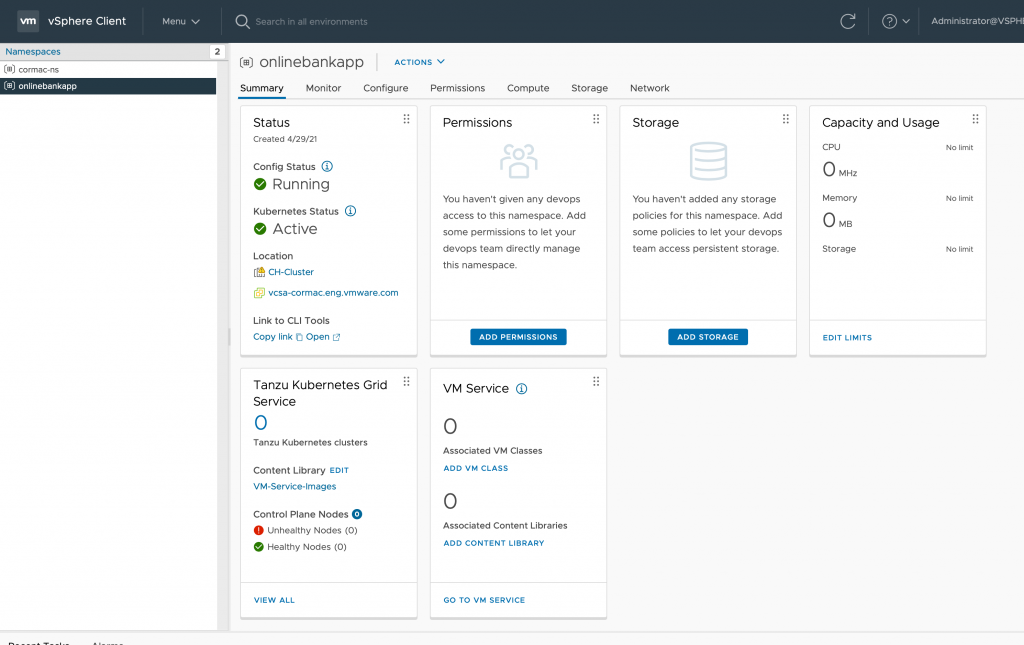
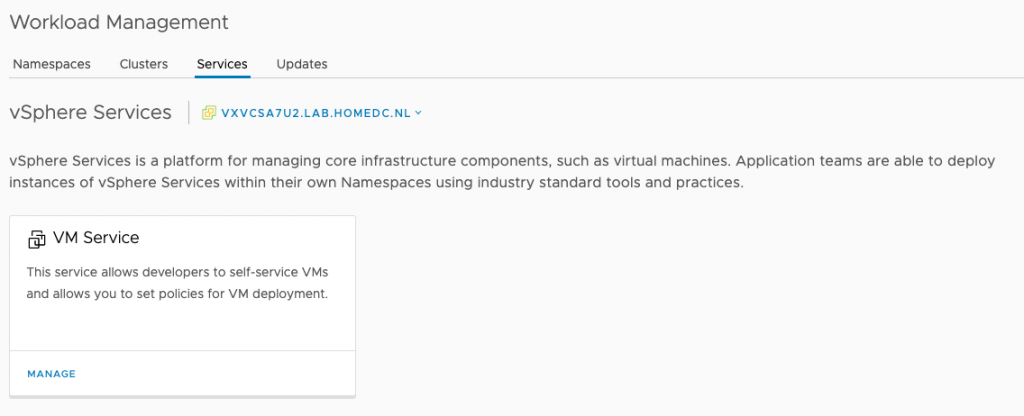
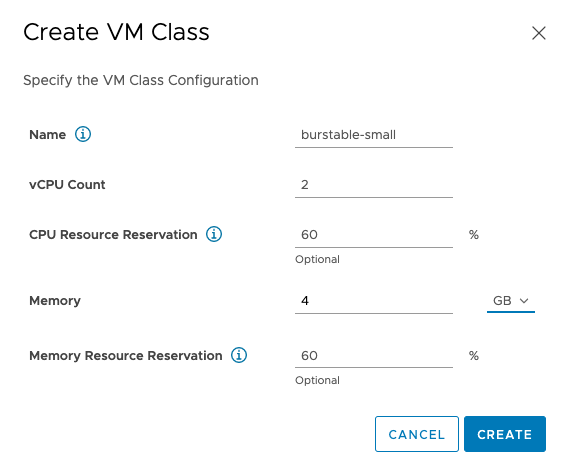
To add burstable classes to the Supervisor Cluster, go to the Workload Management view, select the Services tab, and click on the manage option of the VM Service. Click on the “Create VM Class” option and enter the appropriate settings. In the example below, I entered 60% reservations for both CPU and memory resources, but you can set independent values for those resources. Interestingly enough, no disk size configuration is possible.

Although the VM Class is created, you have to add it to a namespace to be made available for self-service deployments.

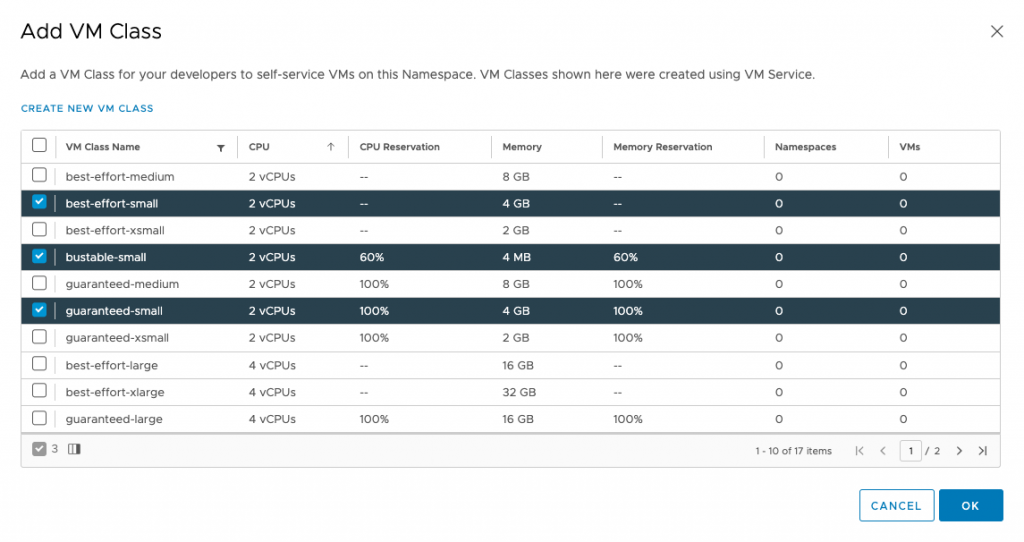
Click on “Add VM Class” in the VM Service tile. I modified the view by clicking on the vCPU column, to find the different “small” VM classes and selected the three available classes.

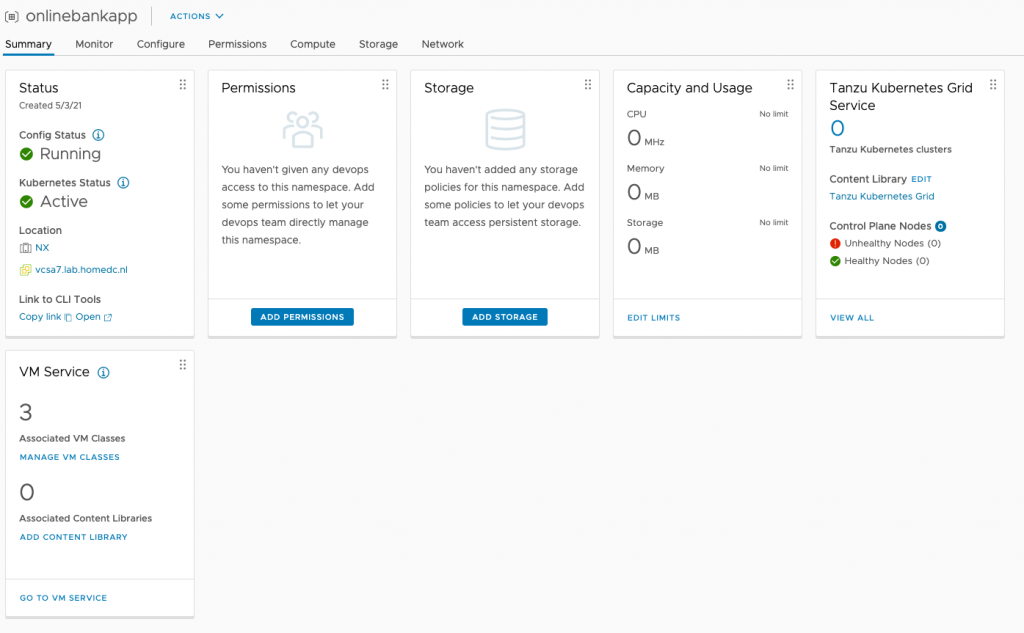
After selecting the appropriate classes, click ok. The Namespace Summary overview shows that the namespace offers three VM classes.

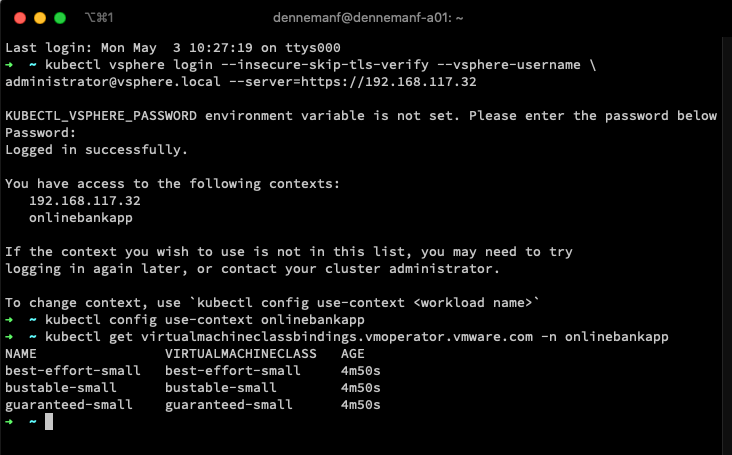
The developer can view the VM classes assigned to the namespace by using the following command:

kubectl get virtualmachineclassbindings.vmoperator.vmware.com -n namespacename I logged into the API server of the supervisor cluster, changed the context to the namespace “onlinebankapp” and executed the command:

kubectl get virtualmachineclassbindings.vmoperator.vmware.com -n onlinebankapp

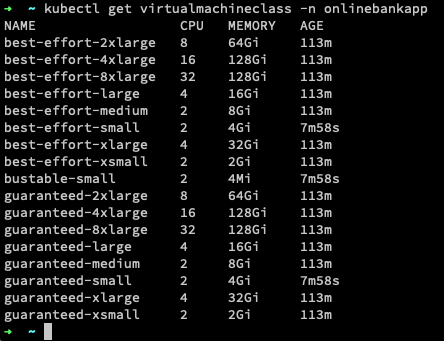
If you would have used the command “kubectl get virtualmachineclass -n onlinebankapp“, you get presented with the list of virtualmachineclasses available within the cluster.

Help Developers by Aligning Their Kubernetes Nodes to the Physical Infrastructure

With the new VM service and the customizable VM classes, you can help the developer align their nodes to the infrastructure. Infrastructure details are not always visible at the Kubernetes layers, and maybe not all developers are keen to learn about the intricacies of your environment. The VM service allows you to publish only the VM classes you see fit for that particular application project. One of the reasons could be the avoidance of monster-VM deployment. Before this update, developers could have deployed a six worker node Kubernetes cluster using the guaranteed 8XLarge class (each worker node equipped with 32 vCPUs, 128Gi all reserved), granted if your hosts config is sufficient. But the restriction is only one angle to this situation. Long-lived relationships are typically symbiotic of nature, and powerplays typically don’t help build relationships between developers and the InfraOps team. What would be better is to align it with the NUMA configuration of the ESXi hosts within the cluster.

NUMA Alignment
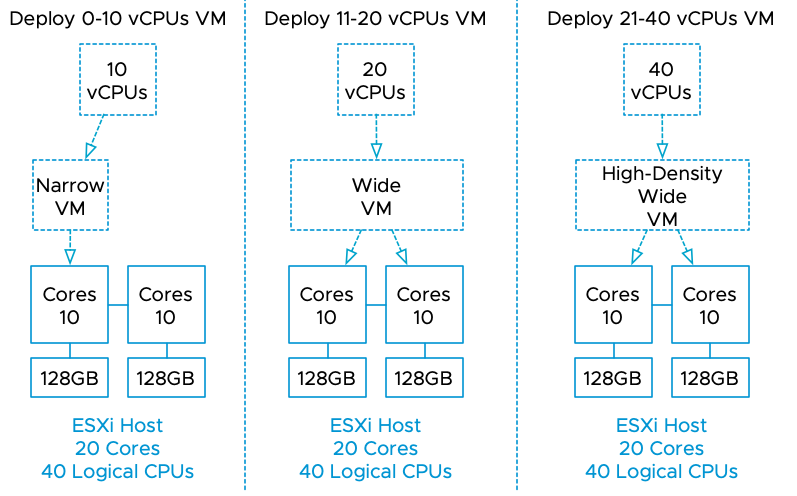
I’ve published many articles on NUMA, but here is a short overview of the various NUMA configuration of VMs. If a virtual machine (VM) powers on, the NUMA scheduler creates one or more NUMA clients based on the VM CPU count and the physical NUMA topology of the ESXi host. For example, a VM with ten vCPUs powered on an ESXi host with ten cores per NUMA node (CPN2) is configured with a single NUMA client to maximize resource locality. This configuration is a narrow-VM configuration. Because all vCPU have access to the same localized memory pool, this can be considered an Unified Memory Architecture (UMA).

Take the example of a VM with twelve vCPUs powered-on on the same host. The NUMA scheduler assigns two NUMA clients to this VM. The NUMA scheduler places both NUMA clients on different NUMA nodes, and each NUMA client contains six vCPUs to distribute the workload equally. This configuration is a wide VM configuration. If simultaneous multithreading (SMT) is enabled, a VM can have as many vCPUs equal to the number of logical CPUs within a system. The NUMA scheduler distributes the vCPUs across the available NUMA nodes and trusts the CPU scheduler to allocate the required resources. A 24 vCPU VM would be configured with two NUMA clients, each containing 12 vCPUs if deployed on a 10 CPN2 host. This configuration is a high-density wide VM.

A great use of VM service is to create a new set of VM classes aligned with the various NUMA configurations. Using the dual ten core system as an example, I would create the following VM classes and the associated CPU and memory resource reservations :

CPUMemoryBest EffortBurstableBurstable Mem OptimizedGuaranteed
UMA-Small216GB0% | 0%50% | 50%50% | 75%100% | 100%
UMA-Medium432GB0% | 0%50% | 50%50% | 75%100% | 100%
UMA-Large648GB0% | 0%50% | 50%50% | 75%100% | 100%
UMA-XLarge864GB0% | 0%50% | 50%50% | 75%100% | 100%
NUMA-Small1296GB0% | 0%50% | 50%50% | 75%100% | 100%
NUMA-Medium14128GB0% | 0%50% | 50%50% | 75%100% | 100%
NUMA-Large16160GB0% | 0%50% | 50%50% | 75%100% | 100%
NUMA-XLarge18196GB0% | 0%50% | 50%50% | 75%100% | 100%

The advantage of curating VM classes is that you can align the Kubernetes nodes with a physical NUMA node’s boundaries at CPU level AND memory level. In the table above, I create four classes that remain within a NUMA node’s boundaries and allow the system to breathe. Instead of maxing out the vCPU count to what’s possible, I allowed for some headroom, avoiding a noisy neighbor with a single NUMA node and system-wide. Similar to memory capacity configuration, the UMA-sized (narrow-VM) classes have a memory configuration that does not exceed the physical NUMA boundary of 128GB, increasing the chance that the ESXi system can allocate memory from the local address range. The developer can now query the available VM classes and select the appropriate VM class with his or her knowledge about the application resource access patterns. Are you deploying a low-latency memory application with a moderate CPU footprint? Maybe a UMA-Medium or UMA-large VM class helps to get the best performance. The custom VM class can transition the selection process from just a numbers game (how many vCPUs do I want?) to a more functional requirement exploration (How does it behave?) Of course, these are just examples, and these are not official VMware endorsements.

In addition, I created a new class, “Burstable mem optimized”, A class that reserves 25% more memory capacity than its sibling VM class “Burstable”. This could be useful for memory-bound applications that require the majority of memory to be reserved to provide consistent performance but do not require all of it. The beauty of custom VM classes is that you can design them as they fit your environment and your workload. With your skillset and knowledge about the infrastructure, you can help the developer to become more successful.

Filed Under: Kubernetes, NUMA

vSphere with Tanzu vCenter Server Network Configuration Overview

November 6, 2020 by frankdenneman

I noticed quite a few network-related queries about the install of vSphere with Tanzu together with vCenter Server Networks (Distributed Switch and HA-Proxy).

The whole install process can be a little overwhelming when it’s your first time dealing with Kubernetes and load-balancing services. Before installing Workload Management (the user interface designation for running Kubernetes inside vSphere), you have to setup HA-Proxy, a virtual appliance for provisioning load-balancers.

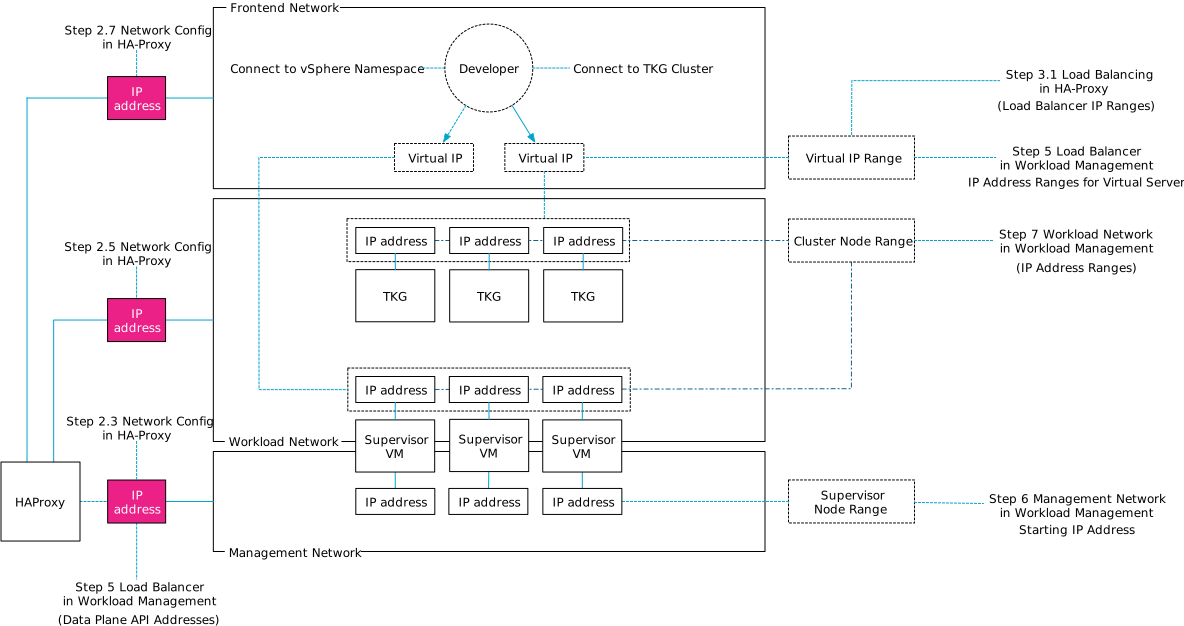
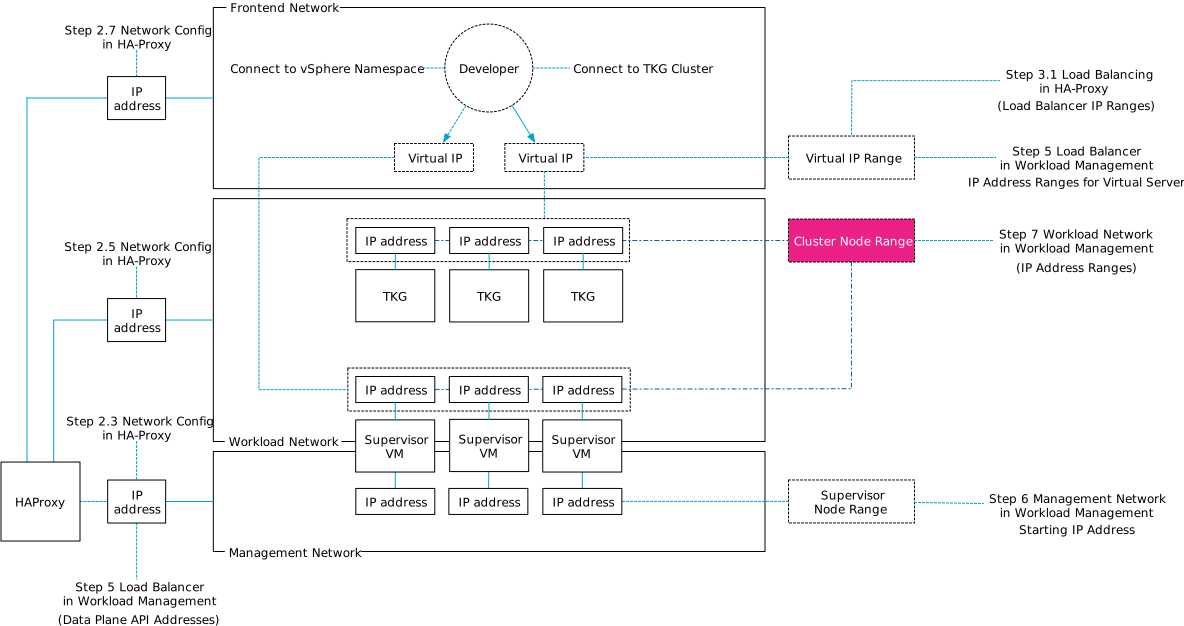
Cormac did a tremendous job describing the configuration steps of all components. Still, when installing vSphere with Tanzu, I found myself mapping out the network topology to make sense of it all since there seems to be a mismatch of terminology between HA-proxy and Workload Management configuration workflow.

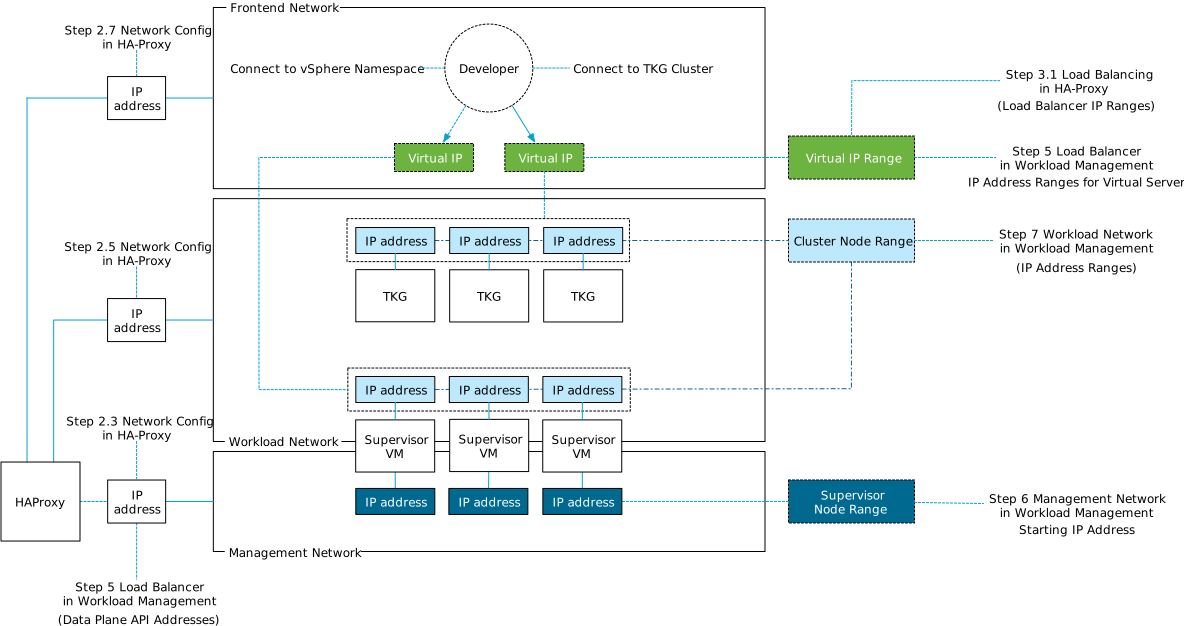
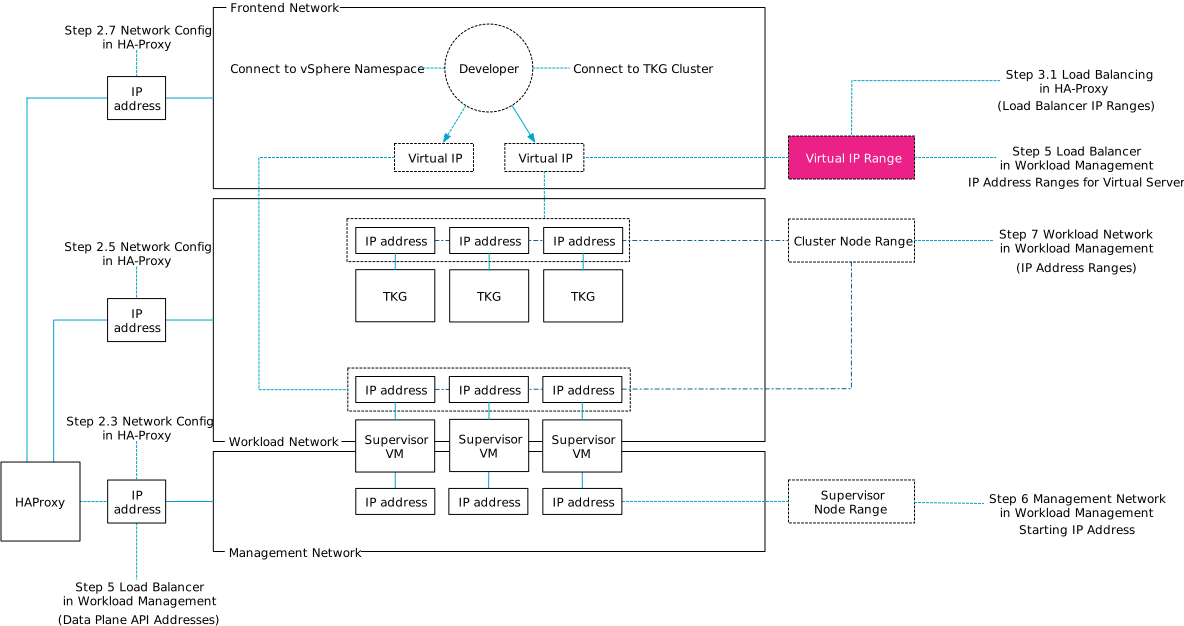
To help you navigate this diagram, I’ve provided annotations of the actual UI install steps. In total, three networks can be used for this platform;

NetworkMain Purpose
Management Communicating with vCenter, HA Proxy
WorkloadIP addresses for Kubernetes Nodes
FrontendVirtual IP range for Kubernetes clusters

You can use the same network for the workload and frontend but be sure you are using IP-ranges that do not overlap. Also, do not use a DHCP range on that network. I wasted two days figuring out that this was not a smart thing to do. The supervisor VMs are dual-homed and connect to the management network and the workload network. The frontend network contains the virtual IP range assigned to the kubernetes clusters, which can be the supervisor cluster and the TKG clusters.

To make it simple, I created three distinct VLANs with each their own IP-range:

Network IP Range VLAN
Management network 192.168.115/24 115
Workload network 192.168.116/24 116
Frontend network 192.168.117/24 117

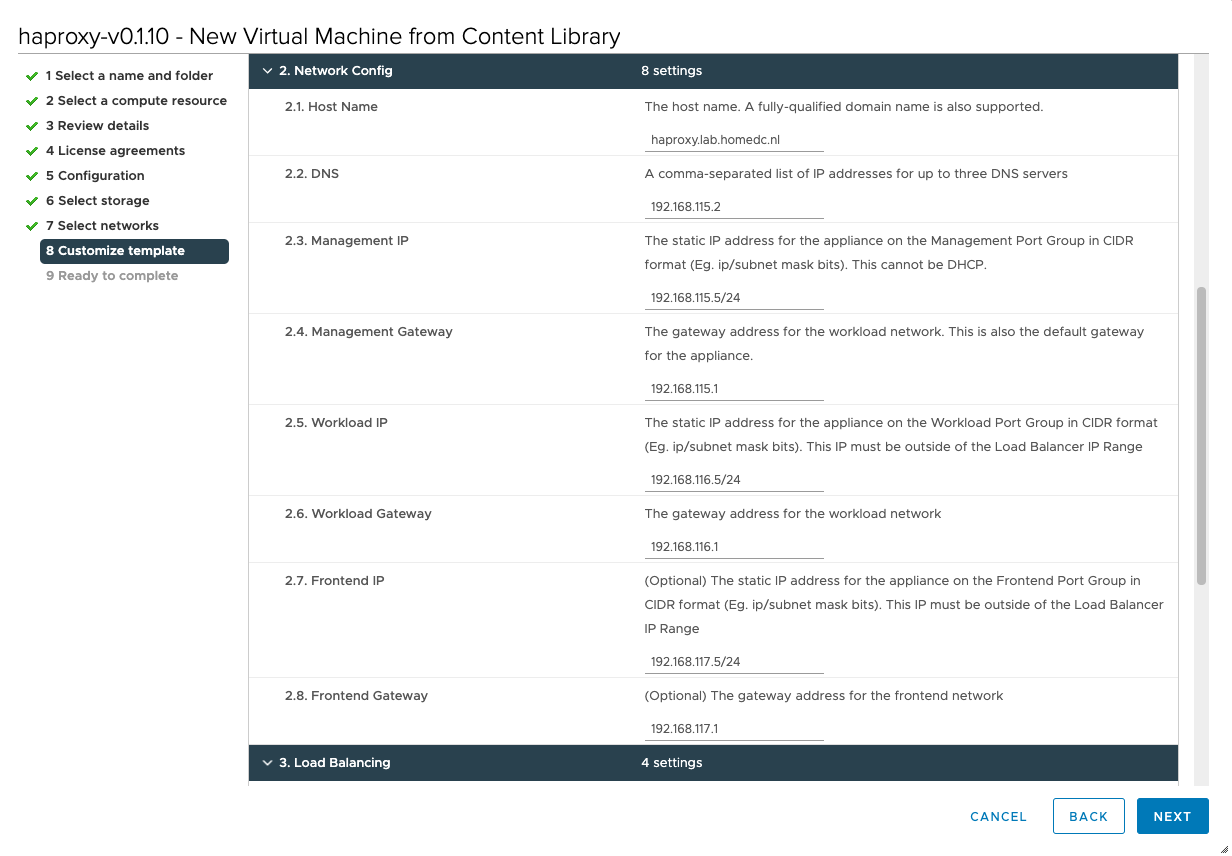
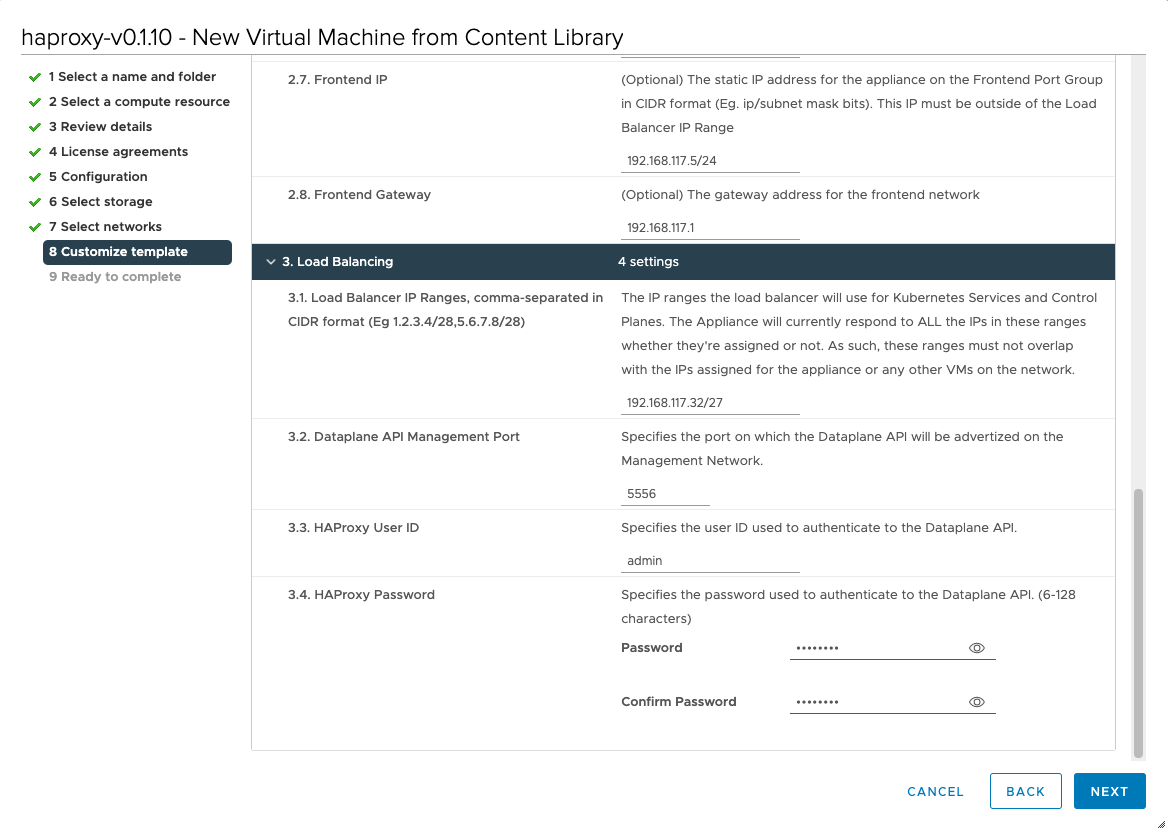
This overview can help you with mapping the ip-addresses used in the screenshot to the network designations in the diagram. For example, during the HA-Proxy install, you have to configure the network. This is step 2 of this process and step 2.3 requests the management IP of the HA Proxy virtual appliance.

HA-Proxy requires you to provide a load balancer IP range, that is used to provide a Kubernetes cluster a virtual IP.

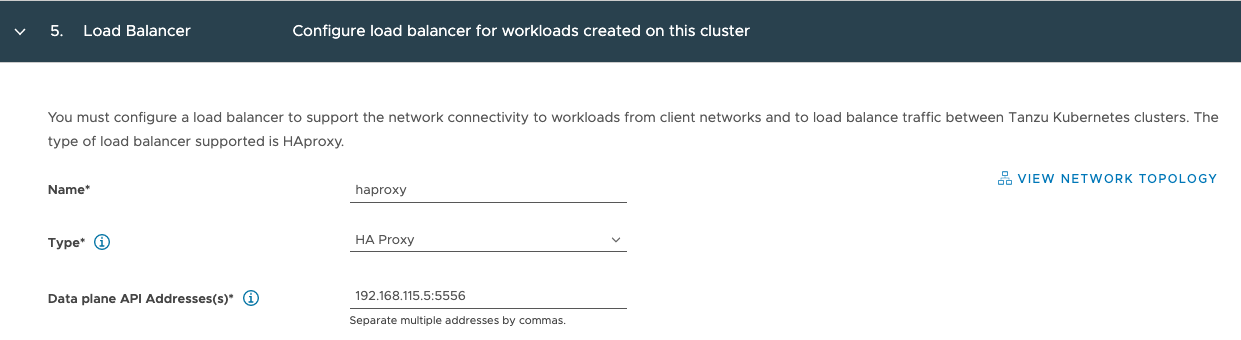
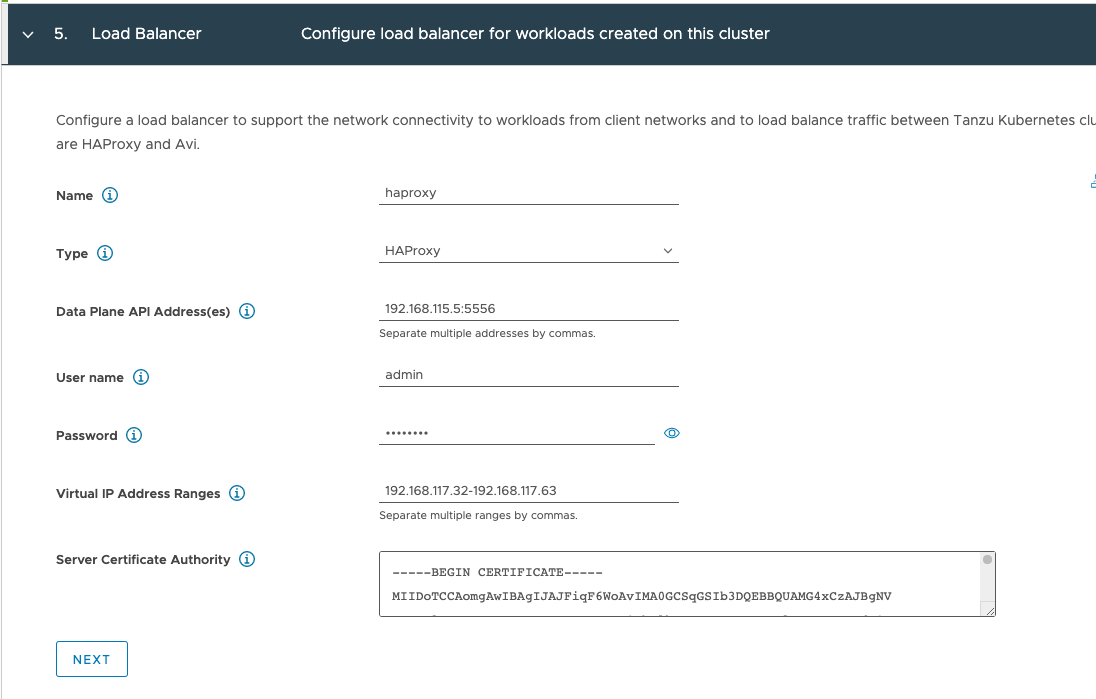
The next stop is workload management. In step 5, the first IP-address that you need to supply is the management IP address which you provided in step 2.3 of the HA-Proxy config process.

Staying on same config page, you need to provide the IP ranges for virtual servers, those are the ip-address defined in the frontend network. It’s the exact same range you used when configuring step 3.1 of the HA-proxy configuration process, but this time you have to write it out instead of using a CIDR format (Let’s keep you sharp! 😉 )

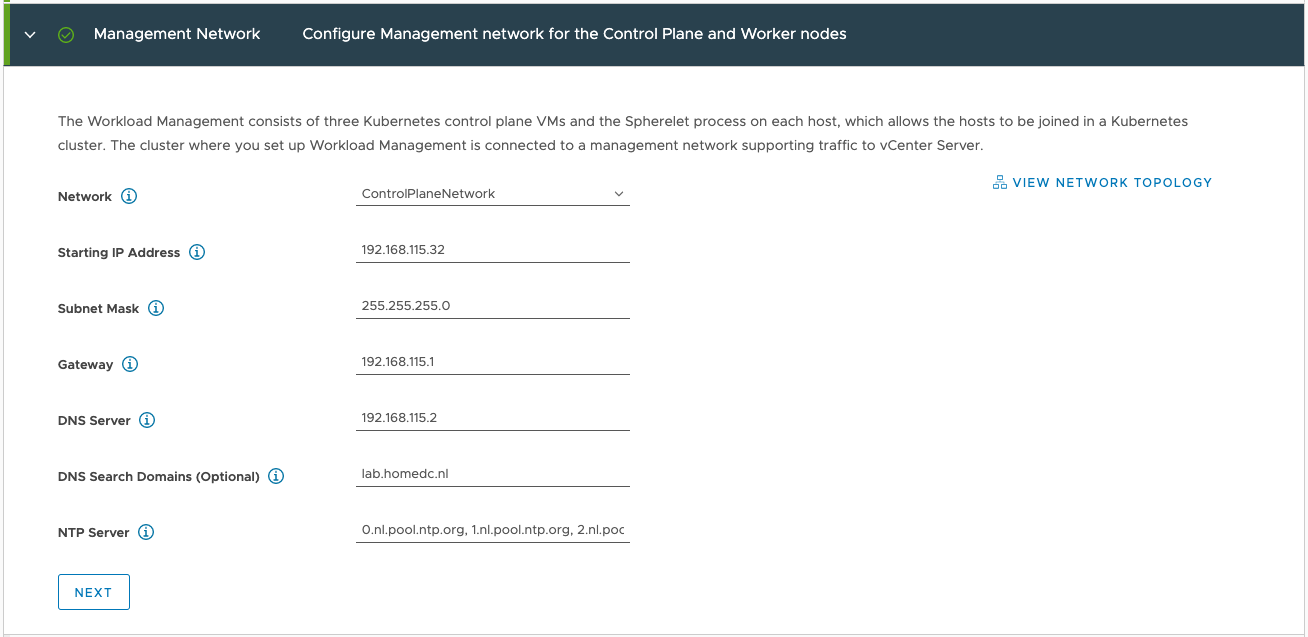
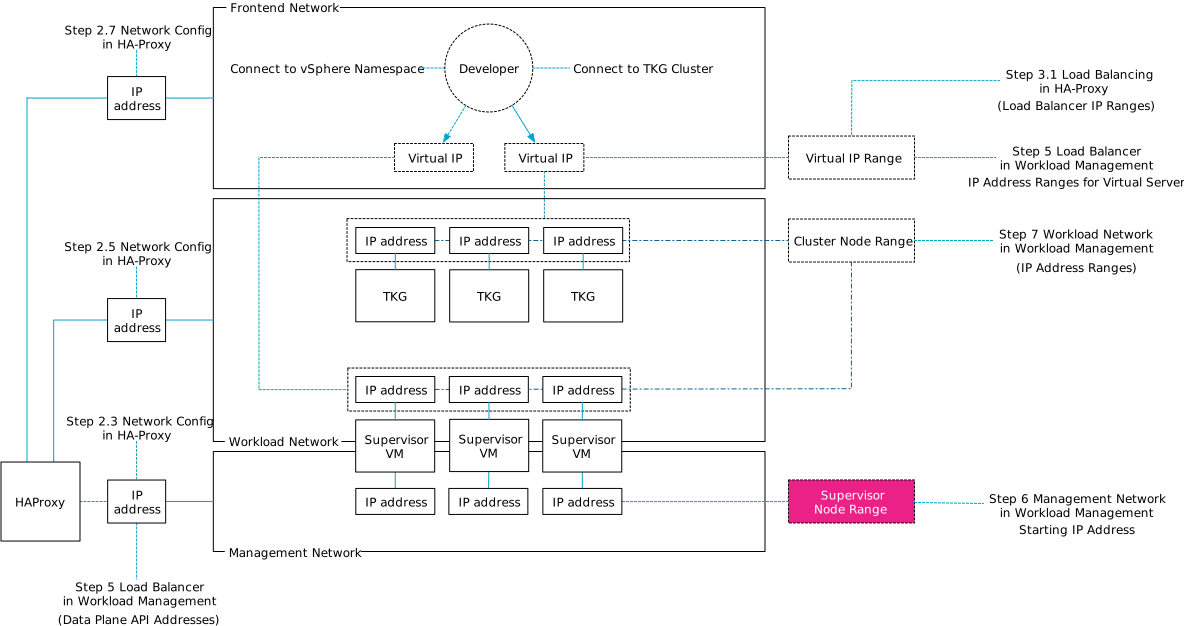
Step 6 of the workload management config process requires you to specify the IP addresses of the supervisor control plane VMs on the management network.

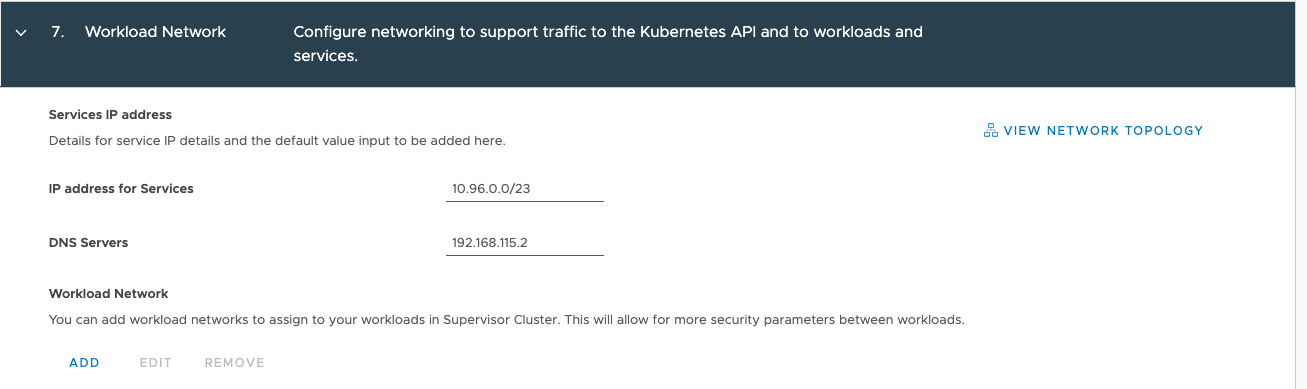
And the last network related configuration option, is step 7 in which you define the Kubernetes node IP range, this applies to both the supervisor cluster as well as the guest TKG clusters. This range is defined in the workload network portion in the top part the screen:

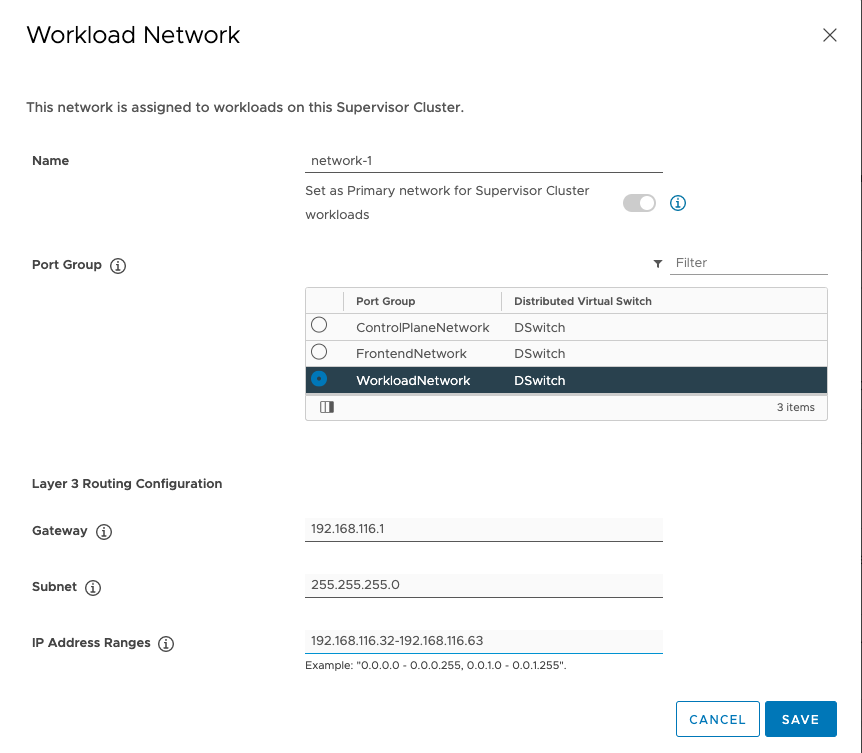
Click on add to open workload network config screen.

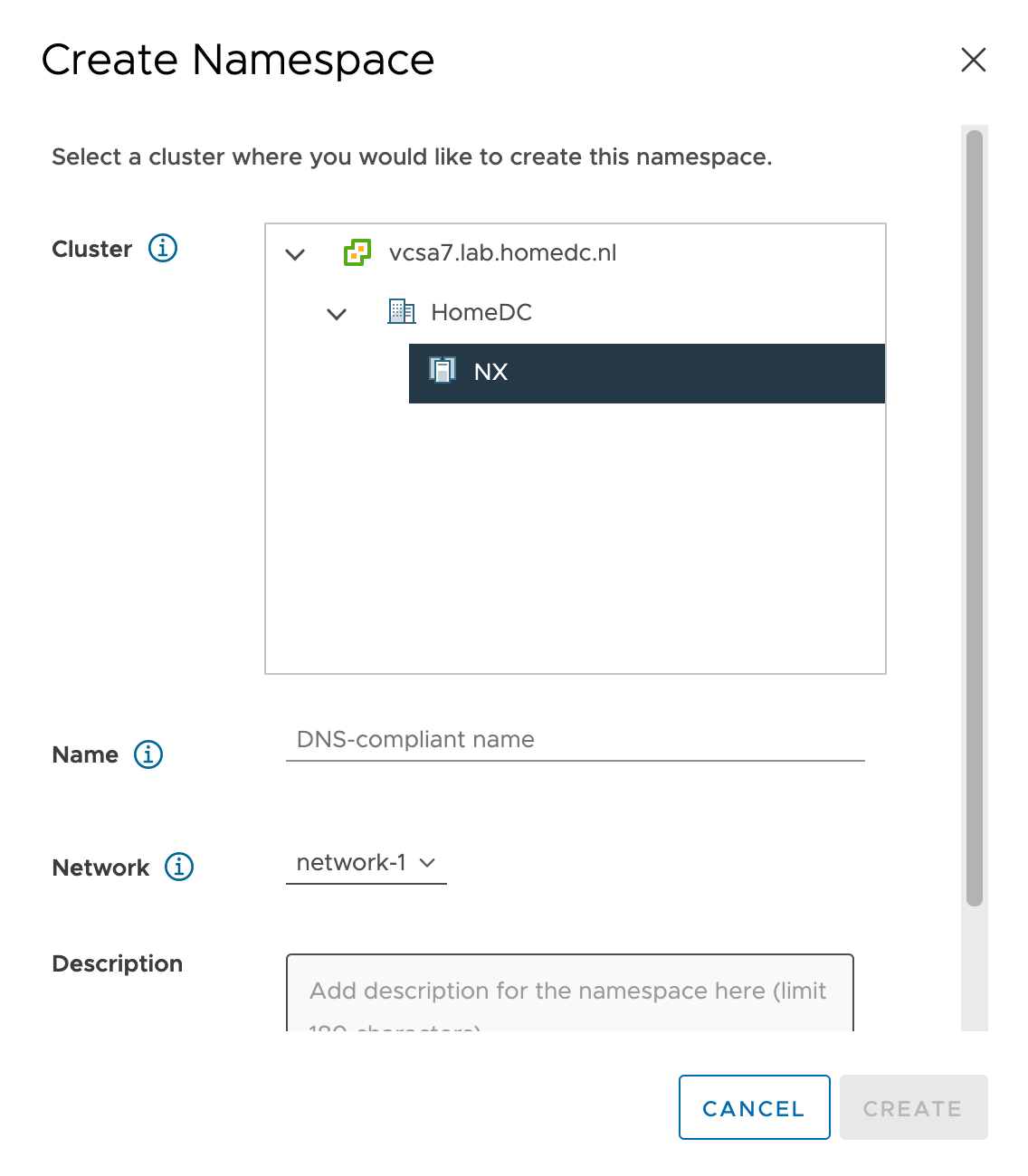
Tip, the network name you provide is presented to you when configuring a namespace for a workload within the vSphere\supervisor cluster. Please provide a meaningful name other than network-1

I hope this article helps you to wrap your head around these network requirements a little bit better. Please follow the instructions laid out in Cormacs Blog series and refer to these sets of diagram to get some visual aid in the process.

Filed Under: Uncategorized

What’s Your Favorite Tech Novel?

July 30, 2020 by frankdenneman

Today I was discussing with Duncan some great books to read. Disconnecting fully from work is difficult for me, so typically, the books I read are tech-related. I have read some brilliant books that I want to share with you, but mostly I want to hear your recommendations for other excellent tech novels.

Cyberwarfare

Cyberwarfare intrigues me, so any book covering Operation Olympic Games -or- Stuxnet interests me. One of the best books on this topic “Countdown to Zero day” by Kim Zetter. The book is filled with footnotes and references to corresponding research.

David Sanger, the NYT reporter who broke the Olympic Games story, wrote another brilliant piece on the future of Cyberwarfare, “The Perfect Weapon: War, Sabotage, and Fear in the Cyber Age“. This book is the basis of an upcoming HBO documentary.

 “No Place to Hide,” tells the story of Glenn Greenwald (The Guardian Journalist) of the encounters with Snowden right after he walked away with highly classified material. Greenwald explores some of the technology used by the NSA uncovered by the Snowden leak.

Tech History

If you are interested in the inception of the internet, then “Where Wizards stay up late” should be on your bookshelf or a part of your digital library. Moving the computer from being a giant calculator to a communication device.

“Command and Control” explores the systems used to manage the American nuclear arsenal. It tells stories about near misses. If you think you’re behind on patching and updating your systems, do yourself a favor and read this book 😉

Technothriller

Old-timers know Mark Russinovich from the advanced system utility toolset called Sysinternals, the new generation knows him as CTO of Azure Webservices. It turns out, that Mark is a gifted author as well. He published three tech novels that are highly entertaining to read: “Zero day“, “Rogue Code” and “Trojan Horse“. 

Little Brother by Cory Doctorow (Thanks to Mark Brookfield for recommending this) tells an entertaining story of how a young hacker takes on the department of homeland security.

Hacking

“Ghost in the Wires” reads like a technothriller, but tells the story of the hunt on Kevin Mitnick. A must-have.

“Kingpin: How One Hacker Took Over the Billion-Dollar Cybercrime Underground” tells the story of Kevin Poulsen, ofter referred to in Ghost in the Wires, as one of the most notorious hackers focusing on credit card fraud. An exciting and quick read.

What’s in your top 5?

Filed Under: Uncategorized

New whitepaper available on vSphere 7 DRS Load Balancing

July 22, 2020 by frankdenneman

vSphere 7 contains the new DRS algorithm that differs tremendously from the old one. The performance team has put the new algorithm through the test and have published a whitepaper presenting their findings.

Read the white paper: Load Balancing Performance of DRS in vSphere 7.0.

Filed Under: DRS, Uncategorized

  • « Go to Previous Page
  • Page 1
  • Interim pages omitted …
  • Page 10
  • Page 11
  • Page 12
  • Page 13
  • Page 14
  • Interim pages omitted …
  • Page 89
  • Go to Next Page »

Copyright © 2026 · SquareOne Theme on Genesis Framework · WordPress · Log in