Designing a vMotion network can be quite a challenge. You want to provide vMotion as much bandwidth as possible but not at the expense of other network traffic streams. Network I/O Control (NetIOC) can provide you bandwidth management tools to shape and form your vMotion network.
NetIOC provides a QoS that allows vMotion to utilize as much bandwidth as possible until contention occurs. The moment a physical NIC is saturated NetIOC distributes network bandwidth according to the relative share value of the network resource pool. In the article “A primer of Network I/O Control” I explain the various resource management constructs of Network I/O Control. How does NetIOC work with a Multi-NIC vMotion network?
Multi-NIC vMotion network on a distributed switch
NetIOC is only supported on a distributed switch therefor you need to create multiple vMotion portgroups on your distributed switch. In order to have a supported vMotion network, both distributed port groups need to be configured with an alternate failover order configuration. In my lab I’ve named the two dvPortgroups vMotion-01 and vMotion-02. dvPortgroups vMotion-01 is configured with a failover order where dvUplink1 is active and dvUplink2 is standby. vMotion-02 is configured with dvUplink2 as active and dvUplink1 as standby.
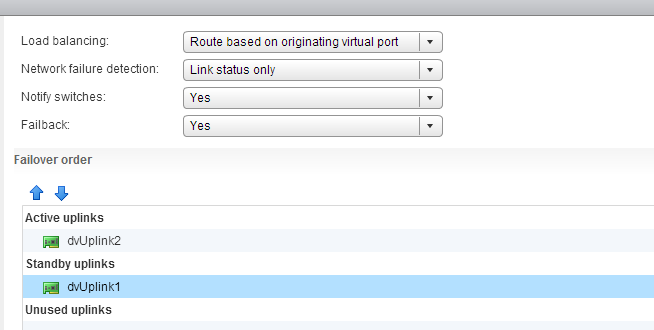
If you wonder why I’m configuring the redundant uplink as Unused please review the article: “Multi-NIC vMotion – failover order configuration”. The reason why “Route Based on originating virtual port” is chosen is described in the initial article of this series: “Designing your vMotion network”.
vMotion network resource pool
Each host in my lab is connected to the distributed switch has two dvUplink portgroups. A virtual adapter with vMotion enabled is connected to a uplink and vMotion is able to leverage both physical adapters to send out vMotion traffic. When enabling NetIOC, 7 predefined system network resource pools become active. One system network resource pool is vMotion, vMotion traffic binds to the vMotion system network resource pool and if contention occurs the network resource pool competes for bandwidth with the other active streams. It’s important to realize that the shares apply at the physical adapter layer. Therefore as vMotion is able to utilize both uplinks it “receives” 50 shares per physical adapter.
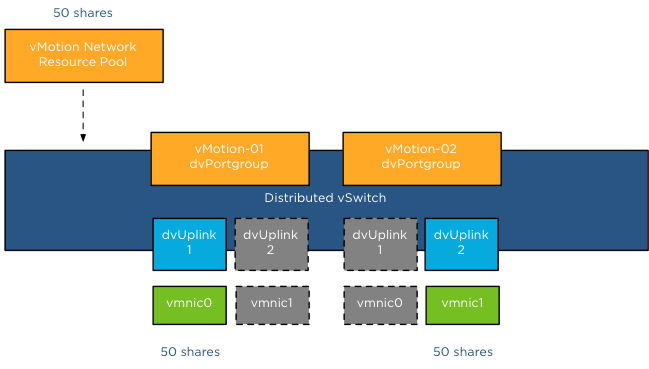
As mentioned in the NetIOC primer article, shares are only active when contention exists and they only count when it is transmitting. Consequently, if vMotion is not active, the shares are not counted when an adapter is congested. Also when vMotion uses a single link only 50 shares are active. Although the dvUplink portgroup is configured with 2 dvUplinks, one dvUplink is configured as standby. When the active NIC is operating normally, the dvPortgroups cannot utilize the standby link. This results in the utilization of only 1 link and therefor only 50 shares become active during congestion.
Example Scenario 1; vmnic0 saturated
The distributed switch is configured with 5 dvPortgroups, management, vMotion01, vMotion02, NFS and a virtual machine portgroup. Each network resource pool is configured with the default physical adapter shares. In this scenario vMotion is load-balancing traffic across both dvPortgroups, however the VMkernel decides to also send management and virtual machine traffic through dvUplink1, saturating vmnic0.
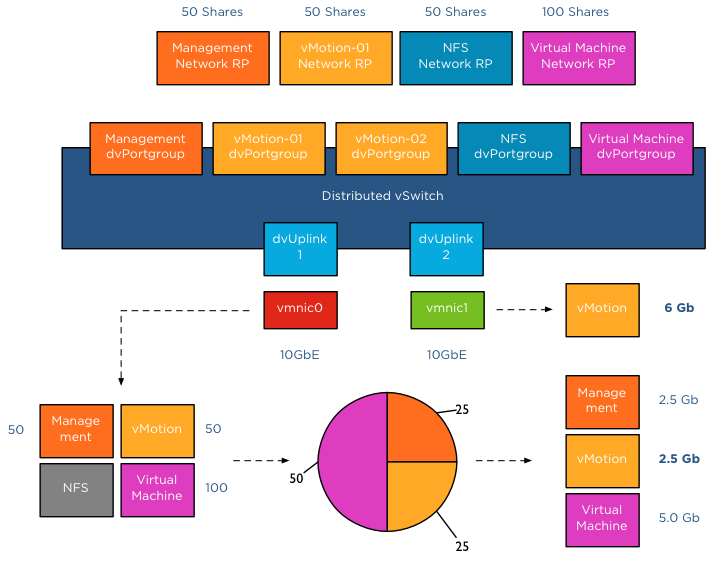
In this scenario, bandwidth is distributed following relative share values. As NFS traffic isn’t transmitting across dvUplink1, its shares are not active. Available bandwidth for vMotion is reduced to 2.5Gb as long as this situation persists. vMotion is also using dvUplink2, as a result traffic flows through vmnic1 as well. Fortunately vmnic1 is not saturated and vMotion can utilize as much bandwidth it can allocate. Restricted by the CPU speed of the host, vMotion is able to utilize 6Gb of bandwidth on vmnic1 while having an additional bandwidth allocation of 2.5Gb on vmnic0. In total vMotion utilizes 8.5Gb at that moment.
Example Scenario 2; Both NICs saturated
The moment both NICs are saturated, the available bandwidth available to vMotion is calculated on a NIC basis. vMotion traffic wanting to use vmnic0 is assigned bandwidth relative to their share value, similar to example scenario 1. vMotion traffic wanting to use vmnic1 is assigned bandwidth relative to their share value compared to the active traffic streams, in this case NFS and vMotion are sending traffic to the dvUplink.
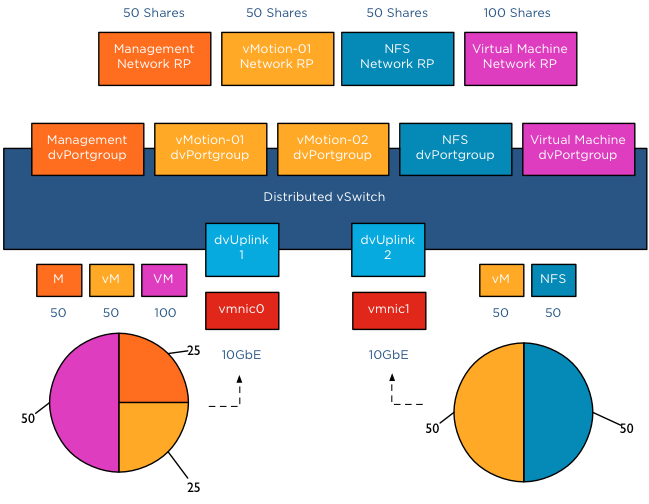
The distributed switch receives traffic from NFS and vMotion destined for vmnic1, as a result NetIOC will assign half of the bandwidth to vMotion and NFS as each owns 50 shares of the total active 100 shares. In this case the amount of bandwidth vMotion can utilize is 2.5Gb on vmnic0 and 5 Gb on vmnic1, allowing vMotion to utilize 7.5Gb of the total available 20Gb.
Host Limits
vSphere 5.1 introduced a big adjustment to hosts limits, the host limits now applies to each individual uplink. This means that when setting a host limit on the network resource pool for vMotion of 3000Mbps, vMotion is limited to transmit a maximum of 3Gb per uplink. In the case of a Multi-NIC vMotion configuration (2NICs) the maximum traffic vMotion can issue to the vmnics is 6Gb. Divide the host limit by the number of active NICs if you decide to set a limit on a particular network resource pool. If you want to limit vMotion to 3Gb with a 2 NIC Multi-NIC configuration, set the host limit on the network resource pool to 1500 Mbps.
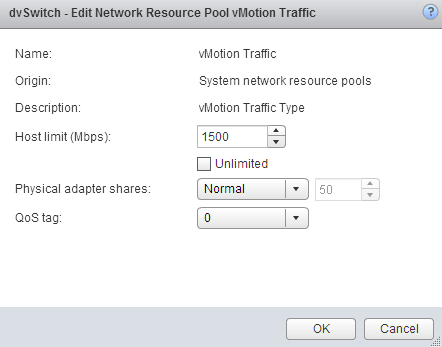
As for limits, limits are always active! Host limits are always enforced on the physical adapter regardless of the utilization rate of the adapter. This means setting a host limit on a network resource pool restricts the traffic to utilize more bandwidth even if this bandwidth is available. Saturating an adapter is not by definition wrong you are utilizing the infrastructure. Taking precaution and limiting certain network streams unconditionally might hurt you more than your assumed gain. Before limiting a network stream my recommendation is always to measure traffic patterns over a longer period of time.
Ingress only
NetIOC shares and limits are only applied to ingress traffic. In ESX , the ingress and egress traffic are with respect to a distributed switch. Ingress traffic is traffic that flows from the VMkernel or vNic from the running VM towards the distributed switch. Egress is traffic that flows from the distributed vSwitch to the physical nic or to the vNIC
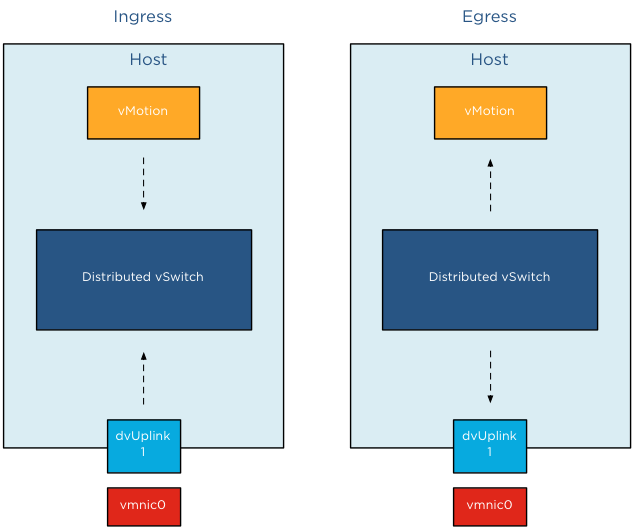
It is important to know NetIOC only controls ingress traffic initiated from within the ESX host. This means that you can set a limit the vMotion network resource pool, this only affects traffic send towards the uplink inside the host. If you have a cluster with a small number of hosts, it can happen that multiple vMotion operations are inbound to that host. In that scenario, NetIOC cannot prevent the Uplinks to get saturated by incoming vMotion traffic.
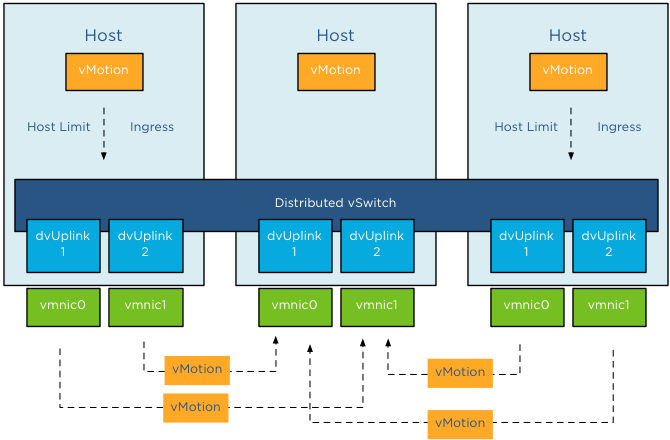
To avoid this situation, traffic shaping needs to be configured on the dvPortgroups. The upcoming article Designing your vMotion network – vMotion dvPortgroups traffic shaping explores this feature in depth.
Part 1 – Designing your vMotion network
Part 2 – Multi-NIC vMotion failover order configuration
Part 4 – Choose link aggregation over Multi-NIC vMotion?
Part 5 – 3 reasons why I use a distributed switch for vMotion networks
A primer on Network I/O Control
Network I/O Control (NetIOC) provides controls to partition network capacity during contention. NetIOC provides additional control over the usage of network bandwidth in the form of network isolation and limits. vMotion operations introduce temporary network traffic that tries to consume as much bandwidth as possible. In a converged network vMotion operations may have a disruptive effect on other network traffic streams. Due to way NetIOC operates, NetIOC provides control for predictable networking performance while different network traffic streams are contending for the same bandwidth. This article serves as an introduction on Network I/O Control resource control before we dive into specifics on how to use NetIOC on multi-NIC vMotion networks on distributed switches. Please note that this article covers NetIOC in vSphere 5.1
Distributed Switch
NetIOC is only available on the vNetwork Distributed Switch (vDS). To enable it, in the vSphere web client go to Networking, Manage, Settings, click on the third icon from the left (Edit distributed switch settings) and enable Network I/O Control.
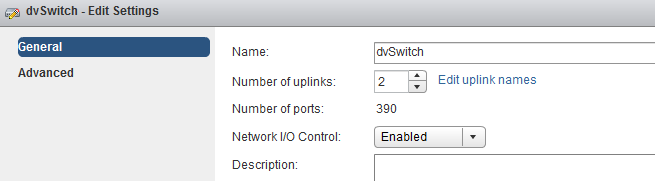
Once enabled go to the Resource Allocation tab there you will find an overview of the (predefined) Network Resource Pools, Host Limits and Physical Adapter Shares and the Shares value.
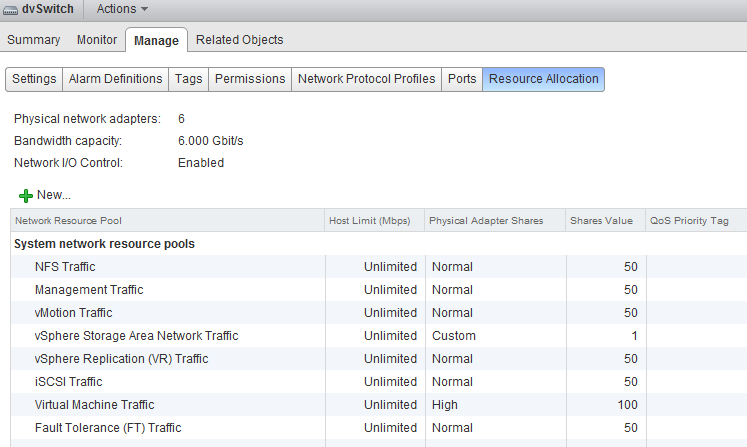
Network Resource Pool
The NetIOC network resource pool (NRP) construct is quire similar in many ways to the compute resource pools already existing for CPU and Memory. Each resource pool is assigned shares to define the relative priority of its workload against other workloads active on the same resource. In the case of NetIOC, network resource pools are used to differentiate between network traffic classes. NetIOC predefines 7 different system network resource pools:
1. Management Traffic
2. vMotion Traffic
3. Fault Tolerance (FT) Traffic
4. iSCSI Traffic
5. vSphere Storage Area Network Traffic *
6. NFS Traffic
7. vSphere Replication (VR) Traffic
8. Virtual Machine Traffic
* The vSphere client marks this as a User defined network resource pool, while the web client marks this (correctly) as system network resource pool.
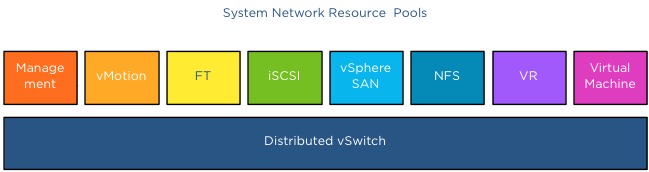
NetIOC classifies incoming traffic and binds it automatically to the correct system network resource pool; therefor you do not have to assign the vMotion traffic network resource pool to the distributed port groups manually. Once a vMotion operation starts NetIOC “tags” it as vMotion traffic and assigns the appropriate share value to it. The user interface displays the term (default) in the Network resource pool settings screen.
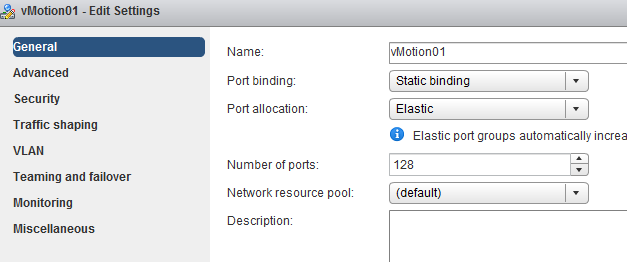
vSphere 5.0 introduced User-defined network resource pools and these are only applicable to virtual machine network traffic. User defined network pools are excellent to partition your network when multiple customers are using a shared network infrastructure.
Physical adapter Shares
NetIOC shares are comparable to the traditional CPU and memory shares. In the case of NetIOC, shares assigned to a network resource pool determine the portion of the total available bandwidth if contention occurs. Similar to compute shares, shares are only relative to the other active shares using the same resource.
NetIOC provides 3 predefined share levels and a custom share level. The predefined share levels; low, normal and high provide an easy method of assigning a number of shares to the network resource pool. Low assigns 25 shares to the network resource pool, Normal 50 shares and High 100 shares. Custom allows you to assign the number of shares yourself within the supported range of 1 – 100. By default every system network resource pool is assigned 50 shares with the exception of the virtual machine traffic resource pool, this NRP gets 100 shares.
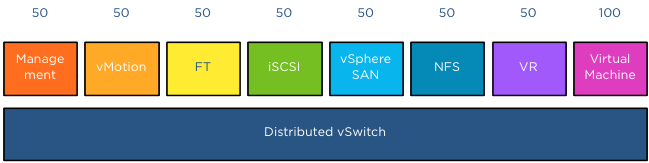
The key to understand network resource pools and shares is that the shares apply on the physical adapter; hence the name physical adapter shares ;). This means that if the physical adapter of a host is saturated the shares of the network resource pools actively transmitting are in play. For example, your distributed switch is configured with a Management portgroup, a vMotion portgroup, NFS and virtual machine portgroup. All NRPs are configured with default shares and you use 2 uplinks. For the sake of simplicity, in this scenario both uplinks are configured as active uplinks
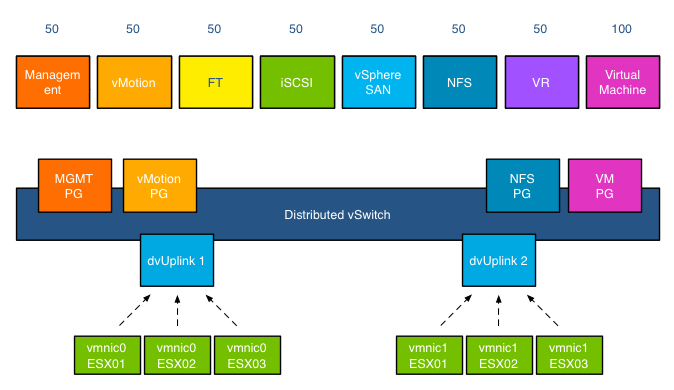
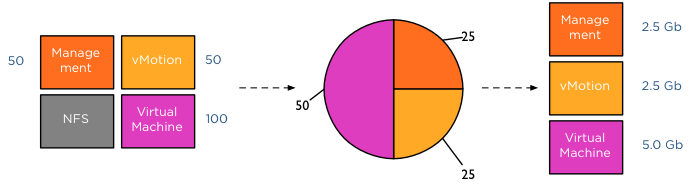
Although this environment is configured with 4 portgroups, the default system network pools remain to exist. The existences of the non-utilized system-NRPs have no effect on the distribution of bandwidth during contention. As mentioned before the when the physical adapter is saturated, then the shares apply. In the following scenario vmnic0 of host ESX02 is saturated, as there are only 4 portgroups active on the distributed switch, the shares of the network pools are applied:
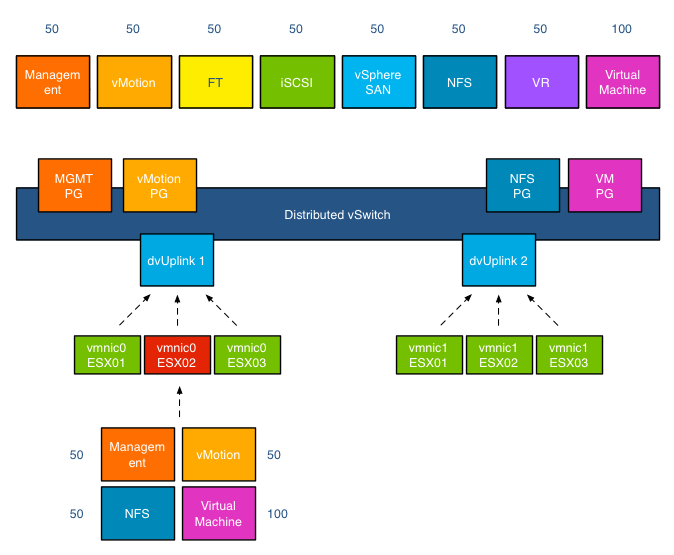
This means that 50+50+50+100 (250) shares are active, in this scenario the virtual machine network resource pool gets to divide 40% (100/(50+50+50+100)) of the available physical network bandwidth. If vmnic0 was a 10GB NIC, the virtual machines network pool would receive 4GB to distribute amongst the actively transmitting virtual machines on that host.
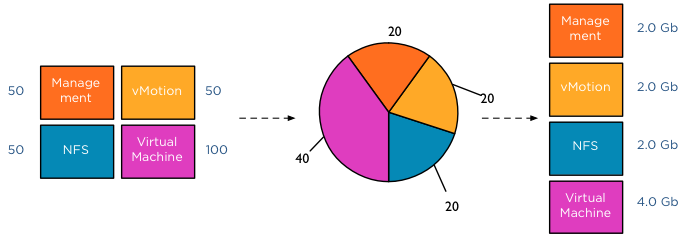
This was a worst-case scenario because usually not all portgroups are transmitting, as the shares are relative to other network pools actively using the physical adapter it might happen that Virtual Machine and vMotion traffic is only active on this NIC. In that case only the shares of the vMotion NRP and VM NRP are compared against each other to determine the available bandwidth for both network resource pools.
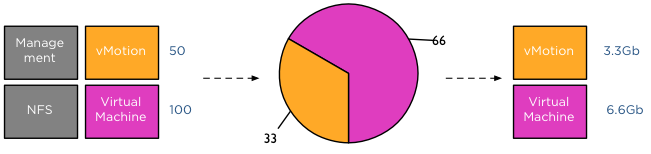
The moment another traffic source transmits to the distributed switch a new calculation is made to determine the available bandwidth for the network resource pools. For example, HA is heart beating across the management LAN, using vmnic0, therefor the active transmitting network resource pools are Management, vMotion and virtual machines, generating a distribution of network bandwidth as follows:
Host Limits
Up to vSphere 5.1 NetIOC applies a limit per host. This means that the host limit enforces a traffic bandwidth limit on the overall set of dvUplinks for that particular network resource pool. The limit is expressed in an absolute unit of Mbps. This means that if you set a 3000Mpbs limit on the vMotion network resource pool, the traffic stream of the vMotion network resource pool will never exceed the given limit of 3000Mpbs for a distributed switch out of a particular ESX host.
vSphere 5.1 introduced a big adjustment to hosts limits, the host limits now applies to each individual uplink. This means that when setting a host limit on the network resource pool for vMotion of 3000Mbps, vMotion is limited to transmit a maximum of 3Gb per uplink. In the case of a Multi-NIC vMotion configuration (2NICs) the maximum traffic vMotion can issue to the vmnics is 6Gb.
Please note that limits only apply on ingress traffic (incoming traffic from vm to vds) meaning that a limit only affects native traffic coming from the active virtual machine running on the host or the vMotion traffic initiated on the host itself.
Coming up next..
The next article in this series is how to use NetIOC for predictable network performance when using a Multi-NIC vMotion configuration on a distributed vSwitch.
Storage DRS survey
If you have a few spare minutes, please fill out the survey about Storage DRS usage. We are very interested in your Storage DRS architecture and which options you use. But we are also seeking to identify adoption blockers preventing you to use Storage DRS. It takes about 5 minutes to get through.
Storage DRS survey
Two very interesting videos about how computer algorithms shapes today's world
Resource management within virtual infrastructures relies on distributed algorithms, as a result I became more and more interested in the application of computer algorithms in other areas. Today I found an English version of the multiple award winning Dutch documentary which I can finally share with my non-dutch speaking friends. The documentary reviews the flash crash on the U.S. Stock Market on May 6th 2010. In particular it explores the application of black box trading (algo-trading) and how algorithms shaped and formed the architecture of not only of the trade market institutions but also city architectures and human terraforming.
Money & Speed: Inside the Black Box (Marije Meerman, VPRO)
Sit back and be amazed.
Once viewed, view the TED presentation by Kevin Slavin: How algorithms shape our world. Kevin Slavin zooms in some of the algorithms applied in our lives and how it affect us and our surroundings.
Adjusting the cost of vMotion – a word of caution
Yesterday I posted an article on how to change the cost of vMotion in order to change the default number of concurrent vMotion. As I mentioned in the article, I’m not a proponent of changing advanced settings.
Today Kris posted a very interesting question;
How about the scenario where one uses multi NIC vMotion for against two 5Gbps virtual adapters)? I know a cost of 4 will be set for the network by the VMkernel, however as the aggregate bandwidth becomes 10Gbps is it safe enough to raise the limit? Perhaps not to the full 8 for 10Gbps, but 6?
Please note that this article does not bash Kris. He provides a use case that I’ve heard a couple of times, making his comment an example use case. Although Kris’s scenario sounds like a very good use case to adjust the cost settings to circumvent the line-speed detection of the VMkernel to determine the max-cost of the network resource, it does not solve the other dynamic elements using line speed.
DRS MaxMovesPerHost
ESX 4.1 Introduces the MaxMovesPerHost setting, allowing the host to dynamically set the limit on moves. The limit is based on how many moves DRS thinks can be completed in one DRS evaluation interval. DRS adapts to the frequency it is invoked (pollPeriodSec, default 300 seconds) and the average migration time observed from previous migrations. However, this limit is still bound by the detected line speed and the associated Max cost. Although the proposed environment has 10GB line speed in total available, the VMkernel will still set the max cost to allow 4 vMotions on the host. Restricting the number of migrations, DRS can initiate during a load balance operation.
vMotion system resource pool CPU reservation
vMotion tries to move the used memory blocks as fast as possible. vMotion uses all the available bandwidth depending on the available CPU speed and bandwidth. Depending on the detected line speed, vMotion reserves an X amount of CPU speed at the start of a vMotion process. vMotion computes its desired host vMotion CPU reservation. For every 1GBe vMotion link speed it detects vMotion in vSphere 5.1 reserved 10% of a CPU core with a minimum desired CPU reservation of 30%. This means that if you use a single 1GBe, vMotion reserves 30% of a core, if you use 4 x 1GBe connections, that means vMotion reserves 40% of a core. A 10GBe link is special as vMotion reserves 100% of a single core.
vMotion creates a (system) resource pool and sets the appropriate CPU reservation on the resource pool. It’s important to note that this is being done to the vMotion resource pool, which means that the reservation is shared across all vMotions happening on the host.
Using two 5GB links, results in a 40% CPU core reservation (default 30% plus 10% for the extra link). However, this dynamic behavior might get unnoticed if you have enough spare CPU cycles in your source and destination host.
Word of caution
I hope these two examples show that there are multiple dynamic elements working together on various levels in your virtual infrastructure. Adjusting a setting might improve the performance of a specific use case, but to change the overall behavior, lots of settings have to be changed. Due to the lack of time and specific information correlating various settings is impossible for many of us most of the time. Therefore I would like to repeat my recommendation. Please do not adjust advanced settings only if VMware supports ask you to.