• Skip to primary navigation
  • Skip to main content

frankdenneman.nl

  • AI/ML
  • NUMA
  • About Me
  • Privacy Policy

VMware Cloud Services Overview Podcast Series

April 17, 2023 by frankdenneman

Over the last year, we’ve interviewed many guests, and throughout the Unexplored Territory Podcast show, we wanted to provide a mini overview series of the VMware Cloud Services. Today we released the latest episode featuring Jeremiah Megie discussing the Azure VMware Solution.

Azure VMware Solution

Listen on Spotify or Apple.

VMware Cloud on AWS

In episode 013, we talk to Adrian Roberts, Head of EMEA Solution Architecture for VMware Cloud on AWS at AWS. Adrian discusses the various reasons customers are looking to utilize VMware Cloud on AWS, some of the challenges, and the opportunities that arise when you have your VMware workloads close to native AWS services.

Listen on Spotify or Apple.

Google Cloud VMware Engine

In episode 016, we talk to Dr. Wade Holmes, Security Solutions Global Lead at Google. Wade introduces Google Cloud VMware Engine, discusses various use cases with us, and highlights some operational differences between on-prem only and multi-cloud.

Listen on Spotify or Apple.

Oracle Cloud VMware Solution

In episode 023, we talk to Richard Garsthagen, Oracle’s Director of Cloud Business Development. Our discussion was all about Oracle Cloud VMware Solution. What is unique about Oracle Cloud VMware Solution compared to other solutions? Why does Richard believe this is a platform everyone should consider when you are exploring public cloud offerings?

Listen on Spotify or Apple.

Cloud Flex Storage

In episode 037, we talk to Kristopher Groh, Direct Product Management at VMware, responsible for various storage projects. Kris introduces us to Cloud Flex Storage and discusses the implementation in-depth. Kris also explains the different use cases for Cloud Flex Storage versus vSAN within VMware Cloud on AWS.

Listen on Spotify or Apple.

Cloud Migration

In episode 039, we have a conversation with Niels Hagoort, Technical Marketing Architect at VMware. Niels guides us through the concept of Cloud Migration and dives into the solutions that VMware offers to make the migration as smooth as possible. 

Listen on Spotify or Apple.

Follow us on Twitter for updates and news about upcoming episodes: https://twitter.com/UnexploredPod.
Filed Under: Podcast, VMware

Research and Innovation at VMware with Chris Wolf

March 27, 2023 by frankdenneman

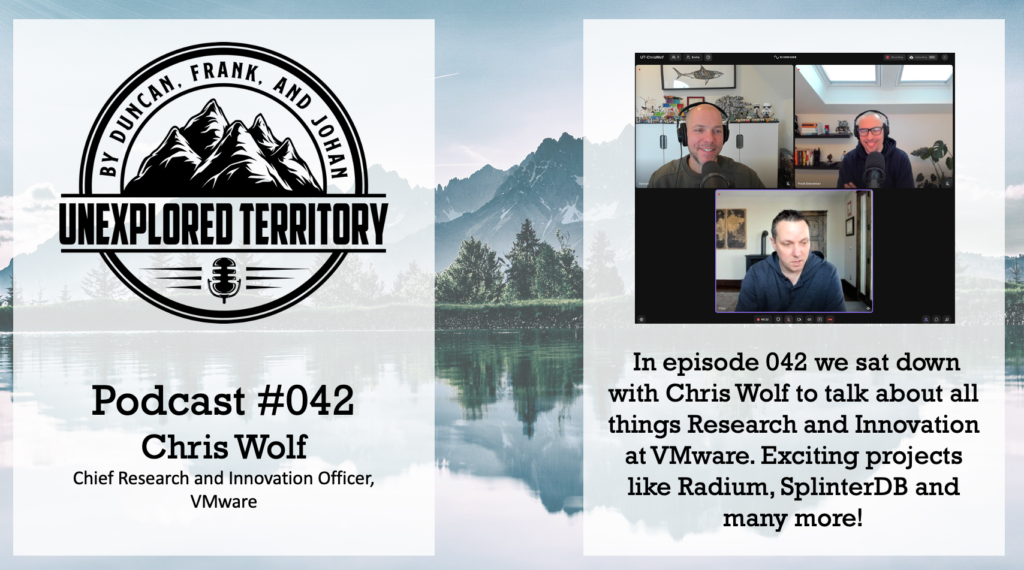
In episode 042 of the Unexplored Territory podcast, we talk to Chris Wolf, Chief Research and Innovation Officer of VMware, about innovation at VMware and exciting new research projects. Make sure to follow Chris on Twitter. Also, check the following resources Chris mentioned in the episode.

  • Cloud Native Security Inspector (Project Narrows)
  • FATE
  • OpenFL
  • WASM

Follow us on Twitter for updates and news about upcoming episodes: https://twitter.com/UnexploredPod. 
Last but not least, hit that subscribe button, rate where ever possible, and share the episode with your friends and colleagues!

Filed Under: Podcast

My Picks for NVIDIA GTC Spring 2023

March 21, 2023 by frankdenneman

This week GTC Spring 2023 kicks off again. These are the sessions I look forward to next week. Please leave a comment if you want to share a must-see session.


MLOps

Title: Enterprise MLOps 101 [S51616]

The boom in AI has seen a rising demand for better AI infrastructure — both in the compute hardware layer and AI framework optimizations that make optimal use of accelerated compute. Unfortunately, organizations often overlook the critical importance of a middle tier: infrastructure software that standardizes the machine learning (ML) life cycle, adding a common platform for teams of data scientists and researchers to standardize their approach and eliminate distracting DevOps work. This process of building the ML life cycle is known as MLOps, with end-to-end platforms being built to automate and standardize repeatable manual processes. Although dozens of MLOps solutions exist, adopting them can be confusing and cumbersome. What should you consider when employing MLOps? How can you build a robust MLOps practice? Join us as we dive into this emerging, exciting, and critically important space.

Michael Balint, Senior Manager, Product Architecture, NVIDIA

William Benton, Principal Product Architect, NVIDIA

Title: Solving MLOps: A First-Principles Approach to Machine Learning Production [S51116]

We love talking about deploying our machine learning models. One famous (but probably wrong) statement says that “87% of data science projects never make it to production.” But how can we get to the promised land of “Production” if we’re not even sure what “Production” even means? If we could define it, we could more easily build a framework to choose the tools and methods to support our journey. Learn a first-principles approach to thinking about deploying models to production and MLOps. I’ll present a mental framework to guide you through the process of solving the MLOps challenges and selecting the tools associated with machine learning deployments.

Dean Lewis Pleban, Co-Founder and CEO, DagsHub

Title: Deploying Hugging Face Models to Production at Scale with GPUs [S51553]

Seems like everyone’s using Hugging Face to simplify and reuse advanced models and work collectively as a community. But how do you deploy these models into real business environments, along with the required data and application logic? How do you serve them continuously, efficiently, and at scale? How do you manage their life cycle in production (deploy, monitor, retrain)? How do you leverage GPUs efficiently for your Hugging Face deep learning models? We’ll share MLOps orchestration best practices that’ll enable you to automate the continuous integration and deployment of your Hugging Face models, along with the application logic in production. Learn how to manage and monitor the application pipelines, at scale. We’ll show how to enable GPU sharing to maximize application performance while protecting your investment in AI infrastructure and share how to make the whole process efficient, effective, and collaborative.

Yaron Haviv, Co-Founder and CTO, Iguazio

Title: Democratizing ML Inference for the Metaverse [S51948]

In this talk, I will drive you through the Roblox ML Platform inference service. You will learn how we integrate Triton inference service with Kubeflow and Kserve. I will describe how we simplify the deployment for our end users to serve models on both CPU and GPUs. Finally, I will highlight few of our current cases like game recommendation and other computer vision models.

Denis Goupil, Principal ML Engineer, Roblox


Data Center / Cloud

Title: Using NVIDIA GPUs in Financial Applications: Not Just for Machine Learning Applications [S52211]

Deploying GPUs to accelerate applications in the financial service industry has been widely accepted and the trend is growing rapidly, driven in large part by the increasing uptake of machine learning techniques. However, banks have been using NVIDIA GPUs for traditional risk calculations for much longer, and these workloads present some challenges due to their multi-tenancy requirements. We’ll explore the use of multiple GPUs on virtualized servers leveraging NVIDIA AI Enterprise to accelerate an application that uses Monte Carlo techniques for risk/pricing application in a large international bank. We’ll explore various combinations of the virtualized application on VMware to show how NVIDIA AI Enterprise software runs this application faster. We’ll also discuss process scheduling on the GPUs and explain interesting performance comparisons using different VM configs. We’ll also detail best practices for application deployments.

Manvender Rawat, Senior Manager, Product Management, NVIDIA

Justin Murray, Technical Marketing Architect, VMware

Richard Hayden, Executive Director and Head of the QR Analytics Team, JP Morgan Chase

Title: AI in the Clouds: Navigating the Hybrid Sky with Ease (Presented by Run:ai) [S52352]

We’ll focus on the different use cases of running AI workloads in hybrid cloud and multi-cloud environments, and the challenges that come along with that. NVIDIA’s Michael Balint Run:ai’s and Gijsbert Janssen van Doorn will discuss how organizations can successfully implement a hybrid cloud strategy for their AI workloads. Examples of use cases include leveraging the power of on-premises resources for sensitive data while utilizing the scalability of the cloud for compute-intensive tasks. We’ll also discuss potential challenges, such as data security and compliance, and how to navigate them. You’ll gain a deeper understanding of the various use cases of hybrid cloud for AI workloads, the challenges that may arise, and how to effectively implement them in your organization.

Michael Balint, Senior Manager, Product Architecture, NVIDIA

Gijsbert Janssen van Doorn, Director Technical Product Marketing, Run:ai

Title: vSphere on DPUs Behind the Scenes: A Technical Deep Dive (Presented by VMware Inc.) [S52382]

We’ll explore how vSphere on DPUs offloads traffic to the data processing unit (DPU), allowing for additional workload resources, zero-trust security, and enhanced performance. But what goes on behind the scenes that makes vSphere on DPUs so good at enhancing performance? Is it just adding a DPU? Join this session to find the answer and more technical nuggets to help you see the power of DPUs with vSphere on DPUs.

Dave Morera, Senior Technical Marketing Architect, VMware

Meghana Badrinath, Technical Product Manager, VMware

Title: Developer Breakout: What’s New in NVAIE 3.0 and vSphere 8 [SE52148]

NVIDIA and VMware have collaborated to unlock the power of AI for all enterprises by delivering an end-to-end enterprise platform optimized for AI workloads. This integrated platform delivers NVIDIA AI Enterprise, the best-in-class, end-to-end, secure, cloud-native suite of AI software running on VMware vSphere. With the recent launches of vSphere 8 and NVIDIA AI Enterprise 3.0, this platform’s ability to deliver AI solutions is greatly expanded. Let’s look at some of these state-of-the-art capabilities.

Jia Dai, Senior MLOps Solution Architect, NVIDIA

Veer Mehta, Solutions Architect, NVIDIA

Dan Skwara, Senior Solutions Architect, NVIDIA


Autonomous Vehicles

Title: From Tortoise to Hare: How AI Can Turn Any Driver into a Race Car Driver [S51328]

Performance driving on a racetrack is exciting, but it’s not widely accessible as it requires advanced driving skills honed over many years. Rimac’s Driver Coach enables any driver to learn from the onboard AI system, and enjoy performance driving on racetracks using full autonomous driving at very high speeds (over 350km/h). We’ll discuss how AI can be used to accelerate driver education and safely provide racing experiences at incredibly high speeds. We’ll dive deep into the overall development pipeline, from collecting data to training models to simulation testing using NVIDIA DRIVE Sim, and finally, implementing software on the NVIDIA DRIVE platform. Discover how AI technology can beat human professional race drivers.

Sacha Vrazic, Director – Autonomous Driving R&D, Rimac Technology


Deep Learning

Title: Scaling Deep Learning Training: Fast Inter-GPU Communication with NCCL [S51111]

Learn why fast inter-GPU communication is critical to accelerate deep learning training, and how to make sure your system has the right level of performance for your model. Discover NCCL, the inter-GPU communication library used by all deep learning frameworks for inter-GPU communication, and how it combines NVLink with high-speed networks like Infiniband to accelerate communication by an order of magnitude, allowing training to be run on hundreds, or even thousands, of GPUs. See how new technologies in Hopper GPUs and ConnectX-7 allow for NCCL performance to reach new highs on the latest generation of DGX and HGX systems. Finally, get updates on the latest improvements in NCCL, and what should come in the near future.

Sylvain Jeaugey, Principal Engineer, NVIDIA

Title: FP8 Mixed-Precision Training with Hugging Face Accelerate [S51370]

Accelerate is a library that allows you to run your raw PyTorch training loop on any kind of distributed setup with multiple speedup techniques. One of these techniques is mixed precision training, which can speed up training by a factor between 2 and 4. Accelerate recently integrated Nvidia Transformers FP8 mixed-precision training which can be even faster. In this session, we’ll dive into what mixed precision training exactly is, how to implement it in various floating point precisions and how Accelerate provides a unified API to use all of them.

Sylvain Gugger, Senior ML Open Source Engineer, Hugging Face


HPC

Title: Accelerating MPI and DNN Training Applications with BlueField DPUs [S51745]

Learn how NVIDIA Bluefield DPUs can accelerate the performance of HPC applications using message passing interface (MPI) libraries and deep neural network (DNN) training applications. Under the first direction, we highlight the features and performance of the MVAPICH2-DPU library in offloading non-blocking collective communication operations to the DPUs. Under the second direction, we demonstrate how some parts of computation in DNN training can be offloaded to the DPUs. We’ll present sample performance numbers of these designs on various computing platforms (x86 and AMD) and Bluefield adapters (HDR-100Gbps and HDR-200 Gbps), along with some initial results using the newly proposed cross-GVMI support with DPU.

Dhabaleswar K. (DK) Panda, Professor and University Distinguished Scholar, The Ohio State University

Title: Tuning Machine Learning and HPC Workloads Performance in Virtualized Environments using GPUs [S51670]

Today’s machine learning (ML) and HPC applications run in containers. VMware vSphere runs containers in virtual machines (VMs) with VMware Tanzu for container orchestration and Kubernetes cluster management. This allows servers in the hybrid cloud to simultaneously host multi-tenant workloads like ML inference, virtual desktop infrastructure/graphics, and telco workloads that benefit from NVIDIA AI and VMware virtualization technologies. NVIDIA AI Enterprise software in VMware vSphere combines the outstanding virtualization benefits of vSphere with near-bare metal, or in HPC applications, better than bare-metal performance. NVIDIA AI Enterprise on vSphere supports NVLink and NVSwitch, which allows ML training, and HPC applications to maximize multi-GPU performance. We’ll describe these technologies in detail, and you’ll learn how to leverage and tune performance to achieve significant savings in total cost of ownership for your preferred cloud environment. We’ll highlight the performance of the latest NVIDIA GPUs in virtual environments.

Uday Kurkure, Staff Engineer, VMware

Lan Vu, Senior Member of the Technical Staff, VMware

Manvender Rawat, Senior Manager, Product Management, NVIDIA

Filed Under: AI & ML

Discover what’s new in vSphere 8.0 U1 and vSAN 8.0 U1

March 16, 2023 by frankdenneman

We (the Unexplored Territory team) work with the vSphere release team to get you the latest information about the new releases as quickly as possible. This week we published two new episodes discussing what’s new with vSphere 8.0 U1 and vSAN 8.0 U1. To enjoy the content, you can listen to them using your favorite podcast apps, such as Apple or Spotify, or the embedded players below.

Filed Under: Podcast

Simulating NUMA Nodes for Nested ESXi Virtual Appliances

March 2, 2023 by frankdenneman

To troubleshoot a particular NUMA client behavior in a heterogeneous multi-cloud environment, I needed to set up an ESXi 7.0 environment. Currently, my lab is running ESXi 8.0, so I’ve turned to William Lams’ excellent repository of nested ESXi virtual appliances and downloaded a copy of the 7.0 u3k version.

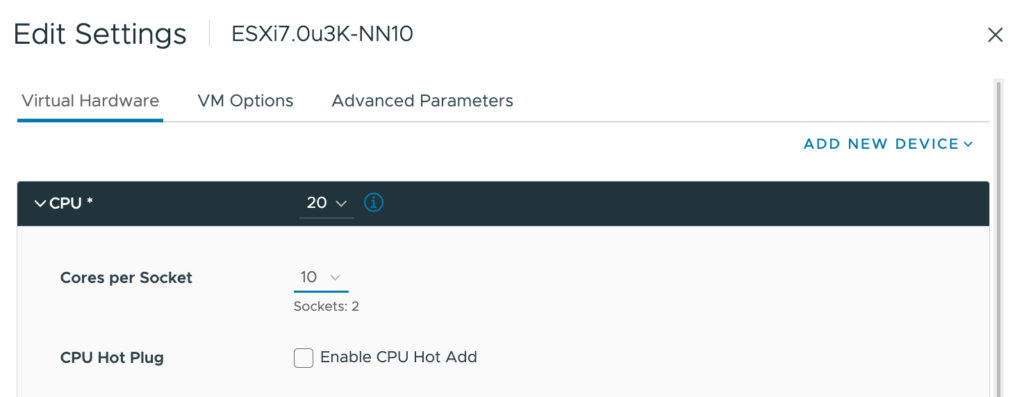
My physical ESXi hosts are equipped with Intel Xeon Gold 5218R CPUs, containing 20 cores per socket. The smallest ESXi host contains ten cores per socket in the environment I need to simulate. Therefore, I created a virtual ESXi host with 20 vCPUs and ensured that there were two virtual sockets (10 cores per socket)

Once everything was set up and the ESXi host was operational, I checked to see if I could deploy a 16 vCPU VM to simulate particular NUMA client configuration behavior and verify the CPU environment.
The first command I use is to check the “physical” NUMA node configuration “sched-stats -t numa-node“. But this command does not give me any output, which should not happen.

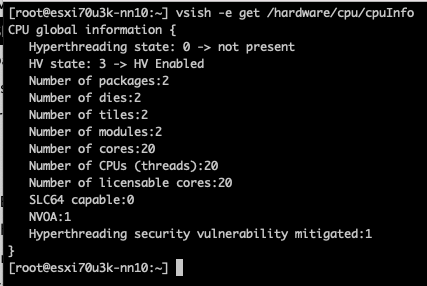
Let’s investigate, let’s start off by querying the CPUinfo of the VMkernel Sys Info Shell (vsish): vsish -e get /hardware/cpu/cpuInfo

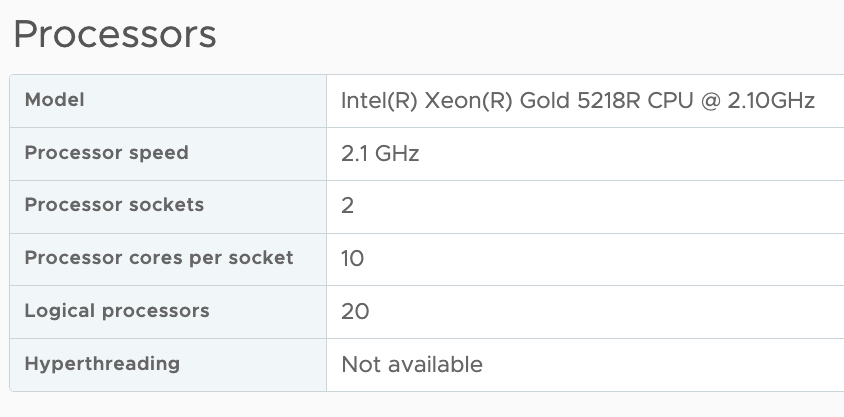
The ESXi host contains two CPU packages. The VM configuration Cores per Socket has provided the correct information to the ESXi kernel. The same info can be seen in the UI at Host Configuration, Hardware, Overview, and Processor.

However, it doesn’t indicate the number of NUMA nodes supported by the ESXi kernel. You would expect that two CPU packages would correspond to at least two NUMA nodes. The command
vsish -e dir /hardware/cpuTopology/numa/nodes shows the number of NUMA nodes that the ESXi kernel detects

It only detects 1 NUMA node as the virtual NUMA client configuration has been decoupled from the Cores Per Socket configuration since ESXi 6.5. As a result, the VM is presented by the physical ESXi host as a single virtual NUMA node, and the virtual ESXi host picks this up. Logging in to the physical host, we can validate the nested ESXi VM configuration and run the following command.

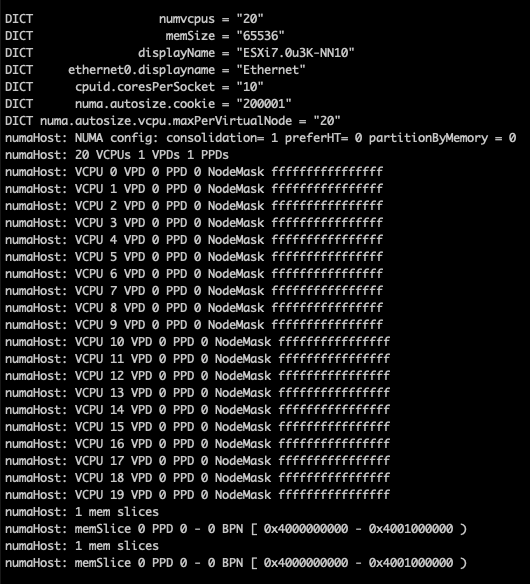
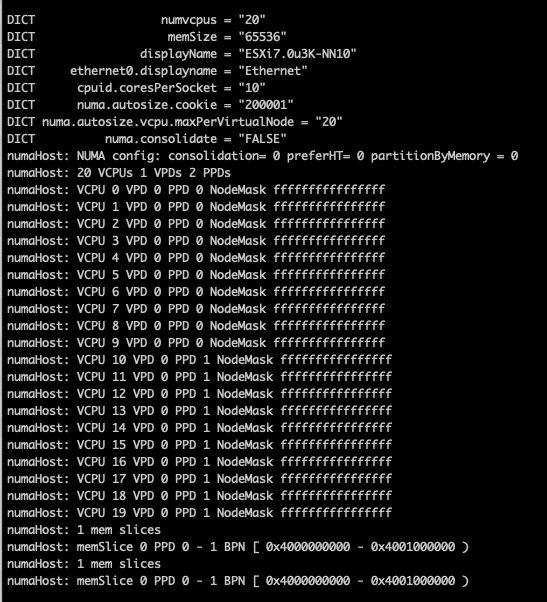
vmdumper -l | cut -d \/ -f 2-5 | while read path; do egrep -oi "DICT.(displayname.|numa.|cores.|vcpu.|memsize.|affinity.)= .|numa:.|numaHost:." "/$path/vmware.log"; echo -e; done

The screen dump shows that the VM is configured with one Virtual Proximity Domain (VPD) and one Physical Proximity Domain (PPD). The VPD is the NUMA client element that is exposed to the VM as the virtual NUMA topology, and the screenshot shows that all the vCPUs (0-19) are part of a single NUMA client. The NUMA scheduler uses the PPD to group and place the vCPUs on a specific NUMA domain (CPU package).

By default, the NUMA scheduler consolidates vCPUs of a single VM into a single NUMA client up to the same number of physical cores in a CPU package. In this example, that is 20. As my physical ESXi host contains 20 CPU cores per CPU package, all the vCPUs in my nested ESXi virtual appliance are placed in a single NUMA client and scheduled on a single physical NUMA node as this will provide the best possible performance for the VM, regardless of the Cores per Socket setting.

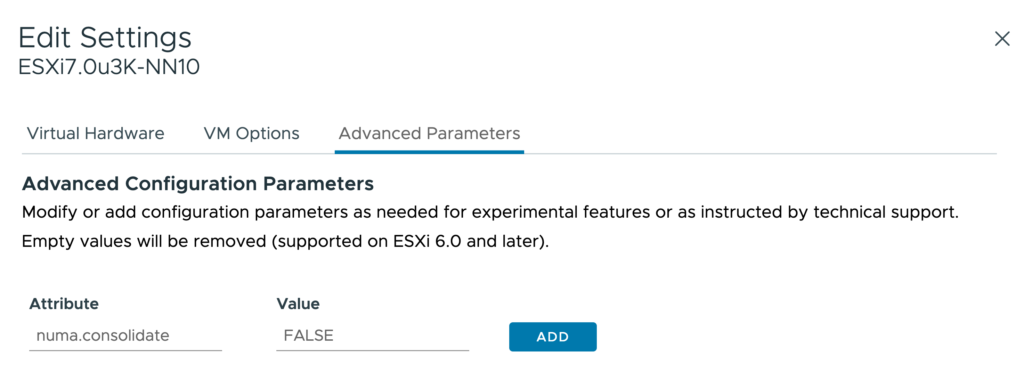
The VM advanced configuration parameter numa.consolidate = "false” forces the NUMA scheduler to evenly distribute the vCPU across the available physical NUMA nodes.

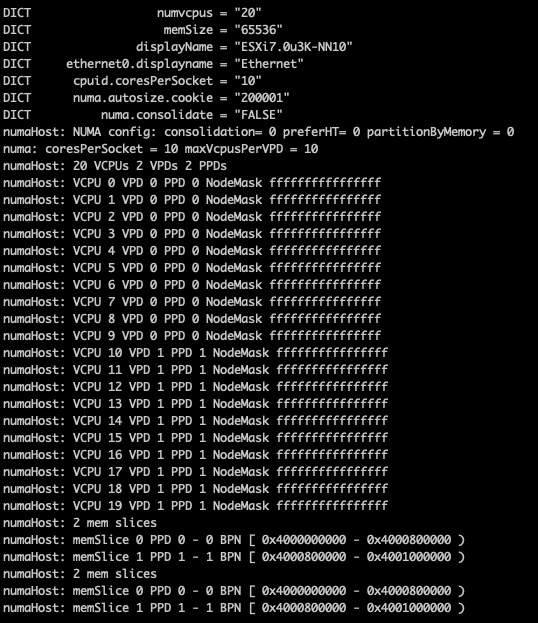
After running the vmdumper instruction once more, you see that the NUMA configuration has changed. The vCPUs are now evenly distributed across two PPDs, but only one VPD exists. This is done on purpose, as we typically do not want to change the CPU configuration for the guest OS and application, as that can interfere with previously made optimizations.

You can do two things to change the configuration of the VPD, use the VM advanced configuration parameter numa.vcpu.maxPerVirtualNode and set it to 10. Or remove the numa.autosize.vcpu.maxPerVirtualNode = “20” from the VMX file.

I prefer removing the numa.autosize.vcpu.maxPerVirtualNode setting, as this automatically follows the PPD configuration, it avoids mismatches between numa.vcpu.maxPerVirtualNode and the automatic numa.consolidate = "false" configuration. Plus, it’s one less advanced setting in the VMX, but that’s just splitting hairs. After powering up the nested ESXi virtual appliance, you can verify the NUMA configuration once more in the physical ESXi host:

The vsish command vsish -e dir /hardware/cpuTopology/numa/nodes shows ESXi detects two NUMA nodes

and sched-stats -t numa-pnode now returns the information you expect to see

Please note that if the vCPU count of the nested ESXi virtual appliance exceeds the CPU core count of the CPU package, the NUMA scheduler automatically creates multiple NUMA clients.

Filed Under: NUMA Tagged With: VMware

  • « Go to Previous Page
  • Page 1
  • Interim pages omitted …
  • Page 3
  • Page 4
  • Page 5
  • Page 6
  • Page 7
  • Interim pages omitted …
  • Page 89
  • Go to Next Page »

Copyright © 2026 · SquareOne Theme on Genesis Framework · WordPress · Log in