The problem
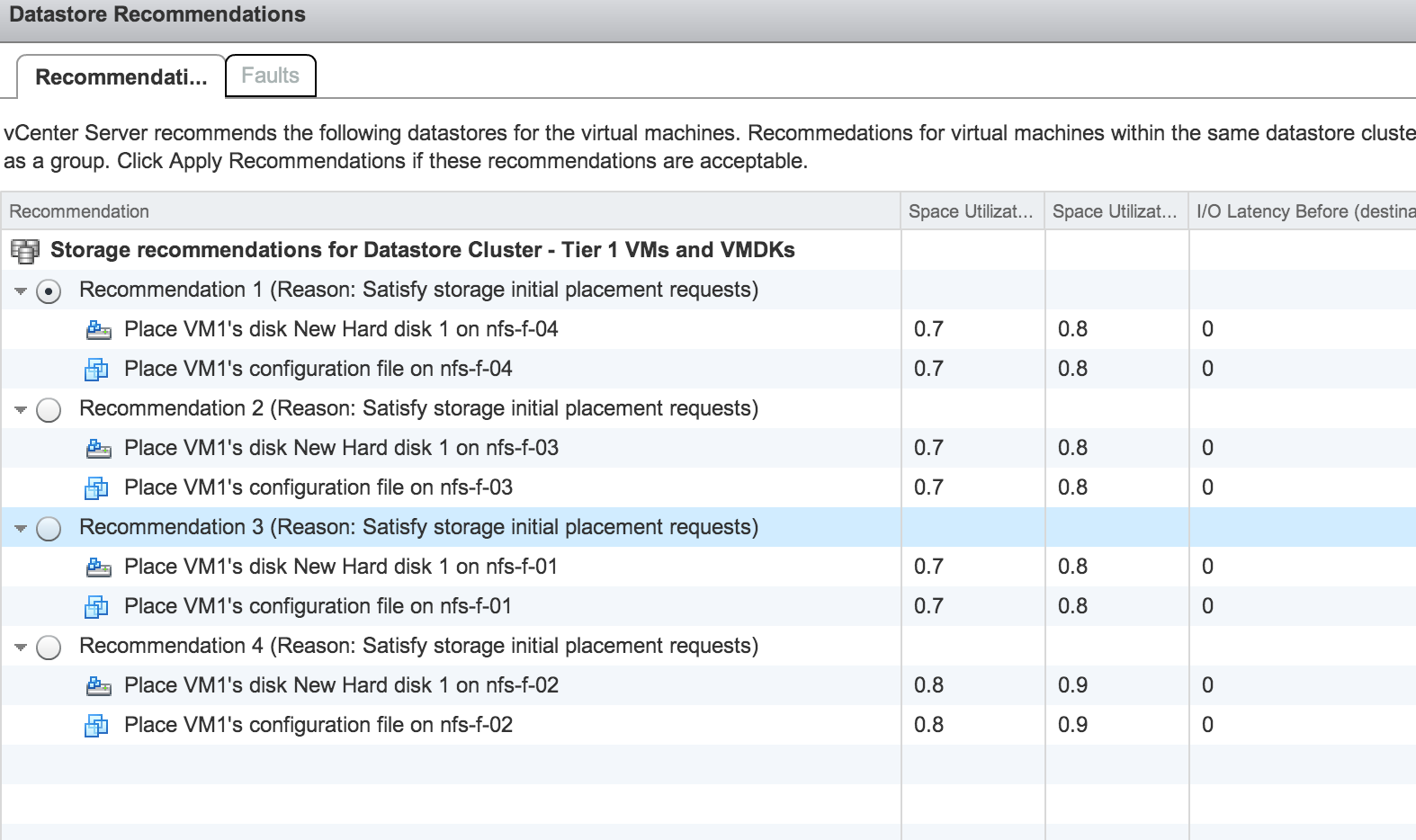
Recently I noticed that my datastore cluster was not providing Latency statistics during initial placement. The datastore recommendation during initial placement displayed space utilization statistics, but displayed 0 in the I/O Latency Before column
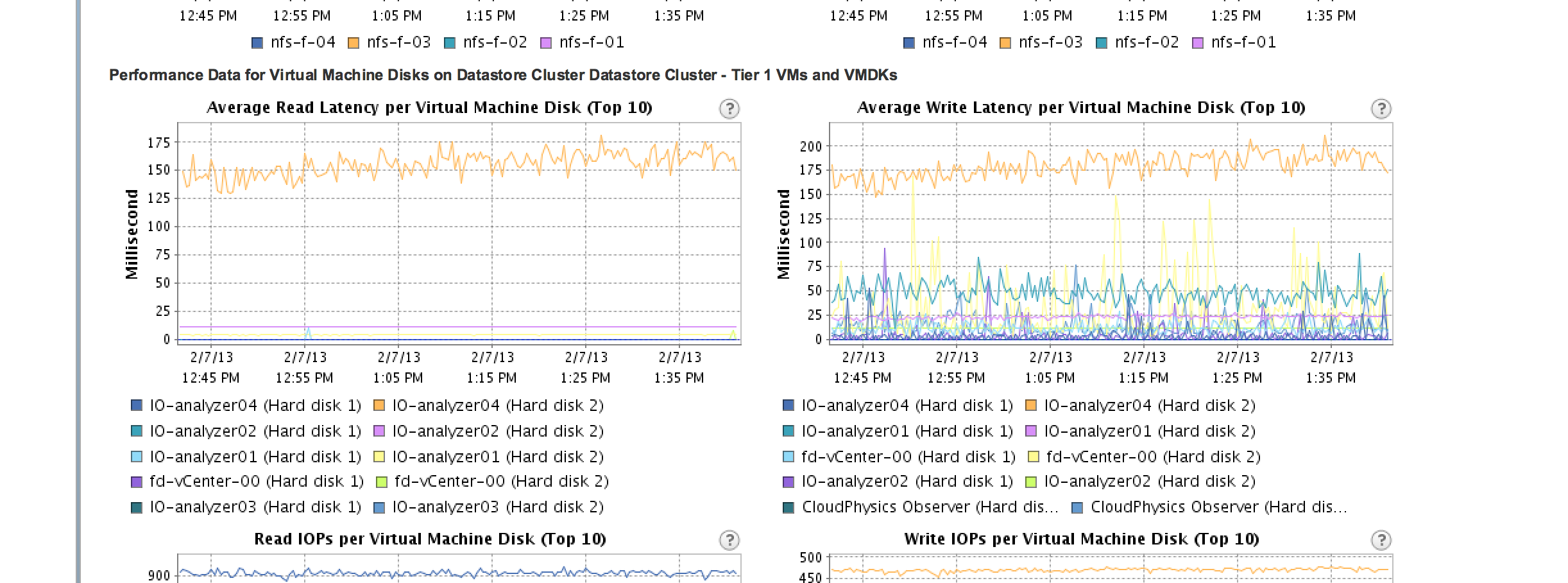
The performance statistics of my datastores showed that there was I/O activity on the datastores.
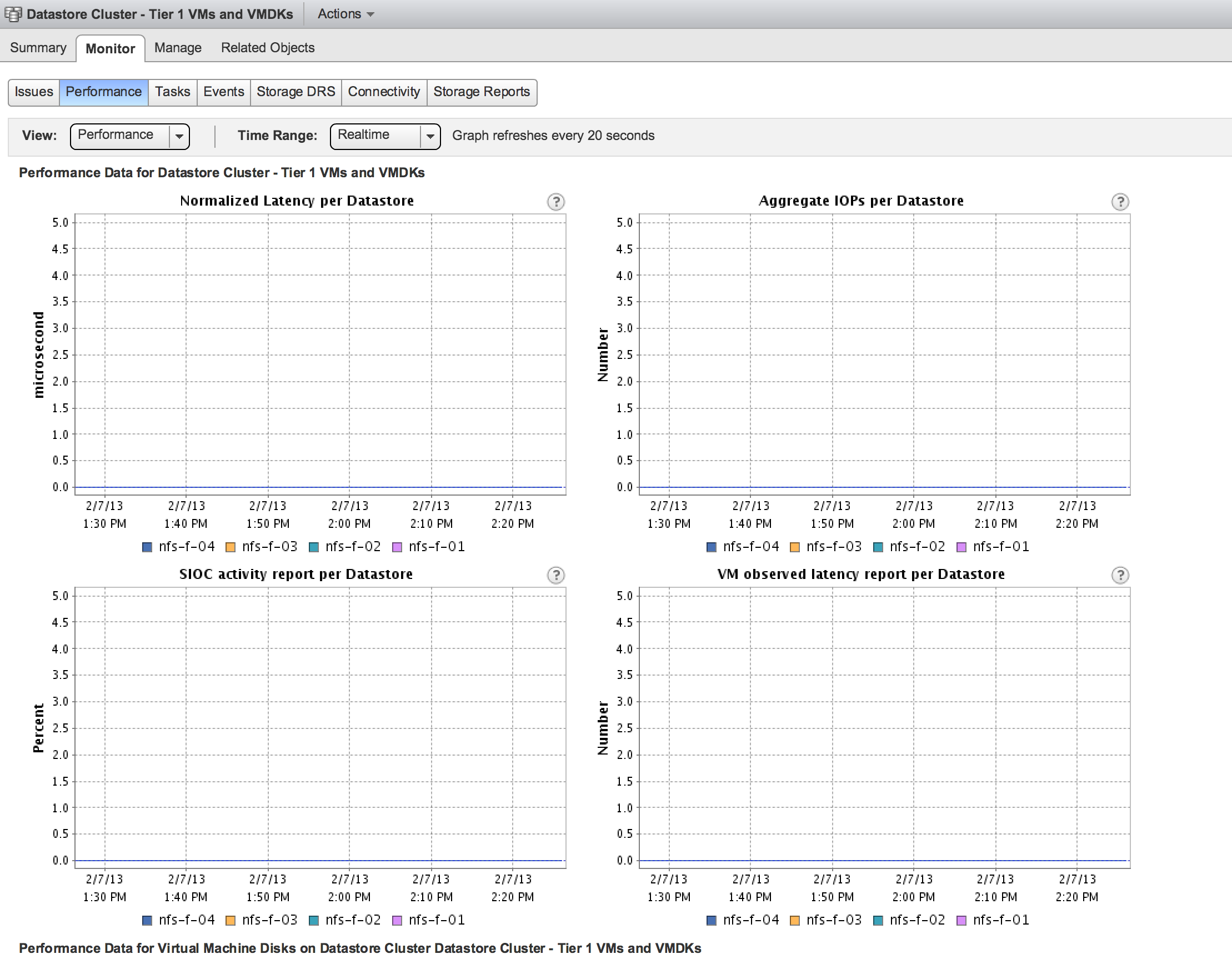
However the SIOC statistics all showed no I/O activity on the datastore
The SIOC log file (storagerm.log) showed the following error:
Open /vmfs/volumes/
Giving UP Permission denied Error -1 opening SLOT file /vmfs/volumes/datastore/.iorm.sf/slotsfile
Error -1 in opening & reading the slot file
Couldn’t get a slot
Successfully closed file 6
Error in opening stat file for device: datastore. Ignoring this device
The following permissions were applied on the slotfile:

The Solution
Engineering explained to me that these permissions were not the default standards and default permissions are read and execute access for everyone and write access for the owner of the file. The following command sets the correct permissions on the slotsfile:
Chmod 755 /vmfs/volumes/datastore/.iorm.sf/slotsfile
Checking the permission shows that the permissions are applied:

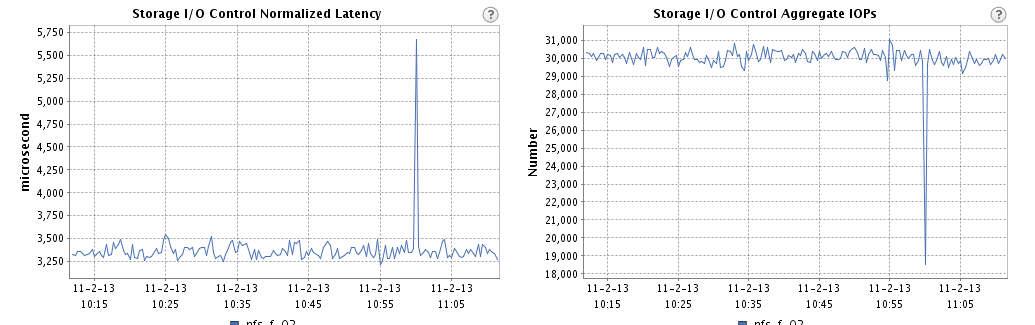
The SIOC statistics started to show the I/O activity on the datastore
Before changing the permissions on the slotsfile I stopped the SIOC service on the host by entering the command: /etc/init.d/storageRM stop
However I believe this isn’t necessary. Changing the permissions without stopping SIOC on the host should work.
Cause
We are not sure what causes this problem and support and engineering are troubleshooting this error. In my case I believe it has to do with the frequent restructuring of my lab. vCenter and ESXi servers are reinstalled regularly, but I have never reformatted my datastores. I do not expect to see this error appear in stable production environments. Please check the current permissions on the slotsfile if Storage DRS does not show I/O utilization on the datastore. (VMs must be running and I/O metric on the Datastore cluster must be enabled of course)
I expect the knowledge base article to be available soon.
Error -1 in opening & reading the slot file error in storageRM.log (SIOC)
The problem
Recently I noticed that my datastore cluster was not providing Latency statistics during initial placement. The datastore recommendation during initial placement displayed space utilization statistics, but displayed 0 in the I/O Latency Before column
The performance statistics of my datastores showed that there was I/O activity on the datastores.
However the SIOC statistics all showed no I/O activity on the datastore
The SIOC log file (storagerm.log) showed the following error:
Open /vmfs/volumes/
Giving UP Permission denied Error -1 opening SLOT file /vmfs/volumes/datastore/.iorm.sf/slotsfile
Error -1 in opening & reading the slot file
Couldn’t get a slot
Successfully closed file 6
Error in opening stat file for device: datastore. Ignoring this device
The following permissions were applied on the slotfile:
The Solution
Engineering explained to me that these permissions were not the default standards and default permissions are read and execute access for everyone and write access for the owner of the file. The following command sets the correct permissions on the slotsfile:
Chmod 755 /vmfs/volumes/datastore/.iorm.sf/slotsfile
Checking the permission shows that the permissions are applied:
The SIOC statistics started to show the I/O activity on the datastore
Before changing the permissions on the slotsfile I stopped the SIOC service on the host by entering the command: /etc/init.d/storageRM stop
However I believe this isn’t necessary. Changing the permissions without stopping SIOC on the host should work.
Cause
We are not sure what causes this problem and support and engineering are troubleshooting this error. In my case I believe it has to do with the frequent restructuring of my lab. vCenter and ESXi servers are reinstalled regularly, but I have never reformatted my datastores. I do not expect to see this error appear in stable production environments. Please check the current permissions on the slotsfile if Storage DRS does not show I/O utilization on the datastore. (VMs must be running and I/O metric on the Datastore cluster must be enabled of course)
I expect the knowledge base article to be available soon.
Why is vMotion using the management network instead of the vMotion network?
On the community forums, I’ve seen some questions about the use of the management network by vMotion operations. The two most common scenarios are explained, please let me know if you notice this behavior in other scenarios.
Scenario 1: Cross host and non-shared datastore migration
vSphere 5.1 provides the ability to migrate a virtual machine between hosts and non-shared datastores simultaneously. If the virtual machine is stored on a local or non-shared datastore vMotion is using the vMotion network to transfer the data to the destination datastore. When monitoring the VMkernel NICs, some traffic can be seen following over the management NIC instead of the VMkernel NIC enabled for vMotion.
When migrating a virtual machine, vMotion determines hot data and cold data. Virtual disks or snapshots that are actively used are considered hot data, while the cold data are the underlying snapshots and base disk. Let’s use a virtual machine with 5 snapshots as an example. The active data is the recent snapshot, this is sent over across the vMotion network while the base disk and the 4 older snapshots are migrated via a network file copy operation across the first VMkernel NIC (vmk0).
The reason why vMotion uses separate networks is that the vMotion network is reserved for data migration of performance-related content. If the vMotion network is used for network file copies of cold data, it could saturate the network with non-performance related content and thereby starving traffic that is dependent on bandwidth. Please remember that everything sent over the vMotion network directly affects the performance of the migrating virtual machine.
During a vMotion the VMkernel mirrors the active I/O between the source and the destination host. If vMotion would pump the entire disk hierarchy across the vMotion network it would steal bandwidth from the I/O mirror process and this will hurt the performance of the virtual machine.
If the virtual machine does not contain any snapshots, the VMDK is considered active and it is migrated across the vMotion network. The files in the VMDK directory are copied across the network of the first VMkernel NIC.
Scenario 2: Management network and vMotion network sharing same IP-range/subnet
If the management network (actually the first VMkernel NIC) and the vMotion network share the same subnet (same IP-range) vMotion sends traffic across the network attached to first VMkernel NIC. It does not matter if you create a vMotion network on a different standard switch or distributed switch or assign different NICs to it, vMotion will default to the first VMkernel NIC if same IP-range/subnet is detected.
Please be aware that this behavior is only applicable to traffic that is sent by the source host. The destination host receives incoming vMotion traffic on the vMotion network!
I’ve been conducting an online-poll and more than 95% of the respondents are using a dedicated IP-range for the vMotion traffic. Nevertheless, I would like to remind you that it’s recommended to use a separate network for vMotion. The management network is considered to be an unsecured network and therefore vMotion traffic should not be using this network. You might see this behavior in POC environments where you use a single IP-range for virtual infrastructure management traffic.
If the host is configured with a Multi-NIC vMotion configuration using the same subnet as the management network/1st VMkernel NIC, then vMotion respects the vMotion configuration and only sends traffic through the vMotion-enabled VMkernel NICs.
If you have an environment that is using a single IP-range for the management network and the vMotion network, I would recommend creating a Multi-NIC vMotion configuration. If you have a limited amount of NICs, you can assign the same NIC to both VMkernel NICs, although you do not leverage the load balancing functionality, you force the VMkernel to use the vMotion-enabled networks exclusively.
Please help VMware bring project NEE down to its (k)nees
Folks,
We have been testing the HOL platform for a few weeks using automated scripts and thought it would be great if we could do a real time stress test of our environment.
The goal of this test is to put a massive load on our infrastructure and see how fast we can get the service to crawl to its knees. We understand that this is not a very good scientific approach but think collecting real user data will help us prepare for massive loads like Partner Exchange and VMworld.
Currently we have close to 10,000 users in the Beta so we expect the application / infrastructure to keel over right after we start. We want to use this test as a way to learn what happens and where the smoke is coming from.
If you registered for the Beta and you do not have an account please check your inbox from email from admin projectnee.com to verify your account. If you have not registered its time to do so,…REGISTER FOR BETA
Here is what we need you to do:
- Take any lab on Thursday Feb 7th from 2:00 – 4:00 PM PST.
- Send us feedback (on this thread) on your experience.
- Include Lab Name, Description of Problem, Screen Shot.
Follow Project NEE on Twitter for latest Updates http://twitter.com/vmwarehol
Thanks for your support!
Storage DRS Initial placement workflow
Last week I received the question how exactly Storage DRS picks a datastore.
On a SDRS the initial placement of a vm is done on the weight calculated based on the storage free and IO. My question is: when I have a similar weight between all the datastore in the cluster, which datastore is choose for the initial placement?
Storage DRS takes the virtual machine configuration into account, the platform & user-defined constraints and the resource utilization of the datastores within the cluster. Let’s take a closer look at the Storage DRS initial placement workflow.
User-defined constraint
When selecting the datastore cluster as a storage destination, the default datastore cluster affinity rule is applied to the virtual machine configuration. The datastore cluster can be configured with a VMDK affinity rule (Keep files together) or a VMDK anti-affinity rule (Keep files separated). Storage DRS obeys the affinity rule and is forced to find a datastore that is big enough to store the entire virtual machine or the individual VMDK files. The affinity rule is considered to be a user-defined constraint.
Platform constraint
The next step in the process is to present a list of valid datastores to the Storage DRS initial placement algorithm. The Storage DRS placement engine checks for platform constraints.
The first platform constraint is the check of the connectivity state of the datastores. Fully connected datastores (datastores connected to all host in the compute cluster) are preferred over partially connected datastores (datastores that are not connected to all host in the cluster) due to the impact of mobility of the virtual machine in the compute cluster.
The second platform constraint is applicable to thin-provisioned LUNs. If the datastore exceeds the thin-provisioning threshold of 75 percent, the VASA provider (if installed) triggers the thin-provisioning alarm. In response to this alarm Storage DRS removes the datastores from the list of valid destination datastores, in order to prevent virtual machine placement on low-capacity datastores.
Resource utilization
After the constraint handling, Storage DRS sorts the valid datastores in order of combined resource utilization rate. The combined resource utilization rate consists of the space utilization and the I/O utilization of a datastore. The best-combined resource utilization rate is a datastore that has a high level of free capacity and Low I/O utilization. Storage DRS selects the datastore that has the best-combined utilization rate and attempts to place the virtual machine. If the virtual machine is configured with a VMDK anti-affinity rule, Storage DRS starts with placing the biggest VMDK first.