If you are following us on twitter you may have seen some recent tweets regarding our forthcoming book. Duncan (@duncanyb) and I have already started work on a new version of the HA and DRS Technical Deepdive. The new book will cover HA and DRS topics for the upcoming vSphere release. We are also aiming to include information about SIOC and Storage DRS in this version.
We received a lot of feedback about the vSphere 4.1 book, one of the main themes was the lack of color in the diagrams. We plan to use a more suitable grayscale color combination in the next version, but we wondered if our readers would be interested in a full color copy of the upcoming book.
Obviously printing costs increase with full color printing and in addition, low volume cost of color printing can be quite high. We expect the price of the full color version to cost around $50 USD – $55 USD.
[poll id=”1″]
IP-Hash versus LBT
vSwitch configuration and load-balancing policy selection are major parts of a virtual infrastructure design. Selecting a load-balancing policy can have impact on the performance of the virtual machine and can introduce additional requirements at the physical network layer. Not only do I spend lots of time discussing the various options during design sessions, it is also an often discussed topic during the VCDX defense panels.
More and more companies seem to use IP-hash as there load balancing policy. The main argument seems to be increased bandwidth and better redundancy. Even when the distributed vSwitch is used, most organizations still choose IP-hash over the new load balancing policy “Route based on physical NIC load”. This article compares both load-balancing policies and lists the characteristics, requirements and constraints of both load-balancing policies.
IP-Hash
The main reason for selecting IP-Hash seems to be increased bandwidth as you aggregate multiple uplinks, unfortunately adding more uplinks does not proportionally increase the available bandwidth for the virtual machines.
How IP-Hash works
Based on the source and destination IP address together the VMkernel distributes the load across the available NICs in the vSwitch. The calculation of outbound NIC selection is described in KB article 1007371. To calculate the IP-hash yourself convert both the source and destination IP-addresses to a Hex value and compute the modulo over the number of available uplinks in the team. For example
Virtual Machine 1 opens two connections, one connection to a backup server and one connection server to an application server.
| Virtual Machine | IP-Address | Hex Value |
| VM1 | 164.18.1.84 | A4120154 |
| Backup Server | 164.18.1.160 | A41201A0 |
| Application Server | 164.18.1.195 | A41201C3 |
The vSwitch is configured with two uplinks.
Connection 1: VM1 > Backup Server (A4120154 Xor A41201A0 = F4) % 2 = 0
Connection 2: VM1 > Application Server (A4120154 Xor A41201C3 = 97) % 2 = 1
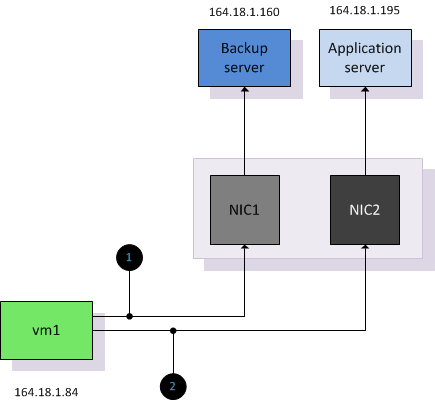
IP-Hash treats each connection between a source and destination IP address as a unique route and the vSwitch will distributed each connection across the available uplinks in the vSwitch. However due to the pNIC to vNIC affiliation, any connection is on a per flow basis. A flow can’t overflow to another uplink; this means that a connection is still limited to the speed of a single physical NIC. A real-world user case for IP-hash would be a backup server which requires a lot of bandwidth across multiple connections other than that; there are very few workloads that require bandwidth that can’t be satisfied by a single adapter.
Complexity –In order for IP-hash to function correctly additional configuration at the network layer is required:
EtherChannel: IP-hash needs to be configured on the vSwitch if EtherChannel technology is used at the physical switch layer. With EtherChannel the switch will load balance connections over multiple ports in the EtherChannel. Without IP-hash, the VMkernel only expects to receive information on a specific MAC address on a single vNIC. Resulting in some sessions go through to the virtual machine while other sessions will be dropped. When IP-hash is selected, then the VMkernel will accept inbound mac addresses on both active NICs
EtherChannel configuration: As vSphere does not support dynamic link aggregation (LACP), none of the members can be set up to auto-negotiate membership and therefore physical switches have to be configured with static EtherChannel.
Switch configuration: vSphere supports EtherChannel from one switch to the vSwitch. This switch can be a single switch or a stack of individual switches that act as one, but vSphere does not support EtherChannel from two separate – non stacked – switches, when the EtherChannel connect to the same vSwitch.
Additional overhead – For each connection the VMkernel needs to select the appropriate uplink. If a virtual machine is running a front-end application and communicates 95% of its time to the backend database, the IP-Hash calculation is almost pointless. The VMkernel needs to perform the math for every connection and 95% of the connections will use the same uplink because the Algorithm will always result in the same hash.
Utilization-unaware – It is possible that a second virtual machine is assigned to use the same uplink as the virtual machine that is already saturating the link. Let’s use the first example and introduce a new virtual machine VM3. Due to the backup window, VM3 connects to the backup server.
| Virtual Machine | IP-Address | Hex Value |
| VM3 | 164.18.1.86 | A4120156 |
Connection 3: VM3> Backup Server (A4120156 Xor A41201A0 = F6) % 2 = 0
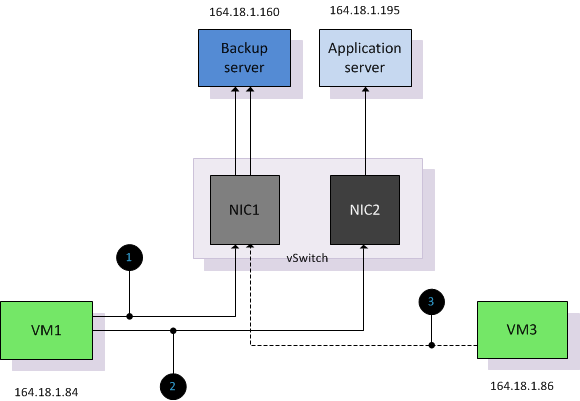
Due to IP-HASH load balancing policy being unaware of utilization it will not rebalance if the uplink is saturated or if virtual machine are added or removed due to power-on or (DRS) migrations. DRS is unaware of network utilization and does not initiate a rebalance if a virtual machine cannot send or receive packets due to physical NIC saturation. In worst-case scenario DRS can migrate virtual machines to other ESX servers, leaving all the virtual machine that are saturating a NIC while the other virtual machines utilizing the other NICs are migrated. Admitted it’s a little bit of a stretch, but being aware of this behavior allows you to see the true beauty of the Load-Based Teaming team policy.
Possible Denial of Service –Due to the pNIC-to-vNIC affiliation per connection a misbehaving virtual machine generating many connections can cause some sort of denial of service on all uplinks on the vSwitch. If this application would connect to a vSwitch with “Port-ID” or “based on physical load” only one uplink would be affected.
Network failover detection Beacon Probing – Beacon probe does not work correctly if EtherChannel is used. ESX broadcast beacon packets out of all uplinks in a team. The physical switch is expected to forward all packets to other ports. In EtherChannel mode, the physical switch will not send the packets because it’s considered as one link. No beacon packets will be received and can interrupt network connections. Cisco switches will report flapping errors. See KB article 1012819.
Route based on physical NIC Load
VMware vSphere 4.1 introduced a new load-balancing policy available on distributed vSwitches. Route based on physical NIC load, also known as Load Based Teaming (LBT) takes the virtual machine network I/O load into account and tries to avoid congestion by dynamically reassigning and balancing the virtual switch port to physical NIC mappings.
How LBT works
Load Based Teaming maps vNICs to pNICs and remaps the vNIC-to-PNIC affiliation if the load exceeds specific thresholds on an uplink.
LBT uses the same initial port assignment as the “originating port id” load balancing policy, resulting in the first vNIC being affiliated to the first pNIC, the second vNIC to the second pNIC, etc. After initial placement, LBT examines both ingress and egress load of each uplink in the team and will adjust the vNIC to pNIC mapping if an uplink is congested. The NIC team load balancer flags a congestion condition if an uplink experiences a mean utilization of 75% or more over a 30-second period.
Complexity – LBT requires standard Access or Trunk ports. LBT does not support EtherChannels. Because LBT is moving flows among the available uplinks of the vSwitch, it may create packets re-ordering. Even though the reshuffling process is not done often (worst case scenario every 30 seconds) it is recommended to enable PortFast or TrunkFast on the switch ports.
Additional overhead – The VMkernel will examine the congestion condition after each time window, this calculation creates a minor overhead opposed to using the static load-balancing policy “originating port-id”.
Utilization aware – vNIC to pNIC mappings will be adjusted if the VMkernel detects congestion on an uplink. In the previous example both VM1 and VM3 shared the same connection due to the IP-hash calculation. Both connections can share the same physical NIC as long as the utilization stays below the threshold. It is likely that both vNICs are mapped to separate physical NICs.
In the next example a third virtual machine is powered up and is mapped to NIC1. Utilization of NIC1 exceeds the mean utilization of 70% over a period of more than 30 seconds. After identifying congestion LBT remaps VM2 to NIC2 to decrease the utilization of NIC1.
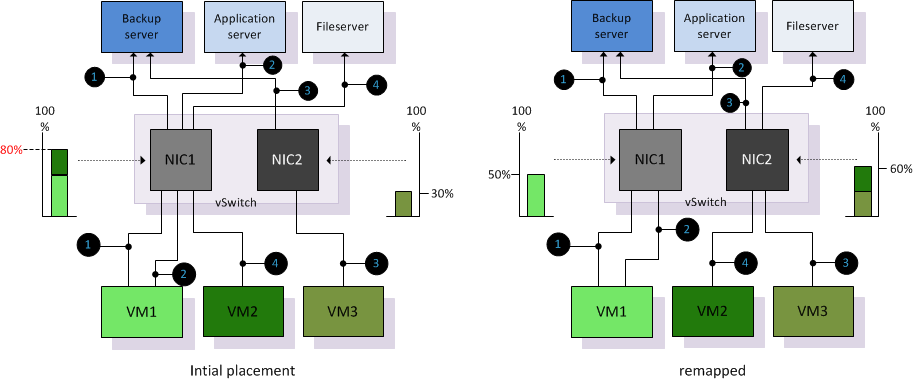
Although LBT is not integrated in DRS it can be viewed as complimentary technology next to DRS. When DRS migrates virtual machines onto a host, it is possible that congestion is introduced on a particular physical NIC. Due to vNIC to pNIC mapping based on actual load, LBT actively tries to avoid congestion at physical NIC level and attempts to reallocate virtual machines. By remapping vNiCs to pNICs it will attempt to make as much bandwidth available to the virtual machine, which ultimately benefits the overall performance of the virtual machine.
Recommendations
When using distributed virtual Switches it is recommended to use Load-Based teaming instead of IP-hash. LBT has no additional requirements on the physical network layer, reduces complexity and is able to adjust to fluctuating workloads. Due to the remapping of vNICs to pNICs based on actual load, LBT attempts to allocate as much bandwidth possible where IP-hash just simply distributes connections across the available physical NICs.
Get notification of these blogs postings and more DRS and Storage DRS information by following me on Twitter: @frankdenneman
Dutch vBeers
Simon Long of The SLOG is introducing vBeers to Holland. I’ve copied the text from his vBeers blog article.
Every month Simon Seagrave and I try organise a social get together of like-minded Virtualization enthusiasts held in a pub in central London (and Amsterdam). We like to call it vBeers. Before I go on, I would just like to state, although it’s called vBeers, you do NOT have to drink beer or any other alcohol for that matter. This isn’t just an excuse to get blind drunk.
We came up with idea whilst on the Gestalt IT Tech Field Day back in April. We were chatting and we both recognised that we don’t get together enough to catch-up, mostly do to busy work schedules and private lives. We felt that if we had a set date each month, the likely hood of us actually making that date would be higher than previous attempts. So the idea of vBeers was born.
 The second Amsterdam vBeers will be held on Thursday 3rd of February starting at 6:30pm in ‘Herengracht Cafe’ which is placed close to Leidseplein and Dam Square. This venue serves a fine of selection of beers along with soft drinks and bar food.
Drinks will not be paid for, there will not be a tab. When you buy a drink please pay for it as no one else will be paying for your drinks.
* Location: The ‘Herengracht Cafe‘ Amsterdam
* Address: Herengracht 435, Herengracht/Leidsestraat
* Nearest Tram Station: Koningsplein – Lijn 1,2,5
* Time: 6:30pm
* Location: Map
Re: impact of large pages on consolidation ratios
Gabe wrote an article about the impact of large pages on the consolidation ratio, I want to make something clear before the wrong conclusions are being made.
Large pages will be broken down if memory pressure occurs in the system. If no memory pressure is detected on the host, i.e the demand is lower than the memory available, the ESX host will try to leverage large pages to have the best performance.
Just calculate how big the Translation lookaside Buffer (TLB)is when a 2GB virtual machine use small pages (2048MB/4KB=512.000) or when using large pages 2048MB/2.048MB =1000. The VMkernel need to traverse the TLB through all these pages. And this is only for one virtual machine, imagine if there are 50 VMs running on the host.
Like ballooning and compressing, if there is no need to over-manage memory than ESX will not do it as it generates unnecessary load.
Using Large pages shows a different memory usage level, but there is nothing to worry about. If memory demand exceeds the availability of memory, the VMkernel will resort to share-before-swap and compress-before-swap. Resulting in collapsed pages and reducing the memory pressure.
Setting Correct Percentage of Cluster Resources Reserved
vSphere introduced the HA admission control policy “Percentage of Cluster Resources Reserved”. This policy allows the user to specify a percentage of the total amount of available resources that will stay reserved to accommodate host failures. When using vSphere 4.1 this policy is the de facto recommended admission control policy as it avoids the conservative slots calculation method.
Reserved failover capacity
The HA Deepdive page explains in detail how the “percentage resources reserved” policy works, but to summarize; the CPU or memory capacity of the cluster is calculated as followed;The available capacity is the sum of all ESX hosts inside the cluster minus the virtualization overhead, multiplied by (1-percentage value).
For instance; a cluster exists out of 8 ESX hosts, each containing 70GB of available RAM. The percentage of cluster resources reserved is set to 20%. This leads to a cluster memory capacity of 448GB (70GB+70GB+70GB+70GB+70GB+70GB+70GB+70GB) * (1 – 20%). 112GB is reserved as failover capacity. Although the example zooms in on memory, the percentage set applies both CPU and memory resources.
Once a percentage is specified, that percentage of resources will be unavailable for active virtual machines, therefore it makes sense to set the percentage as low as possible. There are multiple approaches for defining a percentage suitable for your needs. One approach, the host-level-approach is to use a percentage that corresponds with the contribution of one or host or a multiplier of that. Another approach is the aggressive approach which sets a percentage that equals less than the contribution of one host. Which approach should be used?
Host-level
In the previous example 20% was used to be reserved for resources in an 8-host cluster. This configuration reserves more resources than a single host contributes to the cluster. High Availability’s main objective is to provide automatic recovery for virtual machines after a physical server failure. For this reason, it is recommended to reserve resource equal to a single host or a multiplier of that.
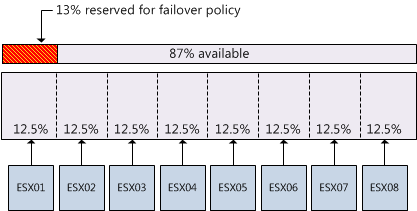
When using the per-host level of granularity in an 8-host cluster (homogeneous configured hosts), the resource contribution per host to the cluster is 12.5%. However, the percentage used must be an integer (whole number). Using a conservative approach it is better to round up to guarantee that the full capacity of one host is protected, in this example, the conservative approach would lead to a percentage of 13%.
Aggressive approach
I have seen recommendations about setting the percentage to a value that is less than the contribution of one host to the cluster. This approach reduces the amount of resources reserved for accommodating host failures and results in higher consolidation ratios. One might argue that this approach can work as most hosts are not fully loaded, however it eliminates the guarantee that after a failure all impacted virtual machines will be recovered.
As datacenters are dynamic, operational procedures must be in place to -avoid or reduce- the impact of a self-inflicted denial of service. Virtual machine restart priorities must be monitored closely to guarantee that mission critical virtual machines will be restarted before virtual machine with a lower operational priority. If reservations are set at virtual machine level, it is necessary to recalculate the failover capacity percentage when virtual machines are added or removed to allow the virtual machine to power on and still preserve the aggressive setting.
Expanding the cluster
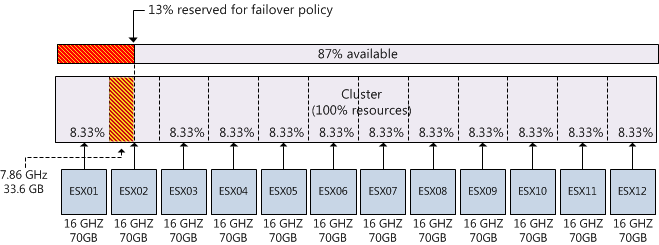
Although the percentage is dynamic and calculates capacity at a cluster-level, when expanding the cluster the contribution per host will decrease. If you decide to continue using the percentage setting after adding hosts to the cluster, the amount of reserved resources for a fail-over might not correspond with the contribution per host and as a result valuable resources are wasted. For example, when adding four hosts to an 8-host cluster while continue using the previously configured admission control policy value of 13% will result in a failover capacity that is equivalent to 1.5 hosts. The following diagram depicts a scenario where an 8 host cluster is expanded to 12 hosts; each with 8 2GHz cores and 70GB memory. The cluster was originally configured with admission control set to 13% which equals to 109.2 GB and 24.96 GHz. If the requirement is to be able to recover from 1 host failure 7,68Ghz and 33.6GB is “wasted”.
Maximum percentage
High availability relies on one primary node to function as the failover coordinator to restart virtual machines after a host failure. If all five primary nodes of an HA cluster fail, automatic recovery of virtual machines is impossible. Although it is possible to set a failover spare capacity percentage of 100%, using a percentage that exceeds the contribution of four hosts is impractical as there is a chance that all primary nodes fail.
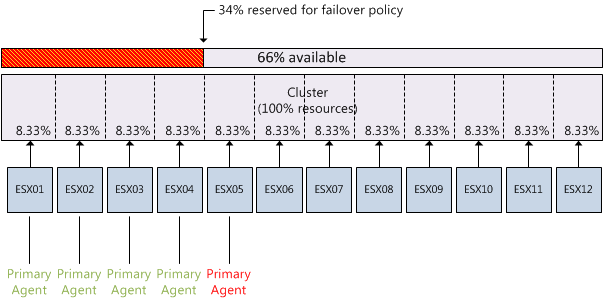
Although configuration of primary agents and configuration of the failover capacity percentage are non-related, they do impact each other. As cluster design focus on host placement and rely on host-level hardware redundancy to reduce this risk of failing all five primary nodes, admission control can play a crucial part by not allowing more virtual machines to be powered on while recovering from a maximum of four host node failure.
This means that maximum allowed percentage needs to be calculated by summing the contribution per host x 4. For example the recommended maximum allowed configured failover capacity of a 12-host cluster is 34%, this will allow the cluster to reserve enough resources during a 4 host failure without over allocating resources that could be used for virtual machines.