VMware vSphere 4.1 introduces a new affinity rule, called “Virtual Machines to Hosts” (VM-Host). This new rule is available in vSphere 4.1 DRS clusters in addition to the existing (anti) affinity rule, which is now called VM-VM affinity rule. The new VM-Host affinity rule provides the ability of placing a group of virtual machines on a subset of hosts inside the cluster. The new rule can very useful in blade system environments and for honoring ISV license requirements. Rules can be created to ensure that virtual machines run on ESX hosts in different blade chassis for availability reasons, or the complete opposite and limit the virtual machines to ESX hosts inside a blade chassis to optimize network speeds by keeping network traffic inside the blade chassis. VM-host are also very useful to fulfill the requirements of special ISV license models as well, for example restricting Oracle database virtual machines to run only on ESX hosts which are licensed by Oracle.
Difference between VM-Host affinity rules and VM-VM rules
The VM-host affinity rule differ from the VM-VM rule, A VM-Host (anti) affinity rule specify the (anti) affinity between a group of virtual machines and a group of ESX hosts inside the cluster, whether a VM-VM (anti) affinity rule only specify the (anti) affinity between individual virtual machines.
Components.
A virtual machine to host affinity rule exists out of three components:
• Virtual machine DRS group
• ESX host DRS group
• Designation – “Must” affinity\anti-affinity or “Should” affinity\anti-affinity
Virtual machine DRS groups and ESX host DRS Group are quite self-explanatory so let’s dive into the designations component straight away.
Designations
Two different types of VM-Host rules are available, a VM-Host affinity rule can either be a “must” rule or a “should” rule. The must-rule is a mandatory rule for HA, DRS and DPM, it confines or prevent the virtual machines to run on the ESX hosts specified in the ESX host DRS Group.
The “should” rule is a preferential rule for DRS and DPM and expresses a preference. DRS and DPM use their best effort to try to confine or prevent the virtual machines from running on the ESX host they are affined to, but DRS and DPM can violate “should” rules if it compromises certain key operations, HA is not aware of preferential rules because DRS will not communicate these rules to HA.
HA, DRS and DPM must take the mandatory rules into account when generating or executing operations. HA, DRS and DPM will never take any action that result in the violation of mandatory affinity rules. Because of this, mandatory rules place more constraints on VM mobility, making it more difficult for DRS to balance load and enforce resource allocation policies, HA and DPM operations are constrained as well, for example, mandatory rules will;
• Limit DRS in selecting hosts to load-balance the cluster
• Limit HA in selecting hosts to power up the virtual machines
• Limit DPM in selecting hosts to power down
Due its limiting behavior, it is recommended to use mandatory rules sparingly and only for specific cases, such as licensing requirements. Preferential rules can be used to meet availability requirements such as separating virtual machines between blade centers.
DRS and mandatory rules
DRS takes mandatory rules into account when generating load-balance recommendations. If a rule is created and the current virtual machine placement is in violation with the rule, DRS will create a priority one recommendation (five stars) and executes the recommendation if DRS is set to fully automatic. DRS will not generate recommendation that will violate the rule, it will not migrate virtual machines to or from an ESX server, even if places the source ESX host into maintenance mode. VMotion will reject the operation as well if it detects that the operation is in violation of the mandatory rule
If a reservation is set on the virtual machine, DRS takes both reservation and mandatory affinity rule into account. Both requirements must be satisfied during placement or power on. If DRS is unable to honor either one of the requirements the virtual machine is not powered on or migrated to the proposed destination host. For example if a new rule is created and the current virtual machine placement is in violation of the rule, it can only migrate to a new host if the virtual machine memory reservation can be satisfied on the new host, if this is not possible, DRS will not generate the recommendation.
If a rule is created that conflict with another active, the older rule overrules the newer rule and DRS will disable the new rule.
As you can imagine that mandatory affinity rules can complicate troubleshooting in certain scenarios for example, why a virtual machine is not migrated from a highly utilized host to an alternative lightly utilized host in the cluster.
DPM
DPM does not place an ESX host into standby mode if it will violate the mandatory rule and will power-on ESX hosts if these are needed to meet the requirements of the mandatory riles.
High Availability
Due to the DRS-HA integration in vSphere 4.1, HA respects mandatory (must) rules. During an ESX host failure event, HA ask DRS to supply the list of hosts and places the virtual machines only on the compatible host, i.e. the host that are allowed by the mandatory rules. HA is unaware of the preferential (should) rules, so HA might unknowingly violate the rule during placement of virtual machines after an ESX failure, but the violation will be corrected by the next DRS invocation.
Let’s take a look at a configuration which I think is going to be widely implemented soon, the Oracle Must affinity rule.
1. Place all Oracle virtual machines in a Cluster VM DRS group. (vm01, vm03, vm11, vm20)
2. Place all Oracle licensed ESX host in a Cluster Host DRS Group (ESX07, ESX08, ESX15, ESX16)
3. Select “Must run on Host in Group”
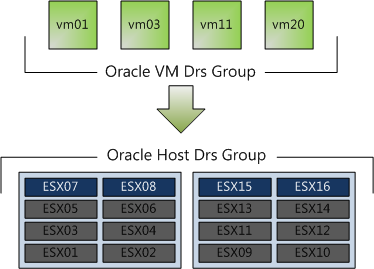
In this scenario, DRS never places, migrates, or recommend placement of a host-affined virtual machine on a host to which is not listed in the Cluster Host DRS Group (ESX01 – ESX06 & ESX09-ESX14). This means that DRS will never ever place the virtual machine on an unlicensed host, not for maintenance mode, not for DPM power saving and not after an ESX host failure event.
This virtual machine to host affinity rule make it possible to run oracle inside big clusters without having to license all the ESX host. I have been involved in a few projects where Oracle license was a constraint. Normally separate smaller clusters were deployed for Oracle database virtual machines, increasing both OPEX and CAPEX of the environment. These rules allows the Oracle virtual machines to run inside the cluster with other virtual machines without having to license all the ESX host inside the cluster. Hereby making the lives easier of both the architect and the administrator. vSphere 4.1, you gotta love it!
Get notification of these blogs postings and more DRS and Storage DRS information by following me on Twitter: @frankdenneman
VMware Fault Tolerance and DPM
Some requirements of the design I am working on is to be as “green” as possible and to offer the highest level of redundancy for business continuity. Enter VMware Fault Tolerance (FT) and Distributed Power Management (DPM)! When mixing multiple features, the requirements of one feature can have impact on- or even worse becomes a constraint of the other feature.
DPM works together with DRS to VMotion virtual machines onto fewer ESX host servers when the resource demand drops below a specific threshold. In the current release of vSphere, DRS does not consider the FT-enabled virtual machines during load balancing operations and DRS will not migrate FT-enabled virtual machine automatically, because of this DPM cannot power down these hosts until the administrator will manually VMotion the primary or secondary virtual machines to another ESX host server.
Fortunately when enabling DPM on the cluster, you can disable DPM at ESX host level. Due to the current limitations of DRS with VMware Fault Tolerance, it is recommended to disable DPM on at least two ESX server host to act as host for FT-enabled virtual machines.
Memory reclamation, when and how?
After discussing with Duncan the performance problem presented by @heiner_hardt , we discussed the exact moment the VMkernel decides which reclamation technique it will use and specific behaviors of the reclamation techniques. This article supplements Duncan’s article on Yellow-bricks.com.
Now let’s begin with when the kernel decides to reclaim memory and see how the kernel reclaims memory. So host physical memory is reclaimed based on four “free memory states”, each with a corresponding threshold. Based on the Threshold, the VMkernel chooses which reclamation technique it will use to reclaim memory from virtual machines.
| Free Memory state | Threshold | Reclamation technique |
| High | 6% | None |
| Soft | 4% | Ballooning |
| Hard | 2% | Ballooning and Swapping |
| Low | 1% | Swapping |
The high memory state has a threshold hold of 6%, that means that 6% of the ESX host physical memory minus the service console memory must be free. When the virtual machines use less than 94% of the host physical memory, the VMkernel will not reclaim memory because there is no need to, but when the memory usage starts to fall towards the free memory threshold the VMkernel will try to balloon memory. The VMkernel selects the virtual machines with the largest amounts of idle memory (detected by the idle memory tax process) and will ask the virtual machine to select it’s idle memory pages. Now to do this the guest os needs to swap those pages, so if the guest is not configured with sufficient swap space, ballooning can become problematic. Linux behaves pretty worse in this situation, invoking OOM (out-of memory) killer when its swap space is full and starts to randomly kill processes.
Back to the VMkernel, in the High and Soft state, ballooning if favored over swapping. If it ESX server cannot reclaim memory by ballooning in time before it reaches the Hard state, the ESX turns to swapping. Swapping has proven to be a sure thing within a limited amount of time. Opposite of the balloon driver, which tries to understand the needs of the virtual machine let the guest decides whether and what to swap, the swap mechanism just brutally picks pages at random from the virtual machine, this impacts the performance of the virtual machine but will help the VMkernel to survive.
Now the fun thing is, before the VMkernel detects the free memory is reaching the soft threshold, it will start to request pages through the balloon driver (vmmemctl), this is because it takes time for the Guest OS to respond to the vmmemctl driver with suitable pages. By starting prematurely, the VMkernel tries to avoid the situation that it will reach the Soft state or worse. So you can see ballooning occurring sometimes before the Soft state is reached. (between 6 and 4% free memory)
One exception is the virtual machine memory limit, if a limit is set on the virtual machine, the VMkernel always tries to balloon or swap pages of the virtual machine after reaching its limit, even if the ESX host has enough free memory available.
Reservations and CPU scheduling
Most of my resource management articles focus more on the behavior of memory management than on CPU management. Mainly because the Memory scheduler within ESX is such an interesting complex system which comprises of memory allocation, swapping and reclamation with algorithms such as Idle Memory Tax and mechanisms like ballooning and swapping. But lately it seems that CPU scheduling seems to attract more and more my attention. The discussion Duncan and I had prior to posting his article about how CPU limits actually sparked the interest how CPU scheduling works when setting reservations, so additional to Duncan excellent article, I want to take a closer look how the ESX CPU scheduler handles CPU reservations and shares and show why CPU scheduling is more fair that memory management.
Similar to memory, the resource allocation settings, reservations, shares and limits can be set on CPU level. Limits and shares have similar behavior on CPU as well as Memory. Reservation act differently, let’s take a quick look at the resource allocation settings:
Shares:Shares indicate the proportional value of the entity on the same hierarchical level. If everything else is equal, reservations, limits and active utilization, the virtual machine that is allocated twice as many shares as another virtual machine is entitled to consume twice as many CPU cycles.
Limit: A limit is a mechanism to restrict physical resource usage of the virtual machine. A limit ensures that the VM will never receive more CPU cycles than specified, even if extra cycles are available on the host.
Reservation: A reservation is a guarantee of the specified amount of physical resources regardless of the total number of shares in his environment.
Now reservations act differently when setting it on a CPU than setting it on memory. When the virtual machine does not use its CPU cycles, these CPU cycles are redistributed to other active virtual machines, so unused reservations are not wasted. Contrary to memory management, when the memory will not be reclaimed by the scheduler once the virtual machine touched the pages.
By redistributing available CPU cycles and not letting the virtual machine hoard CPU resources, the VMkernel tries to properly divide the resources and achieve better fairness among virtual machines and improve utilization of the resources. To achieve both goals and divide the CPU resources among virtual machines the CPU scheduler calculates a MHzPerShare metric. This metric tries to identify which virtual machines are “ahead” of their entitlement and which virtual machines are “behind” and do not fully utilize their entitlement.
MHzPerShare = MHzUsed / Shares
MHzUsed is the current utilization of the virtual machine measured in Megahertz.
Shares is the current configured amount of shares of the virtual machine.
For example, the virtual machine is using 2500 MHZ and has 1000 shares, this means that the MHzPershare value is 2.5.The VMkernel will calculate the MHzPerShare number of each active virtual machine and the virtual machine with the lowest MHzPerShare value will have the highest priority of running on the CPU. If the virtual machine with the lowest MHzPerShare value decides not to use it right to allocate the cycles, the cycles can be used by the virtual machine with the next lower MHzPerShare value.
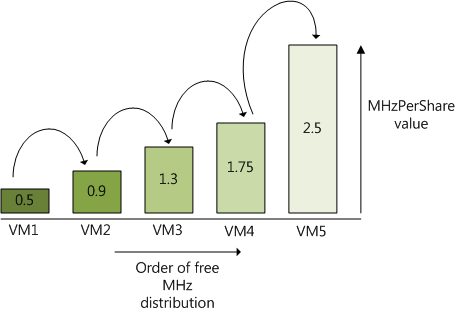
Although not shown, reservations play a important part in this calculation. As mentioned before, reservations overrule shares and guarantee the amount of physical resources regardless of the amount of shares. This means that the virtual machine always can use the CPU cycles specified in its reservation, even if the virtual machine has a greater MHzPerShare value. So how exactly do reservations and shares interact with each other when it comes to calculating the MHzPerShare value?
For example:
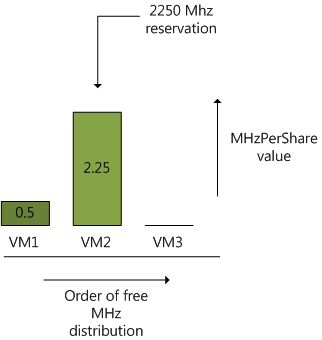
In a 6 GHz system, 1 virtual machine is running and 2 are powered on, VM1 is running a memory intensive app and doesn’t really care much about CPU cycles, the virtual machine is configured with 1000 CPU shares and no reservation. The 2 other virtual machines run CPU intensive apps and are currently competing for resources. VM2 has a reservation of 2250 MHz and has a default share setting of 1000 shares, the other CPU intensive virtual machine, VM3 is equipped with 2vcpu’s and therefore receives 2000 shares, but the administrator didn’t set any reservation.
Now VM1 is running at 500 MHz, with its 1000 shares, the MHzPerShare value equals 0.5. Because VM2 is in need of CPU cycles, it immediately utilizes its reservations and “occupies” all 2250 MHz, its
MHzPerShare value equals 2.25 (2250/1000).
Now because VM3 doesn’t have any reservation and is in need of CPU cycles, the VMkernel looks at its MHzPerShare value to decide how many CPU cycles it can use before distributing excess CPU cycles to other virtual machines. The kernel will distribute cycles to VM3 until it reaches the same MHzPerShare value of VM2, which is 2.25. In theory this means that the VMkernel will allocate 2000 x 2.25 = 4500 MHz before looking at another VM. Due to the fact that CPU scheduler already allocated 500 MHz to VM1 and 2250 MHz to VM2 of the available 6GHz, it can allocate VM3 3250 Mhz.
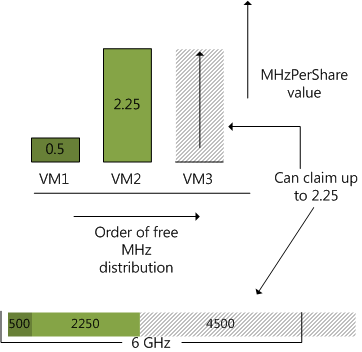
Because VM2 has a reservation it can allocate up to its reservation even when initially VM3 has a lower MHzPerShare value (0) and the CPU cycle requirements of VM1 are met at 500MHz. However due to the fairness principle VM2’s own MHzPerShare value influences the VMkernel’s decision how much cycles to allocate to VM3 before considering allocating additional cycles to vm2 again.
Now for some reason the application in VM3 is leveling out at 2000 MHz, VM1 is still using 500 MHz and VM2 is in desperate need of extra CPU cycles. No settings are changed so VM1 and VM2 has a 1000 shares each and VM2 has a reservation of 2250MHz, VM3 has 2000 shares and no reservation is set.
The VMkernel will satisfy the request of VM1, resulting in a MHzPerShare value of 0.5. VM2 claims its reservation and utilizes 2250 MHz resulting in a MHzPerShare value of 2.25, VM3 can allocate up to 4500 before reaching the MHzPerShare value of VM3, but stops consuming above 2000Mhz, ending up with a MHzPerShare value of 2000/2000 = 1, this means that inside the 6GHz host 1250 cycles are available.
The CPU scheduler will shop around with these available cycles and see which VM is interested. Now the VMkernel will offer the cycles to the virtual machines in the increasing order of MHzPerShare, so first it will ask VM1 (0.5), because its CPU request is satisfied, it will forfeit its claim, VM2 also forfeits this claim, so VM3 will happily accepts the remaining cycles and its resource usage will increase to 3500 MHz.
So here you have it, both shares and reservation interact or even battle with each other to allocate CPU cycles for the virtual machines. Shares are by many perceived as an inferior resource allocation setting, hopefully this demonstrates the power of shares, it can in combination with utilization become a very important factor in ESX resource management.
Virtual Machine memory overhead
Every virtual machine running on an ESX host consumes some memory overhead additional to the current usage of its configured memory. This extra space is needed by ESX for the internal VMkernel datastructures like virtual machine frame buffer and mapping table for memory translation (mapping physical virtual machine memory to machine memory). Two kinds of virtual machine overhead exists:
Static overhead
Static overhead is the minimum overhead that is required for the virtual machine startup. DRS and the VMkernel uses this metric for admission control and VMotion calculations. The destination host must be able to back the virtual machine reservation and the static overhead otherwise the VMotion will fail.
Dynamic overhead
Once the virtual machine has started up, the virtual machine monitor (VMM) can request additional memory space. The VMM will request the space, but the VMkernel is not required to supply it. If the VMM does not obtain the extra memory space, the virtual machine will continue to function but this can lead to performance degradation. The VMkernel treats virtual machine overhead reservation the same as VM-level memory reservation and it will not reclaim this memory once it used.
Overhead memory used in admission control
As mentioned before, DRS and the VMkernel will not allow the virtual machine to be powered up if reservations cannot be guaranteed, this means that the effective memory reservation for a virtual machine is the user configured memory reservation (VM-level reservation) plus the overhead reservation.
Resource pool memory reservations
This means that during the design phase of a resource pool, the memory overhead of a virtual machine must be included in the calculation of the memory reservation specified on the resource pool. The behavior of dynamic overhead must also be taken into account.
Table 3.2 of the vSphere resource management guide list the overhead memory on virtual machines. VMware vSphere Online Library – Table 3.2 overhead memory
Please be aware of the fact that memory overheads are growing with each new release of ESX, so keep this in mind when upgrading to a new version. Verify the documentation of the virtual machine memory overhead and check the specified memory reservation on the resource pool.