
One of the benefits of working for VMware technical marketing, is that you have your own lab.
Luckily my lab is hosted by an external datacenter, which helps me avoid a costly power-bill at home each month 🙂 However, that means I need to connect to my lab remotely.
As a MAC user I used Remote Desktop Connection for MAC from Microsoft. One of the limiting factors of this RDP for MAC is the limited resolution of 1400 x 1050 px. The screens at home have a minimum resolution 2560 x 1440 px. This first world problem bugged me until today!
Today I found CoRD – http://cord.sourceforge.net/. CoRD allows me to connect to my servers with a resolution 2500 x 1600, using the full potential of my displays at home.
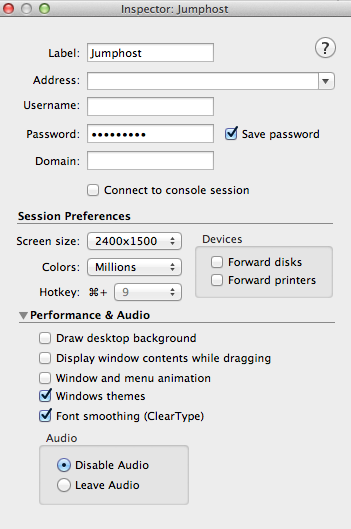
Another create option is the hotkey function, using a key combination I spin up a remote desktop connection. I love these kinds of shortcuts that help me reduce time spend navigating throughout the UI.
If you are using a MAC and often RDP into your lab, I highly recommend to download CoRD.
Btw, it’s free 😉
Using Remote desktop connection on a Mac? Switch to CoRD
38 sec read



F>rank,
give a try to Royal T>S>X: it’s much better than CoRD.
http://www.royaltsx.com/main/home/osx.aspx
I have been using CORD for a while and it is really good. The only issue i have found is that is doesnt like the newer RDP on 2012. Otherwise an excellent 1 window piece of software.
CoRD can’t do the higher security RDP with NLA. The only free OSX client that I’ve found that will do NLA is Microsoft’s.
I used CoRD for a long time, but I got frustrated with the lack of development. No proper full-screen, no cut & paste between OS X/Windows, and crashes. Not as many crashes as the previous version, but enough to annoy me.
Eventually I decided to pay up, and I bought Jump Desktop. Cost at least twice as much as I was comfortable with paying, but it does the job, and doesn’t cause me any problems. The reduced frustrations make it worth the price to me.
Have you tried the 2X RDP Client?
http://www.2x.com/rdp-client/windows-linux-mac/downloadlinks/