• Skip to primary navigation
  • Skip to main content

frankdenneman.nl

  • AI/ML
  • NUMA
  • About Me
  • Privacy Policy

vSphere 6.5+ DRS Pairwise Balancing

October 30, 2019 by frankdenneman

Or maybe I should have called this blog post, “I’m seeing an excessive number of DRS initiated vMotions on my newly upgraded 6.5 environment”. Recently I was part of a few conversations about the nature of DRS load balancing in systems running vSphere 6.5 and newer. It was noticed that more vMotion operations where occurring since running 6.5 and it’s highly likely that these operations occur due to the new DRS pairwise balancing functionality. Pairwise balancing was introduced by vSphere 6.5 and is focused on keeping the host resource utilization disparity within a certain threshold. As a result, DRS performs load-balancing operations if the difference between the lowest-utilized host and the highest-utilized host is a certain percentage. That percentage depends on your migration threshold. The default migration threshold uses a 20% tolerable difference in utilization.

Migration Threshold LevelTolerable CPU/Memory usage difference between any two hosts in the cluster
1Not Available (only Affinity violations and MM migrations allowed)
230%
3 (Default migration threshold)20%
410%
55%

This new feature is needed as clusters keep on growing larger and larger. To determine if load-balancing operations are necessary, DRS calculates two metrics, the current host load standard deviation (CHLSTD) and the target host load standard deviation (THLSTD). Each host reports its load and DRS calculates the standard deviation of the host load metric across all the hosts in the cluster. DRS calculates a target host load balance for the cluster and as long as the current host load standard deviation is less than or equal to the target host load value, DRS will consider the cluster balanced. The migration threshold allows how far apart the CHLSTD and THLSTD before it triggers load balancing operations. The higher the aggressiveness of the migration threshold, the lower the difference between the CHLSTD and THLSTD is tolerated. 

A situation can occur that a few hosts in a large cluster can experience a high resource utilization, while the majority of hosts are not. Due to the size of the cluster, the few high host load become just some statistical outliers than simply disappear as noise due to the vast number of hosts that experience (far) lower utilization. As a result, these outliers are missed as the calculate CHLSTD is below the threshold required to trigger load balancing.

By adding the functionality of pairwise balancing, and “simply” comparing the highest reported utilization with the lowest utilization, these outliers might be a thing of the past. That means that in certain cases, the DRS UI might report that the cluster is in a balanced state, yet load-balance operations still occur. This behavior can be attributed to pairwise balancing.

Please keep in mind that if you are using a migration threshold that is more aggressive than the default setting, the tolerable difference between hosts is reduced, more migrations are likely to occur.

So what happens when the tolerable difference is detected in the cluster? Does this mean that VMs are migrated from the highest utilized host to the lowest utilized host? Not necessarily. VMs can be migrated to any other host in the cluster. DRS still takes many different requirements into account when selecting a virtual machine migration for load-balancing purposes. Anti-affinity and affinity rules cannot be violated to obtain a better cluster load-balance, so these moves are not considered. Compatibility of hosts and VM configuration also impact migration options (typically a missing datastore or network portgroup are common reasons why particular hosts are overloaded and why other hosts are lower utilized), but also the “cost-benefit” of a VM migration is still taken into account. It still needs to make sense for the cluster balance to incur infrastructure costs and risk to move a particular VM.

If you recently updated your vCenter to 6.5/6.7 and are curious to see whether the vMotions are triggered due to Pairwise imbalance operations, you can use the online version of the DRS Dump Insight tool available at https://www.drsdumpinsight.vmware.com/. You can also run the DRS dump insight tool on-prem by installing one of the flings available here: https://flings.vmware.com/?utf8=%E2%9C%93&q=DRS+Dump+Insight&button=. Grep for “Pairwise Imbalance”.

If this behavior is not appreciated, and you do not want to alter the migration threshold, you can switch back to the old behavior by turning off pair-wise balancing by setting the cluster advanced option “CheckPairWiseImbalance to 0. (case-sensitive). Although this functionality was introduced by vSphere 6.5 and is active by default in all newer releases, we have backported this functionality to vSphere 6.0 u3.

One thing I would like to ask if you want to disable it, what are the reasons? I expect “too much vMotions”, but I would like to understand why a vMotion or a collection of vMotions is considered not desirable? The main goal is to get the VMs to a place where they have access to enough resources, why is that still a bad thing? 
Filed Under: DRS, VMware

AMD EPYC Naples vs Rome and vSphere CPU Scheduler Updates

October 14, 2019 by frankdenneman

Recently AMD announced the 2nd generation of the AMD EPYC CPU architecture, the EPYC 7002 series. Most refer to the new CPU architecture using its internal codename Rome. When AMD introduced the 1st generation EPYC (Naples), they succeeded in setting a new record of core count and memory capacity per socket. However, due to the CPU multi-chip-module (MCM) architecture, it is not an apples-to-apples comparison when compared to an Intel Xeon architecture. As each chip module contains a memory controller, each module presents a standalone NUMA domain. This impacts OS scheduling decisions and, thus, virtual machine sizing. A detailed look can be found here in English or here translated by Grigory Pryalukhin in Russian. Rome is different, the new CPU architecture is more aligned with the single NUMA per Socket paradigm, and this helps with obtaining workload performance consistency. There are some differences between Xeons and Rome. In addition, we made some adjustments to the CPU scheduler to deal with this new architecture. Let’s take a closer look at the difference between Naples and Rome.

7 nanometer (7 nm) lithography process forcing a new architecture

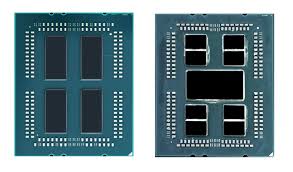
Rome is using the new 7nm Zen 2 microarchitecture. A smaller lithography process (7nm vs. 14nm) allows CPU manufacturers to cram more CPU cores in a CPU package. However, there are more elements on a CPU chip than CPU cores alone, such as I/O and memory controllers. The scalability of I/O interfaces is limited, and therefore, AMD decided to use a separated and more massive 14nm die that contains the memory and I/O controllers. This die is typically revered to as the server I/O Die (sIOD). In the picture below, you see a side by side comparison of an unlidded Naples (left) and an unlidded Rome, exposing the core chiplet dies and the SIOD. 

AMD EPYC Naples vs. EPYC Rome

Naples Zeppelin vs. Rome Chiplet

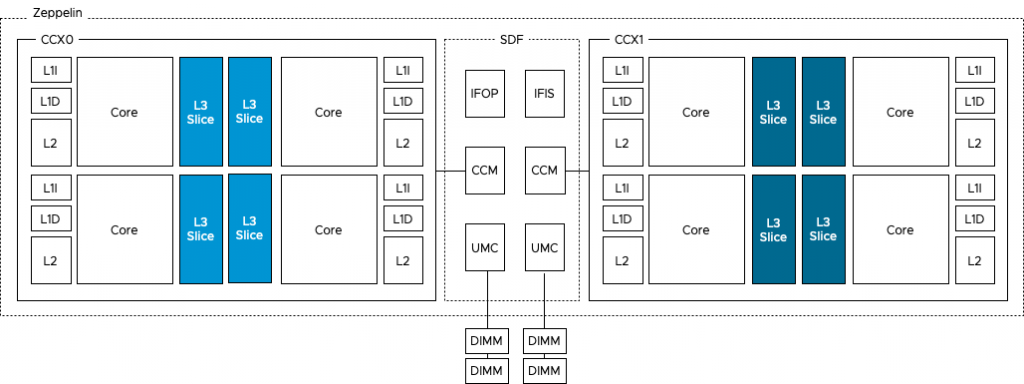
The photo above provides a clear overview of the structure of the CPU package. The Naples CPU package contains four Zeppelin dies (black rectangles). A Zeppelin die provides a maximum of eight Zen cores. The cores are divided across two compute complexes (CCX). A Zeppelin of a 32 core EPYC contains 4 cores per CCX. When Simultaneous Multi-Threading (SMT) is enabled, a CCX offers eight threads. Each CCX is connected to the Scalable Data Fabric (SDF) through the Cache-Coherent Master (CCM) that is responsible for sending traffic cross CCXes. The SDF contains two Unified Memory Controllers (UMC) connecting the DRAM memory modules. Each UMC provides a memory channel to two DIMMs. Providing the memory capacity of 4 DIMMs in total. Due to the combination of Cores, cache, and memory controller, a Zeppelin is a NUMA domain. To access a “remote” on-package memory controller, the Infinity Fabric On Package Controller (IFOP) sets up and coordinates the data communication.

Naples Zeppelin

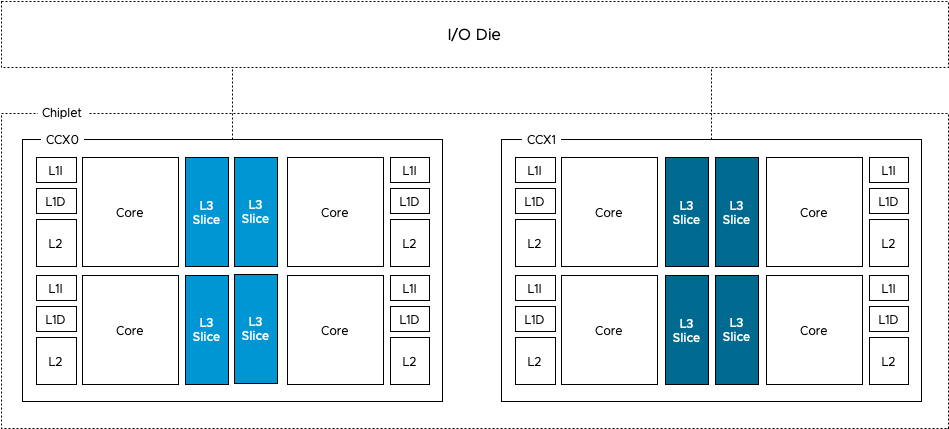
The Rome CPU package contains a 14nm I/O Die (the center black rectangle), and 8 chiplet dies (the smaller black rectangles). A Rome chiplet contains two CCX’es with each containing four cores and L3 cache, but no I/O components or the memory controllers. There is a small Infinity Fabric “controller” on each CCX that connects the CCX to the sIOD. As a result, every memory read beyond the local CCX L3 cache has to go to the sIOD. Even for a cache line (data from memory stored in the cache) that is stored in the LL3 cache of the CCX sharing the same Rome chiplet. A Chiplet is a part of the NUMA Domain.

Rome Chiplet

NUMA Domain per Socket

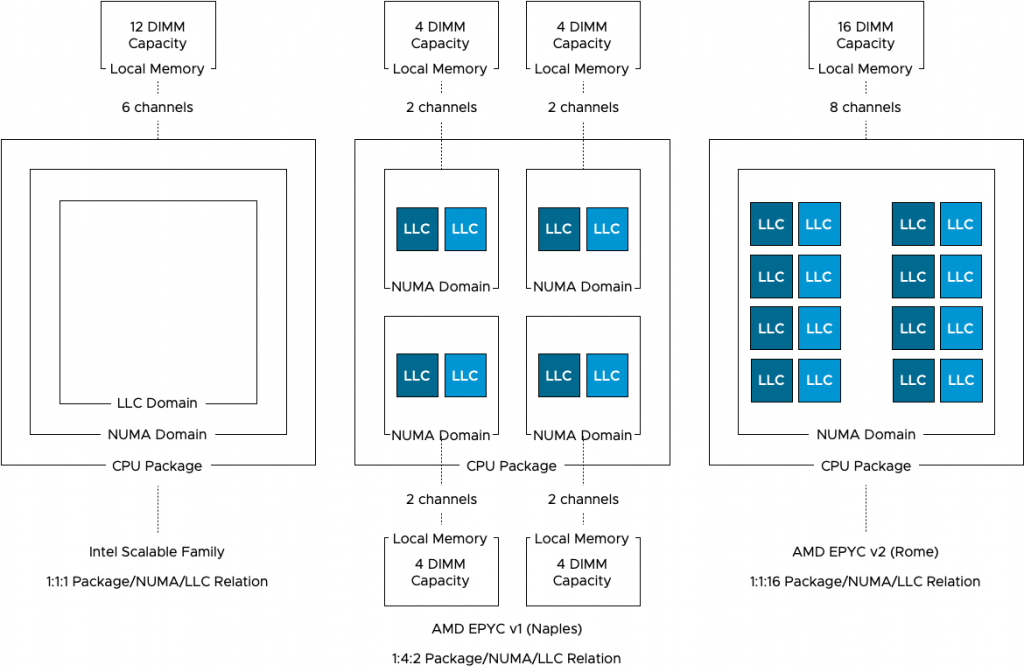
As mentioned before, a NUMA Domain, typically called NUMA node, is a combination of CPU cores, cache, and memory capacity connected to a local memory controller. Intel architecture design uses a single NUMA Domain per Socket (NPS), AMD Naples offered four NPS, while Rome is back to a single NPS. Single NPS simplifies VM and application sizing while providing the best and consistent performance.

NUMA per Socket Overview

The bandwidth to local memory differs between each CPU architecture. The Intel Xeon Scalable Family provides a maximum of six channels of memory supporting a DDR4-2933 memory type. The Naples provides two memory channels to its locally connected memory, supporting a DDR4-2666 memory type. The Rome architecture provides eight memory channels to its locally connected memory, supporting a DDR4-3200 memory type. Please note that the memory controllers in the Rome architecture are located on the centralized die, handling all types of I/O and memory traffic, the Intel memory controllers are constructs isolated from any other traffic. Real-life application testing must be used to determine whether this architecture impacts memory bandwidth performance.

CPU ArchitectureLocal ChannelsMem TypesPeak transfer
Intel Xeon Scalable 6DDR4-2666127.8 GB/s
AMD EPYC v1 (Naples)2DDR4-293346.92 GB/s
AMD EPYC v2 (Rome)8DDR4-3200204.8 GB/s

With a dual-socket system, there are typically two different distances with regards to memory access. Accessing memory connected to the local memory controller and accessing memory connected to the memory controller located on the other socket. With Naples, there are three different distances. The IFOP is used for intra-socket communication, while the Infinity Fabric Inter Socket (IFIS) controller takes care of routing traffic across sockets. As there are eight Zeppelins in a dual-socket system, not every Zeppelin is connected directly to each other and thus sometimes the memory access is routed through the IFIS first before hitting an IFOP to get to the appropriate Zeppelin. 

Naples Memory AccessHops
Local memory access within a Zeppelin0
Intra-socket memory access between Zeppelins1
Inter-socket memory access between Zeppelins with direct IFIS connection1
Inter-socket memory access between Zeppelins with indirect connection (IFIS+Remote IFOP)2

AMD Rome provides equidistant memory access within the die and a single hop connection between sockets. Every memory access within the socket, every cache line load within the socket has to go to the I/O die. Every remote memory and cache access goes across the Infinity Fabric between sockets. This is somewhat similar to the Intel architecture that we have been familiar with since Nehalem, which launched in 2008. Why somewhat? Because there is a difference in cache domain design.

The Importance of Cache in CPU Scheduling

Getting memory capacity as close to the CPU improves performance tremendously. That’s the reason why each CPU package contains multiple levels of cache. Each core has a small but extremely fast cache capacity for instructions and data (L1), a slightly larger but relatively slower (L2) cache. A third and larger cache (L3) capacity is shared amongst the cores in the socket (Intel paradigm). Every time when a core request data to be loaded, it makes sense to retrieve this from the closest source possible, typically this is cache. To get an idea of how fast cache is relative to local and remote memory, look at the following table:

System EventActual LatencyHuman Scaled Latency
One CPU cycle (2.3 GHz)0.4 ns 1 second
Level 1 cache access1.6 ns 4 seconds
Level 2 cache access4.8 ns 12 seconds
Level 3 cache access15.2 ns 38 seconds
Remote level 3 cache access63 ns 157 seconds
Local memory access75 ns 188 seconds (3min)
Remote memory access130 ns 325 seconds (5min)
Optane PMEM Access350 ns 875 seconds (15min)
Optane SSD I/O10 us 7 hours
NVMe SSD I/O25 us 17 hours

Back in the day when you could disable the cache of the CPU, someone tested the effect of cache on loading Windows 95. With cache it took almost five minutes, without the use of the cache, it took over an hour. Cache performance is crucial to get the best performance. And because of this, the vSphere NUMA scheduler and the CPU scheduler work together to optimize workloads that communicate with each other often. As they are communicating, they typically use the same data sources. Therefore, if vSphere can run the workload on the same cores that share the cache, then this could improve performance tremendously. The challenge is that AMD uses a different cache domain design than Intel.

Last Level Cache Domains

As depicted in the diagram above, Intel uses a 1:1:1 relationship model. One socket equals one NUMA domain and contains one Last Level Cache domain. As Intel is used in more than 98% of the dual-socket systems (info based on internal telemetry reports), our scheduling team obviously focused most of their efforts on this model. EPYC Naples introduced a 1:4:2 model, one socket, that contains four NUMA domains, and each NUMA domain contains two LLC domains. Rome provides a NUMA model similar to the XEON, with a single socket and single NUMA domain. However, each chiplet contains two separate LLC domains. A Rome CPU package contains eight chiplets, and thus, 16 different LLC domains exist within a socket & NUMA domain.

Relational Scheduling

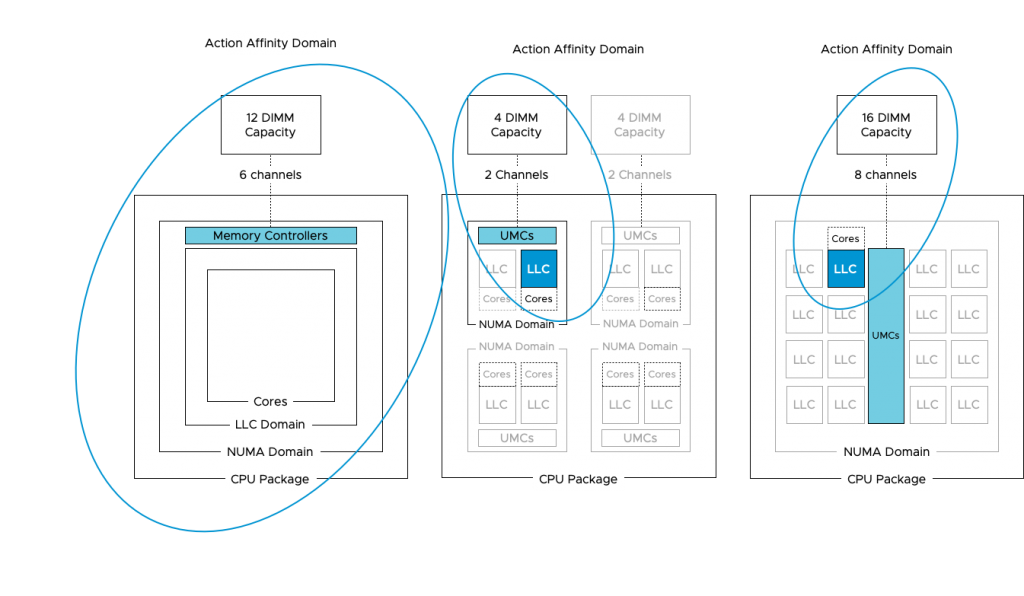
vSphere uses this LLC domain as a target for its relational scheduling functionality. Relational scheduling is better known as Action-Affinity. Its actions have made most customers think that the NUMA scheduler was broken. As the scheduler is optimized for cache sharing, it can happen that a majority of vCPU is running on a single socket, while the cores of the other sockets are idling. When reviewing ESXTOP you might see an unbalanced number of VMs running on the same NUMA Host Node (NHN). As a result, the VMs running in this NUMA domain (or in ESX terminology NHN) might compete with CPU resources and thus experience increased %Ready time.

Side note: It is my opinion to test the difference of relational scheduling on the performance of the application. Do not test this with synthetic test software. Although %Ready time is something to avoid, some applications benefit more from low-latency and highly consistent memory access than being impacted by an increase of CPU scheduling latency.

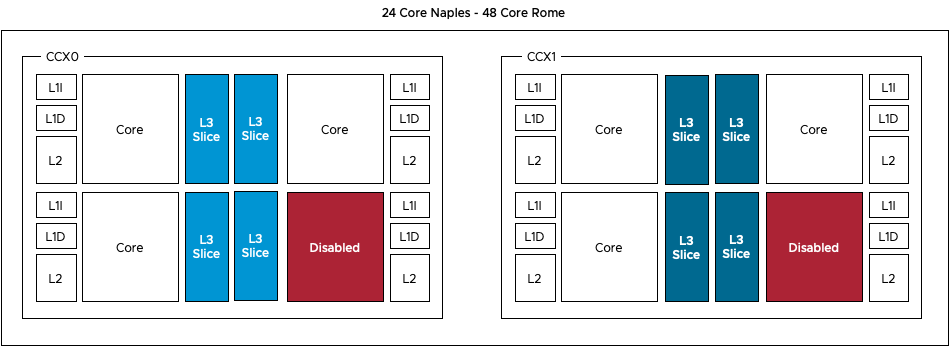
Action-Affinity can lead to ready time on an Intel CPU architecture where more than eight cores share the same cache domain, imagine what impact it can have on AMD EPYC systems where the maximum number of cores per cache domain is four. In lower-core count AMD EPYC systems, the cores are disabled per CCX, reducing the scheduling domain any further.

As the majority of the data centers are running on Intel, vSphere is optimized for a CPU topology where the NUMA and LLC domain are of consistent scope, i.e. the same size. With AMD the scopes are different and thus the current CPU scheduler can make “sub-optimal” decisions, impact performance. What happens is that the NUMA scheduler dictates the client size, the number of vCPUs to run on a NUMA Home Node, but it’s up to the CPU scheduler discretion to decide which vCPU to run on which physical core. As there are multiple Cache domains within a NUMA client, it can happen that there is an extraordinary amount of vCPU migrations between the cache domains within the NUMA domain. And that means cold cache access and a very crowded group of cores.

Therefore, the CPU team worked very hard to introduce optimizations for the AMD architecture and these optimizations are released in the updates ESXi 6.5 Update 3 and ESXi 6.7 Update 2.

The fix informs the CPU scheduler about the presence of the multiple cache domains within the NUMA node, allowing it to schedule the vCPU more intelligently. The fix also introduces a automatic virtual NUMA client sizer. By default, a virtual NUMA architecture is exposed to the guest OS when the vCPU count exceeds the physical core count of the physical NUMA domain and if the vCPU count is no less than the numa.vcpu.min setting, which defaults to 9. A physical NUMA domain in Naples counts eight cores, and thus no virtual NUMA topology is exposed. With the patch, this is solved. What is crucial to note is that the virtual NUMA topology is determined at first boot by default. Therefore, existing VMs need to have its virtual NUMA topology reset to leverage this new functionality. This involves a power-down to remove the NUMA settings in the VMX.

When introducing Naples/Rome based systems in your virtual data center, it’s strongly recommended to deploy the latest update of your preferred vSphere platform version. This allows you to extract as much performance from your recent investment.

Filed Under: NUMA, VMware

60 Minutes of NUMA VMworld Session Commands

August 27, 2019 by frankdenneman

Verify Distribution of Memory Modules with PowerCLI

Get-CimInstance -CimSession $Session CIM_PhysicalMemory | select BankLabel, Description, @{n=‘Capacity in GB';e={$_.Capacity/1GB}}  

PowerCLI Script to Detect Node Interleaving

Get-VMhost | select @{Name="Host Name";Expression={$_.Name}}, ​@{Name="CPU Sockets";Expression={$_.ExtensionData.Hardware.CpuInfo.NumCpuPackages}}, ​@{Name="NUMA Nodes";Expression={$_.ExtensionData.Hardware.NumaInfo.NumNodes}} 

Action-Affinity Monitoring

Sched-Stats
-t numa-migration 

Disable Action Affinity

numa.LocalityWeightActionAffinity = 0  

numa.PreferHT

For more information on how to enable PreferHT: KB article 2003582

Host Setting:  numa.PreferHT=1  
VM Setting:  numa.vcpu.PreferHT = TRUE 

Filed Under: NUMA

5 Things to Know About Project Pacific

August 26, 2019 by frankdenneman

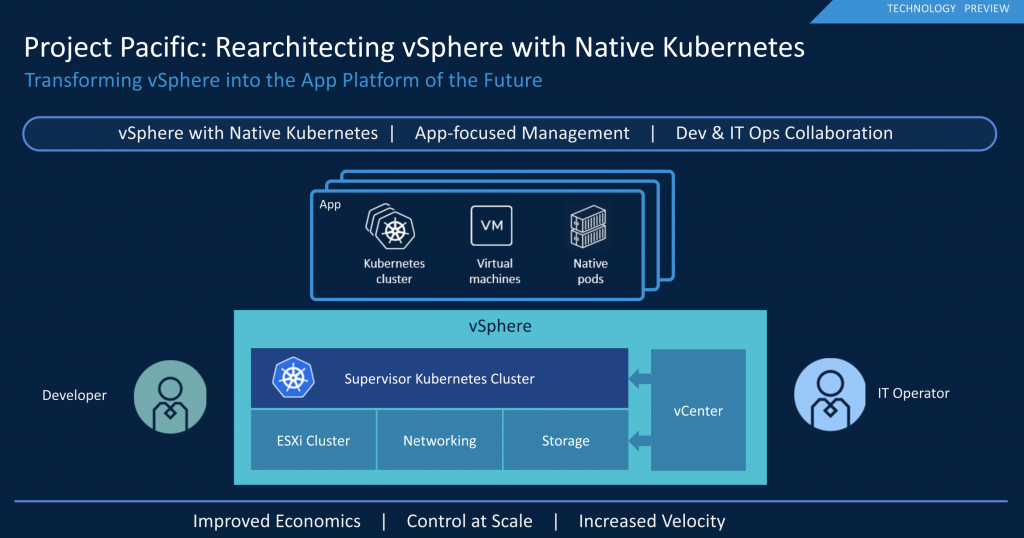
During the keynote of the first day of VMworld 2019, Pat unveiled Project Pacific. In short, project Pacific transforms vSphere into a unified application platform. By deeply integrating Kubernetes into the vSphere platform, developers can deploy and operate their applications through a well-known control plane. Additionally, containers are now first-class citizens enjoying all the operations generally available to virtual machines.

Although it might seem that the acquisition of Heptio and Pivotal kickstarted project Pacific, VMware has been working on project Pacific for nearly three years! Jared Rosoff, the initiator or the project and overall product manager, told me that over 200 engineers are involved as it affects almost every component of the vSphere platform.

Lengthy technical articles are going to be published in the following days. With this article, I want to highlight the five key takeaways from project Pacific.

1: One Control Plane to Rule Them All

By integrating Kubernetes into the vSphere platform, we can expose the Kubernetes control plane to allow both developers and operation teams to interact with the platform. Instead of going through the hassle of installing, configuring, and maintaining Kubernetes clusters, each ESXi host acts as a Kubernetes worker node. Every cluster runs a Kubernetes control plane that is lifecycle managed by vCenter. We call this Kubernetes cluster the supervisor cluster, and it runs natively inside the cluster. This means that Kubernetes functionality, just like DRS and HA, is just a toggle switch away.

2: Unified Platform = Simplified Operational Effort

As containers are first-class citizens, multiple teams can now interact with them. By being able to run them natively on vSphere means they are visible to all your monitoring, log analytics, change management operations as well. This allows IT teams to move away from the dual-stack environments. Many IT teams that have been investing in Kubernetes over the last few years started to create a full operational stack beside the stack to manage, monitor, and operate the virtualization environment. Running independent and separate stacks next to each other is a challenge by itself.

However, most modern application landscapes are not silo’ed in either one of these stacks. They are a mix of containers, virtual machines, and sometimes even functions. Getting the same view across multiple operational stacks is near impossible. Project Pacific provides a unified platform where developers and operations share the same concepts. Each team can see all the objects across the compute, storage, and network layers of the SDDC. The platform provides a universal view with common naming and organization methods while offering a unified view of the complete application landscape.

3: Namespaces Providing Developer Self-service and Simplifying Management

Historically, vSphere is designed with the administrator group in mind as the sole operator. By exposing the Kubernetes API, developers can now deploy and manage their applications directly. As mentioned earlier, modern applications are a collection of containers and VMs, and therefore the vSphere Kubernetes API has been extended to support virtual machines, allowing the developer to use the Kubernetes API to deploy and manage both containers as well as virtual machines.

To guide the deployments of applications by the developers, project Pacific uses namespaces. Within Kubernetes, namespaces allow for resource allocation requirements and restrictions, and grouping of objects such as containers and disks. Withing project Pacific it’s way more than that. In addition, these namespaces allow the IT ops team to apply policies to it as well. For example, in combination with Cloud-Native Storage (CNS), a storage policy can be attached to the namespace, providing a persistent volume with the appropriate service levels. For more info on CNS, check out Myles Gray’s session: HCI2763BU Technical Deep Dive on Cloud Native Storage for vSphere

Besides the benefits for the developers, as the supervisor cluster is subdivided into namespaces, they become a unit of tenancy and isolation. In essence, they become a unit of management within vCenter, allowing IT ops to resource allocation, policy management, and diagnostic and troubleshooting at namespace and workload level. As the namespace is now a native component within vCenter, it is intended to group every workload, both VMs, containers, and guest clusters and allow operators to manage it as a whole.

4: Guest Clusters

The supervisor cluster is meant to enrich vSphere, providing integrations with cloud-native storage and networking. However, the supervisor cluster is not an upstream conformant Kubernetes cluster. Guest clusters use the Kubernetes upstream cluster API for lifecycle management. It is an open system that’s going to work with the whole Kubernetes ecosystem.

5: vSphere Native Pods providing lightweight containers with the isolation of VMs

As we almost squashed the incorrect belief that ESXi is a Linux OS, we are now stating that containers are first-class citizens. Is ESXi after all a Linux OS, since you need to run Linux to operate containers? No ESXi is still not Linux, to run containers project Pacific is using a new container runtime called CRX.

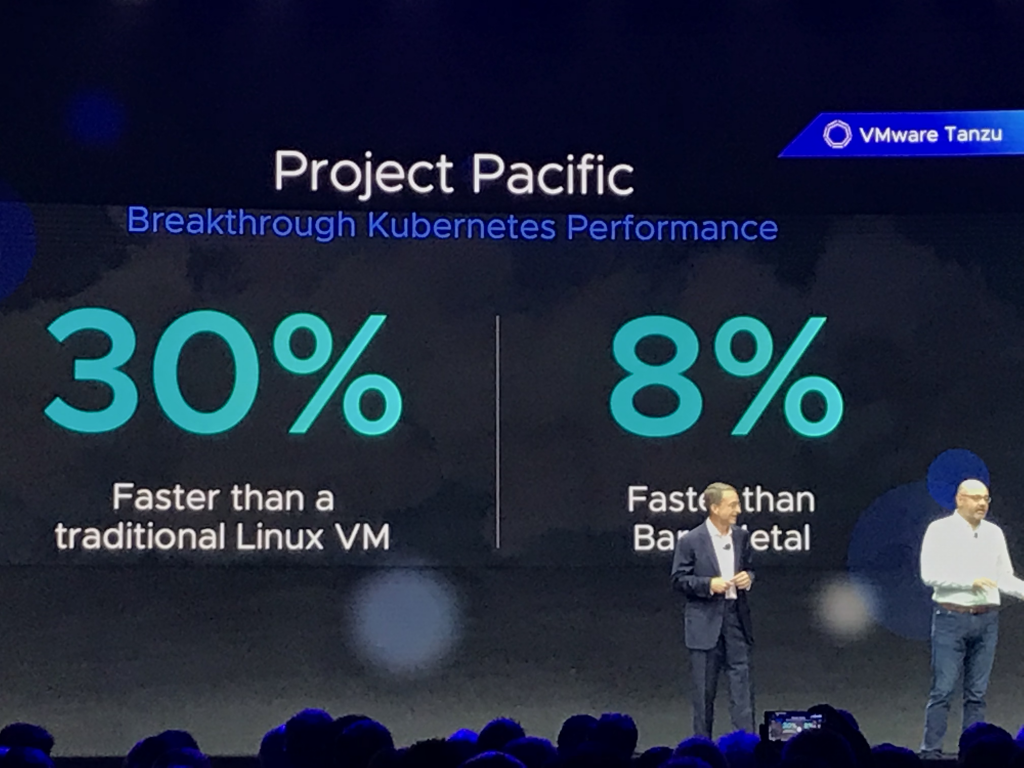
Extremely simplified, a vSphere Native Pod is a virtual machine. We took out all the unnecessary components and run a lightweight Linux kernel and a small container runtime (CRX). To utilize our years of experience of paravirtualization, we optimized this CRX in such a way that it outperforms containers running on the traditional platforms. As Pat mentioned in the keynote, 30% faster than a traditional Linux VM and 8% faster than bare-metal Linux.

The beauty of using a VM construct is that these vSphere Native Pods are isolated at the hypervisor layer. Unlike pods that run on the same Linux host which share the same Linux kernel and virtual hardware (CPU and memory). vSphere Native Pods have completely separate Linux Kernel and virtual hardware, hence much stronger isolation from security and resource consumption perspective. Simplifying security and ensuring proper isolation models for multi-tenancy.

Modern IT Centers Around Flexibility

It’s all about using the right tool for the job. The current focus of the industry is to reach cloud-native nirvana. However, cloud-native can be great for some products, while other applications benefit from a more monolith perspective. Most applications are a hybrid form of microservices mixed with stateful data collections. Project Pacific allows the customer to use the correct tool for the job; all managed and operated from a single platform.

VMware Breakouts to Attend or Watch

HBI4937BU – The future of vSphere: What you need to know now by Kit Colbert. Monday, August 26, 01:00 PM – 02:00 PM | Moscone West, Level 3, Room 3022

More to follow

Where Can I Sign Up for a Beta?

We called this initiative a project as it is not tied to a particular release of vSphere. Because it’s in tech preview, we do not have a beta program going on at the moment. As this project is a significant overhaul of the vSphere platform, we want to collect as much direct feedback from customers as we can. You can expect we will make much noise when the beta program of Project Pacific starts.

Stay tuned!

Filed Under: Uncategorized

VMworld US 2019 – Know Before You Go Podcast

July 22, 2019 by frankdenneman

Last week I had the pleasure of connecting again with my friends and colleagues Pete Flecha, Duncan Epping and amateur back up dancer to Pat Benatar, Mr. Ken Werneburg. During the podcast, we discussed the upcoming VMworld. As it is returning to San Francisco, it might be interesting to revisit your conference strategy.

Although Moscone Center has been rebuilt and expanded, I believe we are still using all three buildings; North, South, and West (Located at Howard and 3rd). So take at least a jacket with you, SF Summers can be treacherous

For more tips about what to wear, what to bring, and which sessions to attend, listen to the episode below or search for it on Spotify. I hope you enjoy the show as much as I did.

Filed Under: Podcast

  • « Go to Previous Page
  • Page 1
  • Interim pages omitted …
  • Page 13
  • Page 14
  • Page 15
  • Page 16
  • Page 17
  • Interim pages omitted …
  • Page 89
  • Go to Next Page »

Copyright © 2026 · SquareOne Theme on Genesis Framework · WordPress · Log in