• Skip to primary navigation
  • Skip to main content

frankdenneman.nl

  • AI/ML
  • NUMA
  • About Me
  • Privacy Policy

Allen, McKeown, and Kondo

April 24, 2019 by frankdenneman

The title is a reference to one of the most interesting books I have ever read, Escher, Godel, and Bach. Someone described it as, “Read this book if you like to think about thinking, as well as to think about thinking about thinking”. The three books I want to share my thoughts on are in a sense feeding and shaping the behavior that allows you to clear your mind and focus more on the task at hand.

The three books that I’m referring to are Getting Things Done (Allen), Essentialism (McKeown), and the KonMari (Kondo) method. They are written by three different authors, from three different continents, impacted by three different cultures in different years. Seemingly they have nothing to do with each other, but they complement each other so perfectly it’s downright amazing. After reading all three and re-reading them again, you start to discover hooks where these individual books mesh together

The three books are instrumental in the way on how I live my life. I can imagine other people in IT with a similar travel lifestyle can benefit from reading these books as well. When you travel a lot, you need to get everything in order, as you have to ensure you have the essentials with you. You sometimes have little time to decompress from your last trip and prepare for the next one. You have to keep track of meetings and obligations both in your personal life as well as your professional one. And above all, you want to avoid wasting time on mundane or trivial tasks while being at home and spend your precious time most optimally. Three books have changed my mindset, and they help me guide my decisions. It helps to provide clarity and streamline day-to-day tasks.

When this topic comes up during a conversation, many of the people I talk to end up buying one (or more) of these books, and it seems they catch the same bug, optimizing life, streamlining their behavior. I thought maybe it’s interesting to more people, let’s write an article about something else than hardcore CPU and Memory resource management. Let’s focus on how to manage time and to some extent energy.

Getting Things Done
The overall theme of Getting Things Done (GTD) is helping you manage to focus and therefore time. The main premise of the book in order, any time, everywhere. In your mind but also your surroundings. Instead of getting distracted by things that you need to do, the main rule is to do it immediately or write it down so you can do when appropriate. Writing it down and classifying the tasks helps to clear your mind, it helps you to focus on the task at hand. The author stresses to get rid of context switching.

A perfect example is the junk drawer. Every time you walk past the junk drawer, it reminds you that you need to sort it out. You need to sift through the junk and see what you can use or what can be tossed away. That’s the context switch. Here you are walking around your house thinking about your big project, and there’s that junk drawer again, providing you with the annoying feeling that you really need to sort that out. You don’t want that, you want your mind focused on bigger things, no guilt trips when walking around the house. That’s where the other two books come into play.

Same applies with the GTD method of categorizing tasks. To have oversight of the tasks at hand, you need to have a clear and tidy surrounding. You can’t keep efficient track of things if you have to go through a lot of junk to find the relevant to-do list. This scene in the movie Limitless is a perfect example. The protagonist is a writer who happens to be excellent in procrastinating. This results in no goals finished and an untidy house. When taking the cognitive expanding drugs, he wants to finish his life long goal of writing a book, but before he begins, he realizes that he cannot deal with any distraction and want order around him, resulting in a big cleanup of the house. That’s what GTD wants you to do as well, sans drugs of course.

Essentialism
When cleaning the house, you typically end up throwing things away. A time-consuming job that never seems to finish. Sometimes you come across that you can’t let go, but you also don’t know what to do with it. In the end, it generates a conflicting feeling, introducing a context switch every time you see it. Hooking back into GTD. Essentialism allows you to prevent this by restructuring your behavior when buying new things and helps you to understand the role of your current belongings. Essentialism is not a lot different than minimalism. However, there is one significant difference, and that is the factor of happiness. With essentialism, you get to rate your belongings on the scale of happiness and usefulness. Does it make you happy or is it useful in day to day activities? If answered yes, then keep it. The interesting thing is that the book starts to reshape your decision making – or better said, the selecting criteria when buying something new. After reading it, I began to buy less of the things that I was eyeing because they just didn’t meet both criteria completely.

The time of the acquisition process of an item is extended as you start to look for the object that provides the most happiness while delivering the required functionality. You begin to research the available options more thoroughly, it’s not uncommon to come to the conclusion that it’s better to approach the “problem” differently. You start to drive towards the essence of the problem, what am I solving here? Is there a better way. This ties in with a mindset that has been introduced by the book of Michael Hammer, reengineering the corporation. A fantastic book about redesigning processes, but I’ll cover that book another time. Another benefit of the elaborate purchase process is the occurrence of (re)buying a similar product, or actually the lack off. We’ve all bought a similar object after the first one because the current one wasn’t living up to its expectation or isn’t functioning properly. As you do your due diligence, you analyze the problem and research the best “tools” available. This can go as far as understand your preference of tactile feel of your cutlery. Trust me, you can go very far with applying this pattern of behavior. As a result, you surround yourself with a minimal set of objects that satisfy your needs perfectly. The stuff you have makes you very happy while decluttering your home as much as possible.

Another example is my collection of Air Jordan shoes. Completely unnecessary, but they bring me joy. I collected these from the period when I played basketball myself. In the beginning, it was almost like a free-for-all, get the next version that is released. Buying it because you can (almost must). After reading essentialism, I reviewed my collection. Yes, collecting specific models makes me happy, but most ones that I have are not meeting the criteria of some of the special ones. In result, I reduced my collection by 70%, sold them so others can have them while reducing “footprint” of the collection in the house. I applied focus to the collection. To this day, with everything that I buy I ask myself: Do I need it? And is this the best I can obtain? What I learned is that the majority of objects acquired after reading essentialism have a longer lifespan than buying the first thing you come across when discovering the need for it. It improves the sustainability of your household tremendously. In short, you end up with a lot less stuff in your house, making it easier to get it organized and clean, increasing or maintaining your focus to the choirs at hand.

The Life-changing Magic of Tidying Up (KonMari Method)
This book took the world by storm, I discovered that the author, Marie Kondo, now has a show on Netflix. Before you wonder, I do not talk to my socks and thank them for the days’ work. 😉 The key takeaway I had from reading this book is that junk is stuff that does not has a permanent place in your home. Everything that keeps moving through the house is junk. It generates context switching. To reduce junk, you have to learn some techniques about how to efficiently store things. Some things have exceeded their purpose and can be let go off. This ties back to the essentialism part. Does it make me happy or is it useful? These are excellent criteria to review all your belongings while cleaning up the house. By ending up with less stuff, it frees up room in your home to find permanent places for things that matter. And with a permanent location, it means less time spent on searching for things. Fewer context switches as the junk drawer is now the drawer that houses x, y, and z. I store my phone, wallet, keys in one particular place. When leaving the house, I do not waste time finding the stuff. I can maintain my focus while grabbing the necessities. The time to pack for a trip is significantly reduced, I just have to understand the weather and the purpose of the trip, I know exactly where everything is stored.

These three books helped me tremendously, maybe they can be of help to you as well, give them a try. Please leave a comment about the books that structurally changed your perception on how to deal with these type of things, hopefully, it expands the must-read book list of others and me.
Filed Under: Uncategorized

VMware Cloud on AWS on Virtually Speaking Podcast

April 9, 2019 by frankdenneman

Last week I had the pleasure of connecting again with my friends and colleagues Pete Flecha a.k.a PedroArrow and eternal sunshine John Nicholson. During the podcast, we discussed the road to Hybrid cloud, cloud mobility, multi-cloud operations, and the necessity of replatforming apps or not. It’s always fun hanging out with these guys especially when talking about cool things. Hope you enjoy the show as much as I did.

Filed Under: VMware Tagged With: #VirtSpeaking, #VMWonAWS, VMware

AMD EPYC and vSphere vNUMA

February 19, 2019 by frankdenneman

AMD is gaining popularity in the server market with the EPYC CPU platform. The EPYC CPU platform provides a high core count and a large memory capacity. If you are familiar with previous AMD generations, you know AMD’s method of operation is different than Intel’s. For reference, take a look at the article I wrote in 2011 about the 12-core 6100 Opteron code name Magny-Cours. EPYC provides an increase of scale but builds on the previously introduced principles. Let’s review the EPYC architecture and see how it can impact your VM sizing and ESXi configuration. (Please note that this article is NOT intended as a good/bad comparison between AMD and Intel, I’m just describing the architectural differences).

EPYC Architecture
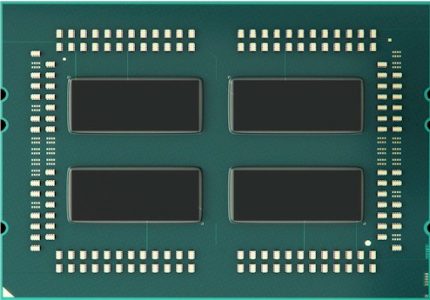
The EPYC processor architecture is what AMD refers to as a Multi-Chip-Module (MCM). EPYC is designed to provide a high core count platform by combining multiple silicon dies within a CPU Package. A silicon die (named Zeppelin) is a wafer that contains the circuitry. In simple terms, it’s the component that contains CPU cores, memory cache, and various controllers. Regardless of the core-count, an EPYC CPU package always contains four Zeppelin dies. Comparing this to Intel Xeon, a Xeon CPU package is a single-chip-design which consist of a single silicon die containing all components. The reason why the difference in chip design is interesting is that impacts the logical grouping of compute resources. The size of the logical group, better known as a NUMA node, impacts scheduling decisions made by the CPU scheduler of the operating system (both the hypervisor kernel and possibly the guest operating system). It might be necessary to change some of the default settings of the ESXi host to alter scheduling behavior, these settings are covered in the last part of the article. Let’s continue to explore the architecture of the EPYC CPU.

AMD EPYC – image courtesy of wccftech.com

Compute Complex
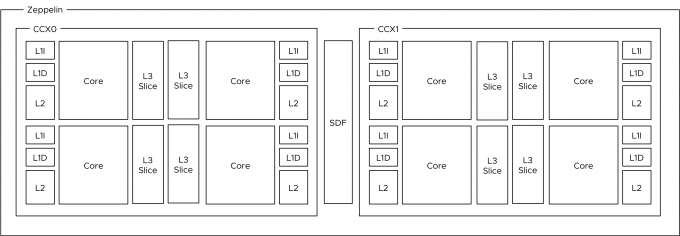
The photo above provides a clear overview of the structure of the CPU package. The CPU package houses four Zeppelin dies. In the current generation, a Zeppelin die provides a maximum of eight Zen cores. The cores are divided across two compute complexes (CCX). A Zeppelin of a 32 core EPYC contains 4 cores per CCX. When Simultaneous Multi-Threading (SMT) is enabled within the BIOS, a CCX offers eight threads.

Zeppelin CCX Layout of 32 Core EPYC

Each core has its own L1 (instruction (64KB) and data (32KB)) and L2 caches (4 MB total L2 cache). A Zeppelin has 16 MB L3 cache. Interestingly enough, each CCX has it’s own L3 Cache of 8MB, in turn, split up into four slices of 2 MB. The two CCXes within a Zeppelin die are connected to each other through an interconnect (Infinity Fabric). Adding hops to memory access is not beneficial to bandwidth and latency. Multiple tech-sites have performed in-depth testing on cache performance, and to quote Anandtech.com:

“The local “inside the CCX” 8 MB L3-cache is accessed with very little latency. But once the core needs to access another L3-cache chunk â€“ even on the same die â€“ unloaded latency is pretty bad: it’s only slightly better than the DRAM access latency.” 

In essence, this means that you cannot think of the 64MB L3 cache as one single pool of cache capacity. Better is to approach it as eight 8MB capacity pools. This is important to realize if multiple workloads share the same data, the NUMA scheduler of ESXi attempts to place both workloads in the same NUMA node to optimize cache and memory performance for these workloads. It might happen that the L3 cache size is not sufficient enough. The option that impacts this behavior is called Action Affinity, more details about this setting can be found in the last part of the article.

Zeppelin Core Count
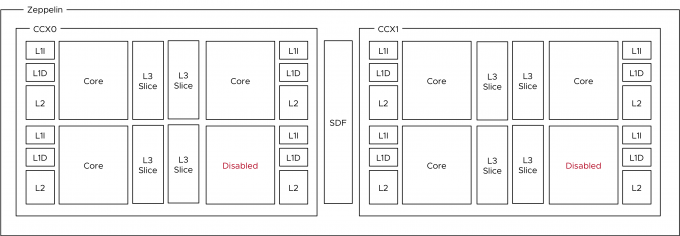
EPYC is offered in multiple SKUs. Next, to the 32 core count model, there are lower-core count models. Since the EPYC architecture always includes four Zeppelins, the difference in core count is created by disabling cores per CCX in a symmetrical way. For example, in a 24 core count EPYC, a single Zeppelin die would look like this.

Zeppelin design of 24 Core EPYC

The table shows the core count per Zeppelin of the three largest EPYC CPUs. The total cores per Zeppelin count can be used as a guideline for the vNUMA setting described later in this article

CoresCores per CCXTotal Cores per ZeppelinZeppelin Count
32484
24364
16244

Infinity Fabric
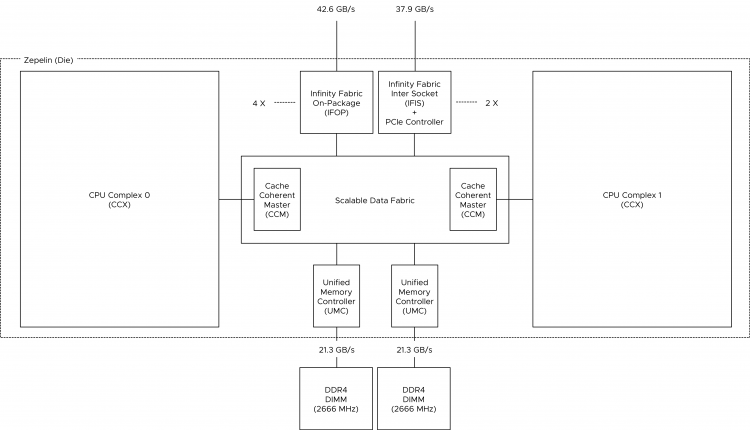
The cores within a CCX communicate with memory (DIMMs) via an on-die memory controller through the infinity Fabric. The Infinity fabric is AMD’s proprietary system interconnect architecture that facilitates data and control transmission across all linked components. The Infinity Fabric consists of two communication planes; the Scalable Data Fabric (SDF) and the Infinity Scalable Control Fabric (SCF). The SCF is responsible for processing system control signals, such as thermal and power management. Although very important, we are more interested in the SDF which is responsible for transmitting data within the system. The rest of the article zooms into SDF design and its impact on scheduling decisions.

Each CCX is connected to the SDF through the Cache-Coherent Master (CCM) that is responsible for sending coherent data traffic cross CCXes. The SDF uses a Unified Memory Controller (UMC) to connect to DRAM memory modules. Each UMC provides a memory channel to two DIMMs. Providing the memory capacity of 4 DIMMs in total.

Zeppelin CCX and SDF Architecture

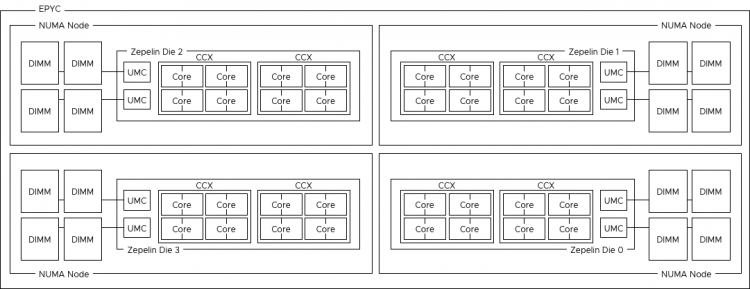
How does this design impact VM sizing? A Zeppelin is a NUMA node that contains a maximum of 8 cores (16 threads) with the memory capacity of four DIMMs. This design results in a single EPYC CPU package presents four NUMA nodes to the operating system.

Server Memory Capacity and NUMA
Intel moved from a 3 DIMMs per channel configuration (DPC) with 4 channels to a model with 6 channels and 2 DIMMs deep. This new model broke the capacity model cadence. For example, using 16 GB DIMMs, you had either 64 GB, 128GB or 192GB available per socket. Now with the scalable architecture, it’s either 96GB or 192GB. That is if you follow the high- performance best practice of populating all channels for maximum bandwidth availability. However, with the current DIMM pricing, a lot of customers cannot afford such a configuration.

With the EPYC, every Zeppelin has two memory channels. Each memory channel can drive two DIMMs. For good performance, each Zeppelin should be equipped with at least 1 DPC. That means that a proper performing dual socket EPYC system should be configured with 16 DIMMs. This configuration allows for a theoretical bandwidth of 42.6 GB/s while providing a (shallow) memory capacity of just the two DIMMs combined. This design results in a single EPYC CPU package presents four NUMA nodes to the operating system. If the minimum of 1DPC is used, the NUMA node size can be too small and thus the overall performance if the VM memory size exceeds the physical memory configuration of each Zeppelin. Servethehome published some benchmark tests about the performance difference between the different memory configurations of EPYC.

1 EPYC CPU Package = 4 NUMA Nodes

With NUMA, it’s important to understand the boundaries of your local memory domain and your remote memory domain. Traditionally the domains were easily demarcated by the CPU package core count and attached memory capacity. With EPYC, a new distinction has to be made between the different remote memory access types. It can be remote on-package memory access or remote socket memory access. The reason why this distinction has to be made is the impact on performance and consistency of application memory access. Having your VM and application span multiple NUMA nodes can introduce a very inconsistent response time.

Local Memory Access 
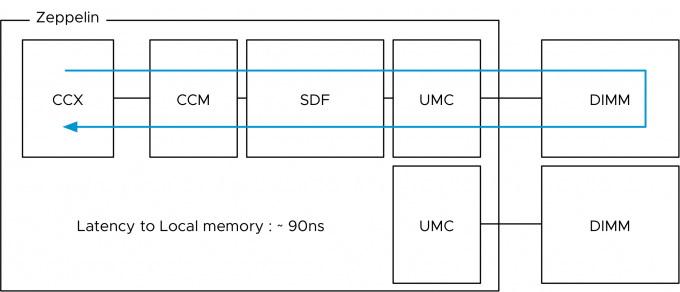
Let’s start with the best and most consistent performance. When a core within the Zeppelin access local memory the path is as follows:

Local Memory Access

The presentation “Zeppelin an SOC for Multi-Chip Architectures” by AMD list the latency of local memory access within the Zeppelin at 90 nanoseconds.

Remote Memory Access On Package
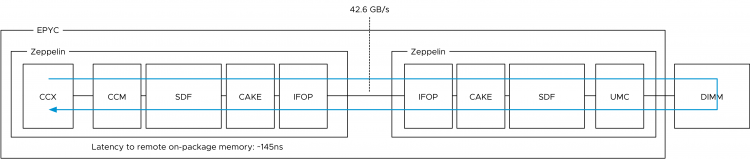
A core can access memory attached to a different Zeppelin within the same CPU package. This is called remote on-package memory access or “on-package Die-to-Die” memory access. This means we are still using memory controllers within the same socket. In total the EPYC CPU has eight memory channels, but two are local to the Zeppelin. To access a “remote” on-package memory controller the Infinity Fabric On Package Controller (IFOP) sets up and coordinates the data communication.

In total each Zeppelin has 4 IFOPs, but actually, only three are needed since there are 3 other Zeppelins within the same CPU package.

To be more precise, the IO traverses an additional component before hitting the IFOP. This component is called the Coherent AMD socKet Extender (CAKE). It facilitates die-to-die or socket-to-socket memory transactions. This module translates the request and response formats used by the SDF transport layer to and from the serialized format used by the IFOP. What that means is that a few extra hops and CPU cycles are introduced when fetching data stored within DIMMs attached to other Zeppelins on the same die. AMD reports a latency of ~145ns.

Remote Memory Access within EPYC CPU

Inter Package Remote Access
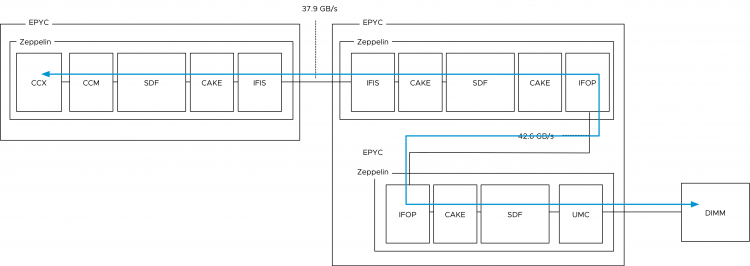
And then we have the chance that memory needs to be fetched from DIMMs attached to UMCs from a Zeppelin that is a part of another EPYC CPU package within the system (dual socket system). Instead of routing the traffic across the IFOP, the traffic is routed across Infinity Fabric Inter Socket (IFIS) controller. Package-to-package traffic has 8/9 of the bandwidth of IFOP traffic, resulting in a theoretical bandwidth of 37.9 GB/s. The reduction in bandwidth increases the chance of experiencing inconsistent performance. The increased length of the path, increments latency. AMD reports a latency of ~200ns.

Remote Access Across EPYC CPUs

Because there are two IFIS controllers per Zeppelin, not every Zeppelin within a dual socket system is directly connected to each other. In the worst case scenario, there are two hops. One hop from one package to the other package and an extra hop to go from one Zeppelin to the Zeppelin that is connected to the DIMM holding the data. Unfortunately, AMD as not shared latency data.

Remote Access Inter-package, die-to-die communication

VM Sizing
The key is to keep memory access as much local as possible. ESXi and most modern guest operating systems are optimized to deal with NUMA. However as with most things in life, for the most optimal performance, reduce distance and reduce any form of variation. Apply this to VM sizing and try to keep the vCPU count of a VM within the core count of NUMA domain. Same applies to VM memory capacity, try to fit this with the capacity of the NUMA node. If the VM cannot fit inside a NUMA node, there is no need to stress, ESXi has got the best NUMA scheduler in the business. To help ESXi to optimize for the EPYC architecture, some advanced settings might be necessary to adjust. As always, tests these settings in a non-revenue critical environment before applying them to production systems.

Virtual NUMA
Virtual NUMA (vNUMA) allows the operating system to understand the “physical” layout of the virtual machine. vNUMA presents the mapping of the VM vCPU to the physical NUMA nodes of the ESXi host. For example, if a VM has 12 vCPUs and the physical core count within a single NUMA node was 10 cores, ESXi would present the guest OS a topology of 2 NUMA nodes with each counting 6 cores. ESXi would group 6 vCPUs into a NUMA client and schedule these across the 10 CPU cores within a NUMA node.

When vNUMA was introduced, the highest core count of a CPU was 8 CPUs, thus the VMware engineers introduced a vNUMA threshold of 9 (numa.vcpu.min=9). Meaning that the VM needs to contain at least 9 vCPUs in order to generate the virtual NUMA topology.Considering the highest core-count of an EPYC system is eight cores per Zeppelin, you might want to adjust the vNUMA default threshold to resemble the physical layout of the used EPYC model.

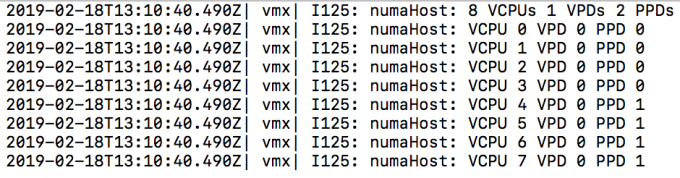
For example, the EPYC 7401 contains 24 cores, 6 cores per Zeppelin and thus 6 cores per NUMA node. When using the default setting of numa.vcpu.min=9, an 8 vCPU VM is automatically configured like this.

Screenshot by @AartKenens

A VPD is the virtual NUMA client that is exposed to the guest OS system, while a PPD is the NUMA client used by the VMkernel CPU scheduler. In this situation, the ESXi scheduler uses two physical NUMA nodes to satisfy CPU and memory requests while the guest OS perceives the layout as a Uniform Memory Access (UMA) system. In a UMA system, the access time to a memory location is independent of which processor makes the request, or which memory chip contains the transferred data). I.e., pretty much the same latency and bandwidth throughout the system. However, this is not the case as reported in this article above. Reading and writing remote CCX cache and remote memory (on-die) is slower than local memory even within the same Zeppelin. By setting the numa.vcpu.min=6, two VPDs are created, and thus the guest OS is made aware of the physical layout by the ESXi scheduler. The guest OS and the applications can optimize memory operations to attain consistent performance.

Action Affinity
When the ESXi scheduler detects multiple VMs communicating with each other, it can decide of placing them together on the same NUMA node to increase intra-NUMA node communication. This behavior is called action affinity, and it can increase performance by up to 30%. However, with the small NUMA nodes of max 8 CPUs, it can also lead to a lot of cache thrashing and remote memory access if the configured memory of the VMs cannot fit inside a single NUMA node. If this is the case, it might be helpful to test disabling the action affinity on the ESXi host. This is done by configuring the /Numa/LocalityWeightActionAffinity to 0 (KB 2097369).

What if the VM Memory Config Exceeds the Memory Capacity of the Physical NUMA Node?
I wrote an article about this situation back in 2017, and it’s featured in the vSphere 6.5 Host deep dive book. However, what happens if your VM memory configuration exceeds the physical capacity of a NUMA node. By default, the ESXi scheduler optimizes for local memory access and attempts to place as much memory along with the vCPU in the same NUMA node. Sometimes it can improve local memory access to creating multiple smaller NUMA clients.

For example, on an EPYC 7601 (32 core), the NUMA node contains 8 cores, and this server is equipped with 256 GB by using 16 x 16 GB DIMMs. A NUMA node has 4 DIMMs attached to it. Thus the NUMA node provides 8 cores and 64 GB. What happens if a VM is configured with 6 vCPUs and 96 GB? By default the NUMA scheduler attempts to store 64GB of VM memory inside the NUMA node, leaving 32 GB in a remote NUMA node. By enabling the VM advanced setting numa.consolidate = FALSE. It instructs the NUMA scheduler to distribute the VM configuration across the optimal number of NUMA nodes greater than 1. In this case, 2 NUMA clients are created, and this will schedule 3 vCPUs in each NUMA node.

Now the performance and the behavior of the application depends on its design. If you have a single-threaded application, this setting might not be helpful at all. However, if it’s a multi-threaded application, you might see some benefit. The only thing to do is to set the numa.vcpu.min equal to the number of vCPUs per virtual NUMA client to expose the vNUMA architecture to the guest OS and the application. The following command helps you to retrieve the NUMA configuration of the VM:

vmdumper -l | cut -d \/ -f 2-5 | while read path; do egrep -oi “DICT.(displayname.|numa.|cores.|vcpu.|memsize.|affinity.)= .|numa:.|numaHost:.” “/$path/vmware.log”; echo -e; done

Please bear in mind that the ESXi CPU and NUMA scheduler do not use an SRAT (System Resource Allocation Table) to determine the distance of the individual NUMA nodes between each other. ESXi uses its own method to determine latency between the different NUMA nodes within the system. It uses these latency numbers for initial placement and attempts to schedule the NUMA clients of a VM as close to each other as possible. However, the ESXi scheduler does not leverage this information during load-balancing operations. This is work in progress. Adding a new first class metric to a heuristic is not a simple task and knowing the CPU engineers, they want to provide a system that is thoroughly improved by augmenting new code.

Increase NUMA Node Compute Sizing
For workloads that are memory latency sensitive with a low processor utilization, you can alter the way the NUMA scheduler sizes the NUMA client of that particular VM. The VM advanced setting numa.vcpu.preferHT=TRUE allows the NUMA scheduler to count threads instead of cores for NUMA node size configuration. For example, an 8 vCPU VM that uses this advanced setting and runs on an EPYC 7401 system (6 cores, 12 threads), is scheduled within a single Zeppelin.
If all workloads follow the same utilization pattern, you can alter the ESXi host setting by adding numa.PreferHT=1 to the ESXi host advanced configuration.

Channel-Pair Interleaving (1 NUMA node per socket)
The EPYC architecture can interleave the memory channels and thus present the cores of the four zeppelins as a single NUMA node. This setting requires that every channel is populated with equal memory size. Some vendors use a different name for it. For example, Dell calls this setting “Memory Die Interleaving”. Little to no data can be found about the performance impact of this setting, but keep in mind, software settings do not change the physical layout (and thus physics). Typically abstraction filters out the outliers and presents an average performance behavior. For NUMA benchmarking, please take a look at the article “AMD EPYC – STREAM, HPL, InfiniBand, and WRF Performance Study” located on the Dell website.

Research Your Workload Requirements
ESXi can handle complex NUMA architectures as the best. However, it’s always best to avoid complexity as possible. Determine if your workload can fit in a minimum number of small NUMA nodes when using the EPYC architecture? Can the workload handle inconsistent memory performance if it does exceed the NUMA node size of 8? The EPYC architecture is an excellent way of adding scale to the server platform but do remember that for real-life workload optimal performance is achieved when you take the NUMA configuration boundaries into account.

On Twitter some asked what my thoughts are about the EPYC CPU architecture? For every tech challenge, there is a solution. When looking at the architecture, I think EPYC is an excellent solution for small and medium-sized workloads. I expect that larger monolithic apps, that require consistent performance, are better off looking at different architectures. (My opinion, not VMware’s!)

Filed Under: NUMA, VMware

Kubernetes, Swap and the VMware Balloon Driver

November 15, 2018 by frankdenneman

Kubernetes requires to disable the swap file at the OS level. As stated in the 1.8 release changelog: The kubelet now fails if swap is enabled on a node.

Why disable swap?
Turning off swap doesn’t mean you are unable to create memory pressure. Why disable such a benevolent tool? Disable swap doesn’t make any sense if you look at it from a single workload, single system perspective.
However, Kubernetes is a distributed system that is designed to operate at scale. When running a large number of containers on a vast fleet of machines, you want predictability and consistency. Disabling swap is the right approach. It’s better to kill a single container than to have multiple containers run on a machine at unpredictable, probably slow, rate.

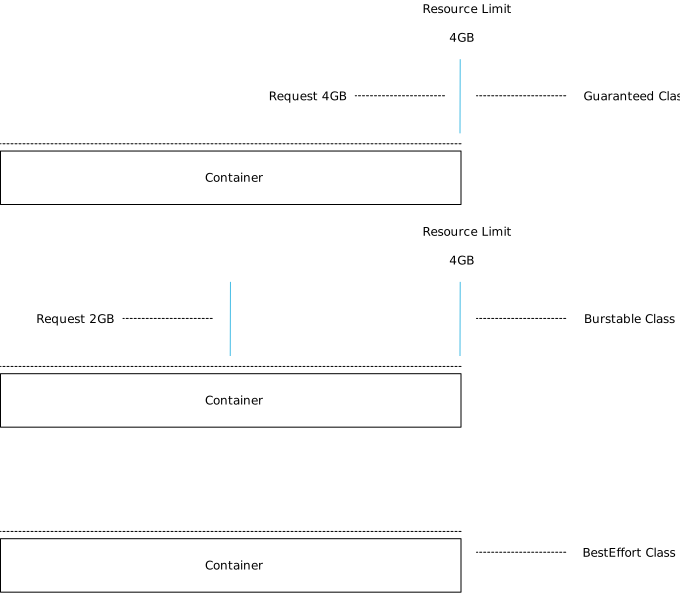
Therefore the kubelet is not designed to handle swap situations. It’s expected that workload demand should fit within the memory of the host. On top of that, it is recommended to apply quality of service (QoS) settings to workloads that matter. Kubernetes provides three QoS classes to pods; Guaranteed, Burstable, and BestEffort .

Kubernetes provides the construct request to ensure the availability of resources. Similar to reservations at the vSphere level. Guaranteed pods have a request configuration that’s equal to the CPU and memory limit. All memory the container can consume is guaranteed, and therefore it should never need swap. With Burstable a portion of the CPU and memory is protected by a request setting, while a BestEffort pod does not have a CPU and memory request and limit setting specified.

Multi-level Resource Management
Resource management is difficult, mainly when you deal with virtualized infrastructure. You have to ensure the workloads receive the resources they require. Furthermore, you want to drive the utilization of the infrastructure in an economically sound manner. Sometimes resources are limited, and not all workloads are equal, thus adding another level of complexity of prioritization. Once you solved that problem, you need to think about availability and serviceability.

Now the good news is that this is relatively easy with boundaries introduced by virtual machine configuration. I.e., you specify the size of the VM by assigning it CPU and memory resources. And this becomes a bin packing problem. Given n items of different weights and bins each of capacity c, assign each item to a bin such that the number of total used bins is minimized.

A virtual machine is, in essence, a virtual hardware representation. You define the size of the box, with the number of CPUs and the amount of memory. This is a mandatory step in the virtual machine creation process.

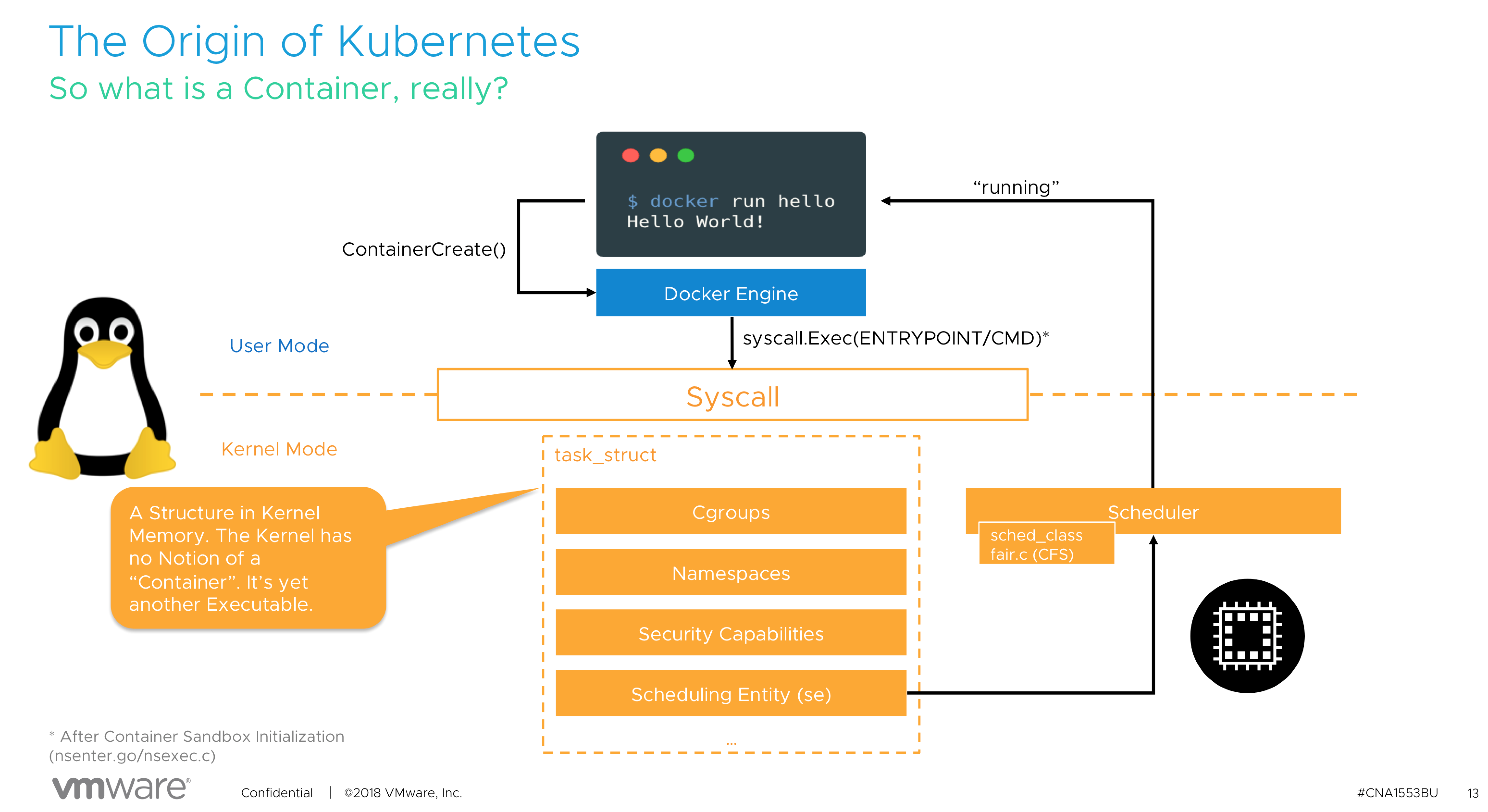
With containers it’s a little bit different. In its default state, the most minimal configuration, a container inherits the attributes of the system it runs on. It is possible to consume the entire system, depending on a workload. (a single threaded application, might detect all CPU cores available in the system, but its nature won’t allow it to run on more than a single core. In essence, a container is a process running in the Linux OS.


For a detailed explanation, please (re)view our VMworld session, CNA1553BE.

This means that if you do not specify any limit, the container has no restriction of how much resources such a pod can use. Similar to vSphere admission control, you cannot overcommit reserved resources. Thus, if you commit to an IT policy that only allows configuration of Guaranteed pods, you leverage Kubernetes admission control to avoid overcommitment of resources.

One of the questions to solve either on a technical level or organization level is, how you are going to control pod configuration? From a technical level, you can solve this by using Kubernetes admission control, but that is out of scope for this article.

Pod utilization is ultimately limited by the resources provided by the virtual machine, but you still want to provide predictability and consistency service to all workloads deployed in containers. Guarantees are only as good as the underlying foundation they are built upon. So how do you make sure behavior remains consistent for pods?

Leveraging vSphere Resource Management Constructs
When running Kubernetes within virtual machines (like the majority of the global cloud providers), you have to control the allocation of resources on multiple levels.

From the top-down, the container is scheduled by Kubernetes on a worker node, predominantly Linux is used in the Kubernetes world, so let’s use that as an example. The guest OS allocates the resources and schedules the container. Please remember that a container is just a set of processes that are isolated from the rest of the system. Containers share the same operating system kernel and thus it’s the OS responsibility to manage and maintain resources. Lastly, the virtual machine runs on the hypervisor and the VMkernel manages resource allocation.

VM-Level Reservation
To ensure resources to the virtual machine, two constructs can be used. VM-level reservations or Resource Pool reservations. With VM-level reservations, the (ESXi host) physical resources are dedicated to the virtual machine, once allocated by the guest OS, it’s not shared with other virtual machines running on that ESXi host. This is the most deterministic way to allocate physical resources. However, this method impacts the virtual machine consolidation ratio. When using the vSphere HA admission control policy of Slot Policy it can impact the VM consolidation ratio at cluster level as well.

Resource Pool Reservation
A resource pool reservation is dynamic in nature. The resources backed by a reservation are distributed amongst the child-objects of the resource pool by usage and priority. If a Kubernetes worker node is inactive or running at a lower utilization-rate, these resources are allocated to other (active) Kubernetes worker nodes within the same resource pool. Resource Pools and Kubernetes are a great fit together, however, resource pool sizing must be adjusted when the Kubernetes cluster is scaled out with new workers. If the resource pool reservation is not adjusted, resources are allocated in an opportunistic manner from the cluster, possibly impacting predictability and consistency of resource behavior.

Non-overcommitted Physical Resources
Some vSphere customers design and size their vSphere clusters to fully back virtual machine memory with physical memory. This can be quite costly, but it does reduce operational overhead tremendously. The challenge is the keep the growth of the physical cluster aligned with the deployment of workload.

Overcommited Resources
But what if this strategy does not go the way as planned? What if for some reason resources are constrained within a host and the VMkernel applies one of its resource reclamation techniques? One of the feature that is in the first line of defense is the balloon driver. Designed to be as non-intrusive as possible to the applications running inside the VMs.

Balloon Driver
The balloon driver is installed within the guest VM as part of the VMware-Tools package. When memory is over-committed the ESXi server reclaims memory by instructing the balloon driver to inflate by allocating pinned physical pages inside the guest OS. This causes memory pressure within the guest OS which invokes its own native memory management techniques to reclaim memory. Balloon driver then communicates these physical pages to the VMkernel which can then reclaim the corresponding machine page. Deflating the balloon driver releases the pinned pages and frees up memory for general use by the guest OS.

The interesting part is the dependencies of guest OS native memory management techniques. As a requirement, the swap file inside the guest OS needs to be set to disabled when you install Kubernetes. Otherwise, the kubelet won’t start. The swap file is the main reason why the balloon driver is so non-intrusive. It allows the guest OS to select memory page it deems fit. Typically these are idle pages and thus the working set of the application is not affected. What happens if the swap file is disabled. Is the balloon driver disabled? The answer is no.

Let’s verify if the swap file is disabled, by using the command cat /proc/swaps. Just to be sure I used another command swapon -s. Both outputs shows no swap file.

The command vmware-toolbox-cmd stat balloon shows the balloon driver size. Just to be sure I used another command lsmod | grep -E ‘vmmemctl|vmware_balloon to show if the balloon driver is loaded
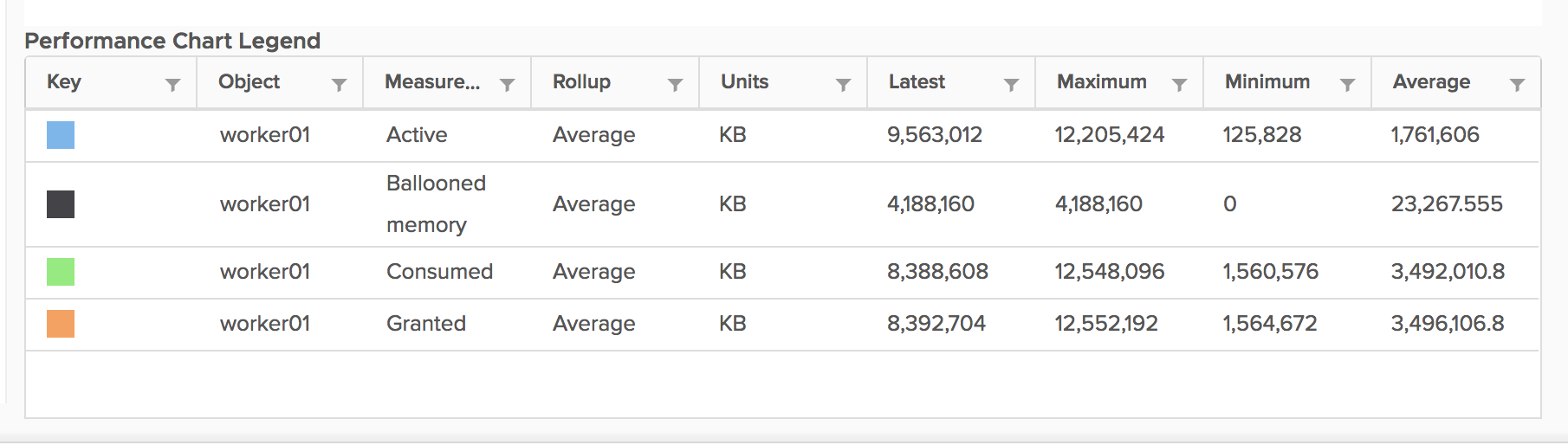
I created an overcommit scenario on the host and soon enough the balloon driver kicked into action.

The command vmware-toolbox-cmd stat balloon confirmed the output of the stats showed by vCenter. The balloon driver pinned 4GB of memory within the guest.


4GB memory pinnned, but top showed nothing in swap.

dmesg shows the kernel messages, one of them is the activity of the OOM Killer. OOM stands for out of memory.

According to online description: The Out-Of-Memory Killer process that It is the task of the OOM Killer to continue killing processes until enough memory is freed for the smooth functioning of the rest of the process that the Kernel is attempting to run.

The OOM Killer has to select the best process(es) to kill. Best here refers to that process which will free up the maximum memory upon killing and is also the least important to the system.

The primary goal is to kill the least number of processes that minimizes the damage done and at the same time maximizing the amount of memory freed.

Beauty is in the eye of the beholder, but I wouldn’t call killing CoreDNS the best process to kill in a Kubernetes system.

Guaranteed Scheduling For Critical Add-On Pods
In the (must-watch) presentation at Kubecon 2018, Michael Gasch provided some best practices from the field. One of them is to protect critical system pods, like DaemonSets, Controllers and Master Components.

In addition to Kubernetes core components like api-server, scheduler, controller-manager running on a control plane (master) nodes there are a number of add-ons which run on a worker node . Some of these add-ons are critical to a fully functional cluster, such as CoreDNS. A cluster may stop working properly if a critical add-on is evicted. Please take a look at the settings and recommendations listed in “Reserve Compute Resources for System Daemons“.

Please keep in mind that the guest OS, the Linux kernel, is a shared resource. Kubernetes runs a lot of its services as containers, however, not everything is managed by Kubernetes. For these services, it is best to monitor these important Linux resources in order that you don’t run out of them if you are using the QoS classes other than guaranteed.

Exploring the Kubernetes Landscape
For the vSphere admin who is just beginning to explore Kubernetes, we recommend keeping the resource management constructs aligned. Use reservations at the vSphere level and use guaranteed QoS class for your pods at the Kubernetes level. Solely using Guaranteed QoS class won’t allow for overcommitment, possibly impacting cluster utilization, but it gives you a nice safety net to learn Kubernetes without chasing weird behavior due to processes such as the OOM killer.

Thanks to Michael Gasch for the invaluable feedback

Filed Under: Kubernetes, VMware

Free vSphere Clustering Deep Dive Book at VMworld Europe

November 2, 2018 by frankdenneman

Last year Rubrik gave away hard copies of the vSphere Host Deep Dive book, this year they are doing it again with the vSphere 6.7 Clustering Deep Dive Book.

Come by the Rubrik Booth #P305 on Tuesday from 4:00 PM – 5:00 PM to get a signed, complimentary copy of vSphere 6.7 Clustering Deep Dive and meet the authors.

Last year we gave away a thousand copies and were gone within an hour. As most of you can remember, the line was insane. This year we have a similar amount, so make sure you’re on time.

Filed Under: VMware

  • « Go to Previous Page
  • Page 1
  • Interim pages omitted …
  • Page 14
  • Page 15
  • Page 16
  • Page 17
  • Page 18
  • Interim pages omitted …
  • Page 89
  • Go to Next Page »

Copyright © 2026 · SquareOne Theme on Genesis Framework · WordPress · Log in