The ‘Draft’ of the vSphere 4.1 Hardening guide has been released. This draft will remain posted for comments until approximately the end of February 2011.The official document will be released shortly after the draft period. Please see the following:
http://communities.vmware.com/docs/DOC-14548
AMD Magny-Cours and ESX
AMD’s current flagship model is the 12-core 6100 Opteron code name Magny-Cours. Its architecture is quite interesting to say at least. Instead of developing one CPU with 12 cores, the Magny Cours is actually two 6 core “Bulldozer” CPUs combined in to one package. This means that an AMD 6100 processor is actually seen by ESX as this:
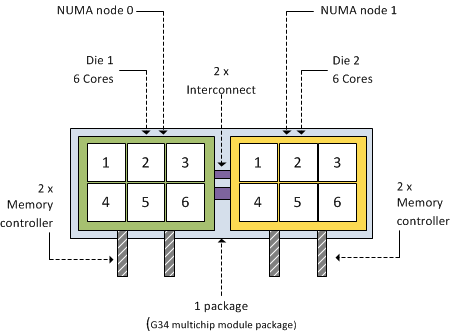
As mentioned before, each 6100 Opteron package contains 2 dies. Each CPU (die) within the package contains 6 cores and has its own local memory controllers. Even though many server architectures group DIMM modules per socket, due to the use of the local memory controllers each CPU will connect to a separate memory area, therefore creating different memory latencies within the package.
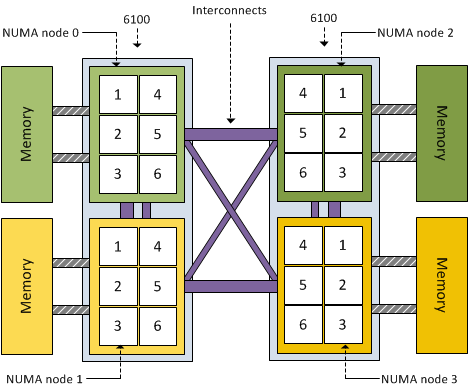
Because different memory latency exists within the package, each CPU is seen as a separate NUMA node. That means a dual AMD 6100 processor system is treated by ESX as a four-NUMA node system:
Impact on virtual machines
Because the AMD 6100 is actually two 6-core NUMA nodes, creating a virtual machine configured with more than 6 vCPUs will result in a wide-VM. In a wide-VM all vCPUs are split across a multitude of NUMA clients. At the virtual machine’s power on, the CPU scheduler determines the number of NUMA clients that needs to be created so each client can reside within a NUMA node. Each NUMA client contains as many vCPUs possible that fit inside a NUMA node.That means that an 8 vCPU virtual machine is split into two NUMA clients, the first NUMA client contains 6 vCPUs and the second NUMA client contains 2 vCPUs. The article “ESX 4.1 NUMA scheduling” contains more info about wide-VMs.
Distribution of NUMA clients across the architecture
ESX 4.1 uses a round-robin algorithm during initial placement and will often pick the nodes within the same package. However it is not guaranteed and during load-balancing the VMkernel could migrate a NUMA client to another NUMA node external to the current package.
Although the new AMD architecture in a two-processor system ensures a 1-hop environment due to the existing interconnects, the latency from 1 CPU to another CPU memory within the same package is less than the latency to memory attached to a CPU outside the package. If more than 2 processors are used a 2-hop system is created, creating different inter-node latencies due to the varying distance between the processors in the system.
Magny-Cours and virtual machine vCPU count
The new architecture should perform well, at least better that the older Opteron series due to the increased bandwidth of the HyperTransport interconnect and the availability of multiple interconnects to reduce the amounts of hops between NUMA nodes. By using Wide-VM structures, ESX reduces the amount of hops and tries to keep as much memory local. But –if possible- the administrator should try to keep the virtual machine CPU count beneath the maximum CPU count per NUMA node. In the 6100 Magny-Cours case that should be maximum 6 vCPUs per virtual machine
Node Interleaving: Enable or Disable?
There seems to be a lot of confusion about this BIOS setting, I receive lots of questions on whether to enable or disable Node interleaving. I guess the term “enable” make people think it some sort of performance enhancement. Unfortunately the opposite is true and it is strongly recommended to keep the default setting and leave Node Interleaving disabled.
Node interleaving option only on NUMA architectures
The node interleaving option exists on servers with a non-uniform memory access (NUMA) system architecture. The Intel Nehalem and AMD Opteron are both NUMA architectures. In a NUMA architecture multiple nodes exists. Each node contains a CPU and memory and is connected via a NUMA interconnect. A pCPU will use its onboard memory controller to access its own “local” memory and connects to the remaining “remote” memory via an interconnect. As a result of the different locations memory can exists, this system experiences “non-uniform” memory access time.
Node interleaving disabled equals NUMA
By using the default setting of Node Interleaving (disabled), the system will build a System Resource Allocation Table (SRAT). ESX uses the SRAT to understand which memory bank is local to a pCPU and tries* to allocate local memory to each vCPU of the virtual machine. By using local memory, the CPU can use its own memory controller and does not have to compete for access to the shared interconnect (bandwidth) and reduce the amount of hops to access memory (latency)

* If the local memory is full, ESX will resort in storing memory on remote memory because this will always be faster than swapping it out to disk.
Node interleaving enabled equals UMA
If Node interleaving is enabled, no SRAT will be built by the system and ESX will be unaware of the underlying physical architecture.

ESX will treat the server as a uniform memory access (UMA) system and perceives the available memory as one contiguous area. Introducing the possibility of storing memory pages in remote memory, forcing the pCPU to transfer data over the NUMA interconnect each time the virtual machine wants to access memory.
By leaving the setting Node Interleaving to disabled, ESX can use System Resource Allocation Table to the select the most optimal placement of memory pages for the virtual machines. Therefore it’s recommended to leave this setting to disabled even when it does sound that you are preventing the system to run more optimally.
Get notification of these blogs postings and more DRS and Storage DRS information by following me on Twitter: @frankdenneman
Impact of oversized virtual machines part 2
In part 1 of the series of post on the impact of oversized virtual machines NUMA architecture, memory overhead reservation and share levels are reviewed, part 2 zooms in of the impact of memory overhead reservation and share levels on HA and DRS.
Impact of memory overhead reservation on HA Slot size
The VMware High Availability admission control policy “Host failures cluster tolerates” calculates a slot size to determine the maximum amount of virtual machines active in the cluster without violating failover capacity. This admission control policy determines the HA cluster slot size by calculating the largest CPU reservation, largest memory reservation plus it’s memory overhead reservation. If the virtual machine with the largest reservation (which could be an appropriate sized reservation) is oversized, its memory overhead reservation still can substantial impact the slot size.
The HA admission control policy “Percentage of Cluster Resources Reserved” calculate the memory component of its mechanism by summing the reservation plus the memory overhead of each virtual machine. Therefore allowing the memory overhead reservation to even have a bigger impact on admission control than the calculation done by the “Host Failures cluster tolerates” policy.
DRS initial placement
DRS will use a worst-case scenario during initial placement. Because DRS cannot determine resource demand of the virtual machine that is not running, DRS assumes that both the memory demand and CPU demand is equal to its configured size. By oversizing virtual machines it will decrease the options in finding a suitable host for the virtual machine. If DRS cannot guarantee the full 100% of the resources provisioned for this virtual machine can be used it will vMotion virtual machines away so that it can power on this single virtual machine. In case there are not enough resources available DRS will not allow the virtual machine to be powered on.
Shares and resource pools
When placing a virtual machine inside a resource pool, its shares will be relative to the other virtual machines (and resource pools) inside the pool. Shares are relative to all the other components sharing the same parent; easier way to put it is to call it sibling share level. Therefore the numeric share values are not directly comparable across pools because they are children of different parents.
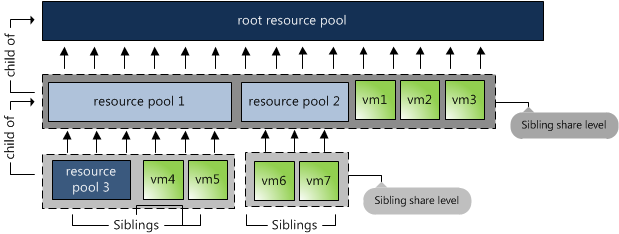
By default a resource pool is configured with the same share amount equal to a 4 vCPU, 16GB virtual machine. As mentioned in part 1, shares are relative to the configured size of the virtual machine. Implicitly stating that size equals priority.
Now lets take a look again at the image above. The 3 virtual machines are reparented to the cluster root, next to resource pools 1 and 2. Suppose they are all 4 vCPU 16GB machines, their share values are interpreted in the context of the root pool and they will receive the same priority as resource pool 1 and resource pool2. This is not only wrong, but also dangerous in a denial-of-service sense — a virtual machine running on the same level as resource pools can suddenly find itself entitled to nearly all cluster resources.
Because of default share distribution process we always recommend to avoid placing virtual machines on the same level of resource pools. Unfortunately it might happen that a virtual machine is reparented to cluster root level when manually migrating a virtual machine using the GUI. The current workflow defaults to cluster root level instead of using its current resource pool. Because of this it’s recommended to increase the number of shares of the resource pool to reflect its priority level. More info about shares on resource pools can be found in Duncan’s post on yellow-bricks.com.
Go to Part 3: Impact of oversized virtual machine.
Impact of oversized virtual machines part 1
Recently we had an internal discussion about the overhead an oversized virtual machine generates on the virtual infrastructure. An oversized virtual machine is a virtual machine that consistently uses less capacity than its configured capacity. Many organizations follow vendor recommendations and/or provision virtual machine sized according to the wishes of the customer i.e. more resources equals better performance. By oversizing the virtual machine you can introduce the following overhead or even worse decrease the performance of the virtual machine or other virtual machines inside the cluster.
Note: This article does not focus on large virtual machines that are correctly configured for their workloads.
Memory overhead
Every virtual machine running on an ESX host consumes some memory overhead additional to the current usage of its configured memory. This extra space is needed by ESX for the internal VMkernel data structures like virtual machine frame buffer and mapping table for memory translation, i.e. mapping physical virtual machine memory to machine memory.
The VMkernel will calculate a static overhead of the virtual machine based on the amount of vCPUs and the amount of configured memory. Static overhead is the minimum overhead that is required for the virtual machine startup. DRS and the VMkernel uses this metric for Admission Control and vMotion calculations. If the ESX host is unable to provide the unreserved resources for the memory overhead, the VM will not be powered on, in case of vMotion, if the destination ESX host must be able to back the virtual machine reservation and the static overhead otherwise the vMotion will fail.
The following table displays a list of common static memory overhead encountered in vSphere 4.1. For example, a 4vCPU, 8GB virtual machine will be assigned a memory overhead reservation of 413.91 MB regardless if it will use its configured resources or not.
| Memory (MB) | 2vCPUs | 4vCPUs | 8vCPUs |
| 2048 | 198.20 | 280.53 | 484.18 |
| 4096 | 242.51 | 324.99 | 561.52 |
| 8192 | 331.12 | 413.91 | 716.19 |
| 16384 | 508.34 | 591.76 | 1028.07 |
The VMkernel treats virtual machine overhead reservation the same as VM-level memory reservation and it will not reclaim this memory once it has been used, furthermore memory overhead reservations will not be shared by transparent page sharing.
Shares (size does not translate into priority)
By default each virtual machine will be assigned a specific amount of shares. The amount of shares depends on the share level, low, normal or high and the amount of vCPUs and the amount of memory.
| Share Level | Low | Normal | High |
| Shares per CPU | 500 | 1000 | 2000 |
| Shares per MB | 5 | 10 | 20 |
I.e. a virtual machine configured with 4CPUs and 8GB of memory with normal share level receives 4000 CPU shares and 81960 memory shares. Due to relating amount of shares to the amount of configured resources this “algorithm” indirectly implies that a larger virtual machine needs to receive a higher priority during resource contention. This is not true, as some business critical applications perfectly are run on virtual machines configured with low amounts of resources.
Oversized VMs on NUMA architecture
vSphere 4.1 CPU scheduler has undergone optimization to handle virtual machines which contains more vCPUs than available cores on one NUMA physical CPU. The virtual machine (wide-vm) will be spread across the minimum number of NUMA nodes, but memory locality will be reduced, as memory will be distributed among its home NUMA nodes. This means that a vCPU running on one NUMA node might needs to fetch memory from its other NUMA node. Leading to unnecessary latency, CPU wait states, which can lead to %ready time for other virtual machines in high consolidated environments.
Wide-NUMA nodes are of great use when the virtual machine actually run load comparable to its configured size, it reduces overhead compared to the 3.5/4.0 CPU scheduler, but it still will be better to try to size the virtual machine equal or less than the available cores in a NUMA node.
More information about CPU scheduling and NUMA architectures can be found here:
http://frankdenneman.nl/2010/09/esx-4-1-numa-scheduling/
Go to Part 2: Impact of oversized virtual machine on HA and DRS