Processor speed and core counts are important factors when designing a new server platform. However with virtualization platforms, the memory subsystem can have equal or sometimes even have a greater impact on application performance than the processor speed.
During my last trip I spend a lot talking about server configurations with customers. vSphere 5.5 update 2 supports up to 6 TB and vSphere 6.0 will support up to 12TB per server. All this memory can be leveraged for Virtual Machine memory and if you run FVP, Distributed Fault Tolerant Memory. With the possibility of creating high-density memory configurations, care must be taken when spec’ing the server. The availability of DIMM slots does not automatically mean expandability. Especially when you want to expand the current memory configuration.
The CPU type and generation impacts the memory configuration and when deciding on a new server spec you get a wide variety of options presented. Memory Channels, Memory bus frequency, ranking, DIMM type are just a selection of options you encounter. DIMM type, the number of DIMMs used and how the DIMMs are populated on the server board impact performance and supported maximal memory capacity.
In this short series of blog posts, I attempt to provide a primer on memory tech and how it impacts scalability.
Part 1: Memory Deep Dive Intro
Part 2: Memory subsystem Organisation
Part 3: Memory Subsystem Bandwidth
Part 4: Optimizing for Performance
Part 5: DDR4 Memory
Part 6: NUMA Architecture and Data Locality
Part 7: Memory Deep Dive Summary
New TPS management capabilities
Recently VMware decided that it’s best to change Transparent Page Sharing (TPS) behavior. In KB 2080735 they state the following:
Although VMware believes the risk of TPS being used to gather sensitive information is low, we strive to ensure that products ship with default settings that are as secure as possible. For this reason new TPS management options are being introduced and inter-Virtual Machine TPS will no longer be enabled by default in ESXi 5.5, 5.1, 5.0 Updates and the next major ESXi release. Administrators may revert to the previous behavior if they so wish.
VMware reworked the TPS code and the new code is included in version: ESXi 5.5 Update 2d (Q1, 2015), ESXi 5.1 Update 3 (12/4, 2014) and ESXi 5.0 Update 3d (Q1, 2015).
In the previous released patches*, new TPS management capabilities where introduced but not enabled by default. The new TPS management capabilities introduce the concept of salting has been introduced to control Intra-VM TPS.
What is salting?
This whole exercise of protecting TPS started when researchers found a way to determine the AES encryption key in use of virtual machines on a physical processor (grossly simplified explanation). To counter act this, VMware added salting options to harden TPS. In encryption salting is the act of adding random data to make a common password uncommon. By concatenating random data to a common password, the password now becomes uncommon, making it unlikely to show up in any common password list. This slows down the attack. Martin Suecia provided a more elaborate, but easy to understand, explanation about salting on crypto.stackexchange.com.
VMware adopted this concept to group virtual machines. If they contain the same random number they are perceived to be trustworthy and can share pages. If the random number doesn’t match, no memory page sharing occurs between the virtual machines. By default the vc.uuid of the virtual machine is used as random number. And because the vc.uuid is unique randomly generated string for a virtual machine in a Virtual Center, it will never be able to share pages with other virtual machines.
Lets rehash TPS, as there seems to be some misconception on how TPS works. TPS by itself is a two-tier process.
Two tier process
There is an act of identifying identical pages and there is an act of sharing (collapsing) identical pages. TPS cannot collapse pages immediately when starting a virtual machine. TPS is a process in the VMkernel; it runs in the background and searches for redundant pages. Default TPS will have a cycle of 60 minutes (Mem.ShareScanTime) to scan a VM for page sharing opportunities. The speed of TPS mostly depends on the load and specs of the Server. Default TPS will scan 4MB/sec per 1 GHz. (Mem.ShareScanGHz). Slow CPU equals slow TPS process. (But it’s not a secret that a slow CPU will offer less performance that a fast CPU.) TPS defaults can be altered, but it is advised to keep to the default. VMware optimized memory management in ESX 4 that allow pages which Windows initially zeroes will be page-shared by TPS immediately. Please not that this is based on best effort basis this to avoid creating massive overhead on trying to scan in-line.
TPS and large pages
One caveat, TPS will not collapse large pages when the ESX server is not under memory pressure. ESX will back large pages with machine memory, but installs page sharing hints. When memory pressure occurs, the large page will be broken down and TPS can do it’s magic. For more info: Future direction of disabling TPS by default and its impact on capacity planning.
TPS and CPU NUMA structures
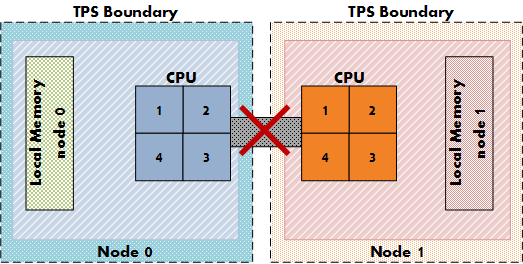
Another impact on the memory sharing potential is the NUMA processor architecture. NUMA allows the best memory performance by storing memory pages as close to a CPU as possible. TPS memory sharing could reduce the performance while pages are shared between two separate CPU systems. For more info about NUMA and TPS please read the article: “Sizing VMS and NUMA nodes”
Intra-VM and Inter-VM
When TPS identifies a common page it will collapse it, common pages occur within the memory footprint of a virtual machine itself (Intra-VM) and between virtual machines (Inter-VM). The new setting allows for TPS to collapse page within the memory footprint of the virtual machine itself, but not between virtual machines! Be aware that Intra-VM sharing only occurs today within a NUMA node, with small pages or when large pages are torn down.
TPS salting
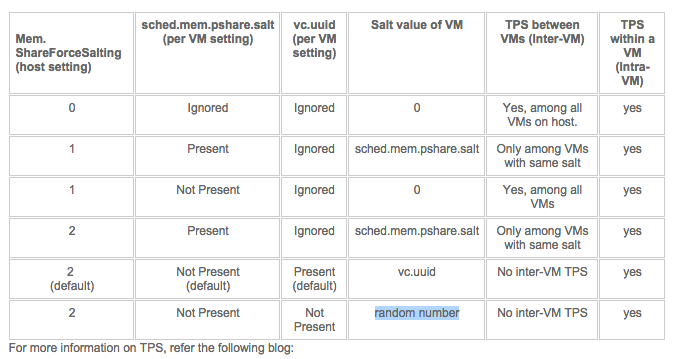
In order to Salt pages, two settings must be activated, one at the host (VMkernel) level and one at the virtual machine level. The VMkernel setting is Mem.ShareForceSalting and in the upcoming update releases it is set to “2”. Why not use the setting “1” you might ask? By reviewing the various KB articles, it seems that VMware extending the current salting options introduced in update releases: ({5.5,5.1}201410401 and 5.0 201412401) (KB: 2091682)
KB article 2097593 provides us with the following table:
Re-enable Intra-VM TPS
That means that if you want to re-enable Intra-VM TPS you have two options. In-line with security guidelines or reverting back to traditional TPS behavior.
1: To be in-line with the security guidelines you have to set Mem.ShareForceSalting to 1 or 2 and for the virtual machines you wish to share, set sched.mem.pshare.salt to a common value. (Bottom row in the table)
2: To revert back to the traditional TPS behavior you have to set Mem.ShareForceSalting to 0.
For the changes to take effect do either of the two:
1. Migrate all the virtual machines to another host in cluster and then back to original host.
2. Shutdown and power-on the virtual machines.
Since its normal to place host in maintenance mode before changing its configuration, option 1 seems like the most common operation. Put a host into maintenance mode, let DRS migrate all the virtual machines to another host, change the setting and exit maintenance mode. Rinse and repeat for all hosts in the cluster.
Recommendations whether to use salting?
Honestly I don’t have any. Security is something that shouldn’t be taken lightly. VMware implies that this security measure is somewhat excessive. Therefor it depends on your security guidelines and your service offering (Public cloud versus own infrastructure) whether you should go through the extra length of securing TPS or not.
Would I recommend enabling TPS? Of course! It’s one of the most intelligent features of the vSphere stack. Allowing you to use the available resources as efficiently as possible.
By default salting is disabled (Mem.ShareForceSalting=0). This means TPS happens as it used to before this patch, that is, all the Virtual Machines on an ESXi box participate in TPS.
* Previous released patches
VMware ESXi 5.5, Patch ESXi550-201410401
VMware ESXi 5.1, Patch ESXi510-201410401
VMware ESXi 5.0, Patch ESXi500-201412401
KB 2104983 explained: Default behavior of DRS has been changed to make the feature less aggressive
Yesterday a couple of tweets were in my timeline discussing DRS behavior mentioned in KB article 2104983. The article is terse at best, therefor I thought lets discuss this a little bit more in-depth.
During normal behavior DRS uses an upper limit of 100% utilization in its load-balancing algorithm. It will never migrate a virtual machine to a host if that migration results in a host utilization of 100% or more. However this behavior can prolong the time to upgrade all the hosts in the cluster when using the cluster maintenance mode feature in vCenter update manager (parallel remediation).

To reduce the overall remediation time, vSphere 5.5 contains an increased limit for cluster maintenance mode and uses a default setting of 150%. This can impact the performance of the virtual machine during the cluster upgrade.
vCenter Server 5.5 Update 2d includes a fix that allows users to override the default and can specify the range between 40% and 200%. If no change is made to the setting, the default of 150% is used during cluster maintenance mode.
Please note that normal load balancing behavior in vSphere 5.5 still uses a 100% upper limit for utilization calculation.
Interesting IT related documentaries
The holidays are upon us and for most its time to wind down. Maybe time for some nice though-provoking documentaries before the food-coma sets in. 😉 Most of the documentaries listed here are created by Tegenlicht (Backlight). Backlight provides some of the best documentaries on Dutch television and luckily they made most of them available in English. The following list is a set of documentaries that impressed me. If you found some awesome documentaries yourself, please leave a comment.
Tech revolution on Wall Street
Backlight created a trilogy on the tech revolution on Wall Street over a period of three years. The most famous one is the second one, “Money and Speed, inside the black box”. It received multiple awards and although it’s the second documentary in the series of three, I recommend starting with that one. If you are intrigued about how the impact of these algorithms, continue with the other two episodes, “Quants. The alchemists of Wall Street” and “Wall Street Code”. They almost make you feel like you are watching a thriller, highly recommended!
08.02.2010: Quants, The alchemists of Wall Street. English | Dutch
20.03.2013: Money & Speed: Inside the Black Box. English | Dutch
04.11.2013: Wall Street Code. English | Dutch
Extra video
08.02.2010: Quants, George Dyson. English
01.07.2011: Kevin Slavin: How algorithms shape our world. English (Ted Talk)
Unfortunately these two documentaries are Dutch only.
21.10.2013: Big Data, the Shell Search. Dutch
Tegenlicht onderzoekt hoe je met behulp van big data kunt doordringen in gesloten bolwerken. Wat geven deze enorme informatiestromen prijs over een multinational als Shell?
1.10.2014: Zero Days veiligheidslekken te koop Dutch
Tegenlicht neemt je mee in de handel van ‘zero days’, onbekende lekken in software of op het internet. Een strijd tussen ‘white hat’ en ‘black hat’ hackers bepaalt onze online veiligheid.
Although the voice over is Dutch, most of this documentary is in English, you might want to give it a try. It focuses on legal trade of unknown security vulnerabilities, so called zero days. Yes your government is also acquiring these from hackers, all perfectly legal!
Enjoy! And of course I wish you all happy holidays!
Playing tonight: DRS and the IO controllers
Ever wondered why the band is always mentioned second, is the band replaceable? Is the sound of the instruments so ambiguous that you can swap out any musician with another? Apparently the front man is the headliner of the show and if he does he job well he will never be forgotten. The people who truly recognize talent are the ones that care about the musicians. They understand that the artist backing the singer create the true sound of the song. And I think this is also the case when it comes to DRS and his supporting act the Storage controllers. Namely SIOC and NETIOC. If you do it right, the combination creates the music in your virtual datacenter, well at least from a resource management perspective. 😉
Last week Chris Wahl started a discussion about DRS and its inability to not load-balance perfectly the VMs amongst host. Chris knows about the fact that DRS is not a VM distribution mechanism, his argument is more focused on the distribution of load on the backend; the north-south and east-west uplinks. And for this I would recommend SIOC and NETIOC. Let’s do a 10.000 foot flyby over the different mechanisms.
Distributed Resource Scheduler (DRS)
DRS distributes the virtual machines – the consumers – across the ESXi hosts, the producers. Whenever the virtual machine wants to consume more resources, DRS attempts to provide these resources to this virtual machine. It can do this by moving other virtual machines to different hosts, or move the virtual machine to another host. Trying to create an environment where the consumers can consume as much as possible. As workload patterns differ from time to time, from day to day, an equal number of VMs per host does not provide a balanced resource offering. It’s best to create a combination of idle and active virtual machines per host. And now think about the size of virtual machines, most environments do not have a virtual machine configuration landscape to utilizes a identical hardware configuration. And if that was the case, think about the applications, Some are memory bound, some applications are CPU bound. And to make it worse, think load correlation and load synchronicity. Load correlation defines the relationship between loads running in different machines. If an event initiates multiple loads, for example, a search query on front-end webserver resulting in commands in the supporting stack and backend. Load synchronicity is often caused by load correlation but can also exist due to user activity. It’s very common to see spikes in workload at specific hours, for example think about log-on activity in the morning. And for every action, there is an equal and opposite re-action, quite often load correlation and load synchronicity will introduce periods of collective non-or low utilization, which reduce the displayed resource utilization. All these things, all this coordination is done by DRS, fixating an identical number of VMs per host is in my opinion lobotomizing DRS.
But DRS is only focused on CPU and Memory. Arguably you can treat network and storage somewhat CPU consumption as well, but lets not go that deep. Some applications are storage bound some applications are network bound. For this other components are available in your vSphere infrastructure. The forgotten heroes, SIOC and NETIOC.
Storage IO Control (SIOC)
Storage I/O Control (SIOC) provides a method to fairly distribute storage I/O resources during times of contention. SIOC provides a datastore-wide scheduling using virtual disk shares to calculate priority. In a healthy and properly designed environment, every host that is part of the cluster should have a connection to the datastore and all host should have an equal amount of paths to the datastore. SIOC monitors the consumption and if the latency experienced by the virtual machine exceeds the user-defined threshold, SIOC distributes priority amongst the virtual machines hitting that datastore. By default every virtual machine receives the same priority per VMDK per datastore, but this can be modified if the application requires this from a service level perspective.
Network I/O Control (NETIOC)
The east-west equivalent of its north-south brother SIOC. NETIOC provides control for predictable networking performance while different network traffic streams are contending for the same bandwidth. Similar controls are offered, but are now done on traffic patterns instead of a per virtual machine basis. Similar architecture design hygiene applies here as well. All hosts across the cluster should have the same connection configuration and amount of bandwidth available to them. The article “A primer on Network I/O Control” provides more info on how NETIOC works, VMware published a NETIOC Best Practice white paper a while ago, but most of it is still accurate.
And the bass guitar player of the virtual datacenter, Storage DRS.
Storage DRS provides virtual machine disk placement and load balancing mechanisms based on both space and I/O capacity. Where SIOC reactively throttles hosts and virtual machines to ensure fairness, SDRS proactively generates recommendations to prevent imbalances from both space utilization and latency perspectives. More simply, Storage DRS does for storage what DRS does for compute resources.
These mechanism combined with a healthy – well architected – environment will help you distribute the consumers across the producers with the proper context in mind. Which virtual machines are hot and which are not? Much better than playing the numbers game! Now, one might argue but what about failure scenarios? If a have an equal number of VMs running on my host, my failover time decreases as well. Well it depends. HA distributes virtual machines across the cluster and if DRS is up and running, it moves virtual machines around if it cannot satisfy the resource entitlement of the virtual machines (VM level reservations). Duncan wrote about DRS and HA behavior a while ago, and of course we touched upon this in our book the 5.1 clustering deepdive. (still fully applicable for 5.5 environments)
In my opinion, trying to outsmart advanced and adaptive computer algorithms with basic math reasoning is really weird. Especially when most people are talking about Software defined datacenters and whether you are managing pets versus cattle. When your environment is healthy and layed-out in a homogenous way , you cannot beat computer algorithms. The thing you should focus on is the alignment of resource priority to business service levels. And that’s what you achieve by applying the correct share levels at DRS, SIOC and NETIOC levels. Maybe you can devops your way into leveraging various scripting languages. 😉