Today my second white paper, VMware vSphere Storage DRS Interoperability, is made available for download at the Technical Resource Center at VMware.com.
This white paper presents an overview of best practices for customers considering the implementation of VMware vSphere Storage DRS in combination with advanced storage device features or other VMware products. This document zooms in on Storage DRS interoperability with array based features, such as Auto-Tiering, Thin provisioning, Depulication but also explains VMware products such as Snapshots. A small preview:
VMware vSphere Snapshots
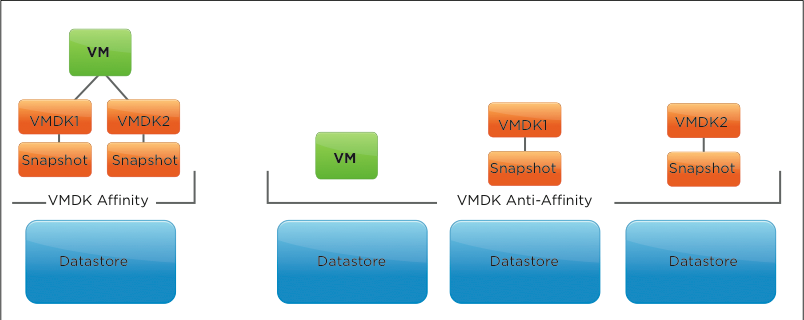
Storage DRS supports virtual machine snapshots. By default, it collocates them with the virtual machine disk file to prevent fragmentation of the virtual machine. Also by default, Storage DRS applies a VMDK affinity rule to each new virtual machine. If it migrates the virtual machine to another datastore, all the files, including the snapshot files, move with it. If the virtual machine is configured with an inter-VMDK affinity setting, the snapshot is placed in the directory of its related disk and is moved to the same destination datastore as when migrated by a Storage vMotion operation.
VMware supports the use of vSphere snapshots in combination with Storage DRS.
Go and download it here: http://www.vmware.com/resources/techresources/10286
VMworld Session proposals
Here is just a quick overview of the sessions I submitted for VMworld events in San Francisco and Barcelona. I’ve submitted three sessions in total, as my passion for resource management and Storage DRS is a public secret it should be no suprise that
all sessions I participate in focus on either vSphere resource managagement or Storage DRS. 🙂 I’ve split them up into two categories, vSphere centric and vCloud centric. The fourth session is the annual Ask the Expert vBloggers with the all-star crew Scott Lowe, Duncan Epping, Rick Scherer, and Chad Sakac. I hope to see you at VMworld!
vSphere centric sessions
Session 1545
Architecting Storage DRS Datastore Clusters
Abstract: In this session Frank Denneman and Valentin Hamburger will cover and explain in great detail what to consider when building a Storage DRS datastore cluster. Introducing the concept of datastore clusters can affect or shift the paradigm of storage management in virtual infrastructures. The goal is to demonstrate the relationship between the datastore cluster and existing objects in the virtual infrastructure and how the introduction of datastore clusters can effect various design decisions. This session is a must for anyone implementing Storage DRS that wants to maximize their cluster and vSphere resource designs.
Session 1683
vSphere Cluster Resource Pools Best Practices
Abstract: In this session Frank Denneman and Rawlinson Rivera will cover and explain in great detail what to consider when using resource pool inside a vSphere cluster. Introducing the concept of resource pools can affect virtual machine performance and overall resource management in virtual infrastructures.
Join Frank and Rawlinson and discover both common pitfalls and best practices of resource pool design. This session is a must for anyone implementing resource pools that wants to maximize their cluster and vSphere resource designs.
vCloud Director centric sessions
Session 1167
vCloud tracks Architecting for vCloud Allocation Models
Abstract: In this session Frank Denneman and Chris Colotti will break down the three vCloud Director Allocation models in depth. Each model’s settings will be shown in detail to explain the effect on vSphere resource scheduling. They will then show how Allocation models of the same type with different configurations, as well as different allocation models could live on the same Provider vDC. The goal is to demonstrate that by not only fully understanding the allocation models, but the vSphere resource allocation together you can design for multiple allocation models on a single Provider vDC. This session is a must for anyone implementing vCloud Director that wants to maximize their cluster and vCloud resource designs.
Session 504
Ask the Expert vBloggers – Scott Lowe, Duncan Epping, Rick Scherer, Frank Denneman, Chad Sakac
Abstract: One of the highest rated sessions at VMworld is back for it’s fifth year! Come meet four VMware Certified Design Experts (VCDX) on stage answering your questions. We get the top Virtualization Bloggers in the industry and get them on stage answering your questions in a wide array of topics.
Simon at Techhead.co.uk wrote a nice article about how to vote for your favorite session at the VMworld.com portal
Blog post on blogs.vmware.com/vsphere/
As part of the Technical Marketing team of VMware focusing on the vSphere platform I contribute to the vSphere blog on VMware.com. From this point forward I will post a link to new articles posted on the vSphere blog.
SDRS maintenance mode impossible because “The virtual machine is pinned to a host.”
VMware vSphere Metro Storage Cluster Case Study Technical Paper available
As of today the VMware vSphere Metro Storage Cluster Case Study Technical Paper is available at http://www.vmware.com/resources/techresources/10284
VMware vSphere Metro Storage Cluster (VMware vMSC) is a new configuration within the VMware Hardware Compatibility List. This type of configuration is commonly referred to as a stretched storage cluster or metro storage cluster. It is implemented in environments where disaster/downtime avoidance is a key requirement. This case study was developed to provide additional insight and information regarding operation of a VMware vMSC infrastructure in conjunction with VMware vSphere. This paper will explain how vSphere handles specific failure scenarios and will discuss various design considerations and operational procedures.
For me this is a new milestone as this is my first published white paper. I had the honor and pleasure of collaborating with Duncan Epping (DuncanYB), Ken Werneburg (@vmken), Stuart Hardman (@shard_man) and Lee Dilworth (@LeeDilworth) on this paper. Working with industry-leading experts, testing all sorts of scenario’s and listing to them analyzing and brainstorming was inspiring and very educational. Not only is this content great for customers who are interested in vSphere Metro Storage Cluster solutions, but is very educational for people who are interested in HA in general. A must read!
DRS clusters and allocating reserved memory
As mentioned in the admission control family, multiple features on multiple layers check to there is enough unused reserved memory available. This article is a part of a short series of articles on how memory is being claimed and provided as reserved memory; other articles will be posted throughout the week.
Refresher
I’ve published two articles that describes memory reservation at the VM level and the resource pool level. These two sources are an excellent way to refresh your memory (no pun intended) on the reservation construct:
• Impact of memory reservation (VM-level)
• Resource pool memory reservations
“Unclaimed” reserved memory?
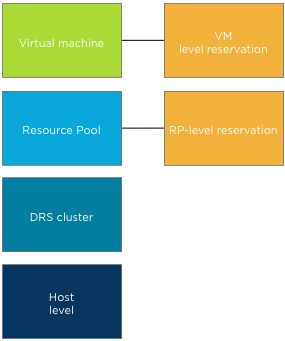
If a memory reservation is configured on a child object (virtual machine or resource pool) admission control checks if there is enough reserved memory available. Which memory can be claimed for reserved memory? And how about the host-level memory and cluster level memory? Let’s dissect the cluster tree of resource providers and resource consumers and start with a bottom-up approach.
Host-level to DRS cluster
Both the host and DRS cluster are resource providers to the resource consumers i.e. resource pools and virtual machines. When a host is made a member of a DRS cluster, all its available memory resources are placed at the DRS disposal. The available memory of a host is the memory that is left after the VMkernel claimed host memory. The DRS cluster, also called the root resource pool, reserves this remaining memory.
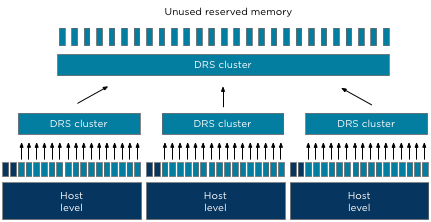
As the DRS cluster reserves this memory per host, all the memory aggregated inside the root resource pool and is actually designated as reserved memory. However to prevent confusion, this reserved memory is labeled as unused reserved memory in the vSphere Client user interface and as such provided to the child resource pools and child virtual machines.At the Resource Allocation Tab of the cluster, the Total memory capacity of the cluster is listed as well as the reserved capacity. The Available capacity is the result of Total capacity – Reserved capacity. Note that if HA is configured the amount of resources reserved for failover is automatically added to the reserved capacity.

Child resource pools
Resource pools allow for hierarchical partitioning of the cluster, but they always span the entire cluster. Resource pools draw resources from the root resource pool and do not pick and select resources from a specific hosts. The root resource pool functions as an abstraction layer. When configuring a reservation on resource pool level the specified amount of memory is claimed by that specific resource pool and cannot be allocated by other resource pools.
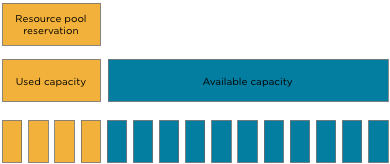
Note that the claim of reserved resources by the resource pool is done immediately during the creation of the resource pool. It does not matter if there are running virtual machine inside the resource pools or not. The total configured memory is withdrawn from the root resource pool and thus unavailable for other resource pools. Please keep this in mind when sizing resources pools.
The next article will expand on virtual machines inside a resource pool.