Storage DRS extends the DRS feature set to the storage space. The primary element used by SDRS is a datastore cluster. Introducing the concept of datastore clusters can affect or shift the paradigm of storage management in virtual infrastructures. This article is the start of a short series of articles focusing on the design considerations of datastore clusters
Datastore cluster concept
Let’s start with looking at the concept datastore cluster. Datastore clusters can be regarded as the equivalent of DRS clusters. A datastore cluster is the storage equivalent of an vCenter (DRS) cluster whereas a datastore is the equivalent of a ESXi host. As datastore clusters pool storage resources into one single logical pool it becomes a management object. This storage pooling allows the administrator to manage many individual datastores as one element, and depending on the enabled SDRS features, providing optimized usage of storage capacity and IO performance capability off all member datastores.
SDRS settings are configured at datastore cluster level and are applied to each member datastore inside the datastore cluster. When SDRS is enabled the datastore cluster it becomes the storage load-balancing domain, requiring administrators and architects to treat the datastore cluster as a single entity for decision making instead of individual datastores.
Datastore Clusters architecture and design
Although datastore clusters offers an abstraction layer, one must keep in mind the relationship between existing objects like hosts, clusters, virtual machine and virtual disks. This new abstraction layer might even disrupt existing (organizational) processes and policies. Introducing datastore clusters can have impact on various design decisions such as VMFS datastores sizing, configuration of the datastore clusters, the variety in datastore clusters and the number of datastore clusters in the virtual infrastructure.
In this series I will address these considerations more in depth. Stay tuned for the first part; the impact of connectivity of datastores in a datastore cluster.
More articles in the architecting and designing datastore clusters series:
Part2: Partially connected datastore clusters.
Part3: Impact of load balancing on datastore cluster configuration.
Part4: Storage DRS and Multi-extents datastores.
Part5: Connecting multiple DRS clusters to a single Storage DRS datastore cluster.
SDRS out of space avoidance
During VMworld I noticed a lot of focus of the attendees was on the IO load balancing features of Storage DRS (SDRS), however SDRS is more than only IO load balancing. Both space load balancing feature and initial placement are just as incredible, powerful and as useful as IO load balancing.
Actually the term space load balancing isn’t really doing the algorithm any justice as it sounds it makes “unnecessary” moves around space usage, whereas “out of space avoidance” suits more the nature of this SDRS algorithm, because it will make crucial recommendations that in my opinion bring a lot of value.
Initial placement and IO load balancing will be featured in future articles, but in this post I would like to focus on the out of space avoidance feature of SDRS. When SDRS is enabled, it will automatically make recommendations based on space utilization and IO load. IO load balancing can be activated or deactivated when enabling or disabling the option “Enable I/O metric for SDRS recommendations”. SDRS does not offer the option to enable or disable out of space avoidance; out of space avoidance is enabled by default and can only be disabled by disabling SDRS in its entirety.
Thresholds
By default, SDRS monitors the datastore space utilization and generates migration recommendations if the datastore utilization is exceeding the “space utilization ratio threshold”. The utilized space threshold determines the maximum acceptable space load of the VMFS datastore. And this is a part of the SDRS settings of the datastore cluster. This threshold is set by default to 80% and can be set to any value between 50 and 100 percent.

Be aware that this threshold applies to each datastore that is a member of the datastore cluster; if you want to have similar absolute space headroom, it is recommended to add similar sized datastores to the datastore cluster.
If the threshold is reached, SDRS will not migrate a random virtual machine to a random datastore, it needs to adhere to certain rules. Besides running a cost-benefit analysis on the registered virtual machines in the datastore, it also takes the “space utilization ratio difference threshold” into account.

The utilization difference setting allows SDRS to determine which datastores should be considered as destination for virtual machines migrations. The space utilization ratio difference threshold indicates the required difference of utilization ratio between the destination and source datastores. The difference threshold is an advanced option of the SDRS runtime rules and is set to a default value of 5%. Consequently SDRS will not move any virtual machine disk from an 83% utilized datastore to a 78% utilized datastore. The reason why SDRS uses this setting is to avoid recommending migrations of marginal value.
SDRS also uses space growth rate to avoid risky migrations. A migration is considered risky if it has to be undone in the near future. SDRS defines near future as a time window that is longer than the lead-time of a storage vMotion and defaults to 30 hours. This option cannot be changed in any supported way. Hence, SDRS will avoid moving any virtual machine disk to a datastore that is expected, based on growth rate, to exceed the utilization threshold within the next 30 hours.
Space Utilization
How does SDRS determine if VMFS datastore has exceeded the threshold? It does this by comparing the “Space utilization” against the utilized space threshold. Space utilization is determined by dividing the total consumed space on the datastore by the datastore capacity.
Space utilization = total consumed space on the datastore / datastore capacity
To determine the space utilization of the datastore, SDRS requires the “per-VMDK” usage statistic and the VMFS datastore usage statistic. The per-VMDK statistic provides SDRS data about the allocated space in the VMDK, while the VMFS datastore statistic provides information about the datastore utilization.
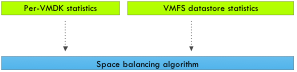
Now this is one of the more cool parts of the algorithm, as mentioned, SDRS takes into account the allocated amount of disk space instead of the provisioned disk space using thin disk. SDRS receives the per-VMDK statistics and space utilization per datastore on an ongoing basis. If the utilization exceeds the threshold the SDRS algorithm is triggered immediately and does not have to wait to complete his invocation period.
By receiving space utilization information frequently, SDRS is able to understand and trend-map the data-growth within the VMDK. The growth rate is estimated using historical usage samples, with recent samples weighing more than older historical usage samples. By including this information in the cost-benefit risk analysis SDRS attempts to avoid migrating virtual machines with data-growth rates that will likely cause the destination datastore to exceed the threshold in the near future. By including the estimated growth rate, SDRS is equipped with an outage avoiding strategy. This avoiding outage intelligence helps most organization to adopt thin provisioned disks located in the virtualization stack. You still need to think about the over-subscription level, but SDRS will helps to control the environment and avoid outage caused by out-of-space situations as much as possible.
Migration candidate selection
Now how does SDRS know which virtual machines to move? As mentioned before SDRS uses a cost-benefit risk analysis. Moving virtual machines is expensive, both on CPU and memory subsystems as well as the IO subsystems. Therefore SDRS aims to generate recommendations that have the lowest impact on the environment while delivering improvements and solve any violation. SDRS considers the size of the VMDK (allocated space) and the activity of the IO workload to calculate the cost aspect of the CB analysis.
When a datastore exceeds the space utilization threshold, SDRS will try to move the number of megabytes out of the datastore to correct the space utilization violation. In other words, SDRS attempts to select a virtual machine that is closest in size required to bring the space utilization of the datastore to the space utilization ratio threshold.
Caveats
Before enabling SDRS on arrays configured to use deduplication or replication technologies you might want to check your array vendor on their recommendation of combining SDRS with their technology. Duncan has written an excellent article about the interop between SDRS and various technologies. Please read if you already haven’t: http://www.yellow-bricks.com/2011/07/15/storage-drs-interoperability/
Key Takeaway
SDRS out of space avoidance alone is reason enough to use SDRS. Having an automated way of distributing virtual machines across your datastore landscape can result in a more efficient usage of available storage space, while reducing the management effort. Understanding the outage avoidance measures inside the algorithm might help to consider using thin-provisioned VMDK format to decrease the footprint of the virtual machines, speed up SDRS migrations and possibly increase the VM density per datastore.
Mem.MinFreePct sliding scale function
One of the cool “under the hood” improvements vSphere 5 offers is the sliding scale function of the Mem.MinFreePct.
Before diving into the sliding scale function, let’s take a look at the Mem.MinFreePct function itself. MinFreePct determines the amount of memory the VMkernel should keep free. This threshold is subdivided in various memory thresholds, i.e. High, Soft, Hard and Low and is introduced to prevent performance and correctness issues.
The threshold for the low state is required for correctness. In other words, it protects the VMkernel layer from PSOD’s resulting from memory starvation. The soft and hard thresholds are about virtual machine performance and memory starvation prevention. The VMkernel will trigger more drastic memory reclamation techniques when it approaches the Low state. If the amount of free memory is just a bit less than the Min.FreePct threshold, the VMkernel applies ballooning to reclaim memory. The ballooning memory reclamation technique introduces the least amount of performance impact on the virtual machine by working together with the Guest operating system inside the virtual machine, however there is some latency involved with ballooning. Memory compressing helps to avoid hitting the low state without impacting virtual machine performance, but if memory demand is higher than the VMkernels’ ability to reclaim, drastic measures are taken to avoid memory exhaustion and that is swapping. However swapping will introduce VM performance degradations and for this reason this reclamation technique is used when desperate moments require drastic measurements. For more information about reclamation techniques I recommend reading the “disable ballooning” article.
vSphere 4.1 allowed the user to change the default MinFreePct value of 6% to a different value and introduced a dynamic threshold of the Soft, Hard and Low state to set appropriate thresholds and prevent virtual machine performance issues while protecting VMkernel correctness. By default vSphere 4.1 thresholds was set to the following values:
| Free memory state | Threshold | Reclamation mechanism |
| High | 6% | None |
| Soft | 64% of MinFreePct | Balloon, compress |
| Hard | 32% of MinFreePct | Balloon, compress, swap |
| Low | 16% of MinFreePct | Swap |
Using a default MinFreePct value of 6% can be inefficient in times where 256GB or 512GB systems are becoming more and more mainstream. A 6% threshold on a 512GB will result in 30GB idling most of the time. However not all customers use large systems and prefer to scale out than to scale up. In this scenario, a 6% MinFreePCT might be suitable. To have best of both worlds, ESXi 5 uses a sliding scale for determining its MinFreePct threshold.
| Free memory state threshold | Range |
| 6% | 0-4GB |
| 4% | 4-12GB |
| 2% | 12-28GB |
| 1% | Remaining memory |
Let’s use an example to explore the savings of the sliding scale technique. On a server configured with 96GB RAM, the MinFreePct threshold will be set at 1597.6MB, opposed to 5898.24MB if 6% was used for the complete range 96GB.
| Free memory state | Threshold | Range | Result |
| High | 6% | 0-4GB | 245.96MB |
| 4% | 4-12GB | 327.68MB | |
| 2% | 12-28GB | 327.68MB | |
| 1% | Remaining memory | 696.32MB | |
| Total High Threshold | 1597.60MB |
Due to the sliding scale, the MinFreePct threshold will be set at 1597.96MB, resulting in the following Soft, Hard and low threshold:
| Free memory state | Threshold | Reclamation mechanism | Threshold in MB |
| Soft | 64% of MinFreePct | Balloon | 1022.69 |
| Hard | 32% of MinFreePct | Balloon, compress | 511.23 |
| Low | 16% of MinFreePct | Balloon, compress, swap | 255.62 |
Although this optimization isn’t as sexy as Storage DRS or one of the other new features introduced by vSphere5 it is a feature of vSphere 5 that helps you drive your environments to higher consolidation ratios.
Upgrading VMFS datastores and SDRS
Among many new cool features introduced by vSphere 5 is the new VMFS file system for block storage. Although vSphere 5 can use VMFS-3, VMFS-5 is the native VMFS level of vSphere 5 and it is recommended to migrate to the new VMFS level as soon as possible. Jason Boche wrote about the difference between VMFS-3 and VMFS-5.
vSphere 5 offers a pain free upgrade path from VMFS-3 to VMFS-5. The upgrade is an online and non-disruptive operation which allows the resident virtual machines to continue to run on the datastore. But upgraded VMFS datastores may have impact on SDRS operations, specifically virtual machine migrations.
When upgrading a VMFS datastore from VMFS-3 to VMFS-5, the current VMFS-3 block size will be maintained and this block size may be larger than the VMFS-5 block size as VMFS-5 uses unified 1MB block size. For more information about the difference between native VMFS-5 datatstores and upgraded VMFS-5 datastore please read:
Cormac’s article about the new storage features
Although the upgraded VMFS file system leaves the block size unmodified, it removes the maximum file size related to a specific block size, so why exactly would you care about having a non-unified block size in your SDRS datastore cluster?
In essence, mixing different block sizes in a datastore cluster may lead to a loss in efficiency and an increase in the lead time of a storage vMotion process. As you may remember, Duncan wrote an excellent post about the impact of different block sizes and the selection of datamovers.
To make an excerpt, vSphere 5 offers three datamovers:
• fsdm
• fs3dm
• fs3dm – hardware offload
The following diagram depicts the datamover placement in the stack. Basically, the longer path the IO has to travel to be handled by a datamover, the slower the process.
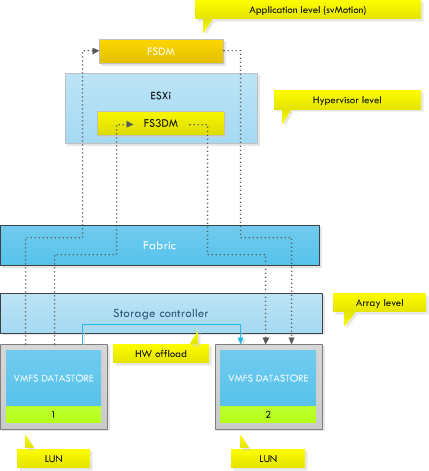
In the most optimal scenario, you want to leverage the VAAI capabilities of your storage array. vSphere 5 is able to leverage the capabilities of the array allowing hardware offload of the IO copy. Most IOs will remain within the storage controller and do not travel up the fabric to the ESXi host. But unfortunately not every array is VAAI capable. If the attached array is not VAAI capable or enabled, vSphere will leverage the FS3DM datamover. FS3DM was introduced in vSphere 4.1 and contained some substantial optimizations so that data does not travel through all stacks. However if a different block size is used, ESXi reverts to FSDM, commonly known as the legacy datamover. To illustrate the difference in Storage vMotion lead time, read the following article (once again) by Duncan: Storage vMotion performance difference. This article contains the result of a test in which a virtual machine was migrated between two different types of disks configured with deviating block sizes and at a different stage a similar block size. To emphasize; the results illustrates the lead time of the FS3DM datamover and the FSDM datamover. The results below are copied from the Yellow-Bricks.com article:
| From(MB) | To | Duration in Minutes |
| FC datastore 1MB blocksize | FATA datastore 4MB blocksize | 08:01 |
| FATA datastore 4MB blocksize | FC datastore 1MB blocksize | 12:49 |
| FC datastore 4MB blocksize | FATA datastore 4MB blocksize | 02:36 |
| FATA datastore 4MB blocksize | FC datastore 4MB blocksize | 02:24 |
As the results in the table show, using a different blocksize lead to an increase in Storage vMotion lead time. Using different block sizes in your SDRS datastore cluster will decrease the efficiency of Storage DRS. Therefore it’s recommended designing for performance and efficiency when planning to migrate to a storage DRS cluster. Plan ahead and invest some time the migration path.
If the VMFS-3 datastore is formatted with a larger blocksize than 1 MB, it may be better to empty the VMFS datastore and reformat the LUN with a fresh coat of VMFS-5 file system. The effort and time put into the migration will have a positive effect on the performance of the daily operations of Storage DRS.
Multi-NIC vMotion support in vSphere 5.0
There are some fundamental changes to vMotion scalability and performance in vSphere 5.0 one is the multi-nic support. One of the most visible changes is multi-NIC vMotion capabilities. In vSphere 5.0 vMotion is now capable of using multiple NICs concurrently to decrease lead time of a vMotion operation. With multi-NIC support even a single vMotion can leverage all of the configured vMotion NICs, contrary to previous ESX releases where only a single NIC was used.
Allocating more bandwidth to the vMotion process will result in faster migration times, which in turn affects the DRS decision model. DRS evaluates the cluster and recommends migrations based on demand and cluster balance state. This process is repeated each invocation period. To minimize CPU and memory overhead, DRS limits the number of migration recommendations per DRS invocation period. Ultimately, there is no advantage recommending more migrations that can be completed within a single invocation period. On top of that, the demand could change after an invocation period that would render the previous recommendations obsolete.
vCenter calculates the limit per host based on the average time per migration, the number of simultaneous vMotions and the length of the DRS invocation period (PollPeriodSec).
PollPeriodSec: By default, PollPeriodSec – the length of a DRS invocation period – is 300 seconds, but can be set to any value between 60 and 3600 seconds. Shortening the interval will likely increase the overhead on vCenter due to additional cluster balance computations. This also reduces the number of allowed vMotions due to a smaller time window, resulting in longer periods of cluster imbalance. Increasing the PollPeriodSec value decreases the frequency of cluster balance computations on vCenter and allows more vMotion operations per cycle. Unfortunately, this may also leave the cluster in a longer state of cluster imbalance due to the prolonged evaluation cycle.
Estimated total migration time: DRS considers the average migration time observed from previous migrations. The average migration time depends on many variables, such as source and destination host load, active memory in the virtual machine, link speed, available bandwidth and latency of the physical network used by the vMotion process.
Simultaneous vMotions: Similar to vSphere 4.1, vSphere 5 allows you to perform 8 concurrent vMotions on a single host with 10GbE capabilities. For 1GbE, the limit is 4 concurrent vMotions.
Design considerations
When designing a virtual infrastructure leveraging converged networking or Quality of Service to impose bandwidth limits, please remember that vCenter determine the vMotion limits based on the vMotion uplink physical NIC reported link speed. In other words, if the physical NIC reports at least 10GbE, link speed, vCenter allows 8 vMotions, but if the physical NIC reports less than 10GBe, but at least 1 GbE, vCenter allows a maximum of 4 concurrent vMotions on that host.
For example; HP Flex technology sets a hard limit on the flexnics, resulting in the reported link speed equal or less to the configured bandwidth on Flex virtual connect level. I’ve come across many Flex environments configured with more than 1GB bandwidth, ranging between 2GB to 8GB. Although they will offer more bandwidth per vMotion process, it will not offer an increase in the amount of concurrent vMotions.
Therefore, when designing a DRS cluster, take the possibilities of vMotion into account and how vCenter determines the concurrent number of vMotion operations. By providing enough bandwidth, the cluster can reach a balanced state more quickly, resulting in better resource allocation (performance) for the virtual machines.
**disclaimer: this article contains out-takes of our book: vSphere 5 Clustering Technical Deepdive**