• Skip to primary navigation
  • Skip to main content

frankdenneman.nl

  • AI/ML
  • NUMA
  • About Me
  • Privacy Policy

Beating a dead horse – using CPU affinity

January 11, 2011 by frankdenneman

Lately the question about setting CPU affinity is rearing its ugly head again. Will it offer performance advantages for the virtual machine? Yes it can, but only in very specific cases. Additional settings and changes to the virtual infrastructure are required to obtain a performance increase over the default scheduling techniques. Setting CPU affinity by itself will not result in any performance gain, but usually a performance decrease.

What does CPU affinity do?
By setting a CPU affinity on the virtual machine you are limiting the available CPUs on which the virtual machine can run. It does not dedicate that CPU to that virtual machine and therefore does not restrict the CPU scheduler from using that CPU for other virtual machines.

When will CPU-affinity help?
Under a controlled environment some specific workloads can benefit from using CPU affinity. When the virtual machine workload is cache bound and has a larger cache footprint than the available cache of one CPU it can profit from aggregated caches. However, if this workload has high intra-thread communications and is running on specific CPU architectures setting CPU affinity can have the opposite effect and become detrimental to the performance of the application.

CPU-affinity can also be used to isolate a physical CPU to a virtual CPU. But requires a lot of changes and increases management. It will never dedicate the physical CPU to the virtual machine as the VMkernel schedules all its processes across all available CPUs regardless of any custom setting a virtual machine has. Furthermore the scheduling overhead stays the same whether CPU-affinity is set on the virtual machine or not.

To determine if you application fit this description can be a challenge and maintaining such configurations usually result in a nightmare. Generally CPU-affinity is only used for simulations and load testing and it is better left unused for every other cases. Setting CPU-affinity results in less choice for the CPU scheduler to schedule the virtual machine, but there is more to it as well:

Controlled environment
Already mentioned but this cannot be stressed enough, CPU affinity does not equal isolation of a physical CPU. In other words, when a virtual machine is pinned to a physical CPU it does not control or own that CPU. The VMkernel CPU scheduler still considers that physical CPU a valid CPU to schedule other virtual machines on. If isolation of a CPU is the end-goal, than all other residing virtual machines on the host (and virtual machine that will be created in the future) must be configured with CPU affinity as well and the specific CPU(s) assigned to the virtual machine must excluded from all other virtual machines.

Setting CPU affinity results in manual CPU micro management and can be a nightmare to maintain. To make it worse, think of the impact a migration will have, the administrator needs to configure the virtual machines on the destination host to exclude the CPU from all active virtual machines as well.

(Update: Recent vSphere versions offer the “Latency Sensitive” functionality, isolating cores for vCPUs)

Virtual Machine worlds
A virtual machine is made of multiple worlds (threads), besides the vCPU world, worlds are active for the virtual machine MKS subsystem, CD-ROM and VMX file. Although the vCPU world generates the greater part of the CPU load, sometimes a physical CPU is required to run the other worlds. If CPU affinity is set, then all the worlds that constitute the virtual machine can only run on the specified CPUs. If set incorrectly, it can reduce the throughput of the virtual machine as the worlds must compete between each other for CPU time. Therefore it is recommended to add an additional CPU for these worlds. For example; configure a CPU affinity setting that contains 3 physical CPUs for a 2 vCPU virtual machine.

Resource entitlements
As CPU affinity will not automatically isolate the CPU for that specific virtual machine, shares and reservations needs to be set to guarantee a specific performance level. Because the scheduler will attempt to maintain fairness for all virtual machines it is possible that other virtual machines will be scheduled on the set of CPU specified in the affinity set of the virtual machine. Adjust the shares and reservations of the virtual machine accordingly to ensure priority over other active virtual machines. Be aware that CPU reservations are friendly; although the vCPU is guaranteed a specific portion of physical resources, it might happen that an external thread/interloper (other virtual machine) is using the vCPU; this thread will not instantly be de-scheduled. Even when the waiting virtual machine has a 100% CPU reservation configured.

To make it worse, in the case when multiple virtual machines are affinity-bound to the same processor it is possible that the CPU scheduler cannot meet the specified reservation. Be aware that admission control ignores affinity, so multiple virtual machines can have a full reservation equal to a full core but still need to compete with other affinity bound virtual machines. More information about how CPU reservations work can be found in the article: “Reservations and CPU Scheduling”.

CPU reservations and HA admission control
If the virtual machine with the reservation is running in a HA cluster with a “Host failures cluster tolerates” admission control policy, the CPU reservation will influence the Slot size of the Cluster and can therefore impact the consolidation ratio of the cluster. More info about slot-sizes can be found on the HA deepdive.

CPU affinity and DRS clusters.
Because vMotion is not allowed if a virtual machine is configured with CPU affinity, that virtual machine cannot be placed in a DRS cluster with automation mode set to fully automated. If a virtual machine needs to be configured with CPU affinity, the administrator has three choices:

  • Place the virtual machine on a stand-alone host
  • Set DRS automation level to manual / partially automated
  • Set virtual machine automation mode to manual / partially automated

Stand-alone host
If the virtual machine is placed on the stand-alone host the performance of the virtual machine depends on the level of contention and the virtual machine resource entitlement. During resource contention it can only fall back on its resource entitlement and hopefully gain a higher priority than the other residing virtual machines. If the virtual machine was located on an ESXi host in a DRS cluster, the virtual machine could have been migrated to receive its resource entitlement on another host. By choosing CPU-affinity, you are betting only on one horse, the local CPU scheduler of one host instead of leveraging the full suite of resource management vSphere delivers today.

DRS set to Manual or partially automated
If the DRS automation level is set to manual or partially automated, the cluster will not automatically load balance virtual machines and DRS will recommend migrations. These recommendations must be applied manually by the administrator. DRS imbalance calculation will be invoked every 300 seconds but is also triggered if the cluster detects resource demand and supply changes, as well as changes in the resource settings in the cluster. As you can imagine, this behavior will create an incredible load on the administrator to let the cluster operate as efficiently as possible if he wants to ensure that the virtual machines are receiving their resource entitlements.

Set Virtual machine automation mode to manual / partially automated
By changing the automation mode on VM-level, the virtual machine can still be placed inside a fully automated DRS cluster. Although DRS will not automatically migrate this virtual machine, it can migrate other virtual machines to ensure every virtual machine will receive its resource entitlement. However additional measures (shares and reservations) must be taken to guarantee the virtual machine enough physical resources.

CPU architectures
Today new CPU architectures, such as the Intel Nehalem and AMD Opteron’s offer a variety of on-die caches, multiple cores \ logical CPUs and an optimized local\remote memory subsystem. These features can either helpful or be detrimental to the performance of a virtual machine with CPU affinity.

Cache level
If a virtual machine is spanned across two processors (packages) it effectively results in having two L3 caches available to the virtual machine. Today’s CPU architectures offer dedicated L1 and L2 cache per core and a shared last-level L3 cache for all cores inside the CPU package. Because access to Last level cache is faster than (normal) memory, it makes sense to span the virtual machine across two processor packages to increase the amount of available L3 cache.

However the inter-socket communication speed can reduce –or remove- the positive effect of having low-latency cache available and if the workload can fit inside one cache (small cache footprint) and uses intensive intra-thread communication, than placement in one processor packaged is to be preferred over spanning multiple packages.

HyperThreading
If a virtual machine is running on a HyperThreading-enabled system it is best to set the CPU-affinity to logical CPUs not belonging to the same core. The HT threads on a core are translated by the VMkernel as logical CPUs and are consecutively numbers, for example Core 1 contains LCPU0 and LCPU1, Core 2 contains LCPU2 and LCPU3, etc. If CPU-affinity is set to logical CPUs belonging to the same core, both vCPUs of the virtual machine need to compete with each other for physical CPU resources. By scheduling a virtual machine on logical CPUs of different cores, it doesn’t have to compete and can benefit the vCPUs’ throughput because the VMkernel allows the vCPU to use the entire Cores’ resources if only one logical CPU residing on the core is active.

NUMA
If CPU affinity is set on a virtual machine running in a NUMA architecture (Intel Nehalem and AMD Opteron) the virtual machine is treated as a NON-NUMA client and gets excluded from NUMA scheduling. Therefore the NUMA scheduler will not set a memory affinity for the virtual machine to its current NUMA node and the VMkernel can allocate memory from every available NUMA node in the system Therefore the virtual machine may end up running on a different NUMA node than were its memory is residing, resulting in unnecessary memory latency and possibly higher %Ready time as the instruction must wait until the memory is fetched from a remote node.

Bottomline
The bottomline is that almost in every case CPU affinity is better left unused. Scheduling threads is very complex, scheduling threads belonging to multiple virtual machines with different priorities, activity, progress and still considering optimal use of the underlying CPU and memory architecture is mind-blowing complex. The CPU scheduler is aware of all these components and together with the global scheduler (DRS) it can see to it that the virtual machine will receive its resource entitlement. If the virtual machine must have access to physical resources at any time, other mechanisms such as resource allocation settings will have a better effect than using the advanced setting CPU-affinity.

Filed Under: CPU Tagged With: CPU-affinity, NUMA, VMware

AMD Magny-Cours and ESX

January 5, 2011 by frankdenneman

AMD’s current flagship model is the 12-core 6100 Opteron code name Magny-Cours. Its architecture is quite interesting to say at least. Instead of developing one CPU with 12 cores, the Magny Cours is actually two 6 core “Bulldozer” CPUs combined in to one package. This means that an AMD 6100 processor is actually seen by ESX as this:

AMD Magny Cours seen by ESX
As mentioned before, each 6100 Opteron package contains 2 dies. Each CPU (die) within the package contains 6 cores and has its own local memory controllers. Even though many server architectures group DIMM modules per socket, due to the use of the local memory controllers each CPU will connect to a separate memory area, therefore creating different memory latencies within the package.

Because different memory latency exists within the package, each CPU is seen as a separate NUMA node. That means a dual AMD 6100 processor system is treated by ESX as a four-NUMA node system:

dual processor AMD 6100 magny-cours system and NUMA node architecture
Impact on virtual machines
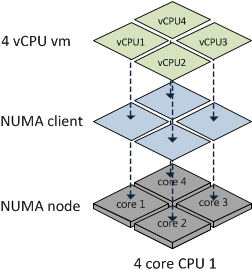
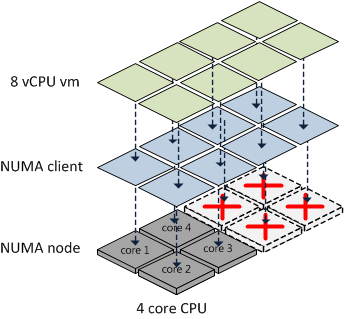
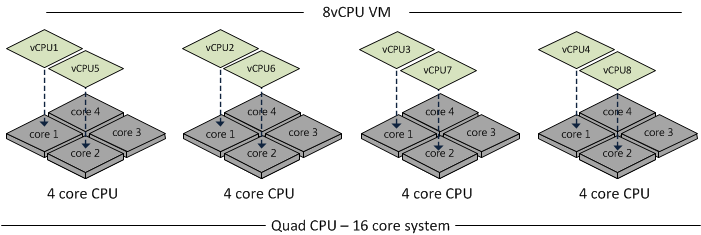
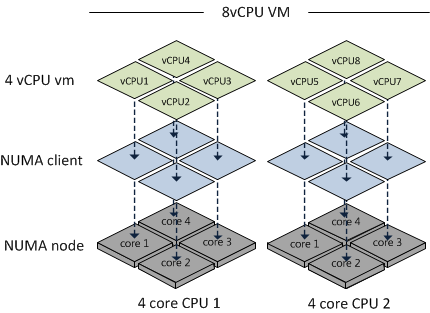
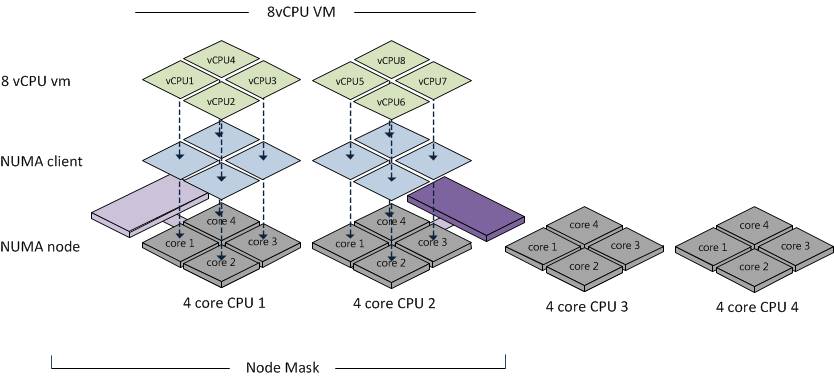
Because the AMD 6100 is actually two 6-core NUMA nodes, creating a virtual machine configured with more than 6 vCPUs will result in a wide-VM. In a wide-VM all vCPUs are split across a multitude of NUMA clients. At the virtual machine’s power on, the CPU scheduler determines the number of NUMA clients that needs to be created so each client can reside within a NUMA node. Each NUMA client contains as many vCPUs possible that fit inside a NUMA node.That means that an 8 vCPU virtual machine is split into two NUMA clients, the first NUMA client contains 6 vCPUs and the second NUMA client contains 2 vCPUs. The article “ESX 4.1 NUMA scheduling” contains more info about wide-VMs.

Distribution of NUMA clients across the architecture
ESX 4.1 uses a round-robin algorithm during initial placement and will often pick the nodes within the same package. However it is not guaranteed and during load-balancing the VMkernel could migrate a NUMA client to another NUMA node external to the current package.

Although the new AMD architecture in a two-processor system ensures a 1-hop environment due to the existing interconnects, the latency from 1 CPU to another CPU memory within the same package is less than the latency to memory attached to a CPU outside the package. If more than 2 processors are used a 2-hop system is created, creating different inter-node latencies due to the varying distance between the processors in the system.

Magny-Cours and virtual machine vCPU count
The new architecture should perform well, at least better that the older Opteron series due to the increased bandwidth of the HyperTransport interconnect and the availability of multiple interconnects to reduce the amounts of hops between NUMA nodes. By using Wide-VM structures, ESX reduces the amount of hops and tries to keep as much memory local. But –if possible- the administrator should try to keep the virtual machine CPU count beneath the maximum CPU count per NUMA node. In the 6100 Magny-Cours case that should be maximum 6 vCPUs per virtual machine

Filed Under: NUMA, VMware Tagged With: 6100, AMD Magny-Cours, NUMA, VMware

Funny: HA and DRS technical deepdive audiobook

January 3, 2011 by frankdenneman

During a conversation the idea of an audiobook of the HA and DRS book spawned. Within a couple of minutes, I found the following in my inbox….
Once a tiny little vm found himself in a big bad cluster filled with big vm’s……
Rapunzel, Rapunzel, set down your high shares!
Then the admin installed the LittleBoyBlue patch on the Dike server, and plugged the memory leak.
Odysseus set a CPU limit on the Cyclops-VM so low that Cyclops couldn’t even see. “Who are you?” yelled the Cyclops. Odysseus replied, “My name is No One!” When the Cyclops complained to the Scheduler, it asked, “Who has limited you so badly?” “No One has!” replied the Cyclops…. (BTW who makes a creature with one eye? What a horrible single point of failure to bake into your design!)
But the third little VM had his very own Resource Pool, and he huffed and he puffed and he outcompeted the much bigger VMs who were all sharing their Resource Pool shares…
Just let’s focus on publishing an ebook first…..

Filed Under: Miscellaneous

Impact of oversized virtual machines part 3

January 3, 2011 by frankdenneman

In part 1 of the series of post on the impact of oversized virtual machines NUMA architecture, memory overhead reservation and share levels are reviewed, part 2 zooms in on the impact of memory overhead reservation and share levels on HA and DRS. This part looks at CPU scheduling, memory management and what impact oversized virtual machines have on the environment when a bootstorm occurs.
Multiprocessor virtual machine
In most cases, adding more CPUs to a virtual machine does not automatically guarantee increase throughput of the application, because some workloads cannot always take advantage of all the available CPUs. Sharing resources and scheduling these processes will introduce additional overhead.
For example, a four-way virtual machine is not four times as productive as a single-CPU system. If the application is unable to scale than the application will not benefit from these additional available resource.

Progress
Although relaxed co-scheduling reduces the requirement of the VMkernel to simultaneous schedule all vCPUs of the virtual machine, periodically scheduling the unused or idle vCPUs is still necessary to keep the progress of each vCPU in the virtual machine acceptably synchronized.

Esxtop also gives scheduling stats for SMP virtual machines;

%CRUN: All VCPUs want to run at once. CRUN is the amount of time between when a PCPU is told to run a certain VCPU on an SMP VM and when it is actually able to run that VM. This should be almost 0.

%CSTOP: If a VCPU gets ahead of another VCPU of the same SMP VM, then we ask the faster VCPU to stop until the other one can catch up. The time spent in this stopped state is CSTOP.

Single thread application
Only applications with multiple threads and allow them to be scheduled in parallel can benefit from multiprocessor systems. A single-threaded application can only be scheduled on one CPU at the time and will not benefit from the multiple CPUs available. The Guest OS is able to migrate the thread between the available CPUs, introducing unnecessary overhead such as interrupts or context switches and cache misses.

Timer interrupts
In older guest operating systems, the unused virtual CPUs still take timer interrupts, which consumes a small amount of additional CPU. Please refer to KB articles “High CPU Utilization of Inactive Virtual Machines – KB1077”

Configured memory
Oversizing the memory configuration of a virtual machine can impact the performance of the virtual machine itself or even worse, impact the other active virtual machines on the host and in the cluster. Using memory reservations on oversized virtual machines will make it go from bad to worse.

Application memory management
Excess memory is a problem when the application uses this memory opportunistically, in other words the application is hoarding memory. Java, SAP and often Oracle workloads assume it can use all the memory it detects. Because ESX cannot determine which memory is important to the virtual machine, it always backs memory pages of the virtual machine with physical pages. Besides creating a large memory footprint on the physical level, these kinds of applications add a third level of memory management as well.

Due to this additional management level, the Guest OS does not understand which pages are important and which are not. And because the Guest OS isn’t aware, it can not return inactive pages to the balloon driver when requested, therefor impacting the performance of the application during contention even more.

Setting memory reservation at virtual machine level will guarantee the availability of physical memory and will secure a certain level of application performance (if memory bound). However setting memory reservations at virtual machine level will impact the virtual infrastructure and the larger the memory reservation, the larger the impact. Visit “Impact of memory reservation” for more info.

To avoid these effects, it is recommended to monitor the behavior of the application over time and tune the configuration of the virtual machine and its reservation to get proper performance and limit the impact of its configured memory and the memory reservation.

NUMA node
If the virtual machines mentioned in the previous paragraph are configured with more memory than available in their home NUMA node, the system needs to fetch the memory from remote NUMA nodes. Accessing memory from remote nodes introduces latencies and generally reduced throughput of the vCPU. ESX does not communicate any NUMA information to the Guest OS and therefore both the Guest OS as well as the application are unaware of the non-uniform latency characteristics of the underlying platform. The Guest OS and application are therefor unable to prioritize which memory it will use.

If the virtual machine uses all the available memory of a NUMA node, it will lead to a higher degree of remote memory of all the other active virtual machines using the pCPU, leading to higher memory latencies and less throughput of the other virtual machines and eventually an intra-node migration. For more information about NUMA nodes, please read the articles: Sizing VMs and NUMA nodes and ESX 4.1 NUMA Scheduling.

Attempt to configure virtual machine with less memory than available in a NUMA node.

Swap file
During boot a swap file is created that equals the virtual machines configured memory minus the configured memory reservation. If no memory reservation is set, the virtual machine swap file (.vswap) equals the configured memory. Large virtual machines will generate an additional requirement for storing these large swap files reducing the consolidation ratio of virtual machines per VMFS datastore.

Bootstorms

A bootstorm is the occurrence of powering on a multitude of virtual machines simultaneously.

Virtual infrastructures running versions prior to ESX 4.1 can encounter memory contention when a bootstorm occurs of virtual machines running windows. Windows checks how much memory is available to the OS by zeroing out pages it detects. Transparent page sharing will collapse these pages but this will not occur immediately. Transparent Page Sharing is a cycle-driven process that tries to make a pass over the virtual machine memory with a timeframe of 3600 seconds. The level of contention will impact the speed of the TPS process. During a bootstorm, this zero-out behavior and delayed TPS process can introduce contention. Usually this contention is short-lived. Unfortunately during the startup phase of the guest OS the balloon driver will not be loaded and this situation can lead to compressing (10% of configured memory) and swapping useless data straight to disk.
ESXTOP will display swapped out memory but due to the nature of the data will show little to none swap-in.
ESX 4.1 uses a new technique called zero-page sharing. An in-depth post about this cool new technique will follow shortly.
End-note
This post concludes the three-part series about the impact of oversized virtual machines. The reason I wrote these articles is that I know many organizations still size their virtual machines on assumed peak loads happing somewhere in the (late) future of that service or application. Many organizations are using the same policy or method used for physical machines. The beauty of using virtual machines is the flexibility an organization has when it comes to determining the size of a machine during its lifecycle. Leverage these mechanisms and incorporate this in your service catalog and daily operations. Size the virtual machine according to its current or near-future workload.

Filed Under: CPU, Memory Tagged With: Bootstorms, NUMA, VMware

Node Interleaving: Enable or Disable?

December 28, 2010 by frankdenneman

There seems to be a lot of confusion about this BIOS setting, I receive lots of questions on whether to enable or disable Node interleaving. I guess the term “enable” make people think it some sort of performance enhancement. Unfortunately the opposite is true and it is strongly recommended to keep the default setting and leave Node Interleaving disabled.

Node interleaving option only on NUMA architectures
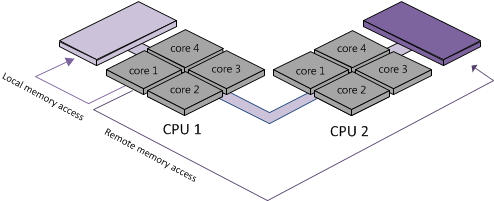
The node interleaving option exists on servers with a non-uniform memory access (NUMA) system architecture. The Intel Nehalem and AMD Opteron are both NUMA architectures. In a NUMA architecture multiple nodes exists. Each node contains a CPU and memory and is connected via a NUMA interconnect. A pCPU will use its onboard memory controller to access its own “local” memory and connects to the remaining “remote” memory via an interconnect. As a result of the different locations memory can exists, this system experiences “non-uniform” memory access time.

Node interleaving disabled equals NUMA
By using the default setting of Node Interleaving (disabled), the system will build a System Resource Allocation Table (SRAT). ESX uses the SRAT to understand which memory bank is local to a pCPU and tries* to allocate local memory to each vCPU of the virtual machine. By using local memory, the CPU can use its own memory controller and does not have to compete for access to the shared interconnect (bandwidth) and reduce the amount of hops to access memory (latency)

* If the local memory is full, ESX will resort in storing memory on remote memory because this will always be faster than swapping it out to disk.

Node interleaving enabled equals UMA
If Node interleaving is enabled, no SRAT will be built by the system and ESX will be unaware of the underlying physical architecture.

ESX will treat the server as a uniform memory access (UMA) system and perceives the available memory as one contiguous area. Introducing the possibility of storing memory pages in remote memory, forcing the pCPU to transfer data over the NUMA interconnect each time the virtual machine wants to access memory.

By leaving the setting Node Interleaving to disabled, ESX can use System Resource Allocation Table to the select the most optimal placement of memory pages for the virtual machines. Therefore it’s recommended to leave this setting to disabled even when it does sound that you are preventing the system to run more optimally.

Get notification of these blogs postings and more DRS and Storage DRS information by following me on Twitter: @frankdenneman

Filed Under: NUMA, VMware Tagged With: node interleaving, NUMA, VMware

  • « Go to Previous Page
  • Page 1
  • Interim pages omitted …
  • Page 73
  • Page 74
  • Page 75
  • Page 76
  • Page 77
  • Interim pages omitted …
  • Page 89
  • Go to Next Page »

Copyright © 2026 · SquareOne Theme on Genesis Framework · WordPress · Log in