Should I use consumer grade SSD drives or should I use enterprise grade SSD drives?
This a very popular question and I receive it almost on a daily basis. Lab or production environment, my answer is always the same: Enterprise grade without a doubt! Why? Enterprise Grade drives have a higher endurance level, they contain power loss data protection features and they consistently provide high level of performance. All align with a strategy ensuring reliable and consistent performance. Lets expand on these three key features;
Endurance
Recently a lot of information is released about the endurance levels of consumer grade SSDs and tests show that they operate well beyond the claimed endurance levels. Exciting news as it shows how much progression is made during the last few years. But be aware that vendors test their consumer grade SSDs with client workloads while enterprise grade SSDs are tested with worst-case data center workload. The interesting question is whether the SSD vendor is list the rate a drive in DWPD or drive-writes per-day in a conservative manner or an aggressive manner? As I don’t want to gamble with customers’ data, I’m not planning to find out whether the consumer SSD wasn’t able to sustain high levels of continuous data center load. I believe vSphere architectures have high endurance requirements; therefore use enterprise drives as they are specifically designed and tested for this use.
Power loss data protection features
Not often highlighted but most enterprise SSDs contain power loss data protection features. These SSDs typically contains a small buffer or cache in which the data is stored before it’s written to disk. Enterprise SSD leverages various on-board capacitance solutions to provide enough energy for the SSD to move the data from the cache to the drive itself. Protecting the drive and the data. It protects the drive because if a sector is partially written it becomes unreadable. This can lead to performance problems, as the drive will perform time-consuming error recovery on that sector. Select Enterprise drives with power loss data protection features, it avoids erratic performance levels or even drive failure after a power-loss.
Consistent performance
Last but certainly not least is the fact that enterprise SSDs are designed to provide a consistent level of performance. SSD vendors expect their enterprise disks to be used intensively for an extended period of time. This means that possibility of a full disk increases dramatically when comparing it to a consumer grade SSD. As data can only be written to a cell that is in an erased state, high levels of write amplification is expected. Please read this article to learn more about write amplification (write amp).
Write amp impacts the ratio of drive writes to host writes, that means that when write amp occurs the number of writes a drive needs to make increases considerably in order to execute those host writes. One way to reduce this strain is to “over-provision” the drive. Vendors, such as Intel, allocate a large amount of flash resource to allow the drive to absorb these write amp operations. This results in a more consistent rate of IOPS and predictable IOPS.
Impact on IOPS and Latency
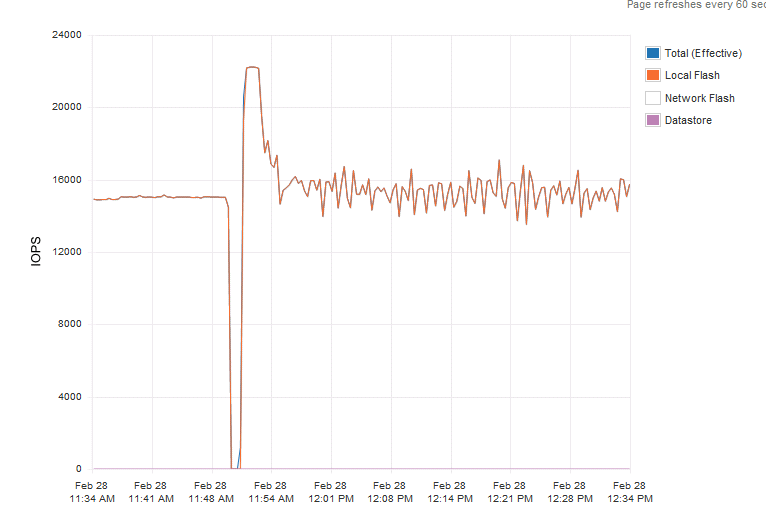
I’ve done some testing in my lab, and used two enterprise flash drives, a Intel DC S3700 and a Kingston E-100. I also used two different consumer grade flash devices. I refrain from listing the type and vendor name of these disks. I ran the first test from 11:30 to 11:50 I ran the test an enterprise grade SSD drive, the rate of IOPS was consistent and predictable. The VM was migrated to the host with the consumer grade SSD and the same test was run again, not a single moment did the disk provide a steady rate of IOs.
Anandtech.com performed similar tests and witnessed similar behaviour, the publish their results in the article “Exploring the Relationship Between Spare Area and Performance Consistency in Modern SSDs” An excellent read, highly recommended.
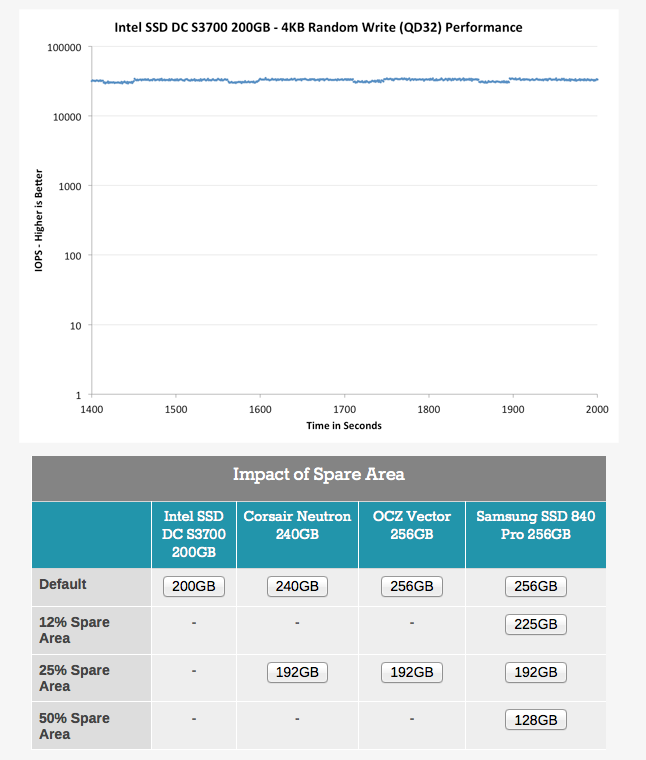
Click on the different drive sizes to view their default performance and the impact of spare flash resources on the ability to provide consistent performance.
Next step was to determine latency behaviour. Both Enterprise grade SSD provided an extreme case of predictable latency. To try to create an even playing field I ran read tests instead of write centric tests. The first graph was a read test on the Kingston e100.
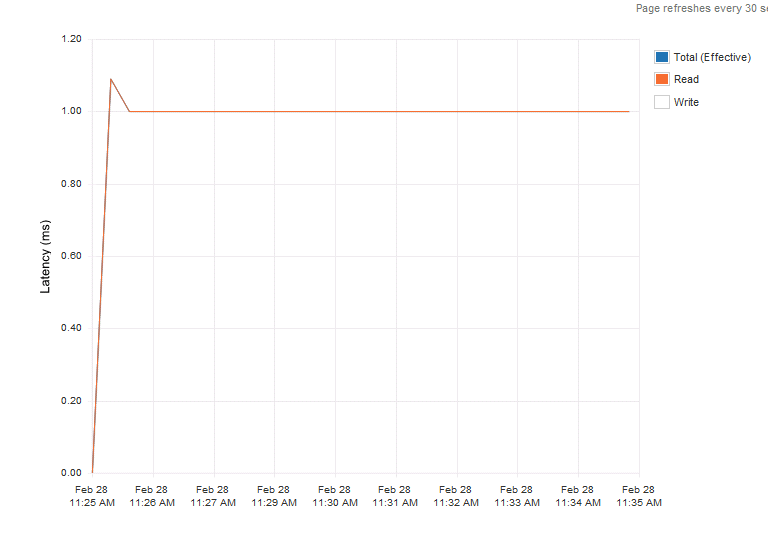
Latency was consistent providing predictable and consistent application response time.
The consumer grade drive performance charts were not as pretty. The virtual machine running the read test was the only workload hitting the drive and yet the drive had trouble providing steady response times.
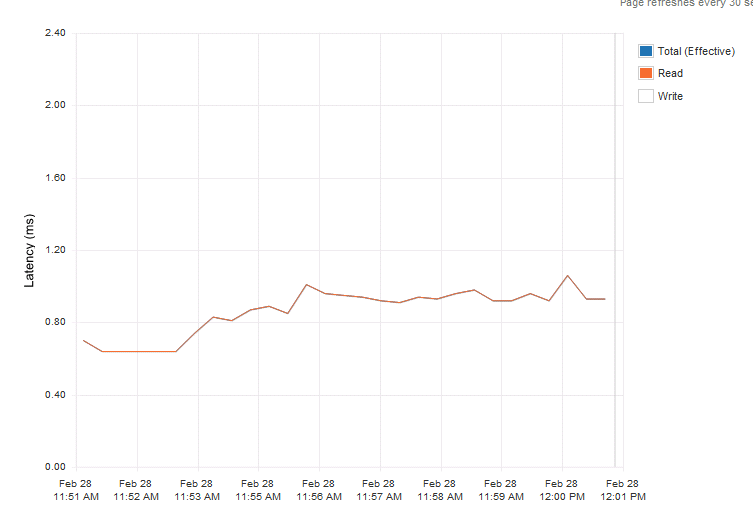
Please note that the test were ran multiple times and the graphs shown are the most positive ones for the consumer grades. Multiple (enterprise-level) controllers were used to avoid any impact from that layer.
As more and more SSD drive hit the market we decided to help to determine which drives fit in a strategy ensuring reliable and consistent performance. Therefor PernixData started the PernixDrive initiative, in which we test and approve flash devices.
Conclusion
Providing consistent performance is key for predictable application behaviour. This applies to many levels of operation. First of all it benefits day-to-day customer satisfaction and helps you to reduce troubleshooting application performance. Power-loss data protection features help you to cope with short-term service loss, and avoid continuous performance loss as the drive can survive power-loss situations. Reverting applications to a non-accelerated state, due to complete loss of SSD drive can result in customer dissatisfaction or neglecting your SLA. Higher levels of drive-writes per-day help you to create and ensure high levels of consistent performance for longer terms.
In short, use the correct tool for the job and go for enterprise SSD drives.
Who to vote for?
This week Eric Siebert opened up the 2014 edition of top virtualization blog contest. For the industry this is one of the highlights and applaud the effort Eric and his team of volunteers put in to make this work. I cannot wait to the watch the show in which they unveil this years top 25 winners. A big thank you to Eric and the team!
Most of the time you will see blog articles that highlight this years effort and I think they are great. As there are so many great bloggers writing and sharing their thoughts and ideas, it’s very easy to miss out on some brilliant post. A quick scan of these posts helps to (re)discover the wealth of information that is out there.
Last year I was voted number 2, however this year the frequency (hopefully not the quality) of my blog articles went down. This was due to my career change and the new responsibilities my job role encompasses. Plus creating the vSphere design book took a lot of time and effort. For this years VMworld we have planned something even better, so please stay tuned for this years VMworld book!
But this post is not about me as a blogger and my material, but to highlight some of the bloggers that help the community understand the product better, comprehend the behavior of the complex systems we work with every day and the insights they provide by spending a lot of their (spare) time writing and creating these great articles. Voting for them you will help them understand that their time and effort is well spend!
First of all, guys like Duncan Epping, Cormac Hogan, William Lam and Eric Sloof relentlessly churn out great collateral, whether it is a written article, podcast or video. It keeps the community well fed when it comes to quality information. Writing a great article is a challenge, doing this on a continuous basis is even more impressive!
But I would like to highlight some of the guys that are considered “new” guys. They are all industry veterans, but they decided to pick up blogging recently. I would like to highlight these guys, but there are many more of course.
Pete Koehler – vmpete.com
Pete writes a lot about PernixData, but that’s not the reason I want to highlight him. His articles are quite in-depth and I love reading those articles as I learn from them every time Pete decides to post his most recent insights. For example in the article “Observations of PernixData in a Production environment” he covers the IOPS, Throughput & Latency relationship in great detail. In this exercise he discovers that applications do not use a static block size, something you don’t read that often. He correlates specific output and explains how each metric interacts which each other, educating you along the way and helping you to do a better and more effective job in your own environment.
Josh Odgers – joshodgers.com
Josh is listed both on the general blogging list as well as a newcomer and I think he deserves to be “rookie of the year” Josh’s insight are very valuable and its always a joy to read his articles. His VCDX articles are top notch and are a must read for every aspiring VCDX candidate. Just too bad he decided to join Nutanix ;).
Luca Dell’Oca – virtualtothecore.com
Dropping knowledge both in English and Italian, Luca is covering new technologies as well as insight full tips and tricks on a frequent basis. Ranging from reclaiming space on a Windows 2012 installation to a complete write up on how to create a valuable I/O test virtual machine. A blog that should be visited regularly.
Willem ter Harmsel – willemterharmsel.nl
Not your average virtualization blog, Willem covers the startup world by interviewing CEO’s and CTOs of the hottest and newest startups this world currently has to offer. Willem provides insights of upcoming technology and allows its readers to place and compare different technologies. A welcome change of pace after spending a day knee-deep into the bits and bytes
Consuming those stories and articles on a daily basis, are they helpful in your daily work? Please show your appreciation and vote today on your favorite blogs! Thanks!
Please vote now!
VCDX Defence: Are you planning to use a fictitious design?
This week the following tweet caught my eye:
“@wonder_nerd Fictitious designs in a #VCDX defense have a failure rate of 90%. #VMwarePEX” < interesting statistic
— Mark Snook (@VirtualSnook) February 8, 2014
Apparently Marc Brunstad (VCDX program manager) stated this fact during the PEX VCDX workshop. But what does this stat mean and to what level do you need to take this into regard when submitting your own design?
During my days as a panel member, I’ve seen only a handful of fictitious designs and although they were technically sound, the reasoning and defense were usually not that strong. Be aware that the VCDX program isn’t born into existence to find the best design ever. It determines if the candidate has aligned the technical functionality with the customers’ requirements, the constraints provided by the environment and the assumptions the team made about for example future workloads or organizational growth.
But does that mean that you shouldn’t use any fictitious element in your design? Are fictiticous elements inherently bad? I don’t think so. Speaking from own experience I made some adjustments to my design I submitted.
My submitted design was largely based on the environment that I worked on for a couple of years. At that time the customer used rack-based systems, my design contained a blade architecture. The reason why I changed this, as it allowed me to demonstrate my knowledge of the HA stack featured in vSphere 4.1. Some might argue that I deliberately made my design more complex, but I was comfortable enough to defend my choices and explain High Availability Primary and Secondary node interaction and how to mitigate risk.
More over it allowed me to demonstrate the pros and cons of such a design on various levels, such as the impact it had on operational processes, the influence on scalability and the alignment of availability policies to org-defined failure domains. Did I have these discussions in real life? Yes, with many other customers but just not with that specific customer that this design was based on.
And that’s why complete fictitious designs fail and why most reasoning is incomplete. The candidate only focused on the alignment of technical specs and workload. Not the “softer” side of things.
Arguing that this design element was just the wish of a customer just doesn’t cut it. Sure we all met customers that were strung on having that particular setting configured in the way they saw fit, but its your responsibility to explain to the panel which steps you took to inform the customer about the risk and potential impact that setting had. Try to explain which setting you would have used and why. Demonstrate your knowledge about feasible alternatives.
My recommendation to future candidates; when incorporating a specific fictitious design element in your design, make sure you had a conversation with a customer about that element once. You can easily align this with the main design and it helps to recollect the specifics during your defense.
Installing Exchange Jetstress without full installation media.
I believe in testing environments with applications that will be used in the infrastructure itself. Pure synthetic workloads, such as IOmeter, are useful to push hardware to their theoretical limit but that’s about it. Using a real life workload, common to your infrastructure, will give you a better understanding of the performance and behavior of the environment you are testing. However, it can be cumbersome to setup the full application stack to simulate that workload and it might be difficult to simulate future workload.
Simulators made by the application vendor, such as SQLIO Disk Subsystem Benchmark Tool or Exchange Server Jetstress, provide an easy way to test system behaviour and simulate workloads that might be present in the future.
One of my favourite workload simulators is MS Exchange server Jetstress however its not a turn-key solution. After installing Exchange Jetstress you are required to install the ESE binary files from an Exchange server. It can happen that you don’t have the MS exchange installation media available or a live MS exchange system installed.
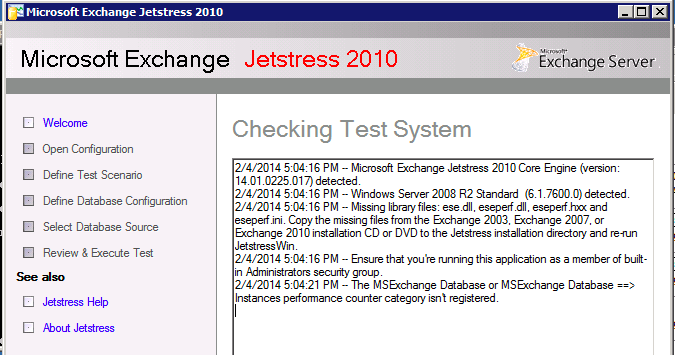
Microsoft recommends downloading the trail version of Exchange, install the software and then copy the files from its directory. Fortunately you can save a lot of time by skipping these steps and extract the ESE files straight from an Exchange Service Pack. Added bonus, you immediately know you have the latest versions of the files.
I want use Jetstress 2010 and therefor I downloaded Microsoft Exchange Server Jetstress 2010 (64 bit) and Microsoft Exchange Server 2010 Service Pack 3 (SP3).
To extract the files direct from the .exe file, I use 7zip file archiver. ()
The ESE files are located in the following directory:
| File | Path |
| ese.dll | \setup\serverroles\common |
| eseperf.dll | \setup\serverroles\common\perf\amd64 |
| eseperf.hxx | \setup\serverroles\common\perf\amd64 |
| eseperf.ini | \setup\serverroles\common\perf\amd64 |
| eseperf.xml | \setup\serverroles\common\perf\amd64 |
Copy the ESE files into the Exchange Jetstress installation folder. By default, this folder is “C:\Program Files\Exchange Jetstress”.
Be aware that you need to run Jetstress as an administrator. Although you might login your system using you local and domain admin account, Jetstress will be kind enough to throw the following error:
The MSExchange Database or MSExchange Database ==> Instrances performance counter category isn’t registered
Just right-click the Jetstress shortcut and select “run as administrator” and you are ready for action.
Happy testing!
vSphere 5.5 vCenter server inventory 0
After logging into my brand spanking new vCenter 5.5 server I was treated with a vCenter server inventory count of 0. Interesting to say the least as I installed vCenter on a new windows 2008 R2 machine, connected to a fresh MS active directory domain. I installed vCenter with a user account that is domain admin, local admin and has all the appropriate local rights (Member of the Administrators group, Act as part of the operating system and Log on as a Service). The install process went like a breeze, no error messages whatsoever and yet the vCenter server object was mysteriously missing after I logged in. A mindbender! Being able to log into the vCenter server and finding no trace of this object whatsoever, it felt like someone answering the door and saying he’s not home.
I believed I did my due diligence, I read the topic “Prerequisites for Installing vCenter Single Sign-On, Inventory Service, and vCenter Server” and followed every step, however it appeared I did not RTFM enough.
administrator@vsphere.local only
Apparently vSphere will only attach the permissions and assign the role of administrator to the default account administrator@vsphere.local and you have to logon with this account after the installation is complete. See “How vCenter Single Sign-On Affects Log In Behavior” for the following quote:
After installation on a Windows system, the user administrator@vsphere.local has administrator privileges to both the vCenter Single Sign-On server and to the vCenter Server system.
It threw my off balance by allowing me to log in with the account that I used to install vCenter, this made me assume the account automatically received the appropriate rights to manage the vCenter server. To gain access to the vCenter database you must manually assign the administrator role to the AD group or user account of your liking. As an improvement over 5.1 vCenter 5.5 adds the active directory as an identity source, but will not assign any administrator rights, ignoring the user account used for installing the product. Follow these steps to use your AD accounts to manage vCenter.
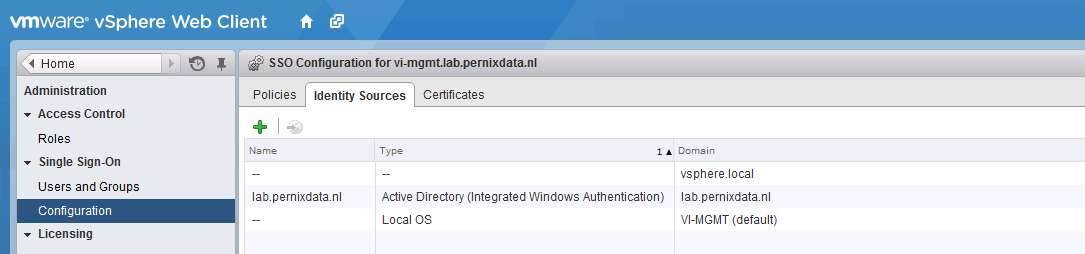
1. Verify AD domain is listed as an Identity Source
Log in with administrator@vsphere.local and select Configuration in the home menu tree. Only when you are logged in with an SSO administrator vCenter will show the Single Sign-on menu option. Select Single Sign-on | Configuration and verify if AD domain is listed.
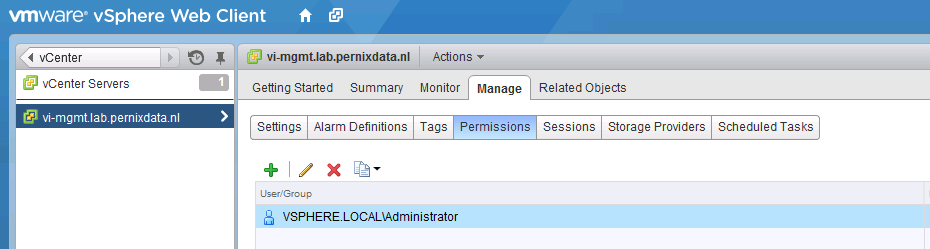
2. Add Permissions to top object vCenter
Go back to home, select menu option vCenter, vCenter Servers and then the vCenter server object. Select the menu option Manage, Permissions
3. Add User or Group to vCenter
Click on the green + icon to open the add permission screen. Click on the Add button located at the bottom.
4. Select the AD domain
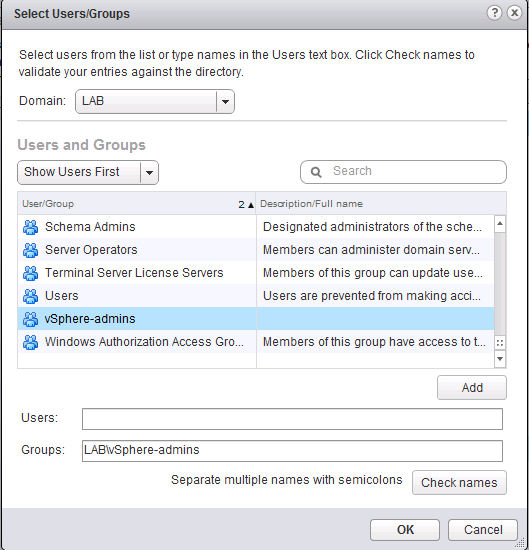
Select the AD domain and then the user or group. In my example I selected the AD group “vSphere-admins”. I’m using groups to keep the vCenter configuration as low-touch as possible. When I need grant additional users administrator rights I can simple do this in my AD Users and Computers tool. Traditionally auditing is of a higher level in AD then in vCenter.
5. Assign Administrator Role
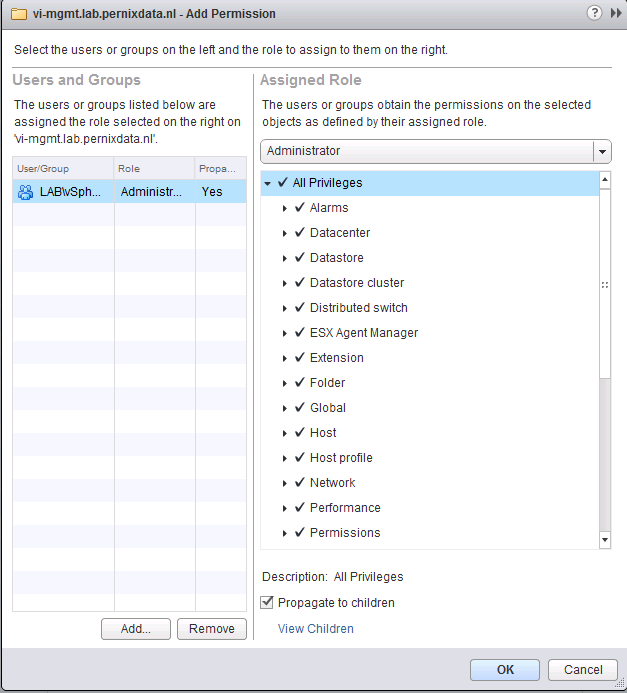
In order to manage the vCenter server all privileges need to be assigned to that user, by selecting the administrator role all privileges are assigned and propagated to all the child objects in the database.
6. Log in with your AD account
Log out the user administrator@vsphere.local and enter your AD account. Click on vCenter to view the vCenter Inventory list. vCenter Servers should list the new vCenter server.