• Skip to primary navigation
  • Skip to main content

frankdenneman.nl

  • AI/ML
  • NUMA
  • About Me
  • Privacy Policy

Life in the Data Center – a story of love, betrayal and virtualization

July 31, 2014 by frankdenneman

I’m excited to announce the first ever “collective novel”, in which members of the virtualization community collaborated to create a book with intrigue, mystery, romance, and a whole lot of geeky data center references.
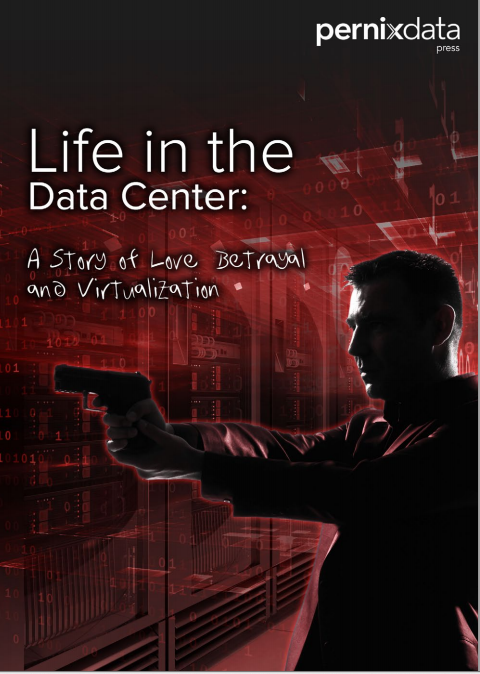
Lifeinthedatacenter
The concept of the project is that one person writes a section and then passes it along. The writers don’t know their fellow contributors. They get an unfinished story in their mailbox and are allowed to take the story in whatever direction it needs to go. The only limitation is the author imagination.
For me it was a fun and interesting project. Writing a chapter for a novel is a whole different ballgame than writing technical focused content. As I rarely read novels it’s a challenge how to properly describe the situation the protagonist is getting himself into. On top of that I needed to figure out how to extend and expand the story line set by the previous authors but also get the story into a direction I prefer. And to make it more challenging, you do not know what the next author will be writing, therefor your intention for the direction of the storyline may be ignored. All in all a great experience and I hope we can do a second collective novel. I’m already collecting ideas ☺
I would like to thank Jeff Aaron. He came up with the idea and guided the project perfectly. Once again Jon Atterbury did a tremendous job on the formatting and artwork of the book. And of course I would like to thank the authors of taking time out of their busy schedules to contribute to the book. The authors:


Jeff Aaron (@jeffreysaaron)

Josh Atwell (@Josh_Atwell)

Kendrick Coleman on twitter
Kendrick Coleman (@KendrickColeman)

Amy Lewis (@commsNinja)

Lauren Malhoit (@malhoit)

Bob Planker (@plankers)

Satyam Vaghani (@SatyamVaghani)

Chris Wahl (@ChrisWahl)

To make it more interesting for the readers, we deliberately hid which author wrote which chapter you can have some fun guessing via a short quiz. Prizes will be given to those people with the best scores.
I’m not entirely sure that this book will be nominated for a Pulitzer, but it is worth a read to see what is in the authors’ crazy heads – and to witness how well they work together when collaborating on a project like this.
Go download the book and take the quiz
Filed Under: Miscellaneous

Which HA admission control policy do you use?

April 4, 2014 by frankdenneman

Yesterday Duncan and I where discussing the 5.5 update of the vSphere clustering deepdive book and we were debating which HA admission control policy is the most popular. Last week I asked around on twitter, but hopefully a short poll will give us better insights. Please cast your vote.
[socialpoll id=”2195435″]

Filed Under: HA

Gotcha – Disable reserve all guest memory setting does not remove the reservation

April 3, 2014 by frankdenneman

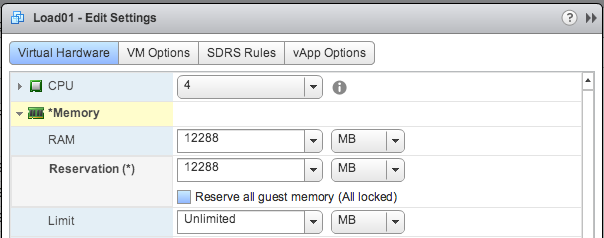
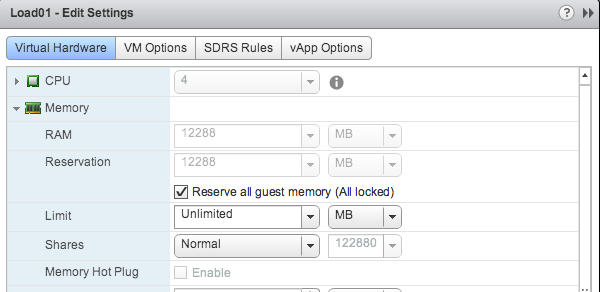
A while ago I wrote about the nice feature Reserve all guest memory available in vSphere 5.1 and 5.5. The feature automatically adjusts the memory reservation when the memory configuration changes. Increase the memory size and the memory reservation is automatically increased as well. Reduce the memory size of a virtual machine, and the reservation is immediately reduced.
Setting enabled
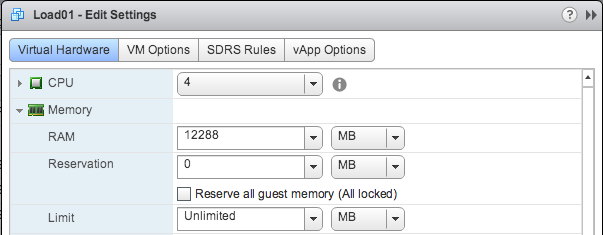
This week I received an email from someone who used the settings temporarily and when disabling this setting he was surprised that the reservation was not set to 0, reverting back to the default.

Expected behavior
Expected behavior

Real product behavior

Although I understand his point of view, the reality is that when you enabled the feature your intent was to apply a memory reservation to the virtual machine. The primary function of this setting is to take away the responsibility of adjusting the reservation when you change the memory reservation.
If your goal is to remove the memory reservation, disable the setting Reserve all guest memory and then change the memory reservation to 0.

Filed Under: Memory

vSphere 5.5 Home lab

March 27, 2014 by frankdenneman

For a while I’ve been using three Dell R610 servers in my home lab. The machines specs are quite decent, each server equipped with two Intel Xeon 5530 CPUs, 48GB of memory and four 1GB NICs. With a total of 24 cores (48 HT Threads) and 144GB of memory the cluster has more than enough compute power.
However from a bandwidth perspective they are quite limited, 3 Gbit/s SATA and 1GbE network bandwidth is not really pushing the envelope. These limitations do not allow me to properly understand what a customer can expect when running FVP software. In addition I don’t have proper cooling to keep the machines cool and their power consumption is something troubling.
Time for something new, but where to begin?
CPU
Looking at the current lineup of CPUs doesn’t make it easier. Within the same CPU vendor product line multiple types of CPU socket exist, multiple different processor series exist with comparable performance levels. I think I spent most of my time on figuring out which processor to select. Some selection criteria were quite straightforward. I want a single CPU system and at least 6 cores with Hyper-Threading technology. The CPU must have a high clock speed, preferably above 3GHz.
Intel ARK (Automated Relational Knowledge base) provided me the answer. Two candidates stood out; the Intel Core i7 4930 and the Intel Xeon E5 1650 v2. Both 6 core, both HT-enabled, both supporting the advanced technologies such as VT-x, VT-d and EPT. http://ark.intel.com/compare/77780,75780
The main difference between the two CPU that matters the most to me is the higher number of supported memory of the Intel Xeon E5. However the i7-4930 supports 64GB, which should be enough for a long time. But the motherboard provided me the answer
Motherboard
Contrary to the variety of choices at CPU level, there is currently one Motherboard that stands out for me. It looks it almost too good to be true and I’m talking about the SuperMicro X9SRH-7TF. This thing got it all and for a price that is unbelievable. The most remarkable features are the on-board Intel X540 Dual Port 10GbE NIC and the LSI 2308 SAS controller. 8 DIMM slots, Intel C602J chipset and a dedicated IPMI LAN port complete the story. And the best part is that its price is similar of a PCI version of the Intel X540 Dual Port 10GbE NIC. The motherboard only supports Intel E5 Xeons, therefor the CPU selection is narrowed down to one choice, the Intel Xeon E5 1650 v2.
CPU Cooler
The SuperMicro X9SRH-7TF contains an Intel LGA2011 socket with Narrow ILM (Independent Loading Mechanism) mounting. This requires a cooler designed to fit this narrow socket. The goal is to create silent machines and the listed maximum acoustical noise of 17.6 dB(A) of the Noctua NH-U9DX i4 “sounds” promising.
Memory
The server will be equipped with 64GB. Four 16GB DDR3-1600 modules allowing for a future upgrade of memory. The full product name: Kingston ValueRAM KVR16R11D4/16HA Modules.
Network
Although two 10 GbE NICs provide more than enough bandwidth, I need to test scenarios where 1GbE is used. Unfortunately vSphere 5.5 does not support the 82571 chipset used by the Intel PRO/1000 Pt Dual Port Server Adapter currently inserted in my Dell servers. I need to find an alternative 1 GbE NIC recommendations are welcome.
Power supply
I prefer a power supply that is low noise and fully modular. Therefore I selected the Corsair RM550. Besides a noise-reducing fan the PSU has a Zero RPM Fan Mode, which does not spin the fan until it is under heavy load, reducing the overall noise level of my lab when I’m not stressing the environment.
Case
The case of choice is the Fractal Design Define R4. Simple but elegant design, enough space inside and has some sound reducing features. Instead of the standard black color, I decided to order the titanium grey.
SSD
Due to the PernixDrive program I have access to many different SSD devices. Currently my lab contains Intel DC 3700 100GB and Kingston SSDNOW enterprise e100 200GB drives. Fusion I/O currently not (yet) in the PernixDrive program was so kind to lend me a Fusion I/O IODrive of 3.2 TB, unfortunately I need to return this to Fusion someday.
Overview

Component Type Cost
CPU Intel Xeon E5 1650 v2 540 EUR
CPU Cooler Noctua NH-U9DX i4 67 EUR
Motherboard SuperMicro X9SRH-7TF 482 EUR
Memory Kingston ValueRAM KVR16R11D4/16HA 569 EUR
SSD Intel DC 3700 100GB 203 EUR
Kingston SSDNOW enterprise e100 200GB 579 EUR
Power Supply Corsair RM550 90 EUR
Case Fractal Design Define R4 95 EUR
Price per Server (without disks) 1843 EUR

In total two of these machines are build as a start of my new lab. Later this year more of these machines will be added. I would like to thank Erik Bussink for providing me recommendations and feedback on the component selection of my new vSphere 5.5 Home Lab. I’m sure he will post a new article of his new lab soon.

Filed Under: VMware

Help my DRS cluster is not load balancing!

March 18, 2014 by frankdenneman

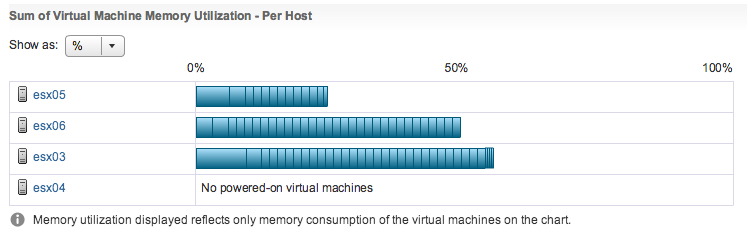
Unfortunately I still see this cry for help appearing on the VMTN forums and on twitter. And they usually are accompanied by screenshots like this:
01-DRS-unbalanced-memory
This screen doesn’t really show you if your DRS cluster is balanced or not. It just shows if the virtual machine receives the resources they are entitled to. The reason why I don’t use the word demand is that DRS calculates priority based on virtual machine and resource pool resource settings and resource availability.
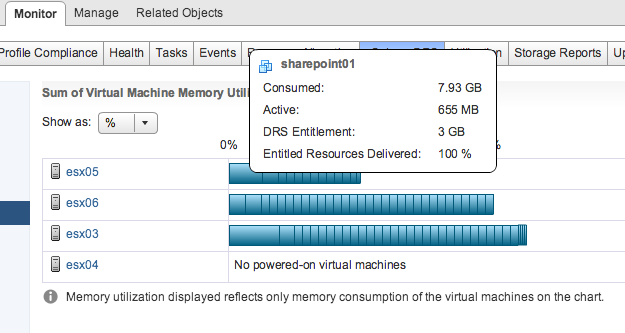
To understand if the virtual machine received the resources it requires, hover over the bar and find the virtual machine. A new window is displayed with the metric “Entitled Resources Delivered”
02-DRS-VM-resource-entitlement
DRS attempts providing the resources requested by the virtual machine. If the current host is not able to provide the resources, DRS move it to another host that is able to provide the resources. If the virtual machine is receiving the resources it requires then there is no need to move the virtual machine to another hosts. Moves by DRS consume resources as well and you don’t want to waste resources on unnecessary migrations.
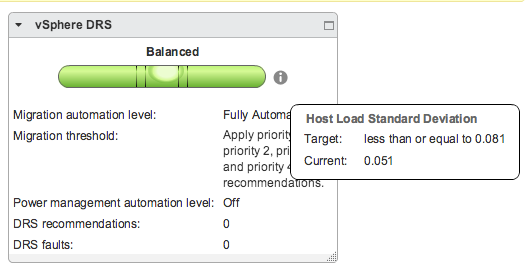
To avoid wasting resources, DRS calculates two metrics, the current host load standard deviation and the target host load standard deviation. These metrics indicate how far the current load of the host is removed from the ideal load. The migration threshold determines how far these two metrics can lie apart before indicating that the distribution of virtual machines needs to be reviewed. The web client contains this cool water level image that indicates the overall cluster balance. It can be found at the cluster summary page and should be used as a default indicator of the cluster resource status.
03-DRS-Host Load Standard Deviation
One of main arguments is that a host contain more than CPU and memory resources alone. Multiple virtual machines located on one host, can stress or saturate the network and storage paths extensively, whereas a better distribution of virtual machine across the hosts would also result in a better distribution of resources at the storage and network path layer. And this is a very valid argument, however DRS is designed to take care of CPU and Memory resource distribution and is therefor unable to take these other resource consumption constraints into account.
In reality DRS takes a lot of metrics into account during its load balance task. For more in-depth information I would recommend to read the article: “DRS and memory balancing in non-overcommitted clusters” and “Disabling mingoodness and costbenefit”.

Filed Under: DRS

  • « Go to Previous Page
  • Page 1
  • Interim pages omitted …
  • Page 33
  • Page 34
  • Page 35
  • Page 36
  • Page 37
  • Interim pages omitted …
  • Page 83
  • Go to Next Page »

Copyright © 2026 · SquareOne Theme on Genesis Framework · WordPress · Log in