It is recommended to configure Storage DRS in manual mode when you are new to Storage DRS. This way you become familiar with the decision matrix Storage DRS uses and you are able to review the recommendations it provides. One of the drawbacks of manual mode is the need to monitor the datastore cluster on a regular basis to discover if new recommendations are generated. As Storage DRS is generated every 8 hours and doesn’t provide insights when the next invocation run is scheduled, it’s becomes a bit of a guessing game when the next load balancing operation has occurred.
To solve this problem, it is recommended to create a custom alarm and configure the alarm to send a notification email when new Storage DRS recommendations are generated. Here’s how you do it:
Step 1: Select the object where the alarm object resides
If you want to create a custom rule for a specific datastore cluster, select the datastore cluster otherwise select the Datacenter object to apply this rule to each datastore cluster. In this example, I’m defining the rule on the datastore cluster object.
Step 2: Go to Manage and select Alarm Definitions
Click on the green + icon to open the New Alarm Definition wizard
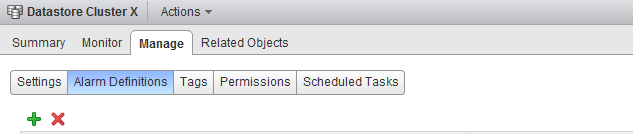
Step 3: General Alarm options
Provide the name of the alarm as this name will be used by vCenter as the subject of the email. Provide an adequate description so that other administrators understand the purpose of this alarm.
In the Monitor drop-down box select the option “Datastore Cluster” and select the option “specific event occurring on this object, for example VM Power On”. Click on Next.
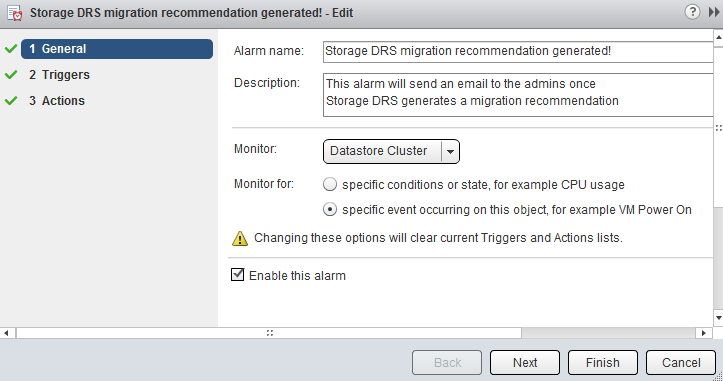
Step 4: Triggers
Click on the green + icon to select the event this alarm should be triggered by. Select “New Storage DRS recommendation generated”. The other fields can be left blank, as they are not applicable for this alarm. Click on next.
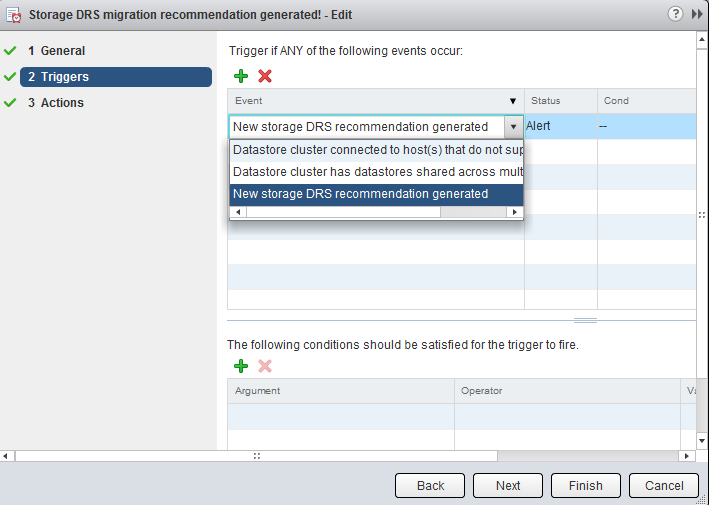
Step 5: Actions
Click on the green plus icon to create a new action. You can select “Run a Command”, “Send a notification email” and “Send a notification trap”. For this exercise I have selected “Send a notification email”. Specify the email address that will receive the messages containing the warning that Storage DRS has generated a migration recommendation. Configure the alarm so that it will send a mail once when the state changes from green to yellow and yellow to red. Click on Finish.
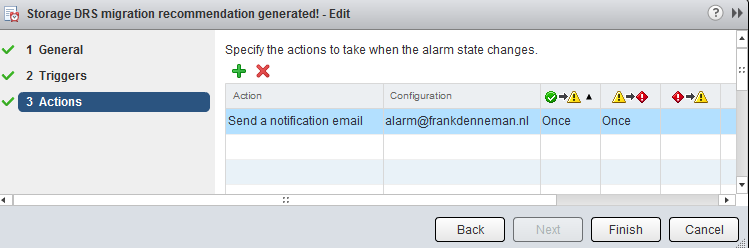
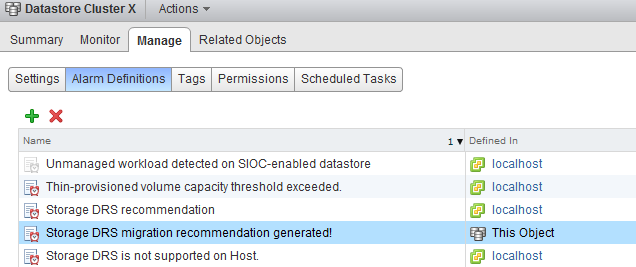
The custom alarm is now listed between the pre-defined alarms. As I chose to define the alarm on this particular datastore cluster, vCenter list that the alarm is defined on “this Object”. This particular alarm is therefor not displayed at Datacenter level and cannot be applied to other datastore clusters in this vCenter Datacenter.
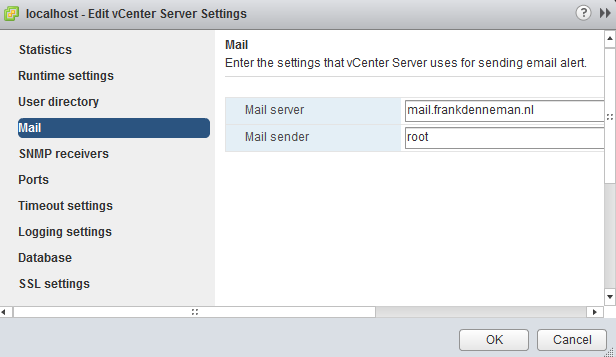
Please note that you must configure a Mail server when using the option “send a notification email” and configure an valid SNMP receiver when using the option “Send a notification trap”. To configure a mail or SNMP server, select the vCenter server option in the inventory list, select manage, settings and click on edit. Go to Mail and provide a valid mail server address and an optional mail sender.
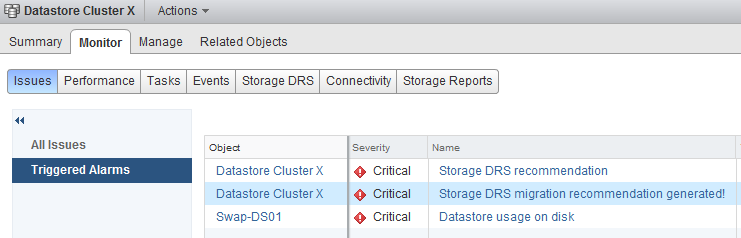
To test the alarm, I moved a couple of files onto a datastore to violate the datastore cluster space utilization threshold. Storage DRS ran and displayed the following notifications on the datastore cluster summary screen and at the “triggered alarm” view:
The moment Storage DRS generated a migration recommendation I received the following email:
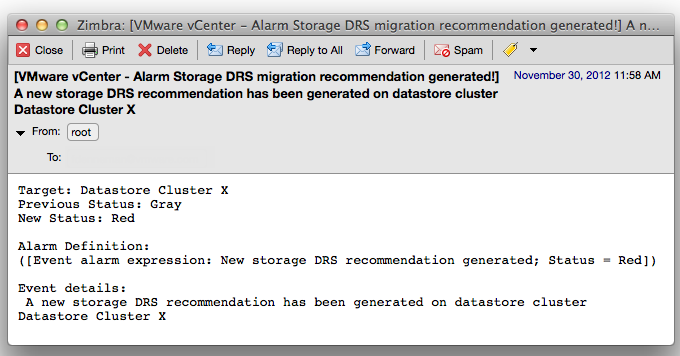
As depicted in the screenshot above, the subject of the email generated by vCenter contains the name of the alarm you specified (notice the exclamation mark), the event itself – New Storage DRS recommendation generated” and the datastore cluster in which the event occurred.
vSphere 5.1 Clustering deepdive Cyber Monday deal
We are long time fascinated by the whole Black Friday and Cyber Monday craze in the USA. Unfortunately we do not celebrate Thanksgiving in the Netherlands and none of the shops are participating in something similar as Black Friday.
Similar to last year, we thought it was a great idea to participate in some form and what better than to offer our vSphere 5.1 Clustering Technical Deepdive book for a price you cannot resist. We just changed the price of the vSphere 5.1 Clustering Technical Deepdive to $17.95, Amazon Deutschland is offering the book for 16.00 EURO, while Amazon UK is selling the book for 11.01 Pounds sterling.
The book has some amazing reviews, here is one we like to share with you:
The book contains information critical to VMware administrators. Clustering is a critical technology, and the book covers the underlying concepts as well as the practical issues surrounding implementation. The information contained within will be important far past vSphere 5.1; the principles will apply for decades, and even the details of implementation are unlikely to change dramatically over the next few generations of the product. As with any good “deep dive,” the fundamental concepts discussed will ultimately help you in any clustering situation, even with non-VMware products.
From a reading comprehension standpoint, the book is easy to grok. The information flows quickly and you can read the entire work cover to cover with relative ease. This is a must have for any systems administrator.
What better way than recover from the madness of Black Friday and just sit back and relax reading this amazing piece of work? This is most definitely the deal of the year for all virtualization fanatics!
Duncan and Frank
(Alternative) VM swap file locations Q&A – part 2
After writing the article “(Alternative) VM swap file locations Q&A” I received a lot of questions about the destination of the swapped pages and reading back my article I didn’t do a good job clarifying that part of the process.
Which network is used for copying swapped pages?
As mentioned in the previous post the swap file itself is not copied over to the destination host, but only the swapped pages itself. Raphael Schitz (@hypervisor_fr) was the first to ask, which network is used to copy over the swapped pages? The answer is vMotion network.
The reason why the vMotion network is used, is that the source host running the active virtual machine, pulls the swapped pages back in to memory when migrating the memory pages to the destination host.
Are swapped pages on the source host swapped out on the destination host?
As the pages are copied out from the swap file to the destination host, swapped pages are copied into the stream of the in-memory pages from the source host to the destination host. That means that the destination host is not aware which pages orginate from swap file and which pages come from in-memory, they are just memory pages that need to be stored and made available to the new virtual machine.
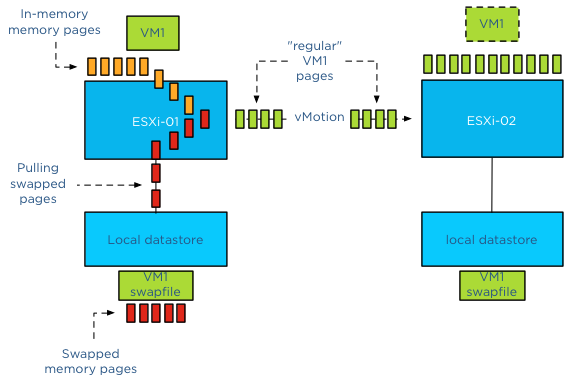
To describe the behavior in a different way, the source host pulls the swapped pages from disk before sending them over, therefor the destination host sees a continues stream of memory pages, unmarked, all equal and are therefor stored in memory by the destination host.
What if the destination host is experiencing contention?
Well it’s up to the destination host to decide which pages to swap out to disk. During a vMotion process, the destination VM starts out with a clean slate, meaning that the memory target is not determined by the source host but by the destination host. Memory targets are local memory schedule metrics and thus not shared. The source host shares the percentage of active pages but it’s the destination hosts’ memory scheduler that determines the appropriate swap target for the new virtual machine. It can possibly push out memory pages back to its swap file as needed. The pages could be the same as the pages on the old host, but they can also completely different pages.
What about compressed pages?
For every rule there is an exception and the exception is compressed pages. During a vMotion process the destination host will maintain the compressed pages by keeping them compressed. This behavior occurs even with an unshared swap migration.
Get notification of these blogs postings and more DRS and Storage DRS information by following me on Twitter: @frankdenneman
(Alternative) VM swap file locations Q&A – part 2
After writing the article “(Alternative) VM swap file locations Q&A” I received a lot of questions about the destination of the swapped pages and reading back my article I didn’t do a good job clarifying that part of the process.
Which network is used for copying swapped pages?
As mentioned in the previous post the swap file itself is not copied over to the destination host, but only the swapped pages itself. Raphael Schitz (@hypervisor_fr) was the first to ask, which network is used to copy over the swapped pages? The answer is vMotion network.
The reason why the vMotion network is used, is that the source host running the active virtual machine, pulls the swapped pages back in to memory when migrating the memory pages to the destination host.
Are swapped pages on the source host swapped out on the destination host?
As the pages are copied out from the swap file to the destination host, swapped pages are copied into the stream of the in-memory pages from the source host to the destination host. That means that the destination host is not aware which pages orginate from swap file and which pages come from in-memory, they are just memory pages that need to be stored and made available to the new virtual machine.
To describe the behavior in a different way, the source host pulls the swapped pages from disk before sending them over, therefor the destination host sees a continues stream of memory pages, unmarked, all equal and are therefor stored in memory by the destination host.
What if the destination host is experiencing contention?
Well it’s up to the destination host to decide which pages to swap out to disk. During a vMotion process, the destination VM starts out with a clean slate, meaning that the memory target is not determined by the source host but by the destination host. Memory targets are local memory schedule metrics and thus not shared. The source host shares the percentage of active pages but it’s the destination hosts’ memory scheduler that determines the appropriate swap target for the new virtual machine. It can possibly push out memory pages back to its swap file as needed. The pages could be the same as the pages on the old host, but they can also completely different pages.
What about compressed pages?
For every rule there is an exception and the exception is compressed pages. During a vMotion process the destination host will maintain the compressed pages by keeping them compressed. This behavior occurs even with an unshared swap migration.
Get notification of these blogs postings and more DRS and Storage DRS information by following me on Twitter: @frankdenneman
(Alternative) VM swap file locations Q&A
Lately I have received a couple of questions about Swap file placement. As I mentioned in the article “Storage DRS and alternative swap file locations”, it is possible to configure the hosts in the DRS cluster to place the virtual machine swapfiles on an alternative datastore. Here are the questions I received and my answer:
Question 1: Will placing a swap file on a local datastore increase my vMotion time?
Yes, as the destination ESXi host cannot connect to the local datastore, the file has to be placed on a datastore that is available for the new ESXi host running the incoming VM.Therefor the destination host creates a new swap file in its swap file destination. vMotion time will increase as a new file needs to be created on the local datastore of the destination host and swapped memory pages potentially need to be copied.
Question 2: Is the swap file an empty file during creation or is it zeroed out?
When a swap file is created an empty file equal to the size of the virtual machine memory configuration. This file is empty and does not contain any zeros.
Please note that if the virtual machine is configured with a reservation than the swap file will be an empty file with the size of (virtual machine memory configuration – VM memory reservation). For example, if a 4GB virtual machine is configured with a 1024MB memory reservation, the size of the swap file will be 3072MB.
Question 3: What happens with the swap file placed on a non-shared datastore during vMotion?
During vMotion, the destination host creates a new swap file in its swap file destination. If the source swap file contains swapped out pages, only those pages are copied over to the destination host.
Question 4: What happens if I have an inconsistent ESXi host configuration of local swap file locations in a DRS cluster?
When selecting the option “Datastore specified by host”, an alternative swap file location has to be configured on each host separately. If one host is not configured with an alternative location, then the swap file will be stored in the working directory of the virtual machine. When that virtual machine is moved to another host configured with an alternative swap file location, the contents of the swap file is copied over to the specified location, regardless of the fact that the destination host can connect to the swap file in the working directory.

Question 5: What happens if my specified alternative swap file location is full and I want to power-on a virtual machine?
If the alternative datastore does not have enough space, the VMkernel tries to store the VM swap file in the working directory of the virtual machine. You need to ensure enough free space is available in the working directory otherwise the VM not allowed to be powered up.
Question 6: Should I place my swap file on a replicated datastore?
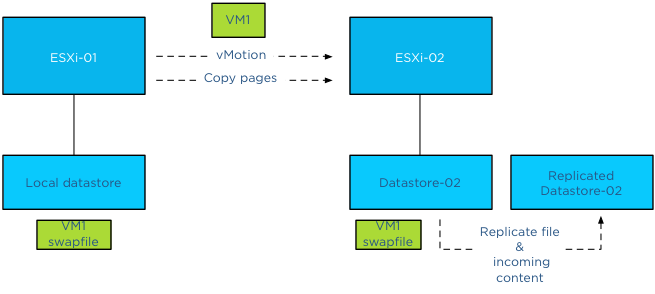
Its recommended placing the swap file on a datastore that has replication disabled. Replication of files increases vMotion time. When moving the contents of a swap file into a replicated datastore, the swap file and its contents need to replicated to the replica datastore as well. If synchronous replication is used, each block/page copied from the source datastore to the destination datastore, it needs to wait until the destination datastore receives an acknowledgement from its replication partner datastore (the replica datastore).
Question 7: Should I place my swap file on a datastore with snapshots enabled?
To save storage space and design for the most efficient use of storage capacity, it is recommended not to place the swap files on a datastore with snapshot enabled. The VMkernel places pages in a swap file if it’s there is memory pressure, either by an overcommitted state or the virtual machine requires more memory than it’s configured memory limit. It only retrieves memory from the swap file if it requires that particular page. The VMkernel will not transfer all the pages out of the swap file if the memory pressure on the host is resolved. It keeps unused swapped out pages in the swap file, as transferring unused pages is nothing more than creating system overhead. This means that a swapped out page could stay there as long as possible until the virtual machine is powered-off. Having the possibility of snapshotting idle and unused pages on storage could reduce the pools capacity used for snapshotting useful data.
Question 8: Should I place my swap file on a datastore on a thin provisioned datastore (LUN)?
This is a tricky one and it all depends on the maturity of your management processes. As long as thin provisioned datastore is adequately monitored for utilization and free space and controls are in place that ensures sufficient free space is available to cope with bursts of memory use, than it could be a viable possibility.
The reason for the hesitation is the impact a thin provisioned datastores has on the continuity of the virtual machine.
Placement of swap files by VMkernel is done at the logical level. The VMkernel determines if the swap file can be placed on the datastore based on its file size. That means that it checks the free space of a datastore reported by the ESX host, not the storage array. However the datastore could exist in a heavily over-provisioned datapool.
Once the swap file is created the VMkernel assumes it can store pages in the entire swap file, see question 2 for swap file calculation. As the swap file is just an empty file until the VMkernel places a page in the swap file, the swap file itself takes up a little space on the thin disk datastore. Now this can go on for a long time and nothing will happen. But what if the total reservation consumed, memory overcommit-level and workload spikes on the ESXi host layer are not correlated with the available space in the thin provisioning storage pool? Understand how much space the datastore could possibly obtain and calculate the maximum configured size of all existing swap files on the datastore to avoid an Out-of space condition.
(Alternative) VM swap file locations Q&A – part 2
Get notification of these blogs postings and more DRS and Storage DRS information by following me on Twitter: @frankdenneman