One of the cool new features of Storage DRS in vSphere 5.1 is the datastore correlation detector used by the SIOC injector. Storage arrays have many ways to configure datastores from among the available physical disk and controller resources in the array. Some arrays allow sharing of back-end disks and RAID groups across multiple datastores. When two datastores share backend resources, their performance characteristics are tied together: when one datastore experiences high latency, the other datastore will also experience similar high latency since IOs from both datastore are being serviced by the same disks. These datastores are considered “performance-related”. I/O load balancing operations in vSphere 5.1 avoid recommending migration of virtual machines between two performance-correlated datastores.
I/O load balancing algorithm
Storage DRS collects several virtual machine metrics to analyze the workload generated by the virtual machines within the datastore cluster. These metrics are aggregated in a workload model. To effectively distribute the different load of the virtual machines across the datastores, Storage DRS needs to understand the performance (latency) of each datastore. When a datastore violates its I/O load threshold, Storage DRS moves virtual machines out of the datastore. By linking workload models to device models, Storage DRS is able to select a datastore with a low I/O load when placing a virtual machine with a high I/O load during load balance operations.
Performance related datastores
However if data is moved between datastores that are backed by the same disks, the move may not decrease the latency experienced on the source datastore as the same set of disks, spindles or RAID-groups service the destination datastore as well. I/O load balancing recommendations should avoid using two performance-correlated datastores, since moving a virtual machine from the source datastore to the destination datastore has no effect on the datastore latency. How does Storage DRS discover performance related datastores?
How does it work? The datastore correlation detector measures performance during isolation and when concurrent IOs are pushed to multiple datastores. The basic mechanism of correlation detector is rather straightforward: compare the overall latency when two datastores are being used alone in isolation and when there are concurrent IO streams on both of the datastores. If there is no performance correlation, the concurrent IO to the other datastore should have no effect. Contrariwise, if two datastores are performance correlated, then concurrent IO stream should amplify the average IO latency on both datastores. Please note that datastores will be checked for correlation on a regular basis. This allows Storage DRS to detect changes to the underlying storage configuration.
Example scenario
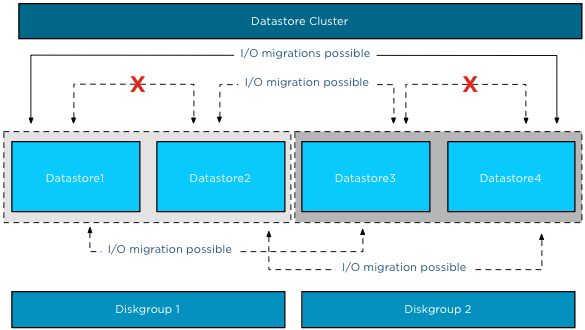
In this scenario Datastore1 and Datastore2 are backed by disk devices grouped in Diskgroup1, while Datastore3 and Datastore4 are backed by disk devices grouped in Diskgroup2. All four datastores belong to a single datastore cluster.
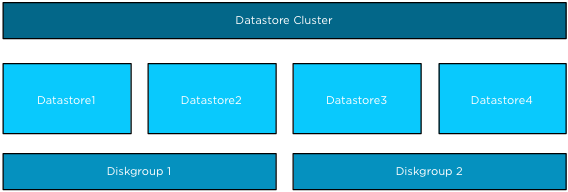
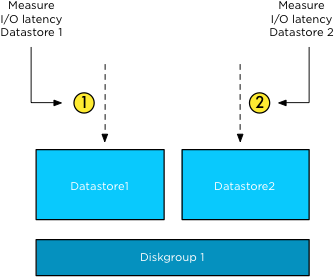
After SIOC has run the workload and device models on a datastore, SIOC picks a random datastore in the datastore cluster to check for correlations. If both datastores are idle, the datastore correlation detector uses the same workload to measure the average I/O latency in isolation and concurrent I/O mode.
Isolation
The SIOC injector measures the average IO latency of Datastore1 in isolation. This means it measures the latency of the outstanding I/O of Datastore1 alone. Next, it measures the average IO latency of Datastore2 in isolation.
Concurrent I/Os
The first two steps are used to establish the baseline for each datastore. In the third step the SIOC injector sends concurrent I/O to both datastores simultaneously.
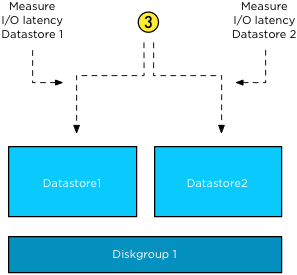
This results in the behavior that Storage DRS does not recommend any I/O load balancing operations between Datastore1 and 2 and Datastore3 and 4, but it can recommend for example to move virtual machines from Datastore1 to Datastore2 or from Datastore2 to Datastore3, etc. All moves are possible as long as the datastores are not correlated.
Enable Storage DRS on performance-correlated datastores?
When two datastores are marked as performance-correlated, Storage DRS does not generate IO load balancing recommendations between those two datastores. However Storage DRS can be used for initial placement and still generate recommendations to move virtual machines between two correlated datastores to address out of space situations or to correct rule violations. Please keep in mind that some arrays use a subset of disk out of a larger diskpool to back a single datastore. With these configurations, it appears that all disks in a diskpool back all the datastores but in reality they don’t. Therefor I recommend to set Storage DRS automation mode to manual and review the migration recommendations to understand if all datastores within the diskpool are performance-correlated.
vSphere 5.1 Clustering Deepdive available
Duncan and I released the vSphere 5.1 Clustering deepdive book this week. The book contains the new features of the vSphere 5.1 suite. We rewrote the Storage DRS chapter and have added a complete new chapter focusing on Stretched Clusters.
Font changes
The challenge for us was to include all the new content in the book without allowing the book to grow beyond its trademark dimensions. To achieve this we used a different font and decreased the font size, this resulted in a growth of 80 pages, making it 415 pages instead of the 505 pages if we used the previous font. Please note that although we decreased the font size, this did not decrease the legibility of the book.
Special cover
The cover is designed in such a way that you can actually have multiple copies with all different shades of orange, dare I say 50 shades of Orange. 😉
We hope you enjoy the new version of the vSphere clustering deepdive series. It’s available in Paperback and Kindle format.
Paper copy – $ 24.95
Kindle version – $ 7.49
CloudPhysics in a nutshell
Disclaimer: I’m a technical advisor for CloudPhysics.
I’m very happy to see CloudPhysics coming out of stealth mode this week and making their beta product available to the public. In a nutshell CloudPhysics is bringing Big Data analytics to the IT environment and it will provide you with tools to analyze your datacenter. How does it acquire this dataset and what benefit do you get from it?
The Observer Appliance
To gather all that data, an Observer Appliance needs to run in the virtual infrastructure. And in order to get a valuable dataset that is used for analytics and simulations the Observer needs to be active in as many as virtual infrastructures as possible. Running an appliance that sends operational data to a third party like CloudPhysics can be a security concern. Going into detail about how CloudPhysics designed the system to handle privacy, security and data sharing issues is outside the scope of this article. In short, data extracted from the virtual infrastructure are performance statistics and inventory and configuration settings. All environmental details are scrubbed and no log files or content of disk and memory is gathered.
The User Interface
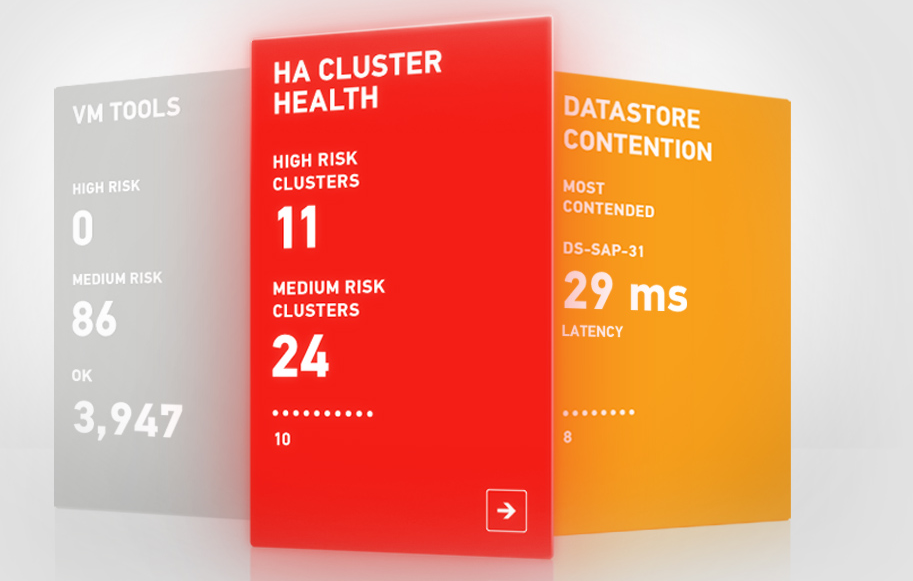
The data acquired by the Observer Appliance is accessible at https://app.cloudphysics.com. Logging in will give you access to your own data. The beta product provides a user interface that allows you to dive into specific focus areas. The UI provides so-called cards that displays key data points and is a launch point to a more detailed view. This view can contain information about the relationship with other features of the vSphere stack. An example of such a card would be Virtual Machine level reservations. Not only does this card provide you information about the present virtual machine level reservations in your environment in a clear and concise manner, it also displays the impact the reservation has on the High Availability slot size and therefor the consolidation ratio of your cluster. All this information combined in a single screen, no need to navigate through multiple screens and correlate particular metrics.
Correlation of metrics
Correlation of particular settings and understanding the impact each setting has on a complex environment, such as a virtual infrastructure, is time consuming and above all very difficult. This correlation of metrics allows you to save time, but it also helps you understand behavior of your environment. Now you might ask how do you know you can trust if these correlations are correct and this is one of the most interesting things about this product. It’s a combination of product expertise and community driven input.
The two pillars of knowledge
The CloudPhysics team comprises of industry heavy hitters. Some of these persons invented core features of the vSphere stack while working for VMware, while others made their mark at other industry leading companies. The second pillar is the community involvement. In this beta program, registered users can suggest ideas for utility cards. Domain experts will verify the community provided cards on technical accuracy.
Near-future developments
One thing I’m very exited about is the upcoming High Availability and DRS simulation tools. Both HA and DRS can be a challenge to configure as some settings impact the virtual infrastructure on multiple levels. The HA and DRS simulation analyzes current settings and provides you a platform where you can predict the effects of a change on your environment.
VMworld Challenge 2012
Now back to the current status. CloudPhysics is running a VMworld Challenge 2012. The contest allows you to describe the problems you are facing, such as “I’m applying different disk shares in my environment but I cannot see the worst case scenario allocation”. The more card you produce, the more points you score. To increase your score, download the Observer Appliance and take your environment for a test drive. The more activity you generate, the more points you accumulate. How will you benefit from this contest, first of all, if you are located in the U.S. you can win some great prices. (Due to U.S legislation, non-U.S. residents are excluded from winning prizes), but by submitting cards you improve the system and the quality of the reporting tool and simulation tool.
Resource Management as a Service
I started of with a disclaimer, I am a technical advisor to CloudPhysics and you can expect to see more articles about the development of CloudPhysics. As I’m able to work with the inventors of DRS and Storage DRS, a lot of my focus is on resource management. Together with the input of the community, the continuous analysis by domain experts you can expect that this might well turn out as Resource Management as a Service.
VM templates and Storage DRS
Please note that Storage DRS cannot move VM templates via storage vMotion. This can impact load balancing operations or datastore maintenance mode operations. When initiating Datastore Maintenance mode, the following message is displayed:

As maintenance mode is commonly used for array migrations of datastore upgrade operations (VMFS-3 to VMFS-5), remember to convert the VM template to a virtual machine first before initiating maintenance mode.
My public VMworld schedule
This year will be an action-packed VMWorld for me, presenting sessions, participating in two panel sessions, hosting a group discussion and available in two “Meet the expert” sessions.
Presenting the following sessions:
INF-STO1545 – Architecting Storage DRS Datastore Clusters
INF-VSP1683 – VMware vSphere Cluster Resource Pools Best Practices
Panel sessions:
(TAM Day) – ASK THE EXPERTS
INF-VSP1504 – Ask the Expert vBloggers
Hosting the GD22 – Resource management (DRS/SDRS) group discussion. I invited Anne Holler (Lead engineer DRS) to host this session together with me.
During Meet the Experts session 13 and session 17 I’m available for short meetings to answer your resource management (DRS\SDRS) questions.
Here is the week schedule of the sessions/events/activities that I will be taking part of, be sure to sign up if you have not already:
Sunday (TAM Day):
14:35 – 15:35 : ASK THE EXPERTS
Monday:
14:30 – 15:30 : INF-VSP1504 – Ask the Expert vBloggers
16:00 – 17:00 : GD22 – Resource Management
Tuesday:
12:30 – 13:30 : INF-STO1545 – Architecting Storage DRS Datastore Clusters (Repeat session)
15:00 – 16:00 : INF-VSP1683 – vSphere Cluster Resource Pools Best Practices
Wednesday:
08:30 – 09:30 : INF-STO1545 – Architecting Storage DRS Datastore Clusters
12:30 – 13:30 : Expert 13
Thursday:
12:00 – 12:00 : Expert 17