As part of the Technical Marketing team of VMware focusing on the vSphere platform I contribute to the vSphere blog on VMware.com. From this point forward I will post a link to new articles posted on the vSphere blog.
SDRS maintenance mode impossible because “The virtual machine is pinned to a host.”
VMware vSphere Metro Storage Cluster Case Study Technical Paper available
As of today the VMware vSphere Metro Storage Cluster Case Study Technical Paper is available at http://www.vmware.com/resources/techresources/10284
VMware vSphere Metro Storage Cluster (VMware vMSC) is a new configuration within the VMware Hardware Compatibility List. This type of configuration is commonly referred to as a stretched storage cluster or metro storage cluster. It is implemented in environments where disaster/downtime avoidance is a key requirement. This case study was developed to provide additional insight and information regarding operation of a VMware vMSC infrastructure in conjunction with VMware vSphere. This paper will explain how vSphere handles specific failure scenarios and will discuss various design considerations and operational procedures.
For me this is a new milestone as this is my first published white paper. I had the honor and pleasure of collaborating with Duncan Epping (DuncanYB), Ken Werneburg (@vmken), Stuart Hardman (@shard_man) and Lee Dilworth (@LeeDilworth) on this paper. Working with industry-leading experts, testing all sorts of scenario’s and listing to them analyzing and brainstorming was inspiring and very educational. Not only is this content great for customers who are interested in vSphere Metro Storage Cluster solutions, but is very educational for people who are interested in HA in general. A must read!
DRS clusters and allocating reserved memory
As mentioned in the admission control family, multiple features on multiple layers check to there is enough unused reserved memory available. This article is a part of a short series of articles on how memory is being claimed and provided as reserved memory; other articles will be posted throughout the week.
Refresher
I’ve published two articles that describes memory reservation at the VM level and the resource pool level. These two sources are an excellent way to refresh your memory (no pun intended) on the reservation construct:
• Impact of memory reservation (VM-level)
• Resource pool memory reservations
“Unclaimed” reserved memory?
If a memory reservation is configured on a child object (virtual machine or resource pool) admission control checks if there is enough reserved memory available. Which memory can be claimed for reserved memory? And how about the host-level memory and cluster level memory? Let’s dissect the cluster tree of resource providers and resource consumers and start with a bottom-up approach.
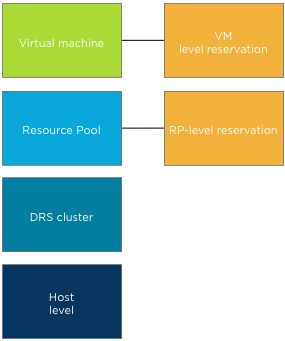
Host-level to DRS cluster
Both the host and DRS cluster are resource providers to the resource consumers i.e. resource pools and virtual machines. When a host is made a member of a DRS cluster, all its available memory resources are placed at the DRS disposal. The available memory of a host is the memory that is left after the VMkernel claimed host memory. The DRS cluster, also called the root resource pool, reserves this remaining memory.
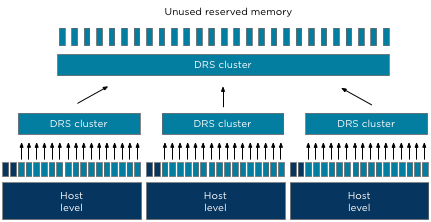
As the DRS cluster reserves this memory per host, all the memory aggregated inside the root resource pool and is actually designated as reserved memory. However to prevent confusion, this reserved memory is labeled as unused reserved memory in the vSphere Client user interface and as such provided to the child resource pools and child virtual machines.At the Resource Allocation Tab of the cluster, the Total memory capacity of the cluster is listed as well as the reserved capacity. The Available capacity is the result of Total capacity – Reserved capacity. Note that if HA is configured the amount of resources reserved for failover is automatically added to the reserved capacity.

Child resource pools
Resource pools allow for hierarchical partitioning of the cluster, but they always span the entire cluster. Resource pools draw resources from the root resource pool and do not pick and select resources from a specific hosts. The root resource pool functions as an abstraction layer. When configuring a reservation on resource pool level the specified amount of memory is claimed by that specific resource pool and cannot be allocated by other resource pools.
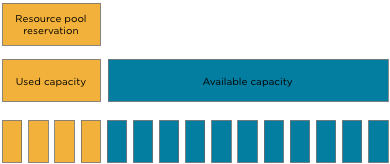
Note that the claim of reserved resources by the resource pool is done immediately during the creation of the resource pool. It does not matter if there are running virtual machine inside the resource pools or not. The total configured memory is withdrawn from the root resource pool and thus unavailable for other resource pools. Please keep this in mind when sizing resources pools.
The next article will expand on virtual machines inside a resource pool.
Admission control and vCloud Allocation Pool model
The previous article outlines the multiple admission controls active in a virtual infrastructure. One that always interested me in particular is the admission control feature that verifies resource availability. With the introduction of vCloud director another level of resource construct were introduced. Along with Provider virtual datacenter (vDC) and Organization vDCs, allocation models were introduced. An allocation model defines how resources are allocated from the provider vDC. An organization vDC must be configured with one of the following three allocation models: “Pay As You Go”, “Allocation Pool” and “Reservation Pool”. It is out of the scope to describe all three models, please visit Chris Colotti’s blog or Yellow Bricks to read more about allocation models.
As mentioned before the distinction between each of the allocation models is how resources are consumed. Depending on the chosen allocation model reservations and limits will be set on resource pool, virtual machine level, or both. One of the most interesting allocation model is the Allocation Pool model as it sets reservations on both resource pool level and virtual machine level simultaneously. During configuration of the allocation pool model, an amount of guaranteed resources can be specified. (Guaranteed is the vCloud term for vSphere reservation). The question I was given is will lowering the default value of 100% guaranteed memory result in an increase of more virtual machines inside the Organization vCD? And the answer lies within the working of vSphere admission control.
Allocation Pool model settings
By default the Allocation Pool model sets a 100% memory reservation on both resource pool level and virtual machine level. By lowering the default guarantee, it allows for opportunistic memory allocation on both resource pool level and virtual machine level. Creating this burstable space (resources available for opportunistic access) usually provides an higher consolidation ratio of virtual machines, however due to the simultaneous configuration of reservation on both resource pool and virtual machine level, this is not the case.
Virtual machine level reservation
During power-on operation admission control checks if the resource pool can satisfy the virtual machine level reservation. Because expandable reservation is disabled in this model, the resource pool is not able to allocate any additional resources from the provider vDC. Therefor the virtual machine memory reservation can only be satisfied by the resource pool level reservation of the organization vDC itself. When a virtual machine is using memory protected by a virtual machine level reservation, this memory is withdrawn from the resource pool-level reservation. If the resource pool does not have enough available memory to guarantee the virtual machine reservation, the power-on operation fails. Let’s use a scenario to visualize the process a bit better.
Scenario
An organization vCD is created with the Allocation Pool model and the memory allocation is set to 20GB; the memory guarantee is set to 50%. These settings result in a resource pool memory limit of 20GB and a memory reservation of 10GB. When powering up a 2GB virtual machine, 1GB of reserved resources will be allocated to that virtual machine and withdrawn from the available reserved memory pool.
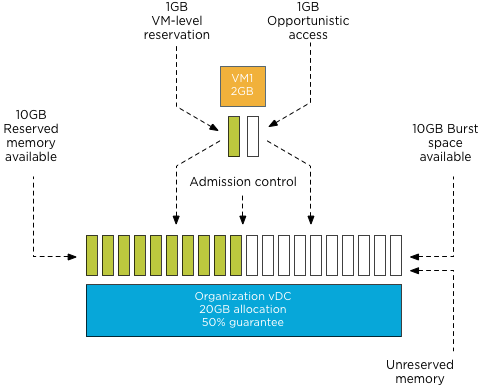
Admission control allows to power-on virtual machines until the reserved memory pool is reduced to zero. Following the previous example, virtual machine 2 is powered on. The resource pool providing resources to the organization vDC has 9 GB available in its pool of reserved memory. Admission control allows the power-on operation of the virtual machine as this pool can provide the reserved resources specified by the virtual machine level reservation.
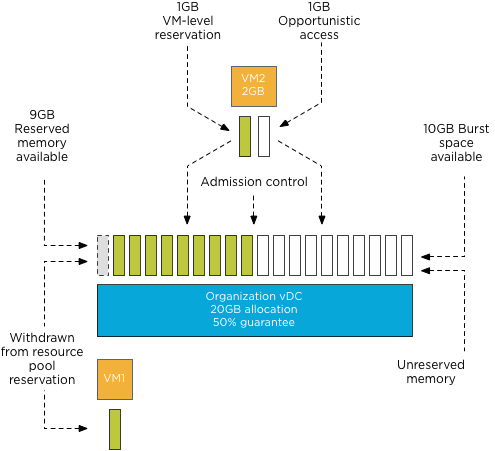
During each power-on operation 1GB of reserved memory is withdrawn from the reserved memory pool available to the organization vDC. Resulting in admission control allowing to power on ten virtual machines. When attempting to deploy virtual machine 11, admission controls fails the power-on operation as the organization vDC has no available reserved memory to satisfy the virtual machine level reservation.
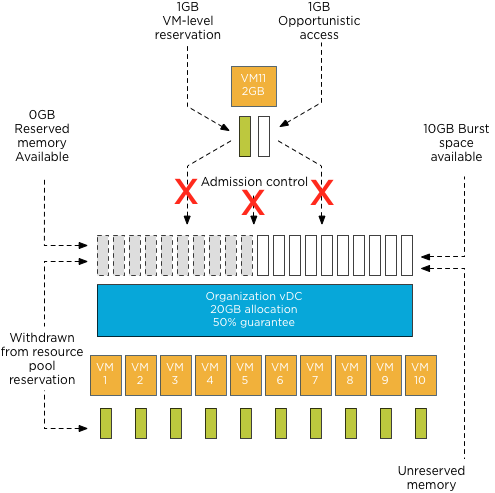
Note: This scenario excludes the impact of memory overhead reservation of each virtual machine. Under normal circumstances, the number of virtual machines that could be powered on would be close to 8 instead of 10 as the reserved pool available to the organization vDC is used to satisfy the memory overhead reservation of each virtual machine as well.
Because the guarantee setting of the Allocation Pool model configures resource pool and virtual machine memory reservation settings simultaneously, the supply and demand of reserved memory resources are always equal regardless of the configured percentage setting. Therefore offering opportunistic access to resources inside the organization vDC does not allow an increase of the number of virtual machines inside the organization vDC.
The next question arises, why should you lower the percentage of guaranteed resources? Providing burstable space increases the number of Organization vCDs inside the Provider vDC.
Resource pool memory reservation
Upon creation resource pools claim and withdraw the configured reserved resources from their parent instantaneously. This memory cannot be provided or distributed to other organization vDCs regardless of utilization of these resources.
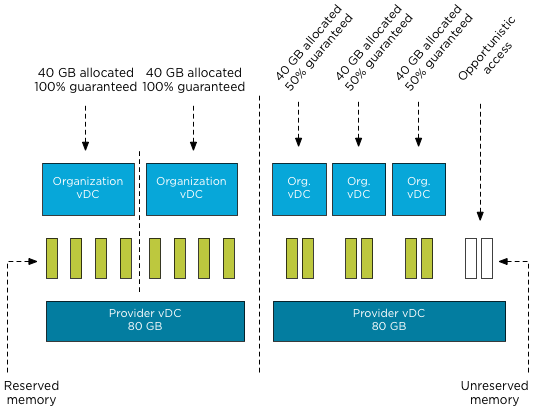
Although new resource constructs are introduced in a vCloud environment, consolidation ratios and resource management still leverage traditional vSphere resource management constructs and rules. Chris Colotti and I are currently working on a technical paper describing the allocation models in details and the way they interact with vSphere resource management. We hope to see this published soon.
The Admission Control Family
It’s funny how sometimes something, in this case a vSphere feature, becomes a “trending topic” on any given day or week. Yesterday I was discussing admission control policies with Rawlinson Riviera (@punchingclouds) and we discussed how to properly calculate a percentage for the percentage based admission control with keeping consolidation ratios in mind. And today Gabe published an article about his misconception of admission control, which triggered me to write an article of my own about admission control.
When discussing admission control usually only HA admission control policies are mentioned. However, HA isn’t the only feature using some sort of admission control. Storage DRS as well as DRS and the ESX(i) host have each their own admission control. Let’s take a closer look what admission control actually is and see how each admission control fits in the process of a virtual machine power-on operation.
What’s the function of admission control? I like to call it our team of virtual bouncers. Admission control is there to ensure that sufficient resources are available for the virtual machine to function within it’s specified parameters / resource requirements. The last part about the parameters and requirements is the key to understand admission control.
During a virtual machine power-on or a move operation, admission control checks if sufficient unreserved resources are available before allowing a virtual machine to power on or moved into the cluster. If a virtual machine is configured with reservation, this could be CPU, memory or even both, admission control needs to make sure that the datastore cluster, compute cluster, resource pool and host can provide these resources. If one of these constructs cannot allocate and provide these resources, then the datastore cluster, compute cluster, resource pool or host cannot provide an environment where the virtual machine can operate within its required parameters. In other words, the moment a virtual machine is configured to have an X amount of resources guaranteed, you want the environment to actually oblige to that wish and that’s why admission control is developed.
As a vSphere environment can be configured in many different ways, each feature sports its own admission control, as you do not want to introduce dependencies for such a crucial component. Let’s take a closer look at each admission control feature and their checkpoints.
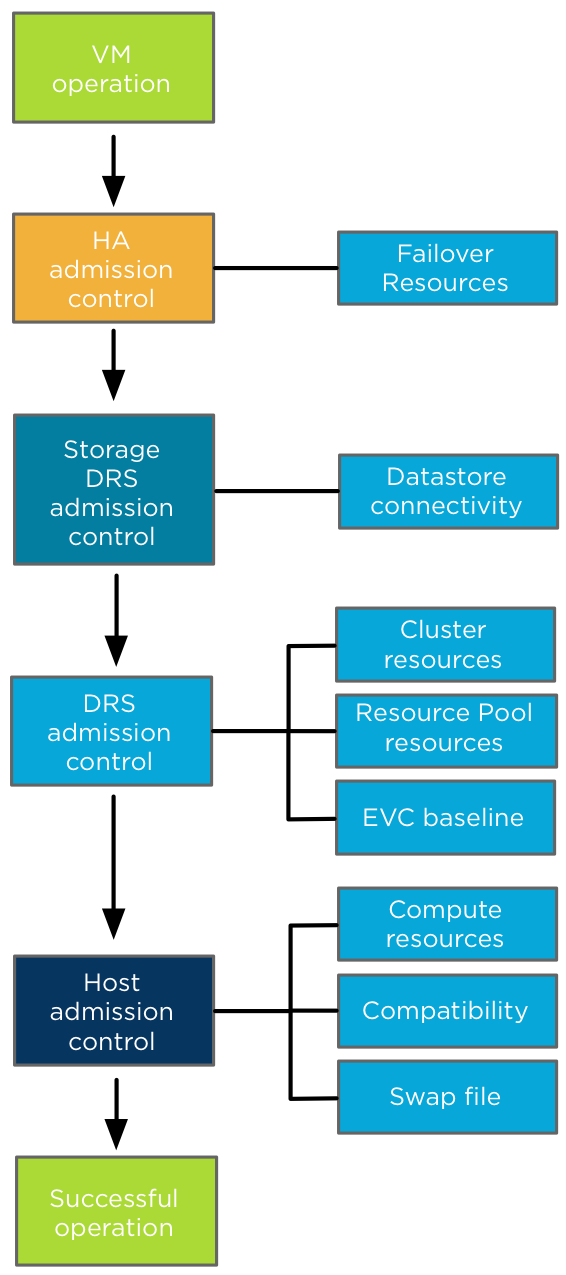
High Availability Admission control: During a virtual machine power-on operation, HA checks if the virtual machine can be powered-on without violating the required capacity to cope with a host failure event. Depending on the HA admission control policy, HA checks if the cluster can provide enough unreserved resources to satisfy the virtual machine reservation. The internals of each type Admission control policies is outside the scope of this article, more information can be found in the clustering deep dive books or online at Yellow-bricks.
After HA admission control gives the green light, it’s up to Storage DRS admission control if the virtual machine is placed in a Storage DRS datastore cluster. Storage DRS admission control checks datastore connectivity amongst the hosts in the datastore cluster and selects the hosts with the highest datastore connectivity to ensure the highest portability of a virtual machine. If there are multiple hosts with the same number of datastore connected it selects the host with the lowest compute utilization.
Up next is DRS admission control to review the cluster state. DRS ensures that sufficient unreserved resources are available in the cluster before allowing the virtual machine to power on. If the virtual machine is placed inside a resource pool, DRS checks if the resource pool can provide enough resources to satisfy the reservation. Depending on the setting “expandable reservation” the resource pool checks its own pool of unreserved resources or borrows resources from its parent. If a virtual machine is moved into the cluster and EVC is enabled in the DRS cluster, EVC admission control verifies if the applied EVC mode to the virtual machine does not exceed the current EVC baseline of the cluster. DRS selects a host based on configured VM-VM and VM-Host affinity rules.
Last step is Host admission control. In the end it’s the host that actually needs to provide the compute environment to allow the virtual machine to operate in. A cluster can have enough unreserved resources available, but it can be in a fragmented stage, where there are not enough resources available per host to satisfy the virtual machine reservation. To solve this problem a DRS invocation is triggered to recommend virtual machine migrations to re-balance the cluster and free up space on a particular host for the new virtual machine. If DRS is not enabled, the Host rejects the virtual machine due to the inability to provide the required resources. Host admission control also verifies is the virtual machine configuration is compatible with the host. The VM networks and datastores must be available in order to accommodate the virtual machine. The virtual machine compatibility list also the suitable host if the virtual machine is placed inside a “must” VM-Host affinity rules, admission control checks if its listed in the compatibility list. The last check is if the host can create a VM-swap file on the designated VM swap location.
So there you have it before a virtual machine is powered-on or moved into a cluster, all these admission controls will make sure the virtual machine can operate within its required parameters and no cluster feature requirement is being violated.