I/O Analyzer v1.1 is now live on the Flings site:
http://labs.vmware.com/flings/io-analyzer
I/O Analyzer is a virtual appliance tool for measuring storage performance. This version of I/O Analyzer adds the ability to run trace replay – a function which allows a user to replay an I/O trace that was captured elsewhere (with vscsistats) on the target test system. This version also has cool data visualization charts, both for the characteristics of an imported trace, and performance results on the test system.
This is really cool stuff, go check it out.
Impact of Intra VM affinity rules on Storage DRS
By default Storage DRS applies an Intra-VM affinity rule to all new virtual machines in the datastore cluster. The Intra-VM affinity rule keeps the virtual machine files, such as VMX file, log files, vSwap and VMDK files together on one datastore.
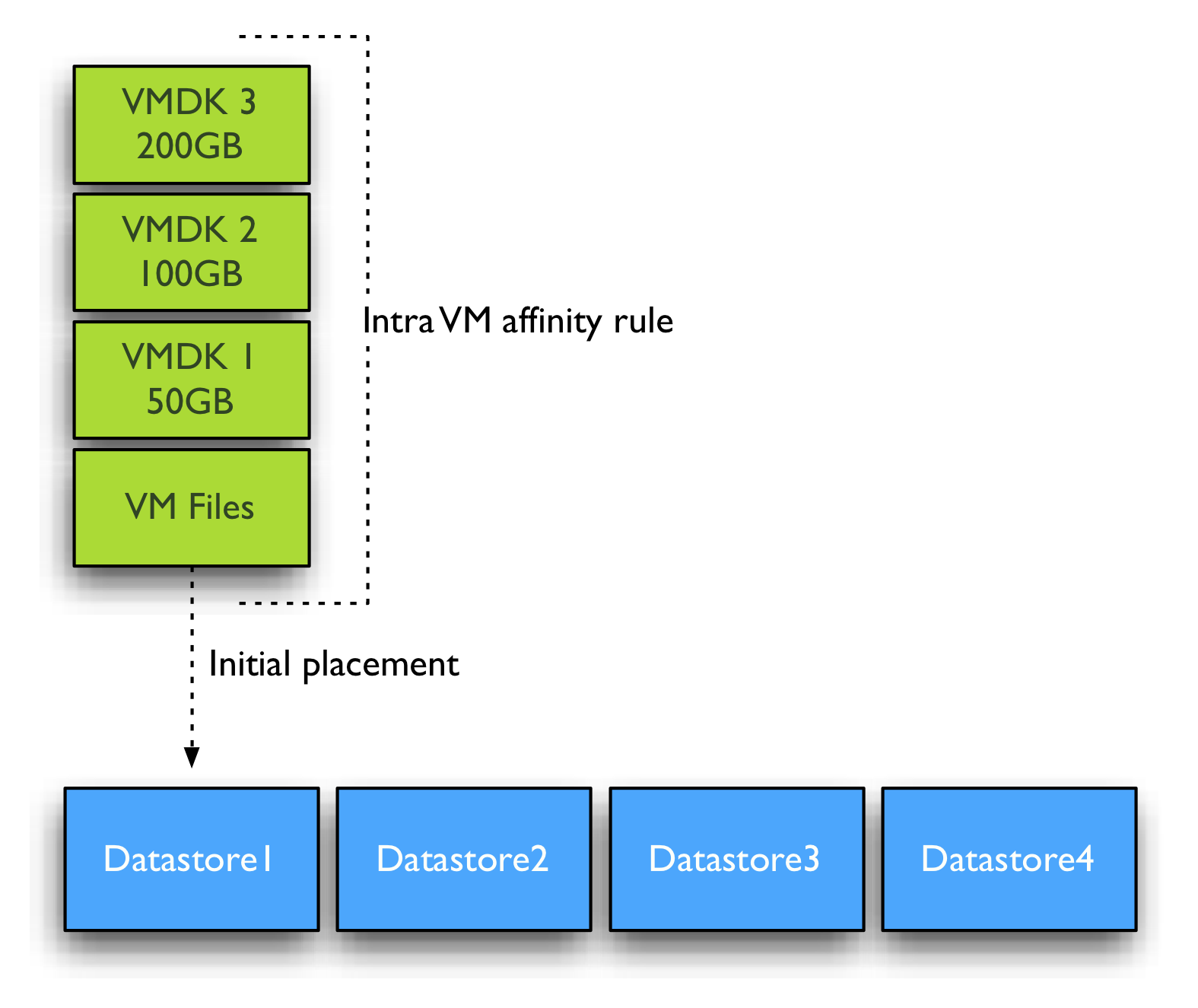
Keeping all files together on one datastore allows ease of troubleshooting. However Storage DRS load balance algorithms may benefit from distributing the virtual machine across datastores. Let’s zoom in how Storage DRS handles virtual machine with multiple disks when the Intra-VM affinity rule is removed from the virtual machine.
DrmDisk
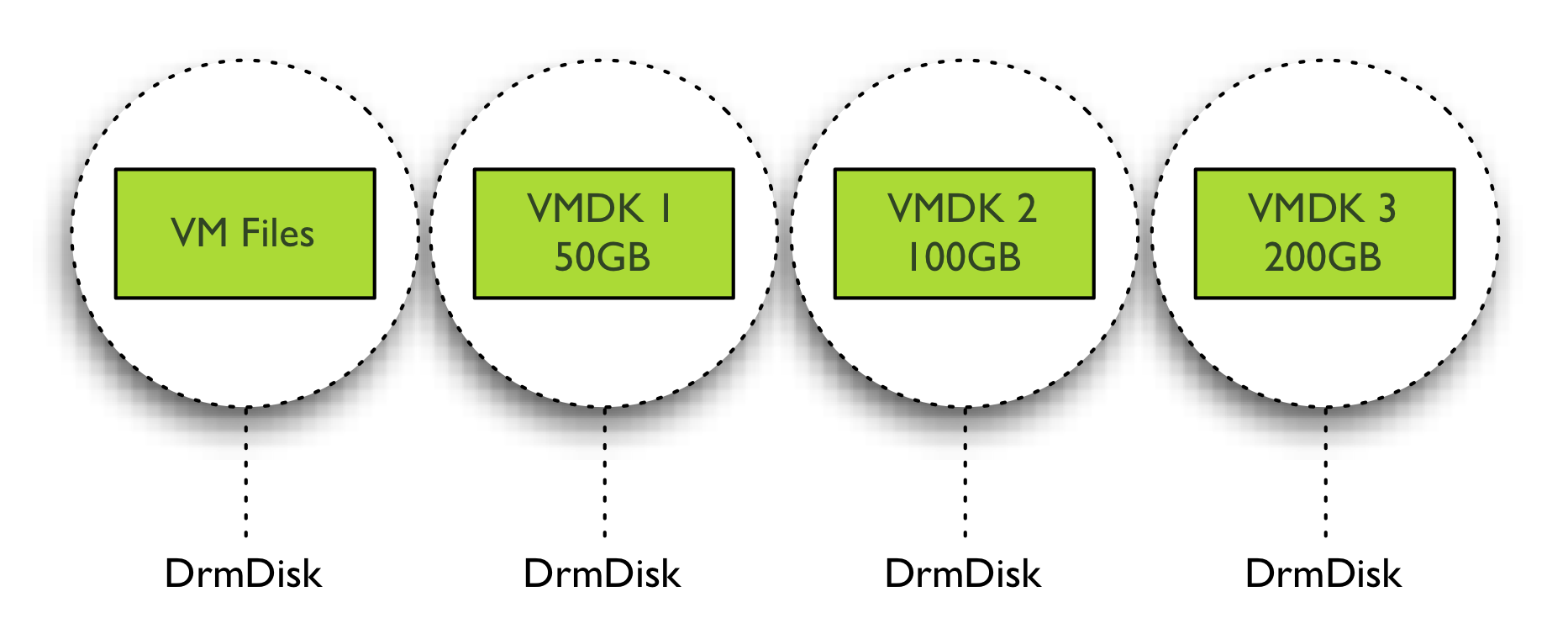
Storage DRS uses the construct “DrmDisk” as the smallest entity it can migrate. A DrmDisk represent a consumer of datastore resources. This means that Storage DRS creates a DrmDisk for each VMDK belonging to the virtual machine. The interesting part is the collection of system files and swap file belonging to virtual machines. Storage DRS creates a single Drmdisk for all the system files, if an alternate swapfile location is specified, the vSwap file is represented as a separate DrmDisk and Storage DRS will be disabled on the swap DrmDisk. More info about alternate swapfile locations can be found here. For example a virtual machine with three VMDK’s and with no alternate swapfile locations configured, Storage DRS creates 4 DrmDisk:
• A separate DrmDisk for each Virtual Machine Disk File
• A DrmDisk for system files (VMX, Swap, logs, etc)
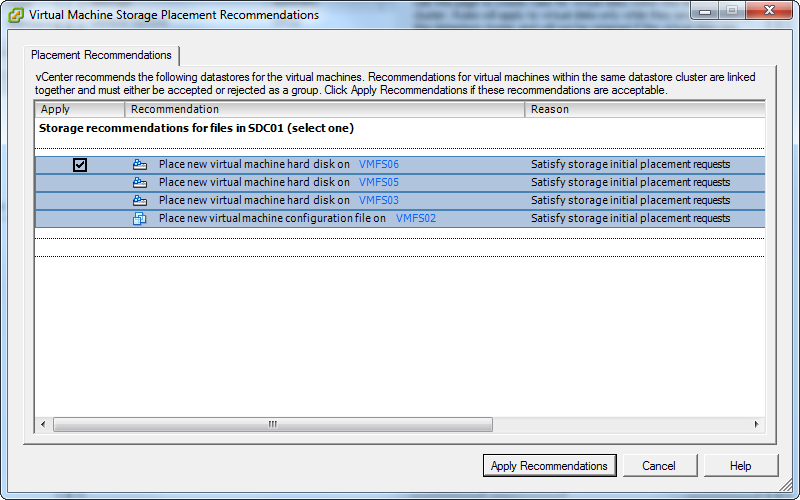
Initial placement recommendation will look similar to this screenshot when the Intra-VM affinity rule is disabled. Notice the separate recommendation for the “virtual machine configuration file”? This is the DrmDisk containing the system files.
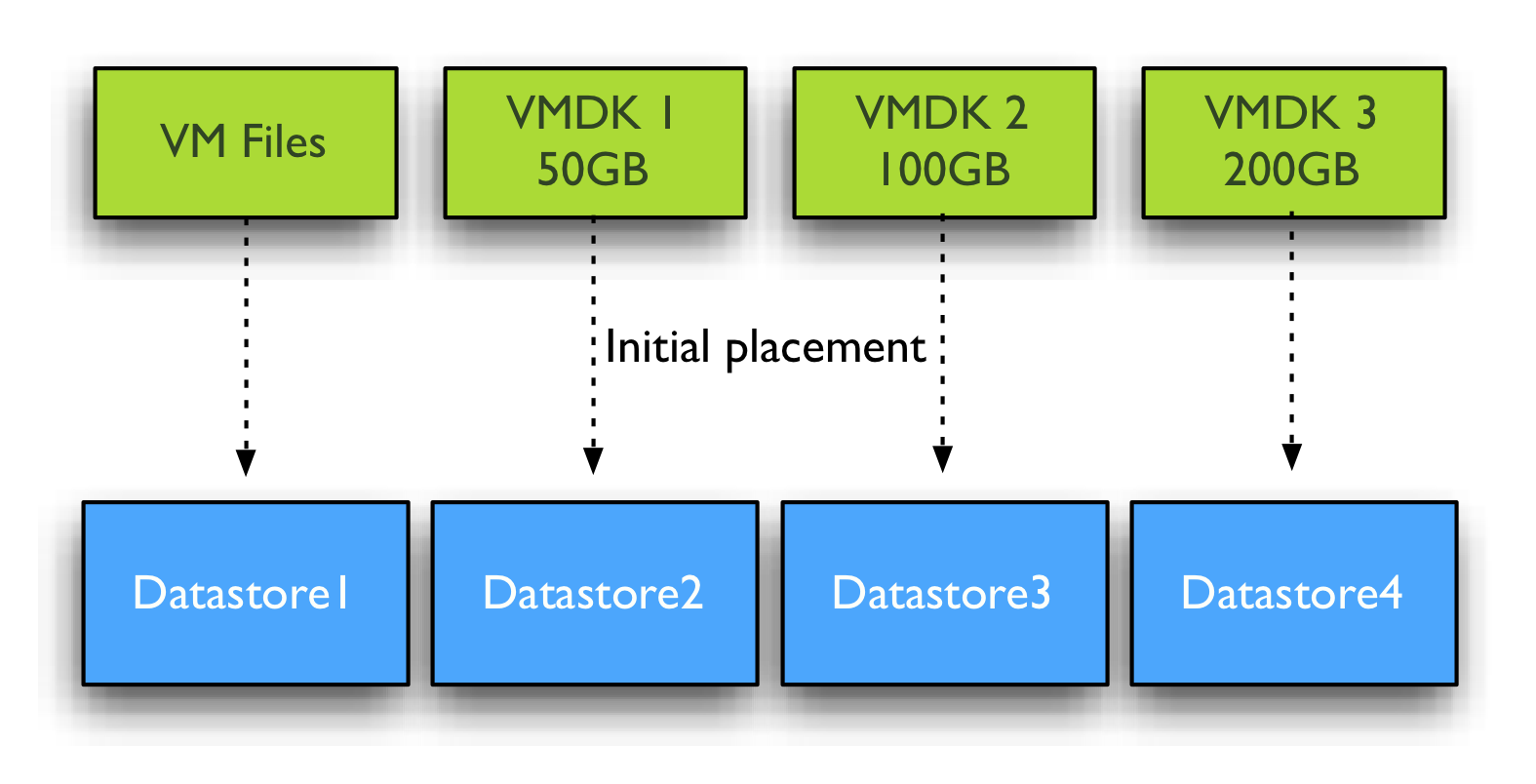
Initial placement Space load balancing
Initial placement and Space load balancing benefit from this increased granularity tremendously. Instead of searching a suitable datastore that can fit the virtual machine as a whole, Storage DRS is able to seek for appropriate datastores for each DrmDisk file separately. Recently I wrote an article about datastore cluster fragmentation and Storage DRS ability to issue prerequisite migrations. You can imagine due to the increased granularity, datastore cluster fragmentation is less likely to happen and if prerequisite migrations are required, the number of migrations is expected to be a lot less.
IO load balancing
Similar to initial placement and load balancing, I/O load balancing benefit from the deeper level of detail. It can find a better fit for each workload generated by the VMDK files. The system file DrmDisk will not be migrated quite often as it small in size and does not generate a lot of I/O often. Storage DRS analyzes the workload and generates a workload model for each DrmDisk, it then decides which datastore it needs to place the DrmDisk to keep the load balanced within the datastore cluster while offering enough performance for each DrmDisk. You can imagine this becomes a lot harder when Storage DRS is required to keep all the VMDK files together. Usually the datastore chosen is the datastore that provides the best performance for the most demanding workload AND is able to store all the virtual machine disk files and system files. Now let’s dig into this a little deeper, for example the virtual machine used in the previous example has two DrmDisk generating heavy workloads, while the DrmDisks containing the system files and VMDK2 are “cold”.
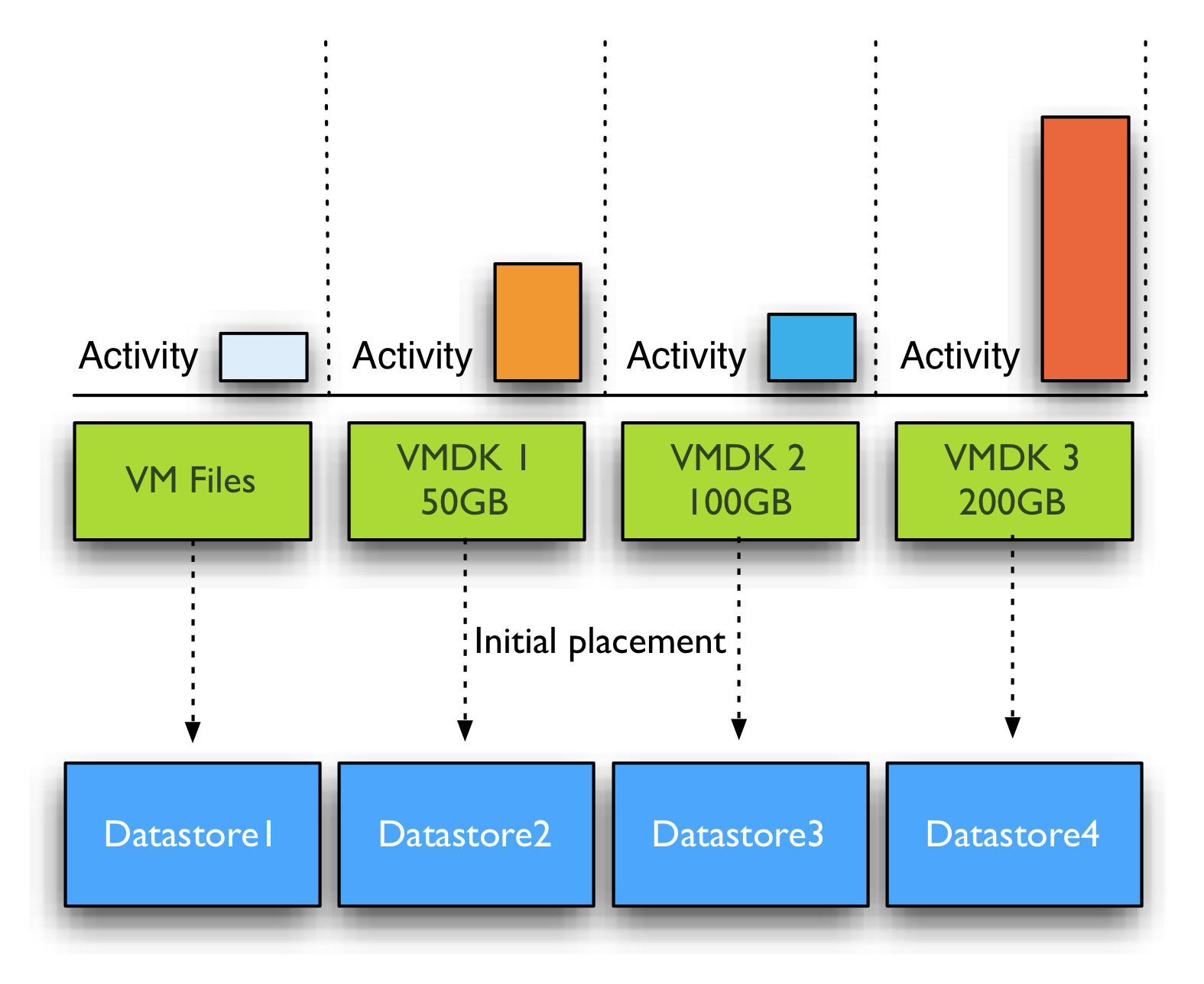
If Intra-VM affinity rules are used, Space balancing is required to find a datastore that has 350+ GB free without exceeding the space utilization threshold. If I/O load balancing is enabled, this datastore also needs to provide enough performance to keep the latency below the I/O latency threshold (by default 15ms) after placing the 4 DrmDisks. You can imagine it’s a lot less complicated when space and I/O load balancing are allowed to place each DrmDisk on a datastore that suits their needs.
How to change default datastore cluster behavior?
Mentioned before, datastore cluster defaults in applying an Intra-VM affinity rule to each new virtual machine. Recently Duncan published an article on how to change the affinity rules on active virtual machines. Unfortunately there is not User-Interface option available that can disable this behavior, so I turned to my good friend and colleague Alan Renouf and he created some nice PowerCLI code to solve this problem:
As I’m not a powerCLI user at all, I’m relaying Alan’s instructions:
First you need to run the below code to put the function into memory:
function Set-DatastoreClusterDefaultIntraVmAffinity{
param(
[CmdletBinding()]
[parameter(Position = 0, Mandatory = $true, ValueFromPipeline = $true)]
[PSObject]$DSC,
[Switch]$Enabled
)
process{
$SRMan = Get-View StorageResourceManager
if($DSC.GetType().Name -eq “string”){
$DSC = Get-DatastoreCluster -Name $DSC | Get-View
}
elseif($DSC.GetType().Name -eq “DatastoreClusterImpl”){
$DSC = Get-DatastoreCluster -Name $DSC.Name | Get-View
}
$spec = New-Object VMware.Vim.StorageDrsConfigSpec
$spec.podConfigSpec = New-Object VMware.Vim.StorageDrsPodConfigSpec
$spec.podConfigSpec.DefaultIntraVmAffinity = $Enabled
$SRMan.ConfigureStorageDrsForPod($DSC.MoRef, $spec, $true)
}
}
Once this has been run you can use this function….
Get-DatastoreCluster “Shared Datastores” | Set-DatastoreClusterDefaultIntraVmAffinity
Shared datastores is the name of the Datastore cluster, you can change that into the name of your own datastore cluster. Or in the case you have multiple datastore clusters and want to disable the rule for all datastore clusters at once, omit the name of the datastore cluster at all.
If ease of troubleshooting is not your first concern, than it might be beneficial to the performance of Storage DRS to disable the default Intra-VM affinity rule on the virtual machines in the datastore cluster. However I’m interested in reasons why you wouldn’t want to disable the default affinity rule besides troubleshooting effort.
Note:
Unfortunately I’m unaware why VMware decided to use the Intra-VM affinity rule as default and I do not know if a future release of vSphere will provide a UI setting to change the affinity rule behavior of the datastore cluster. Please leave a comment if you would like this option included in a new version of vSphere. All I can do is relay this to the appopriate product manager.
Storage DRS I/O load balancing and Array-based Auto-Tiering
In its basic form Storage DRS can be used together with any array, however there are a few combinations of Storage array features and Storage DRS features that don’t mix easily. One of the most sought after question is can Storage DRS work with Array based Auto-tiering? And the answer is yes, yes you can use initial placement and out of space avoidance features that Storage DRS offers, however it is not recommended to enable the I/O metric feature.
Modeling
The main goal of the I/O metric function, popular called I/O load balancing, is to resolve the imbalance of performance delivered from datastores in the datastore cluster. To avoid hotspots in the datastore cluster and decrease overall latency imbalance, Storage DRS I/O load balancing uses device modeling and virtual machine workload modeling. Device modeling helps Storage DRS to understand the performance characteristics of the devices backing the datastores, while virtual machine workload modeling analyzes virtual machine workload running inside the datastore cluster. Both device and workload modeling assists Storage DRS to asses the improvement of I/O latency that will be achieved after a virtual machine migration.
Device modeling and the SIOC injector
To understand and learn the performance of the devices backing the datastore, Storage DRS uses the Storage IO Control (SIOC) workload injector. To characterize the datastore, SIOC injector opens and read random blocks of the datastore. As the SIOC injector does not open every block backing the datastore, we cannot ensure that the SIOC injector opens an identical number of blocks of each performance tier to characterize the disk. As multiple performance tiers of disk back the datastore there is a possibility that the SIOC injector might open blocks located on similar speed disks, either slow or fast, while the datastore is primarily backed by disk with a different performance level. Let’s use an example to clarify this further.

In the diagram pictured above, SIOC opens random blocks and perform its tests. Unfortunately it doesn’t open blocks on other disks. While most of the blocks backing the datastore are located on faster performing disks, Storage DRS device modeling will characterize this disk with performance similar to 7.2K SATA disks. This inaccurate characterization of datastore performance might lead to an incorrect performance assessment and can lead to Storage DRS withholding a migration recommendation while there is sufficient performance available.
Segment migration triggered by auto-tiering algorithms
By using SIOC injector Storage DRS evaluate the performance of the disks, however Auto-tiering solutions migrate LUN segments (chunks) to different disk types based on the use pattern. Hot segments (frequently accessed) typically move to faster disks while cold segments move to slower disks. Depending on the array type and vendor there are different kind of policies and threshold for these migrations. By default Storage DRS is invoked every 8 hours and requires performance data over more than 16 hours to generate I/O load balancing decisions. Multiple storage vendors offer auto-tiering solutions, each using different time-cycles to collect and analyze workload before moving LUN segments. Some auto-tiering solutions move chunks based on real-time workload while other arrays move chunks after collecting performance data for 24 hours. This means that auto tiering solutions alter the landscape in which the SIOC injector performs its test. Let’s turn to another scenario for clarification.
In this scenario, SIOC is primarily opening blocks located in the Tier-1 diskgroup belonging to the datastore. As the datastore isn’t using these segments that often (cold) the auto tiering solution decides to migrate these segments to a lower tier. In this case the segments are migrated to 15K disks instead of SSD devices.
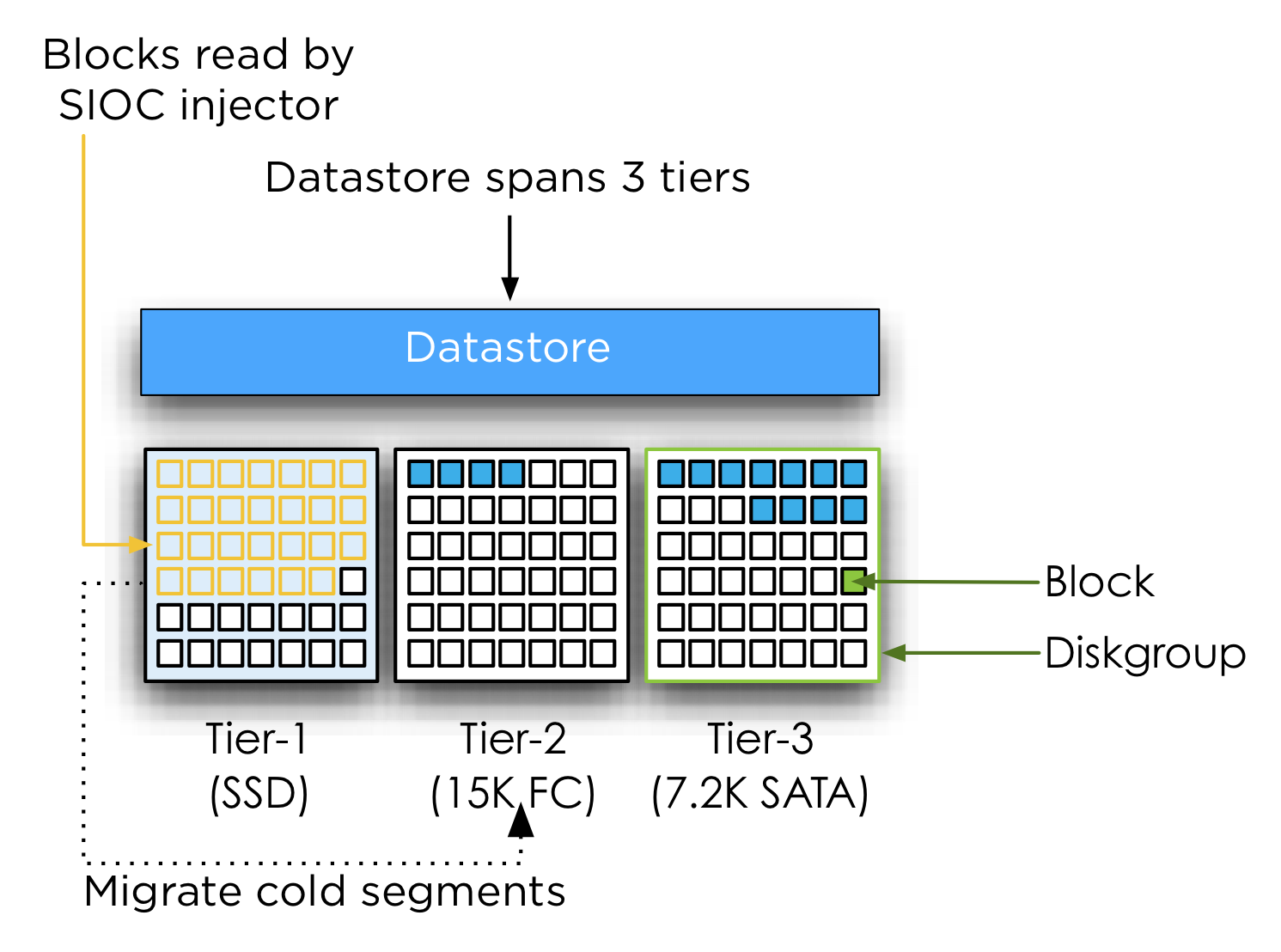
Storage DRS expects that the behavior of the device remains the same for at least 16 hours; it will base its calculation on these facts. Auto tiering solutions might change the underlying structure of the datastore based on its algorithm and timescales, conflicting with Storage DRS its calculation.
The misalignment of Storage DRS invocation and auto-tiering algorithms cycles makes it unpredictable when LUN segments may be moved, potentially colliding with the Storage DRS calculations and recommendations. Together with the transparency of auto tiering algorithms to Storage DRS and the non-existing communication between Storage DRS and Auto-tiering algorithms create the basis of the recommendation to disable I/O metric on datastore clusters backed by devices participating in an auto-tiering solution. Always verify these recommendations with your storage vendor.
Additional information:
Duncan wrote an excellent article about the Storage IO Control workload injector, which can be found here. More info on device modeling and load balancing can be found in the article impact of load balancing on datastore cluster configuration.
Note: This article is describing Storage DRS behavior based on vSphere 5.
(Storage) DRS (anti-) affinity rule types and HA interoperability
Lately I have received many questions about the interoperability between HA and affinity rules of DRS and Storage DRS. I’ve created a table listing the (anti-) affinity rules available in a vSphere 5.0 environment.
| Technology | Type | Affinity | Anti-Affinity | Respected by VMware HA |
| DRS | VM-VM | Keep virtual machines together | Separate virtual machines | No |
| VM-Host | Should run on hosts in group | Should not run on hosts in group | No | |
| Must run on hosts in group | Must not run on hosts in group | Yes | ||
| SDRS | Intra-VM | VMDK affinity | VMDK anti-affinity | N/A |
| VM-VM | Not available | VM Anti-Affinity | N/A |
As the table shows, HA will ignore most of the (anti-) affinity rules in its placement operations after a host failure except the “Virtual Machine to Host – Must rules”. Every type of rule is part of the DRS ecosystem and exists in the vCenter database only. A restart of a virtual machine performed by HA is a host-level operation and HA does not consult the vCenter database before powering-on a virtual machine.
Virtual machine compatibility list
The reason why HA respect the “must-rules” is because of DRS’s interaction with the host-local “compatlist” file. This file contains a compatibility info matrix for every HA protected virtual machine and lists all the hosts with which the virtual machine is compatible. This means that HA will only restart a virtual machine on hosts listed in the compatlist file.
DRS Virtual machine to host rule
A “virtual machine to hosts” rule requires the creation of a Host DRS Group, this cluster host group is usually a subset of hosts that are member of the HA and DRS cluster. Because of the intended use-case for must-rules, such as honoring ISV licensing models, the cluster host group associated with a must-rule is directly pushed down in the compatlist.
Note
Please be aware that the compatibility list file is used by all types of power-on operations and load-balancing operations. When a virtual machine is powered-on, whether manual (admin) or by HA, the compatibility list is checked. When DRS performs a load-balancing operation or maintenance mode operation, it checks the compatibility list. This means that no type of operation can override must- type affinity rules. For more information about when to use must and should rules, please read this article: Should or Must VM-Host affinity rules.
Contraint violations
After HA powers-on a virtual machine, it might violate any VM-VM or VM-host should (anti-) affinity rule. DRS will correct this constraint violation in the first following invocation and restore “peace” to the cluster.
Storage DRS (anti-) affinity rules
When HA restarts a virtual machine, it will not move the virtual machine files. Therefore creation of Storage DRS (anti-) affinity rules do not affect virtual machine placement after a host failure.
Retrospect of 2011 content due to Bloggers survey
vSphere-land.com is running it’s annual Top 25 virtualization blog survey again and I’m really interested to see who are picked this year. Like previous year, some great bloggers disappear while other new great ones emerge. One guy I want to mention by name is Chris Colotti, his blog is a great source of information about vCloud Director. If you haven’t visited his blog yet, go do that right away!.
Last year I’ve been pretty busy writing, shaping, designing, wrestling with publishers in order to get our (@DuncanYB) book “vSphere 5 Clustering technical deepdive out to the public. This meant it cut down on research time, which resulted in a smaller number of blogs being released than previous years. So after seeing other people’s blog about their top 10, I was curious to see what I’ve done last year. The articles that are listed are the ones I’m proud of, spending a lot of time on researching them, but most of all, enjoyed the most writing them.
Storage DRS initial placement and datastore cluster defragmentation
Impact of Load Balancing on datastore cluster configuration
Partially Connected datastore clusters
Mem minfreepct sliding scale function
Upgrading vmfs datastores and Storage DRS
Multi NIC vMotion support in vSphere 5.0
Contention on lightly Utilized Hosts
Restart vCenter results in DRS load balancing
IP-HASH versus Load Based Teaming
Setting correct percentage of cluster resources reserved
AMD Magny Cours and ESX
Please take 5 minutes of your time and vote for your favorite blogger. I hope they will announce the winner like they did last year. 90 minutes of nerve wrecking but oh-so-enjoyable videoshow!
Cast your vote now!