One of most frequent questions I receive is about mixing resource pools and virtual machines at the same hierarchical level. In almost all of the cases we recommend to commit to one type of child objects. Either use resource pools and place virtual machines within the resource pools or place only virtual machines at that hierarchical level. The main reason for this is how resource shares work.
Shares determine the relative priority of the child-objects (virtual machines and resource pools) at the same hierarchical level and decide how excess of resources (total system resources – total Reservations) made available by other virtual machines and resource pools are divided.
Shares are level-relative, which means that the number of shares is compared between the child-objects of the same parent. Since, they signify relative priorities; the absolute values do not matter, comparing 2:1 or 20.000 to 10.000 will have the same result.
Lets use an example to clarify. In this scenario the DRS cluster (root resource pool) has two child objects, resource pool 1 and a virtual machine 1. The DRS cluster issues shares amongst its children, 4000 shares issued to the resource pool, 2000 shares issued to the virtual machine. This results in 6000 shares being active on that particular hierarchical level.

During contention the child-objects compete for resources as they are siblings and belong to the same parent. This means that the virtual machine with 2000 shares needs to compete with the resource pool that has 4000 shares. As 6000 shares are issued on that hierarchical level, the relative value of each child entity is (2000 of 6000 shares) = 33% for the virtual machine and (4000 shares of 6000=66%) for the resource pool.
The problem with this configuration is that the resource pool is not only a resource consumer but also a resource provider. So that it must claim resources on behalf of its children. Expanding the first scenario, two virtual machines are placed inside the resource pool.
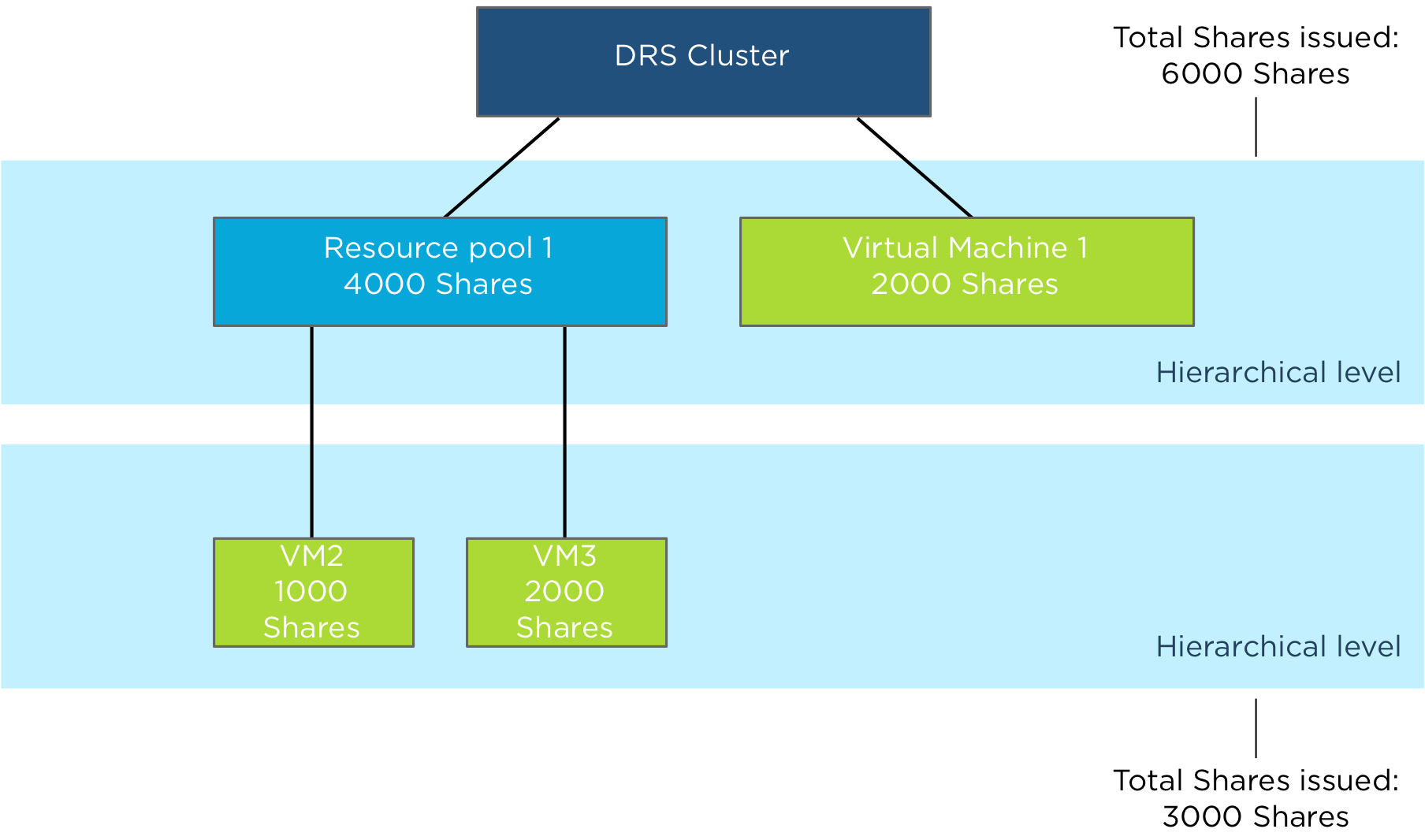
The Resource Pool issues shares amongst its children, 1000 shares issued to virtual machine 2 (VM2) and 2000 shares issued to virtual machine 3 (VM3). This results in 3000 shares being active on that particular hierarchical level.
During contention the child-objects compete for resources as they are siblings and belong to the same parent which is the resource pool. This means that VM2 owning 1000 shares needs to compete with VM3 that has 2000 shares. As 3000 shares are issued on that hierarchical level, the relative value of each child entity is (1000 of 3000 shares) = 33% for VM2 and (2000 shares of 3000=66%) for VM3.
As the resource pool needs to compete for resources with the virtual machine on the same level, the resource pool can only obtain 66% of the cluster resources. These resources are divided between VM2 and VM3. That means that VM2 can obtain up to 22% of the cluster resources (1/3 of 66% of the total cluster resources is 22%).
Forward to scenario 3, two additional virtual machines are created and are on the same level as Resource Pool 1 and virtual machine 1. The DRS cluster issues 1000 shares to VM4 and 1000 shares to VM5.

As the DRS cluster issued an additional 2000 shares, the total issued shares is increased to 8000 shares. Resulting in dilution of the relative share values of Resource Pool 1 and VM1. Resource pool 1 now owns 4000 shares of a total 8000 bringing the relative value down from 66% to 50%. VM1 owns 2000 shares of 8000, bringing its value down to 25%. Both VM4 and VM5 own each 12.5% of shares.
As resource pool 1 provides resources to its child-object VM2 and VM3, fewer resources are divided between VM2 and VM3. That means that in this scenario VM2 can obtain up to 16% of the cluster resources (1/3 of 50% of the total cluster resources is 16%). Introducing more virtual machines to the same sibling level as the Resource Pool 1, will dilute the resources available to virtual machines inside Resource Pool 1.
This is the reason why we recommend to commit to a single type of entity at a specific sibling level. If you create resource pools, stick with resource pools at that level and provision virtual machines inside the resource pool.
Another fact is that a resource pool receives shares similar to a 4-vcpu 16GB virtual machine. Resulting in a default share value of 4000 shares of CPU and 163840 shares of memory when selecting Normal share value level. When you create a monster virtual machine and place it next to the resource pool, the resource pool will be dwarfed by this monster virtual machine resulting in resource starvation.
Note: Shares are not simply a weighting system for resources. All scenarios to demonstrate way shares work are based on a worst-case scenario situation: every virtual machine claims 100% of their resources, the system is overcommitted and contention occurs. In real life, this situation (hopefully) does not occur very often. During normal operations, not every virtual machine is active and not every active virtual machine is 100% utilized. Activity and amount of contention are two elements determining resource entitlement of active virtual machines. For ease of presentation, we tried to avoid as many variable elements as possible and used a worst-case scenario situation in each example.
So when can it be safe to mix and match virtual machines and resource pools at the same level? When all child-objects are configured with reservation equal to their configuration and limits, this result in an environment where shares are overruled by reservation and no opportunistic allocation of resources exist. But this designs introduces other constraints to consider.
Storage DRS load balance frequency
Storage DRS load balancing frequency differs from DRS load balance frequency, where DRS runs every 5 minutes to balance CPU and memory resources, Storage DRS uses a far more complex load balancing scheme. Let’s take a closer look at Storage DRS load balancing.
Default invocation period
The invocation period of Storage DRS is every 8 hours and uses what’s called past-day statistics. Storage DRS triggers a load balancing evaluation process if a datastore exceeds the space utilization threshold. Storage DRS load balances space utilization of the datastores and if I/O metric is enabled, load balances on I/O utilization as well.
Space utilization and I/O load on a datastore are two different load patterns, therefore Storage DRS uses different methods to accumulate and analyze IO load patterns and space utilization of the datastores within the datastore cluster.
Space load balancing statistic collection
Analyzing space utilization is rather straightforward; Storage DRS needs to understand the growth rate of each virtual machine and the utilization of each datastore. It collects information from the vCenter database to understand the disk usage and file structure of each virtual machine. Each ESXi host reports datastore utilization at a frequent interval and this is stored in the vCenter database as well. Storage DRS checks whether the datastore utilization is above the user-set threshold. When generating a load balance recommendation, Storage DRS knows where to move a virtual machine as it knows the current space growth of virtual machines on destination datastores, preventing a threshold violation direct after the placement.
I/O load utilization is a different beast. I/O load may grow over time, however the datastore can experience a temporary increase of load. How does Storage DRS handle these spikes? Enter past-day statistics!
I/O load balancing statistic collection
Storage DRS uses two main information sources for I/O load balancing statistic collection, vCenter and the SIOC injector. vCenter statistics is uses to understand the workload each virtual disk is generating, this is called workload modeling. SIOC injector is used to understand the device performance and this is called device modeling. See “Impact of load balancing on datastore cluster configuration” for more info about device and workload modeling. Data of workload and device modeling is aggregated in a performance snapshot and is used as input for generating migration recommendations.
Migrating virtual machine disk files takes time and most of all it impacts the infrastructure, migrating based on peak value is the last thing you want to do when you are introducing long-term high impact workloads. Therefore Storage DRS starts to recommend I/O load-related recommendations once an imbalance persists for some period of time.
To avoid being caught out by peak load moments, Storage DRS does not use real-time statistics. It aggregates all the data points collected over a period of time. By using 90th percentile values, Storage DRS filters out the extreme spikes while still maintaining a good view of the busiest period of that day as this value translate to the lowest edge of the busiest period.
As workloads shift during the day enough information needs to be collected to make a good assessment of the workloads. Therefore Storage DRS needs at least 16 hours of data before recommendation are made. By using at least 16 hours worth of data Storage DRS has an enough data of the same timeslot so it can compare utilization of datastores for example: datastore 1 to datastore 2 on Monday morning at 11:00. As 16 hour is 2/3 of the day Storage DRS receives enough information to characterize the performance of datastore on that day. But how does this tie in with the 8 hour invocation period?
8-hour invocation period and 16 hours worth of data
Storage DRS uses 16 hours of data, however this data must be captured in the current day otherwise the performance snapshot of the previous day is used. How is this combined with the 8-hour invocation periods?
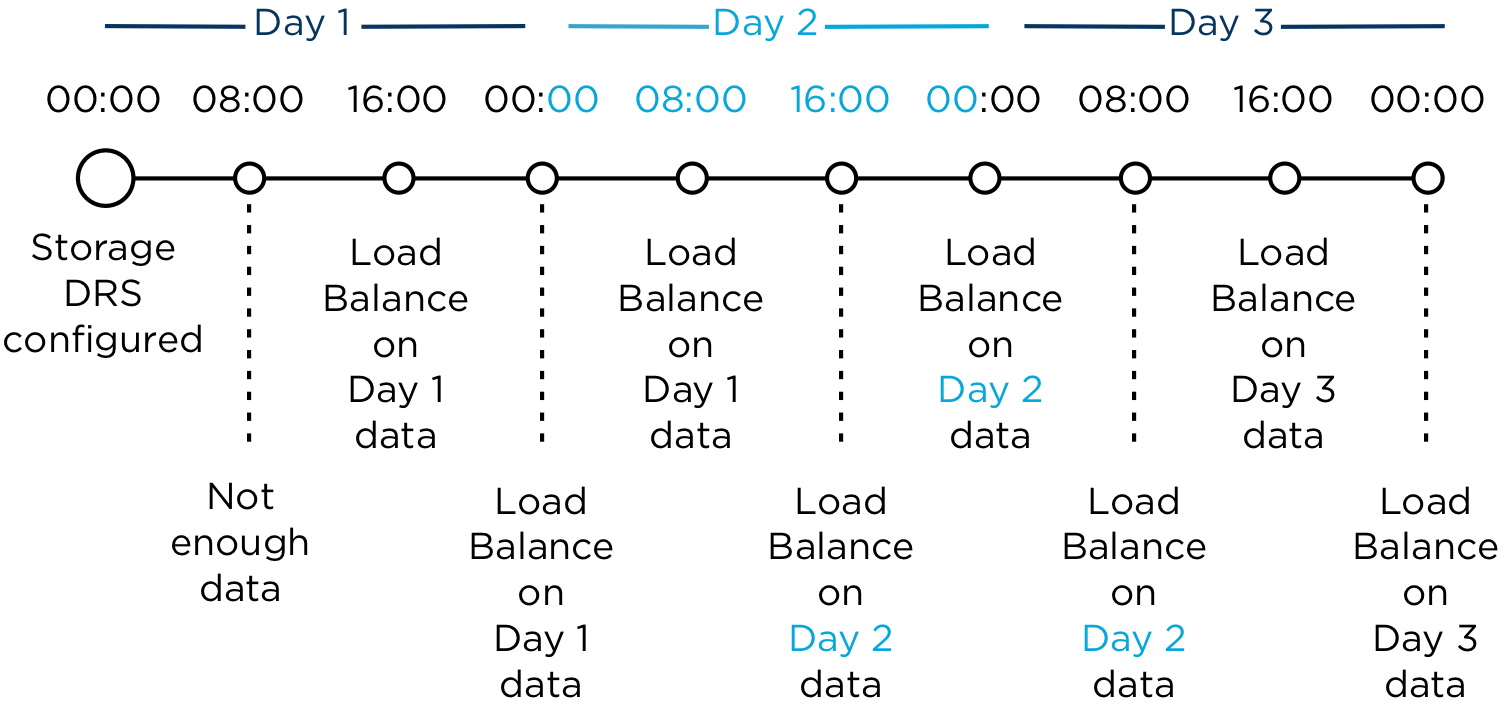
This means that technically, the I/O load balancing is done every 16 hours. Usually after midnight, after the day date, the stats are fixed and rolled up. This is called the rollover event. The first invocation period (08:00) after the rollover event uses the 24 hours statistics of the previous day. After 16 hours are passed of the current day, Storage DRS uses the new performance snapshot and may evaluate moves.
Whiteboard desk
As I’m an avid fan of “post your desk topics \ workspace ” forum threads, I thought it might be nice to publish a blog article about my own workspace. I always love to see how other people design their work environment and how they customize furniture to suit their needs. Hopefully you can find some inspiration in mine.
Last year I decided to refurbish my home office. To create a space that enables me to do my work in the most optimum way, and of course that is pleasing to the eye. The first thing that came to mind was a whiteboard and a really big one. So I needed to build a wall to hang the whiteboard, as the room didn’t had any wall that could hold a whiteboard big enough. After completion of the wall, a 6 x 3 feet wide whiteboard found its way to my office.

Although its roughly 5 to 6 feet away from my desk, I realized I didn’t use it enough due to distance. Sitting behind the desk while on the phone or just using my computer, I found myself scribbling on pieces of paper instead of getting out of my chair and walk over to the whiteboard. Therefor I needed a small whiteboard I could grab and use at my desk. It seemed reasonable, however I like minimalistic designs where clutter is removed as much as possible. I needed to come up with something different; enter the whiteboard desk!
Whiteboard desk
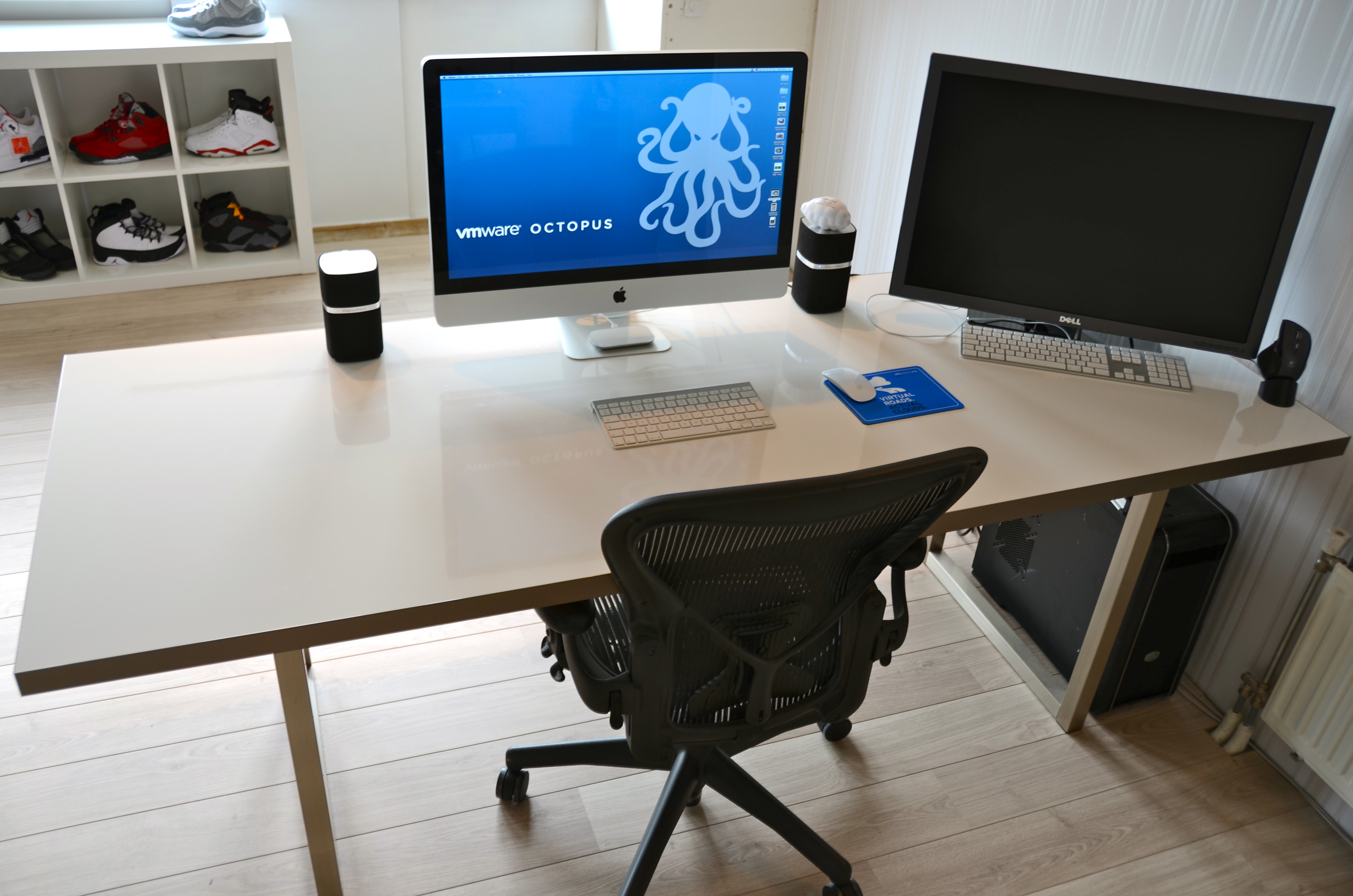
Instead of buying a mini whiteboard that needs to be stored when not used, I decided to visit my local IKEA and see what’s available. Besides “show your desk” threads I hit ikeahackers.net on a daily basis. While looking at tables, I noticed that the IKEA kitchen department sells customized tabletops. Each dimension is possible in almost every shape. I decided to order a 7 feet by 3 feet high-gloss white tabletop with a stainless steel edge. The Ikea employee asked where to put the sink, she was surprised when I told her that the tabletop was going to function as a desk.

I chose to order the 2 inch thick tabletop as I need to have a desktop that is sturdy enough to hold the weight of a 27” I-mac and a 30” TFT screen. The stainless steel edge fits snug around the desk and covers each side; it doesn’t stick out and is not noticeable when typing. It looks fantastic! However the downside is the price, it was more expensive than the tabletop itself. The alternative is a laminate cover that looks like it will be worn out easily. While spending most of my time behind my desk I thought it was worth the investment of buying the real thing.
The high-gloss finish acts as the whiteboard surface and works like a charm with any whiteboard markers. I left notes on my desk for multiple days and could be removed without leaving a trace.

The tabletop rest on two IKEA Vika Moliden stands, due to the cast of the shadow its very difficult to notice that the color of the stands do not exactly match the color as the stainless steel edge.

The whiteboard desk is just an awesome piece of furniture. When on the phone I can take notes on my desk while immediately drawing diagrams next to it. It saves a lot of trees, saves a lot of time scrambling for a piece of paper, and a pen and decreases clutter on the desk. The only thing you need to do when building a whiteboard desk is to banish all permanent markers in your office. 🙂
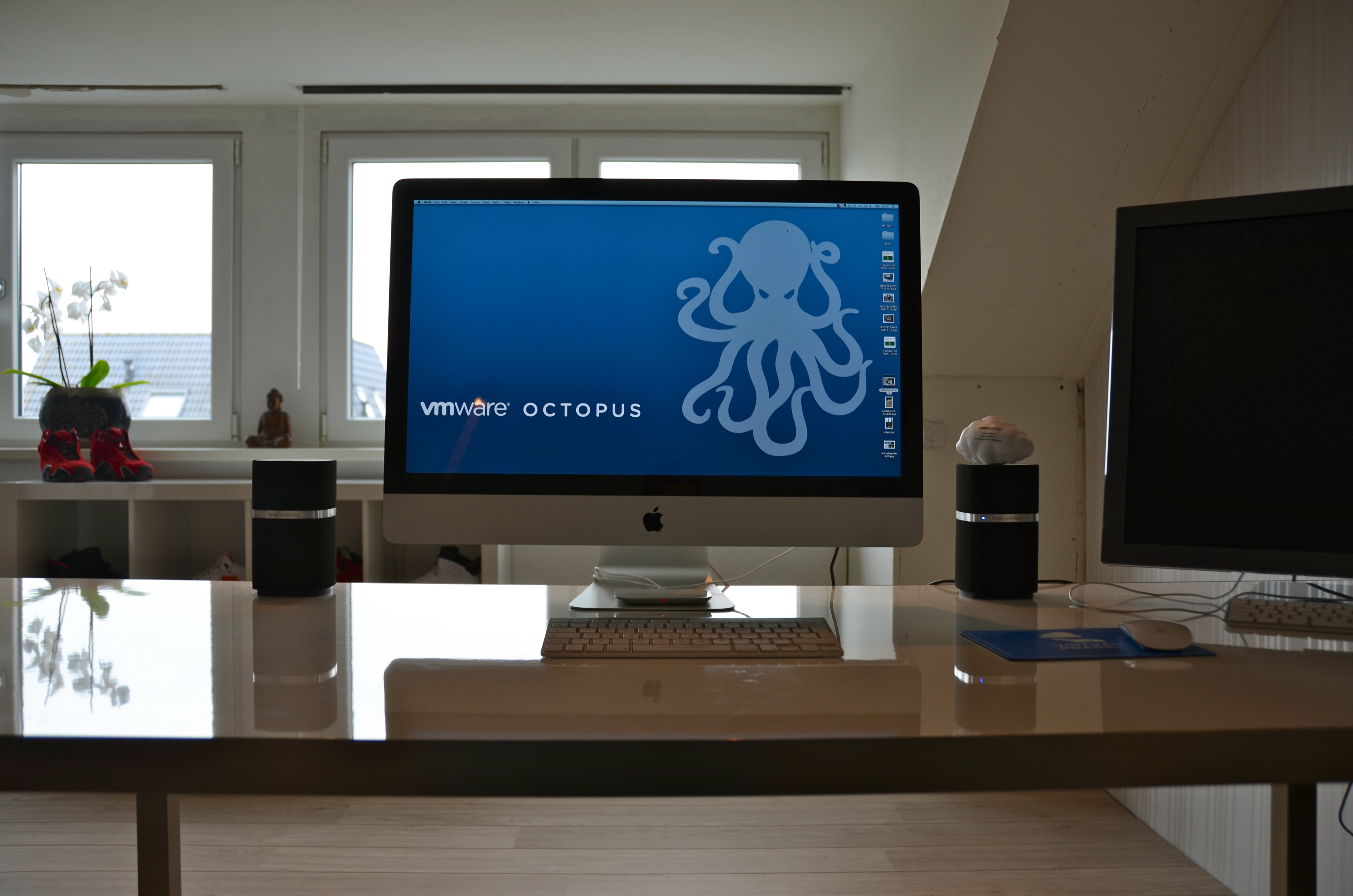
It would be awesome to see what your workspace looks like. What do you love about your workspace and maybe show your own customizations? I would love to see blogs articles pop up describing the workspace of bloggers. Please post a link to your blog article in the comment section.
Aggregating datastores from multiple storage arrays into one Storage DRS datastore cluster.
Combining datastores located on different storage arrays into a single datastore cluster is a supported configuration, such a configuration could be used during a storage array data migration project where virtual machines must move from one array to another array, using datastore maintenance mode can help speed up and automate this project. Recently I published an article about this method on the VMware vSphere blog. But what if multiple arrays are available to the vSphere infrastructure and you want to aggregate storage of these arrays to provide a permanent configuration? What are the considerations of such a configurations and what are the caveats?
Key areas to focus on are homogeneity of configurations of the arrays and datastores.
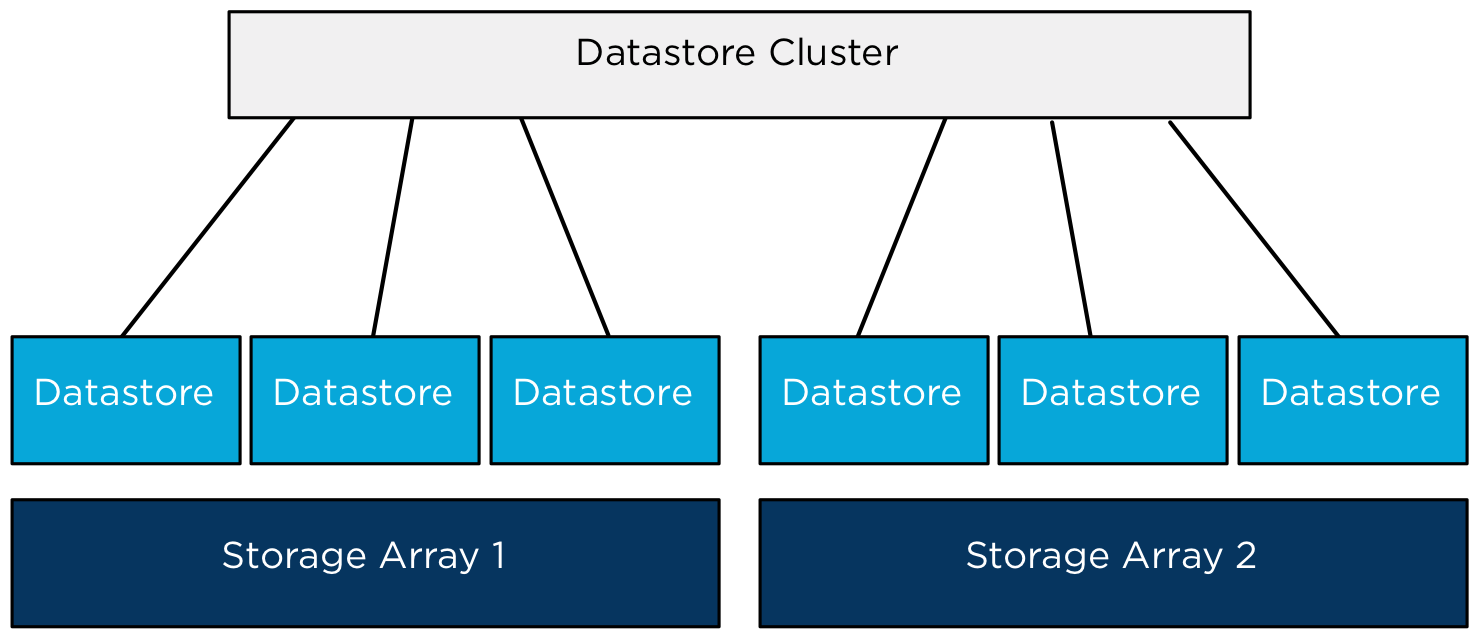
When combining datastores from multiple arrays it’s highly recommended to use datastores that are hosted on similar types of arrays. Using similar type of arrays, guarantees comparable performance and redundancy features. Although RAID levels are standardized by SNIA, implementation of RAID levels by different vendors may vary from the actual RAID specifications. An implementation used by a particular vendor may affect the read and write performance and the degree of data redundancy compared to the same RAID level implementation of another vendor.
Would VASA (vSphere Storage APIs – Storage Awareness) and Storage profiles be any help in this configuration? VASA enables vCenter to display the capabilities of the LUN/datastore. This information could be leveraged to create a datastore cluster by selecting the datastores that have similar Storage capabilities details, however the actual capabilities that are surfaced by VASA are being left to the individual array storage vendors. The detail and description could be similar however the performance or redundancy features of the datastores could differ.
Would it be harmful or will Storage DRS stop working when aggregating datastores with different performance levels? Storage DRS will still work and will load balance virtual machine across the datastores in the datastore cluster. However, Storage DRS load balancing is focused on distributing the virtual machines in such a way that the configured thresholds are not violated and getting the best overall performance out of the datastore cluster. By mixing datastores that provide different performance levels, virtual machine performance could not be consistent if it would be migrated between datastores belonging to different arrays. The article “Impact of load balancing on datastore cluster configuration” explains how storage DRS picks and selects virtual machine to distribute across the available datastores in the cluster.
Another caveat to consider is when virtual machines are migrated between datastores of different arrays; VAAI hardware offloading is not possible. Storage vMotion will be managed by one of the datamovers in the vSphere stack. As storage DRS does not identify “locality” of datastores, it does not incorporate the overhead caused by migrating virtual machines between datastores of different arrays.
When could datastores of multiple arrays be aggregated into a single datastore if designing an environment that provides a stable and continuous level of performance, redundancy and low overhead? Datastores and array should have the following configuration:
• Identical Vendor.
• Identical firmware/code.
• Identical number of spindles backing diskgroup/aggregate.
• Identical Raid Level.
• Same Replication configuration.
• All datastores connected to all host in compute cluster.
• Equal-sized datastores.
• Equal external workload (best non at all).
Personally I would rather create a multiple datastore clusters and group datastores belonging to a single storage array into one datastore cluster. This will reduce complexity of the design (connectivity), no multiple storage level entities to manage (firmware levels, replication schedules) and will leverage VAAI which helps to reduce load on the storage subsystem.
If you feel like I missed something, I would love to hear reasons or recommendations why you should aggregate datastores from multiple storage arrays.
More articles in the architecting and designing datastore clusters series:
Part1: Architecture and design of datastore clusters.
Part2: Partially connected datastore clusters.
Part3: Impact of load balancing on datastore cluster configuration.
Part4: Storage DRS and Multi-extents datastores.
Part5: Connecting multiple DRS clusters to a single Storage DRS datastore cluster.
Connecting multiple DRS clusters to a single Storage DRS datastore cluster.
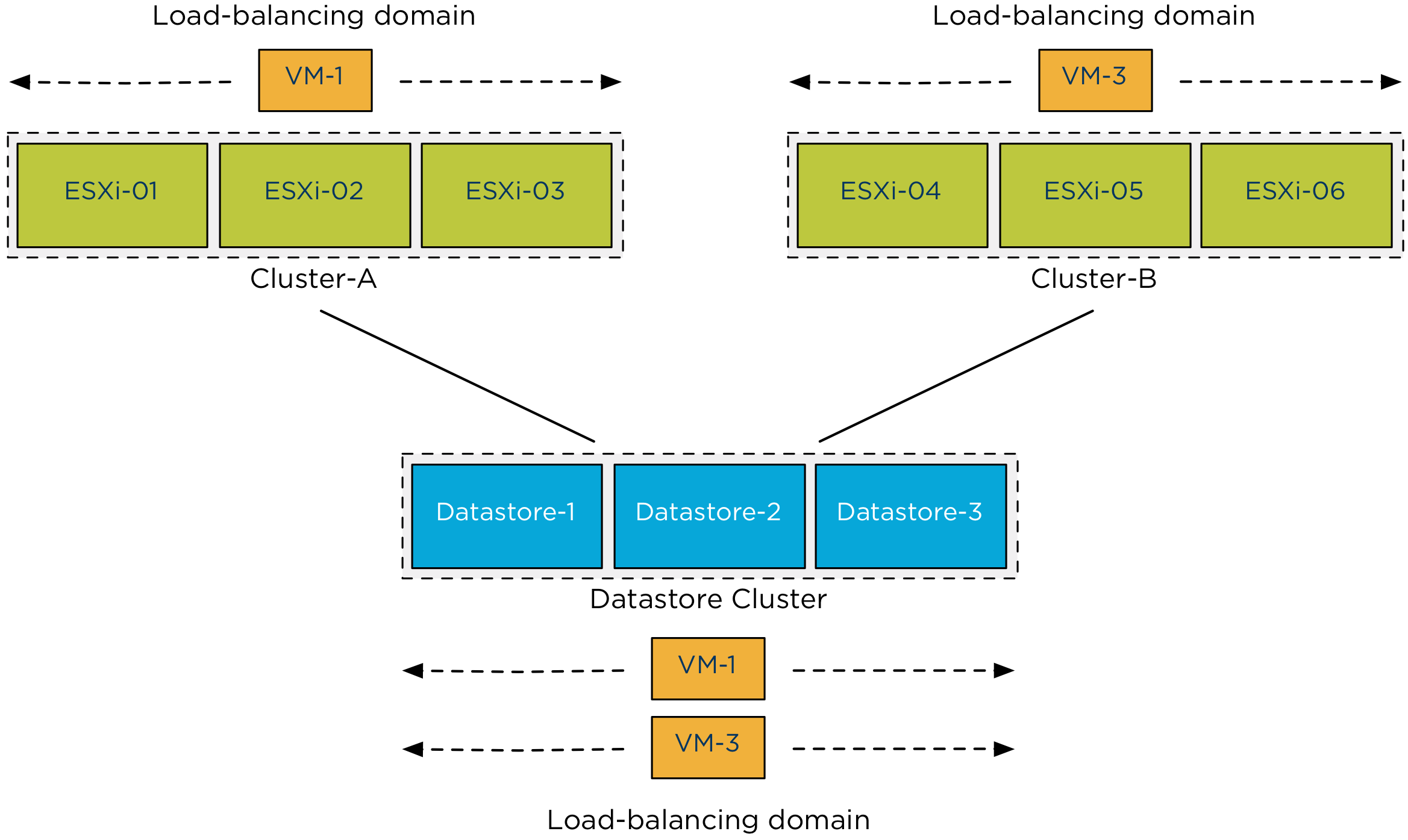
Recently I received the question if you can connect multiple compute (HA and DRS) clusters to a single Storage DRS datastore cluster and specifically how this setup might impact Storage IO Control functionality. Let’s cover sharing a datastore cluster by multiple compute clusters first before diving into details of the SIOC mechanism.
Sharing datastore clusters
Sharing datastore clusters across multiple compute clusters is a supported configuration. During virtual machine placement the administrator selects which compute cluster the virtual machine will run in, Storage DRS selects the host that can provide the most resources to that virtual machine. A migration recommendation generated by Storage DRS does not move the virtual machine at host level, consequently a virtual machine cannot move from one compute cluster to another compute cluster by any operation initiated by Storage DRS.
Maximums
Please remember that the maximum supported number of hosts connected to a datastore is 64. Keep this in mind when sizing the compute cluster or connecting multiple compute clusters to the datastore cluster. As the maximum number of datastores inside a datastore cluster is 32 I think that the number of host connected is the first limit you hit in such a design as the total supported number of paths is 1024 and a host can connect up to 255 LUNs.
The VAAI-factor
If the datastores are formatted with the VMFS, it’s recommended to enable VAAI on the storage Array if supported. One of the important VAAI primitive is the Hardware assisted locking, also called Atomic Test and Set (ATS).
ATS replaces the need for hosts to place a SCSI-2 disk lock on the LUN while updating the metadata or growing a file. A SCSI-2 disk lock command locks out other host from doing I/O to the entire LUN, while ATS modifies the metadata or any other sector on the disk without the use of a SCSI-2 disk lock. This locking was the focus of many best practices around the connectivity of datastores. To reduce the amount of locking, the best practice was to reduce the number of host attached. By using newly formatted VMFS5 volumes in combination with a VAAI-enabled storage array, scsi-2 disk lock commands are a thing of the past. Upgraded VMFS5 volumes or VMFS3 volumes will fall back to using SCSI-2 disk locks if the ATS command fails. For more information about VAAI and ATS please read the KB article 1021976.
Note: If your array doesn’t support VAAI, be aware that SCSI-2 disk lock commands can impact scaling of the architecture.
Storage DRS IO Load balancing and Storage IO Control
When enabling the IO Metric on the datastore cluster, Storage DRS automatically enables Storage IO Control (SIOC) on all datastores in the cluster. Storage DRS uses the IO injector from SIOC to determine the capabilities of a datastore, however by enabling SIOC it also provides a method to fairly distribute I/O resources during times of contention.
SIOC uses virtual disk shares in order to distribute storage resources fairly and are applied on a datastore wide level. The virtual disk shares of the virtual machine running on that datastore are relative to the virtual disk shares of other virtual machines using that same datastore. To be more specific, SIOC is a host-level module and aggregates the per-host views into a single datastore view in terms of observed latency.
If the observed latency exceeds the SIOC level latency threshold, each host sets its own IO queue length based on the total virtual disks shares of the virtual machines in that host using the datastore. As SIOC and its shares are datastore focused cluster membership of the host has no impact on detecting the latency threshold violation and managing the I/O stream to the datastore.
Previous articles in the SDRS short series Architecture and design of Datastore clusters:
Part1: Architecture and design of datastore clusters.
Part2: Partially connected datastore clusters.
Part3: Impact of load balancing on datastore cluster configuration.
Part4: Storage DRS and Multi-extents datastores.