• Skip to primary navigation
  • Skip to main content

frankdenneman.nl

  • AI/ML
  • NUMA
  • About Me
  • Privacy Policy

2 days left to vote

September 19, 2010 by frankdenneman

Eric Siebert owner of vSphere-land.com started the second round of the bi-annual top 25 VMware virtualization blogs voting. The last voting was back in January and this is your chance to vote for your favorite virtualization bloggers and help determining the top 25 blogs of 2010.
This year my blog got nominated for the first time and entered the top 25 (no. 14) and I hope to stay in the top 25 after this voting round. My articles tend to focus primarily on resource management and cover topics such as DRS, CPU and memory scheduler to help you make an informed decision when designing or managing a virtual infrastructure. As noble as this may sound I know that these kinds of topics are not mainstream and I can understand that not everybody is interested to read about these topics week in week out.
Fortunately I’ve managed to get a blog post listed in the Top 5 Planet V12n blog post list at least once every month and referred on a regular basis by sites like Yellow-bricks.com (Duncan Epping), Scott Lowe, NTpro.nl (Eric Sloof) and Chad Sakac and of course many others. So it seems I’m doing something right.
This is my list of top 10 articles I’ve created this year:

  • ESX 4.1 NUMA scheduling
  • vCloud Director Architecture
  • VM to Host Affinity rule
  • Memory Reclaimation, when and how?
  • Reservations and CPU scheduling
  • Resource pools and memory reservations
  • ESX ALUA, TPGS and HP CA
  • Removing an orphaned Nexus DVS
  • Impact of Host local swap on HA and DRS
  • Sizing VMs and NUMA nodes


Closing remarks

This year I’ve got to personally know a lot of bloggers and one thing that amazed me was the time and effort that each of these bloggers put into their work in their spare time. Please take a couple of minutes to vote at vSphere-land whether it’s for me or any of the other bloggers listed and reward them for their hard work.
Filed Under: VMware Tagged With: Top 25 Bloggers, VMware

ESX 4.1 NUMA Scheduling

September 13, 2010 by frankdenneman

VMware has made some changes to the CPU scheduler in ESX 4.1; one of the changes is the support for Wide virtual machines. A wide virtual machine contains more vCPUs than the total amount of available cores in one NUMA node. Wide VM’s will be discussed after a quick rehash of NUMA.

NUMA
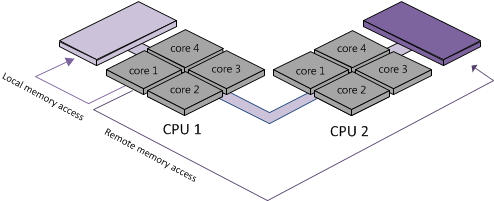
NUMA stands for Non-Uniform Memory Access, which translates into a variance of memory access latencies. Both AMD Opteron and Intel Nehalem are NUMA architectures. A processor and memory form a NUMA node. Access to memory within the same NUMA node is considered local access, access to the memory belonging to the other NUMA node is considered remote access.

NUMA Local and Remote Memory
Remote memory access is slower, because the instructions has to traverse a interconnect link which introduces additional hops. Like many other techniques and protocols, more hops equals more latency, therefore keeping remote access to a minimum is key to good performance. (More info about NUMA scheduling in ESX can be found in my previous article “Sizing VM’s and NUMA nodes“.)

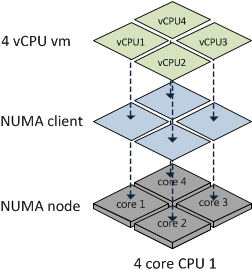
If ESX detects its running on a NUMA system, the NUMA load balancer assigns each virtual machine to a NUMA node (home node). Due to assigning soft affinity rules, the memory scheduler preferentially allocates memory for the virtual machine from its home node. In previous versions (ESX 3.5 and 4.0) the complete virtual machine is treated as one NUMA client. But the total amount of vCPUs of a NUMA client cannot exceed the number of CPU cores of a package (physical CPU installed in a socket) and all vCPUs must reside within the NUMA node.

NUMA Client
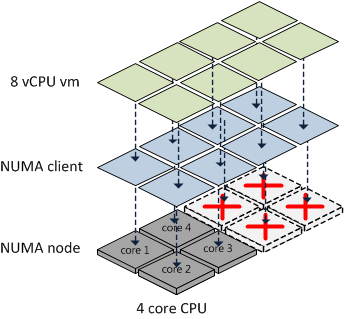
If the total amount of vCPUs of the virtual machine exceeds the number of cores in the NUMA node, then the virtual machine is not treated as a NUMA client and thus not managed by the NUMA load balancer.

Misallignment NUMA client on NUMA node
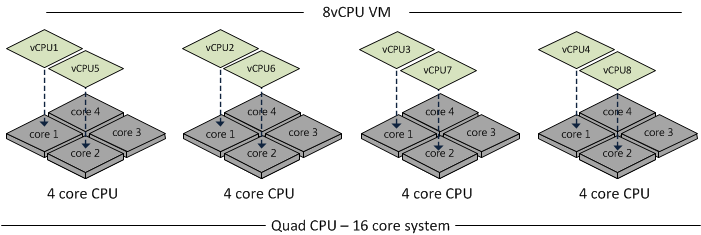
Because the VM is not a NUMA client of the NUMA load balancer, no NUMA optimization is being performed by the CPU scheduler. Meaning that the vCPUs can be placed on any CPU core and memory comes from either a single CPU or all CPUs in a round-robin manner. Wide virtual machines tend to be scheduled on all available CPUs.

Spanning VM as NON-NUMA Client
Wide-VMs
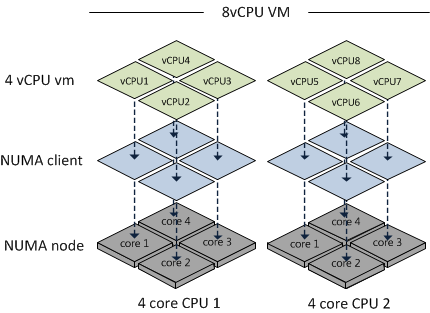
The ESX 4.1 CPU scheduler supports wide virtual machines. If the ESX4.1 CPU scheduler detects a virtual machine containing more vCPUs than available cores in one NUMA node, it will split the virtual machine into multiple NUMA clients. At the virtual machine’s power on, the CPU scheduler determines the number of NUMA clients that needs to be created so each client can reside within a NUMA node. Each NUMA client contains as many vCPUs possible that fit inside a NUMA node.

The CPU scheduler ignores Hyper-Threading, it only counts the available number of cores per NUMA node. An 8-way virtual machine running on a four CPU quad core Nehalem system is split into a two NUMA clients. Each NUMA client contains four vCPUs. Although the Nehalem CPU has 8 threads 4 cores plus 4 HT “threads”, the CPU scheduler still splits the virtual machine into multiple NUMA clients.

8 vCPU VM splitting into two NUMA Clients
The advantage of wide VM
The advantage of a wide VM is the improved memory locality, instead of allocating memory pages random from a CPU, memory is allocated from the NUMA nodes the virtual machine is running on.
While reading the excellent whitepaper: “VMware vSphere: The CPU Scheduler in VMware ESX 4.1 VMware vSphere 4.1 whitepaper” one sentence caught my eye:

However, the memory is interleaved across the home nodes of all NUMA clients of the VM.

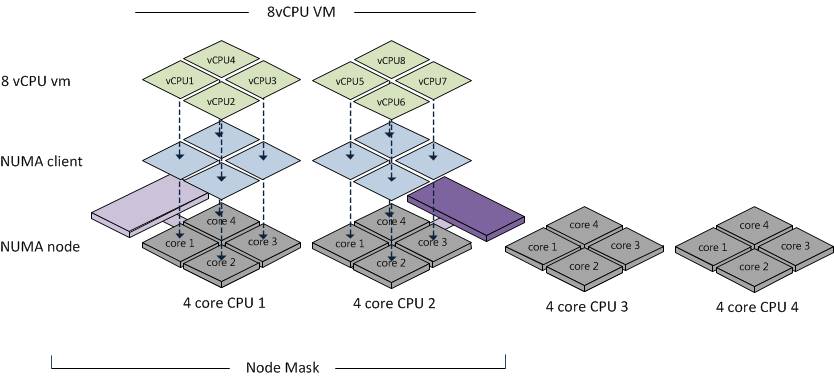
This means that the NUMA scheduler uses an aggregated memory locality of the VM to the set of NUMA nodes. Call it memory vicinity. The memory scheduler receives a list (called a node mask) of the NUMA node the virtual machine is scheduled on.

NUMA Node Mask
The memory scheduler will preferentially allocate memory for the virtual machine from this set of NUMA nodes, but it can distributed pages across all the nodes within this set. This means that there is a possibility that the CPU from NUMA node 1 uses memory from NUMA node 2.

Initially this looks like no improvement compared to the old situation, but fortunately supporting Wide VM makes a big difference. Wide-VM’s stop large VM’s from scattering all over the CPU’s with having no memory locality at all. Instead of distributing the vCPU’s all over the system, using a node mask of NUMA nodes enables the VMkernel to make better memory allocations decisions for the virtual machines spanning the NUMA nodes.

Filed Under: NUMA Tagged With: NUMA, VMware, Wide-VM

vCloud Director Architecture

September 8, 2010 by frankdenneman

A vCloud infrastructure consists of several components. Many of you have deployed, managed, installed or designed vSphere environments. The vCloud Director architecture introduces a new and additional layer on top of the vSphere environment.
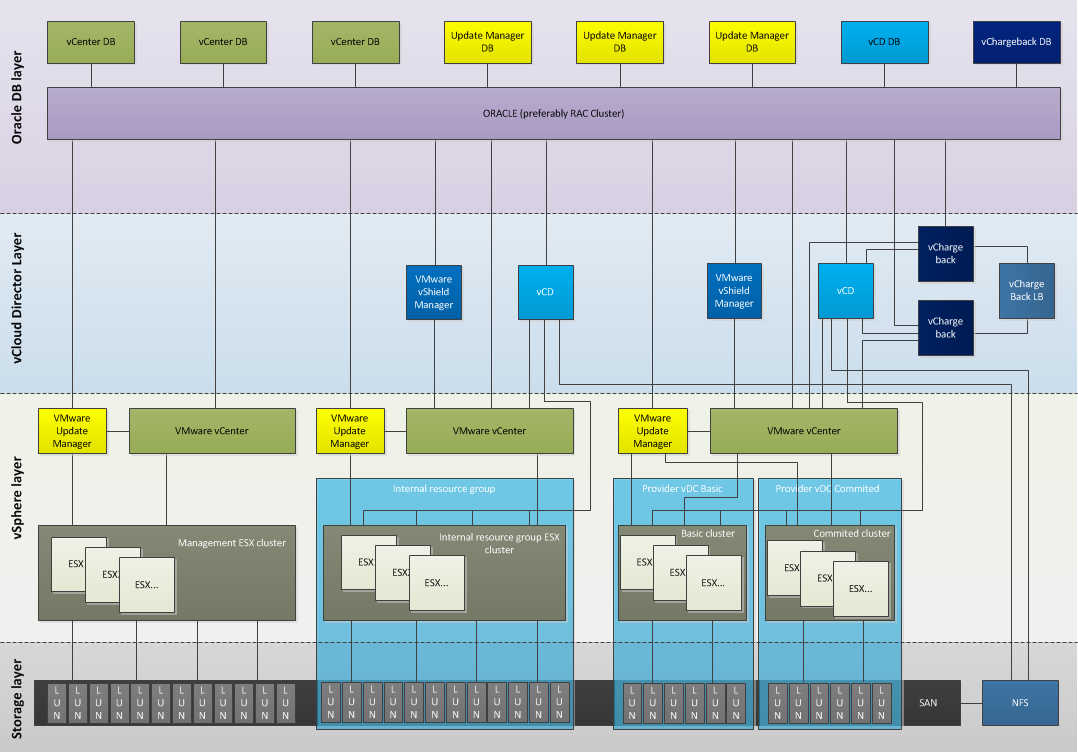
vCloud Director Architecture diagram
I have created a diagram which depicts architecture mainly to be used by service providers. Service providers are likely to use an internal cloud for their own application and IT department operations and an external cloud environment for their service delivery.
The purpose of this diagram is to create a clear overview of the new environment and showing a relational overview of all the components. In essence, which component connects with which other components?
The environment consists of a management cluster, an internal resource group and an external resource group. Building blocks (VMware vSphere, SAN and networking) within a vCD environment are often referred to as “resource groups”.
To run a VMware vCloud environment, the minimum components to run are:
• VMware vCloud Director (vCD)
• VMware vShield Manager
• VMware Chargeback
• VMware vCenter (supporting the Resource groups)
• vSphere infrastructure
• Supporting infrastructure elements (Networking, SAN)
The management cluster contains all the vCD components, such as the vCenters and Update managers managing the resource groups, the vCD cells and Chargeback clusters. Due to the Oracle Database requirement, a physical Oracle cluster is recommended, as RAC clustering is not supported on VMware vSphere. No vCD is used to manage the management cluster, management is done by a dedicated vCenter.
Within a resource pod a separate cluster is created for each pVCD to enable the service provider to deliver the different service levels. Duncan wrote a great introduction to VCD recently. http://www.yellow-bricks.com/2010/08/31/vmware-vcloud-director-vcd/.
This diagram shows two additional vCenters, one for the internal resource pod and one for the external resource pod. It is advised to isolate internal IT resources from customer IT resources. Managing and deploying internal IT services and external IT services such as customers VM from one vCD can become obscure and complex. A single vCenter is used for both pVCDs as it expected that customer will deploy virtual machines in different service level offerings. By using one vCenter a single Distributed Virtual Switch can be used, spanning both clusters\service offerings.
To rehash, this is a abstract high level diagram intended to show the involved elements of a vCloud environment and to show the relation or connections all the components.

Filed Under: VMware Tagged With: diagram, vCD, vCloud architecture

DRS 4.1 Adaptive MaxMovesPerHost

August 27, 2010 by frankdenneman

Another reason to upgrade to vSphere 4.1 is the DRS adaptive MaxMovesPerHost parameter. The MaxMovesPerHost setting determines the maximum amount of migrations per host for DRS load balancing. DRS evaluates a cluster and recommends migrations. By default this evaluation happens every 5 minutes. There are limits to how many migrations DRS will recommend per interval per ESX host because there’s no advantage to recommending so many migrations that they won’t all be completed by the next re-evaluation, by which time demand could have changed anyway.
Be aware that there is no limit on max moves per host for a host entering maintenance or standby mode, but there’s a limit on max moves per host for load balancing. This can (but usually shouldn’t) be changed by setting the DRS Advanced Option “MaxMovesPerHost”. The default value is 8 and is set at the Cluster level. Remember, the MaxMovesPerHost is a cluster setting but configures the maximum migrations from a single host on each DRS invocation. This means you can still see 30 or 40 vMotion operations in the cluster during a DRS invocation.
In ESX/ESXi 4.1, the limit on moves per host will be dynamic, based on how many moves DRS thinks can be completed in one DRS evaluation interval. DRS adapts to the frequency it is invoked (pollPeriodSec, default 300 seconds) and the average migration time observed from previous migrations. In addition DRS follows the new maximum number of concurrent vMotion operations per host over depending on the Network Speed (1GB – 4 vMotions, 10GB – 8 vMotions).
Due to the adaptive nature the algorithm, the name of the setting is quite misleading as it’s no longer a maximum. The “MaxMovesPerHost” parameter will still exist, but its value might be exceeded by DRS. By leveraging the increased amount of concurrent vMotion operations per host and the evaluation of previous migration times DRS is able to rebalance the cluster in a fewer amount of passes. By using fewer amounts of passes, the virtual machines will receive their entitled resources much quicker which should positively affect virtual machine performance.

Filed Under: DRS Tagged With: DRS, MaxMovesPerHost, VMware

vSphere 4.1 – HA and DRS deepdive book

August 25, 2010 by frankdenneman

This is a complete repost of the article written by Duncan, as all publications about this book must be checked by VMware Legal, he wrote one article and speaks for the both of us.
URL: http://www.yellow-bricks.com/2010/08/24/soon-in-a-bookstore-near-you-ha-and-drs-deepdive
Over the last couple of months Frank Denneman and I have been working really hard on a secret project. Although we have spoken about it a couple of times on twitter the topic was never revealed. Months ago I was thinking about what a good topic would be for my next book. As I already wrote a lot of articles on HA it made sense to combine these and do a deepdive on HA. However a VMware Cluster is not just HA. When you configure a cluster there is something else that usually is enabled and that is DRS. As Frank is the Subject Matter Expert on Resource Management / DRS it made sense to ask Frank if he was up for it or not… Needless to say that Frank was excited about this opportunity and that was when our new project was born: VMware vSphere 4.1 – HA and DRS deepdive.
As both Frank and I are VMware employees we contacted our management to see what the options were for releasing this information to market. We are very excited that we have been given the opportunity to be the first official publication as part of a brand new VMware initiative, codenamed Rome. The idea behind Rome along with pertinent details will be announced later this year.
Our book is currently going through the final review/editing stages. For those wondering what to expect, a sample chapter can be found here. The primary audience for the book is anyone interested in high availability and clustering. There is no prerequisite knowledge needed to read the book however, the book will consist of roughly 220 pages with all the detail you want on HA and DRS. It will not be a “how to” guide, instead it will explain the concepts and mechanisms behind HA and DRS like Primary Nodes, Admission Control Policies, Host Affinity Rules and Resource Pools. On top of that, we will include basic design principles to support the decisions that will need to be made when configuring HA and DRS.
I guess it is unnecessary to say that both Frank and I are very excited about the book. We hope that you will enjoy reading it as much as we did writing it. Stay tuned for more info, the official book title and url to order the book.
Frank and Duncan

Filed Under: DRS

  • « Go to Previous Page
  • Page 1
  • Interim pages omitted …
  • Page 73
  • Page 74
  • Page 75
  • Page 76
  • Page 77
  • Interim pages omitted …
  • Page 83
  • Go to Next Page »

Copyright © 2026 · SquareOne Theme on Genesis Framework · WordPress · Log in