VMworld 2011 session voting opened a week ago and there a still a few days left to cast your vote. About 300 in-depth sessions will be presented at VMworld this year and this year two sessions are submitted in which I participate. Both sessions are not the typical PowerPoint slide sessions, but are based on interaction with the attending audience.
TA 1682 – vSphere Clustering Q&A
Du ncan Epping and Frank Denneman will answer any question with regards to vSphere Clustering in this session. You as the audience will have the chance to validate your own environment and design decisions with the Subject Matter Experts on HA, DRS and Storage DRS. Topics could include for instance misunderstandings around Admission Control Policies, the impact of limits and reservations on your environment, the benefits of using Resource Pools, Anti-Affinity Rules Gotchas, DPM and of course anything regarding Storage DRS. This is your chance to ask what you’ve always wanted to know!
Duncan and I conducted this very successful session at the Dutch VMUG. Audience participation led to a very informative session where both general principles and in-depth details were explained and misconceptions where addressed.
TA1425 – Ask the Expert vBloggers
Four VMware Certified Design Experts (VCDX) On Stage! Are you running a virtual environment and experiencing some problems? Are you planning your companies’ Private Cloud strategy? Looking to deploy VDI and have some last minute questions? Do you have a virtual infrastructure design and want it blessed by the experts? Come join us for a one hour panel session where your questions are the topic of discussion! Join the Virtualization Experts, Frank Denneman (VCDX), Duncan Epping (VCDX), Scott Lowe (VCDX) and Chad Sakac, VP-VMware Alliance within EMC, as they answer your questions on virtualization design. Moderated by VCDX #21, Rick Scherer from VMwareTips.com
Many friends of the business have submitted great sessions and there are really too many to list them all, but there is one I would want to ask you to vote on and that is the ESXi Quiz Show.
A 1956 – The ESXi Quiz Show
Join us for our very first ESXi Quiz Show where teams of vExperts and VMware engineers will match expertise on technical facts, trivia related to all VMware ESXi and related products. You as the audience will get 40% of the vote. We will cover topics around ESXi migration, storage, networking security, and VMware products. As an attendee of this session you will get to see the experts battle each other. For the very first time at VMworld you get to decide who leaves the stage as a winner and who does not.
This can become the most awesome thing that ever hit VMworld. Can you think about the gossip, the hype and the sensation will introduce during VMworld? As Top vExperts, bloggers, VMware engineers and the just the lone sys admin (no not you Bob Plankers 😉 ) compete with each other. Will the usual suspect win or will there be upsets? Who will dethrone who? Really I think this will become the hit of VMworld 2011 and will be the talk of the day at every party during the VMworld week.
Session Voting is open until May 18, the competition is very fierce and it’s very difficult to choose between the excellent submitted sessions, however I would like to ask your help and I hope you guys are willing to vote on these three sessions.
http://www.vmworld.com/cfp.jspa
Contention on lightly utilized hosts
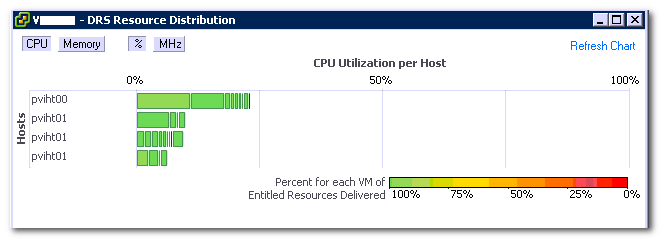
Often I receive the question why a virtual machine is not receiving resources while the ESXi host is lightly utilized and is accumulating idle time. This behavior is observed while reviewing the DRS distribution chart or the Host summary tab in the vSphere Client.
A common misconception is that low utilization (Low MHz) equals schedule opportunities. Before focusing on the complexities of scheduling and workload behavior, let’s begin by reviewing the CPU distribution chart.
The chart displays the sum of all the active virtual machines and their utilization per host. This means that in order to have 100% CPU utilization of the host, every active vCPU on the host needs to consume 100% of their assigned physical CPU (pCPU). For example, an ESXi host equipped with two Quad core CPUs need to simultaneously run eight vCPUs and each vCPU must consume 100% of “their” physical CPU. Generally this is a very rare condition and is only seen during boot storms or incorrect configured scheduled anti-virus scanning.
But what causes latency (ready time) during low host utilization? Lets take a closer look at some common factors that affect or prohibit the delivery of the entitled resources:
- Amount of physical CPUs available in the system
- Amount of active virtual CPUs
- VSMP
- CPU scheduler behavior and vCPU utilization
- Load correlation and load synchronicity
- CPU scheduler behavior
Amount of physical CPUs: To schedule a virtual CPU (vCPU) a physical (pCPU) needs to be available. It is possible that the CPU scheduler needs to queue virtual machines behind other virtual machines if more vCPUs are active than available pCPUs.
Amount of active virtual CPUs: The keyword is active, an ESXi host only needs to schedule if a virtual machine is actively requesting CPU resources, contrary to memory where memory pages can exist without being used. Many virtual machines can run on host without actively requesting CPU time. Queuing will be caused if the amount of active vCPUs exceeds the number of physical CPUs.
vSMP: (Related to the previous bullit) Virtual machines can contain multiple virtual processors. In the past vSMP virtual machine could experience latency due to the requirement of co-scheduling. Co-scheduling is the process of scheduling a set of processes on different physical CPUs at the same time. In vSphere 4.1 an advanced co-scheduling (relaxed co-scheduling) was introduced which reduced the latency radically. However ESX still needs to co-schedule vCPUs occasionally. This is due to the internal working of the Guest OS. The guest OS expects the CPUs it manages to run at the same pace. In a virtualized environment, a vCPU is an entity that can be scheduled and unscheduled independently from its sibling vCPUs belonging to the same virtual machine. And it might happen that the vCPUs do not make the same progress. If the difference in progress of the VM sibling vCPUs is too large, it can cause problems in the Guest OS. To avoid this, the CPU scheduler will occasionally schedule all sibling vCPUs. This behavior usually occurs if a virtual machine is oversized and does not host multithreaded applications. The “impact of oversized virtual machine series” offer more info on right-sizing virtual machines.
CPU scheduler behavior and vCPU utilization: The local-host CPU scheduler uses a default time slice (quantum) of 50 milliseconds. A quantum is the amount of time a virtual CPU is allowed to run on a physical CPU before a vCPU of the same priority gets scheduled. When a vCPU is scheduled, that particular pCPU is not useable for other vCPUs and can introduce queuing.
A small remark is necessary, a vCPU isn’t necessarily scheduled for the full 50 milliseconds, it can block before using up its quantum, and reducing the effective time slice the vCPU is occupying the physical CPU.
Load correlation and load synchronicity: Load correlation defines the relationship between loads running in different machines. If an event initiates multiple loads, for example, a search query on front-end webserver resulting in commands in the supporting stack and backend. Load synchronicity is often caused by load correlation but can also exist due to user activity. It’s very common to see spikes in workload at specific hours, for example think about log-on activity in the morning. And for every action, there is an equal and opposite re-action, quite often load correlation and load synchronicity will introduce periods of collective non-or low utilization, which reduce the displayed CPU utilization.
Local-host CPU scheduler behavior: The behavior of the CPU scheduler can impact the on scheduling of the virtual CPU. The CPU scheduler prefers to schedule the vCPU on the same pCPU it was scheduled before, to improve the chance of cache-hits. It might choose to ignore an idle CPU and wait a little bit so it can schedule the vCPU on the same pCPU again. If ESXi operates on a “Non-Uniform Memory Access” (NUMA) architecture, the NUMA CPU scheduler is active and will have effect on certain schedule decisions. The local host CPU scheduler will adjust progress and fairness calculations when Intel Hyper Threading is enabled on the system.
Understanding CPU scheduling behavior can help you avoid latency, although understanding workload behavior and right sizing your virtual machines can help to improve performance. Frankdenneman.nl hosts multiple articles about the CPU scheduler and can be found here, however the technical paper “vSphere 4.1 CPU scheduler” is a must read if you want to learn more about the CPU scheduler.
Restart vCenter results in DRS load balancing
Recently I had to troubleshoot an environment which appeared to have a DRS load-balancing problem. Every time when a host was brought out of maintenance mode, DRS didn’t migrate virtual machines to the empty host. Eventually virtual machines were migrated to the empty host but this happened after a couple of hours had passed. But after a restart of vCenter, DRS immediately started migrating virtual machines to the empty host.
Restarting vCenter removes the cached historical information of the vMotion impact. vMotion impact information is a part of the Cost-Benefit Risk analysis. DRS uses this Cost-Benefit Metric to determine the return on investment of a migration. By comparing the cost, benefit and risks of each migration, DRS tries to avoid migrations with insufficient improvement on the load balance of the cluster.
When removing the historical information a big part of the cost segment is lost, leading to a more positive ROI calculation, which in turn results in a more “aggressive” load-balance operation.
Kindle version of HA&DRS book and info on Amazon's regional price scheme
Maybe you already seen the tweets flying by, seen the posts on Facebook or just heard it at the water cooler but we finally published the eBook (Kindle) version of the HA and DRS deepdive book. Duncan has the low down on how the eBook came to life: http://www.yellow-bricks.com/2011/04/05/what-an-ebook-is-this-a-late-april-fools-joke/.
We know that many who wanted the eBook bought the paper version instead so we decided to make it cheap and are offering the book for only $7.50.
Please be aware that Amazon is using a regional price scheme, so orders outside the US pay a bit more. However, Marcel van den Berg (@marcelvandenber) posted a workaround how to save some money.
Disclaimer: we do guarantee this works and won’t support this in any form.
So without further ado we present: vSphere 4.1 HA and DRS technical deepdive,. Pick it up.
Duncan & Frank
PS: it is also available in the UK Kindle Store for £5.36.
Kindle version of HA&DRS book and info on Amazon's regional price scheme
Maybe you already seen the tweets flying by, seen the posts on Facebook or just heard it at the water cooler but we finally published the eBook (Kindle) version of the HA and DRS deepdive book. Duncan has the low down on how the eBook came to life: http://www.yellow-bricks.com/2011/04/05/what-an-ebook-is-this-a-late-april-fools-joke/.
We know that many who wanted the eBook bought the paper version instead so we decided to make it cheap and are offering the book for only $7.50.
Please be aware that Amazon is using a regional price scheme, so orders outside the US pay a bit more. However, Marcel van den Berg (@marcelvandenber) posted a workaround how to save some money.
Disclaimer: we do guarantee this works and won’t support this in any form.
So without further ado we present: vSphere 4.1 HA and DRS technical deepdive,. Pick it up.
Duncan & Frank
PS: it is also available in the UK Kindle Store for £5.36.