• Skip to primary navigation
  • Skip to main content

frankdenneman.nl

  • AI/ML
  • NUMA
  • About Me
  • Privacy Policy

(Storage) DRS (anti-) affinity rule types and HA interoperability

February 6, 2012 by frankdenneman

Lately I have received many questions about the interoperability between HA and affinity rules of DRS and Storage DRS. I’ve created a table listing the (anti-) affinity rules available in a vSphere 5.0 environment.

Technology Type Affinity Anti-Affinity Respected by VMware HA
DRS VM-VM Keep virtual machines together Separate virtual machines No
VM-Host Should run on hosts in group Should not run on hosts in group No
Must run on hosts in group Must not run on hosts in group Yes
SDRS Intra-VM VMDK affinity VMDK anti-affinity N/A
VM-VM Not available VM Anti-Affinity N/A

As the table shows, HA will ignore most of the (anti-) affinity rules in its placement operations after a host failure except the “Virtual Machine to Host – Must rules”. Every type of rule is part of the DRS ecosystem and exists in the vCenter database only. A restart of a virtual machine performed by HA is a host-level operation and HA does not consult the vCenter database before powering-on a virtual machine.
Virtual machine compatibility list
The reason why HA respect the “must-rules” is because of DRS’s interaction with the host-local “compatlist” file. This file contains a compatibility info matrix for every HA protected virtual machine and lists all the hosts with which the virtual machine is compatible. This means that HA will only restart a virtual machine on hosts listed in the compatlist file.
DRS Virtual machine to host rule
A “virtual machine to hosts” rule requires the creation of a Host DRS Group, this cluster host group is usually a subset of hosts that are member of the HA and DRS cluster. Because of the intended use-case for must-rules, such as honoring ISV licensing models, the cluster host group associated with a must-rule is directly pushed down in the compatlist.
Note
Please be aware that the compatibility list file is used by all types of power-on operations and load-balancing operations. When a virtual machine is powered-on, whether manual (admin) or by HA, the compatibility list is checked. When DRS performs a load-balancing operation or maintenance mode operation, it checks the compatibility list. This means that no type of operation can override must- type affinity rules. For more information about when to use must and should rules, please read this article: Should or Must VM-Host affinity rules.
Contraint violations
After HA powers-on a virtual machine, it might violate any VM-VM or VM-host should (anti-) affinity rule. DRS will correct this constraint violation in the first following invocation and restore “peace” to the cluster.
Storage DRS (anti-) affinity rules
When HA restarts a virtual machine, it will not move the virtual machine files. Therefore creation of Storage DRS (anti-) affinity rules do not affect virtual machine placement after a host failure.
Filed Under: DRS, Storage DRS

Retrospect of 2011 content due to Bloggers survey

January 24, 2012 by frankdenneman

vSphere-land.com is running it’s annual Top 25 virtualization blog survey again and I’m really interested to see who are picked this year. Like previous year, some great bloggers disappear while other new great ones emerge. One guy I want to mention by name is Chris Colotti, his blog is a great source of information about vCloud Director. If you haven’t visited his blog yet, go do that right away!.
Last year I’ve been pretty busy writing, shaping, designing, wrestling with publishers in order to get our (@DuncanYB) book “vSphere 5 Clustering technical deepdive out to the public. This meant it cut down on research time, which resulted in a smaller number of blogs being released than previous years. So after seeing other people’s blog about their top 10, I was curious to see what I’ve done last year. The articles that are listed are the ones I’m proud of, spending a lot of time on researching them, but most of all, enjoyed the most writing them.
Storage DRS initial placement and datastore cluster defragmentation
Impact of Load Balancing on datastore cluster configuration
Partially Connected datastore clusters
Mem minfreepct sliding scale function
Upgrading vmfs datastores and Storage DRS
Multi NIC vMotion support in vSphere 5.0
Contention on lightly Utilized Hosts
Restart vCenter results in DRS load balancing
IP-HASH versus Load Based Teaming
Setting correct percentage of cluster resources reserved
AMD Magny Cours and ESX
Please take 5 minutes of your time and vote for your favorite blogger. I hope they will announce the winner like they did last year. 90 minutes of nerve wrecking but oh-so-enjoyable videoshow!
Cast your vote now!

Filed Under: Uncategorized

Storage DRS initial placement and datastore cluster defragmentation

January 24, 2012 by frankdenneman

Recently an interesting question was raised about what happens if enough free space is available in the datastore cluster but not enough space is available per datastore during placement of a virtual machine. This scenario is often referred as a defragmented datastore cluster.

The short answer is that if not enough space available on any given datastore, then Storage DRS starts to consider migrating existing virtual machines from the datastore to free up space. This article zooms in on the process of generating such an initial placement recommendation.
Rules and boundaries within a datastore cluster
Storage DRS will not violate the configured space utilization and IO latency threshold of the datastore cluster. This means that Storage DRS will place virtual machines that consume space up to the configured space utilization threshold, for example setting the space utilization threshold to 80% on a 1000GB datastore will allow Storage DRS to place virtual machines that consume space up to 800 GB. Be aware of this when monitoring free space available on the datastores in the cluster.
When creating or moving a virtual machine in the datastore, the first thing to consider is the affinity rules. By default virtual machine files are kept together in the working directory of the virtual machine. If the virtual machine needs to be migrated, all the files inside the virtual machines’ working directory are moved. This article features the use of the default affinity rule, however if the default affinity rule is disabled, Storage DRS will move the working directory and virtual disks separately allowing Storage DRS to distribute the virtual disk files on a more granular level.
Prerequisite migrations
During initial placement, if no datastore with enough space is available in the datastore cluster, Storage DRS starts by searching alternative locations for the existing virtual machines in the datastores and attempts to place the virtual machines to other datastores one by one. As a result Storage DRS may generate sets of migration recommendations of existing virtual machines that allow placement of the new virtual machine. These migrations generated are called prerequisite migrations and combined with the placement operations is called a recommendation set.
Depth of recursion
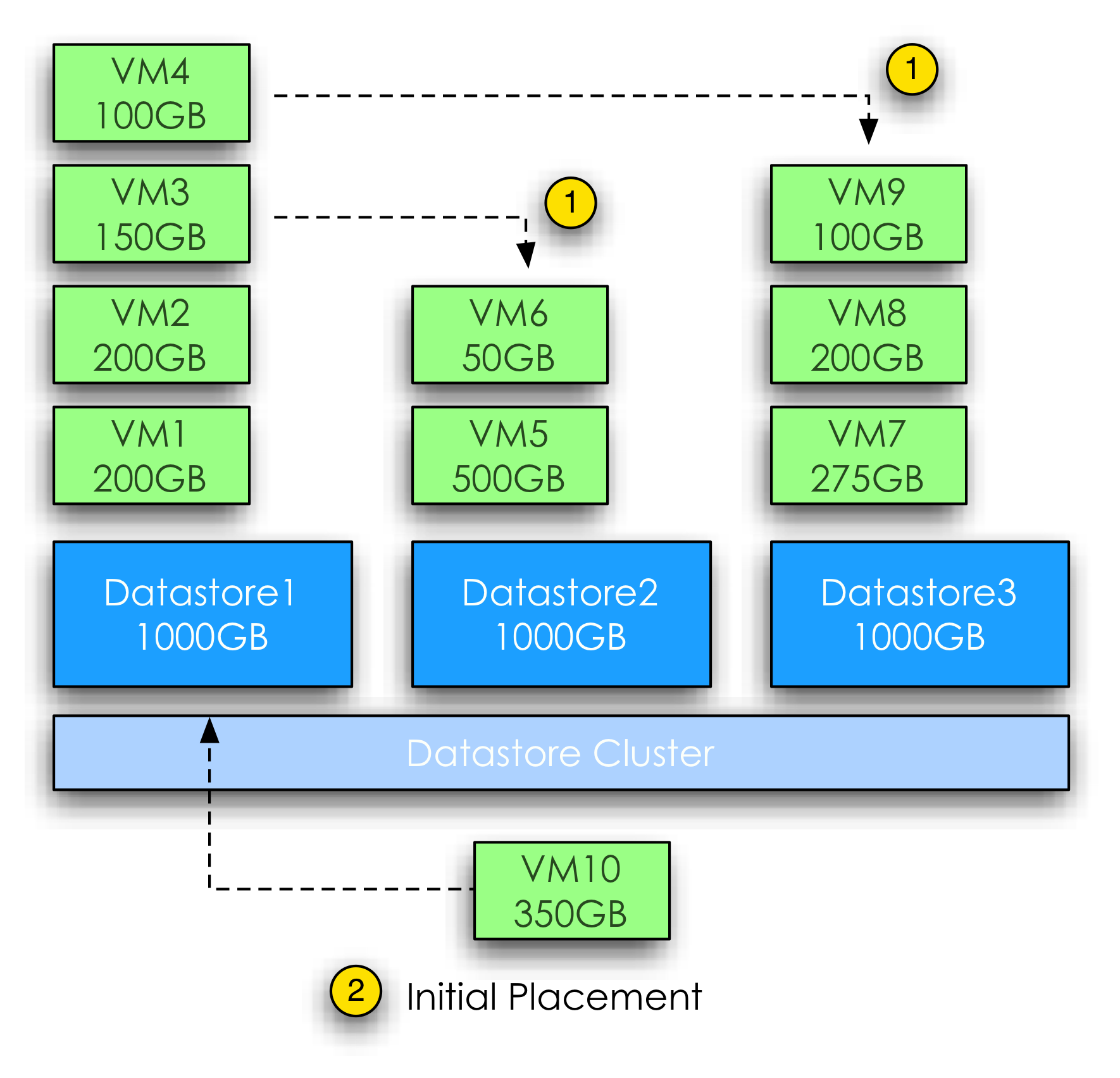
Storage DRS uses a recursive algorithm for searching alternative placements combinations. To keep Storage DRS from trying an extremely high number of combinations of virtual machine migrations, the “depth of recursion” is limited to 2 steps. What defines a steps and what counts towards a step? A step can be best defined as a set of migrations out of a datastore in preparation of (or to make room for) another migration into that same datastore. This step can contain one vmdk, but can also contain multiple virtual machines with multiple virtual disks attached. In some cases, room must be created on that target datastore first by moving a virtual machine out to another datastore, which results in an extra step. The following diagram visualizes the process.

Storage DRS has calculated that a new virtual machine can be placed in Datastore 1 if VM2 and VM3 are migrated to Datastore 2, however, placing these two virtual machines on datastore 2 will violate the space utilization, therefore room must be created. VM4 is moved out of Datastore2 as part of a step of creating space. This results in Step 1, moving out to Datastore 3, followed by Step 2, moving VM2 and VM3 to Datastore 2 to finally placing the new virtual machine on Datastore 1.
Storage DRS stops its search if there are no 2-step moves to satisfy the storage requirement of an initial placement. An advanced setting can be set to change the number of steps used by the search. As always, it is strongly discouraged to change the defaults, as many hours of testing has been invested in researching the setting that offers good performance while minimizing the impact of the operation. If you have a strong case of changing the number of steps, set the advanced configuration option “MaxRecursionDepth”. The default value is 1 the maximum value is 5. Because the algorithm starts counting at 0, default value of 1 allows 2 steps.
Goodness value
Storage DRS will cycle through all the datastores in the datastore cluster and initiates a search for space on each datastore. A search generates a set of prerequisites migration if it can provide space that allows the virtual machine placement within the depth of recursion. Storage DRS evaluates the generated sets and award each set a goodness value. The set with the least amount of cost (i.e. migrations) is the preferred migration recommendation and shown at the top of the list. Let’s explore this a bit more by using a scenario with 3 datastores.
Scenario
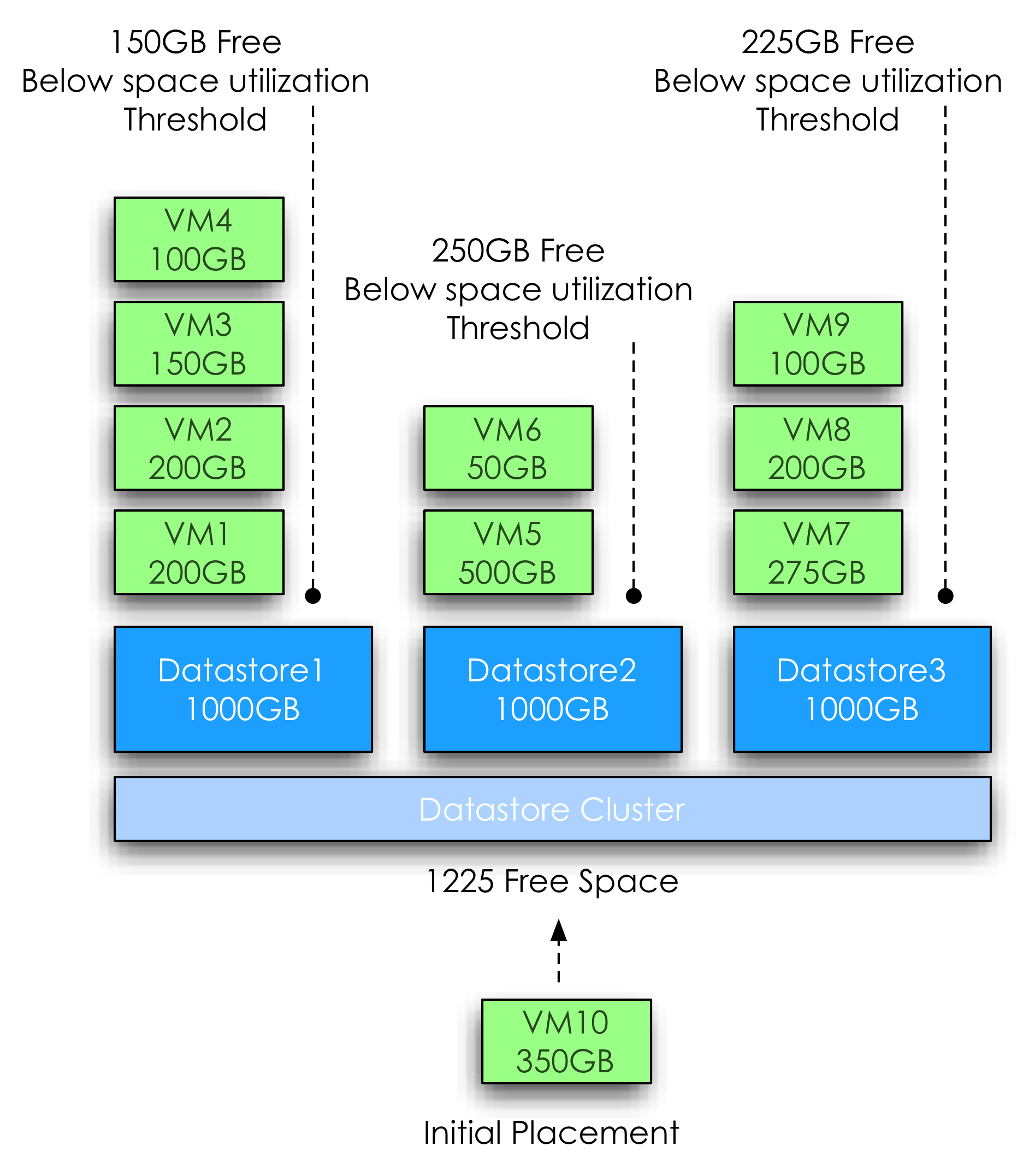
The datastore cluster contains 3 datastores; each datastore has a size of 1000GB and contains multiple virtual machines with various sizes. The space consumed on the datastores range from 550GB to 650GB, while the space utilization threshold is set to 80%. At this point the administrator creates a virtual machine that requests 350GB of space.
Although the datastore cluster itself contains 1225GB of free space, Storage DRS will not go forward and place the virtual machine on any of the three datastores, because placing the virtual machine will violate the space utilization threshold of the datastores.
Search process
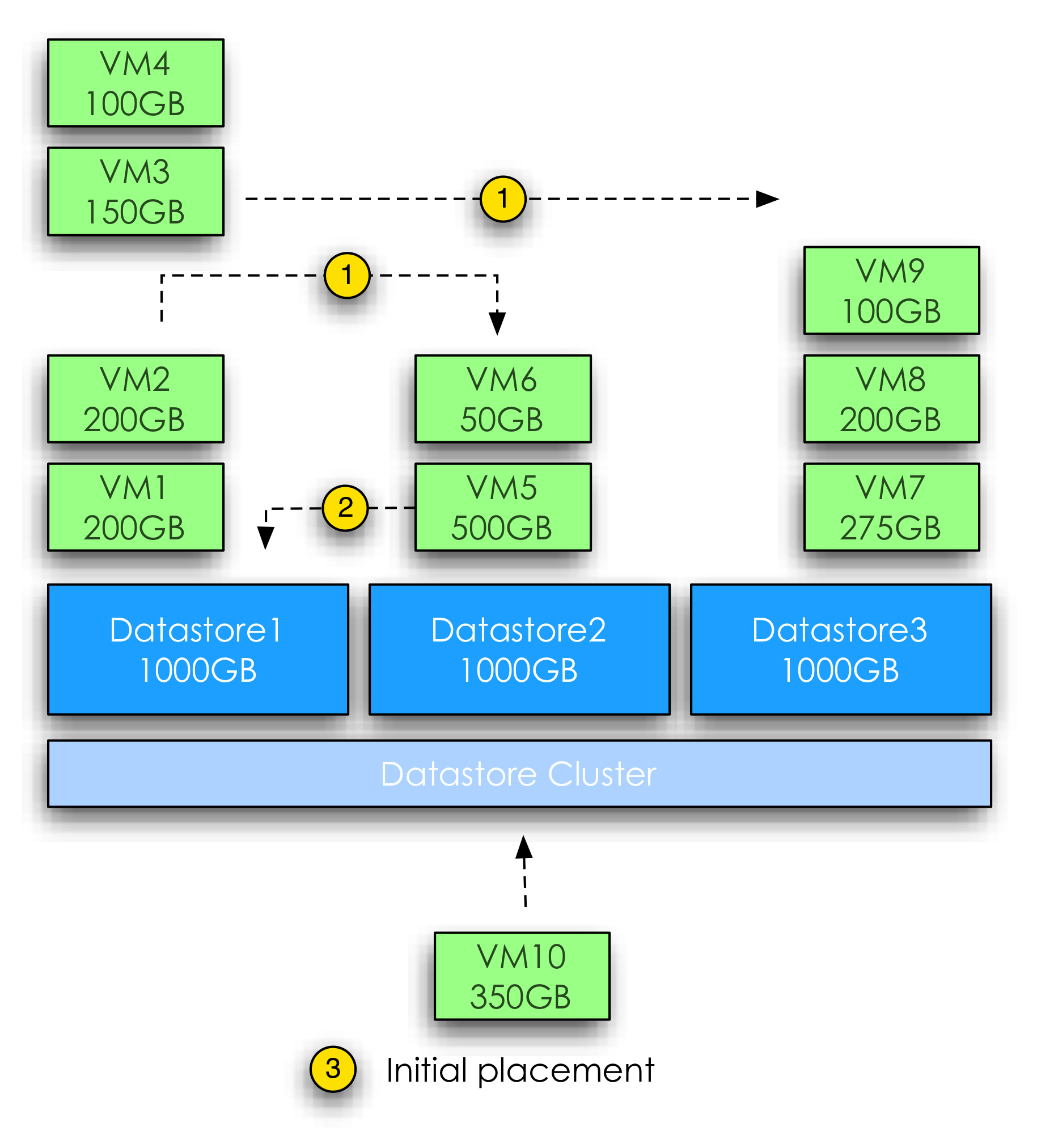
As each ESXi host provide information about the overall datastore utilization and the vmdk statistics, Storage DRS has a clear overview of the most up to date situation and will use these statistics as input for its search. In the first step it will simulate all the necessary migrations to fit VM10 in Datastore 1. The prerequisite migration process with least number of migrations to fit the virtual machine on to Datastore 1 looks as follows:

Step 1: VM3 from Datastore 1 to Datastore 2
Step 1: VM4 from Datastore 1 to Datastore 3
Place new virtual machine on Datastore 1

Although VM3 and VM4 are each moved out to a different datastore, both migrations are counted as a one step prerequisite migration as both virtual machines are migrated OUT of Datastore 1.
Next Storage DRS will evaluate Datastore 2. Due to the size of VM5, Storage DRS is unable to migrate VM5 out of Datastore 2 because it will immediately violate the utilization threshold of the selected destination datastore. One of the coolest parts of the algorithm is that it considers inbound migrations as valid moves. In this scenario, migrating virtual machines into Datastore 2 would free up space on another datastore to provide enough free space to place VM5, which in turn free up space on Datastore 2 allowing Storage DRS to place VM10 onto Datastore2.

The prerequisite migration process with least number of migrations to fit the virtual machine on to datastore 2 looks as follows:

Step 1: VM2 from Datastore 1 to Datastore 2
Step 1: VM3 from Datastore 1 to Datastore 3
Step 2: VM5 from Datastore 2 to Datastore 1
Place new virtual machine on Datastore 2

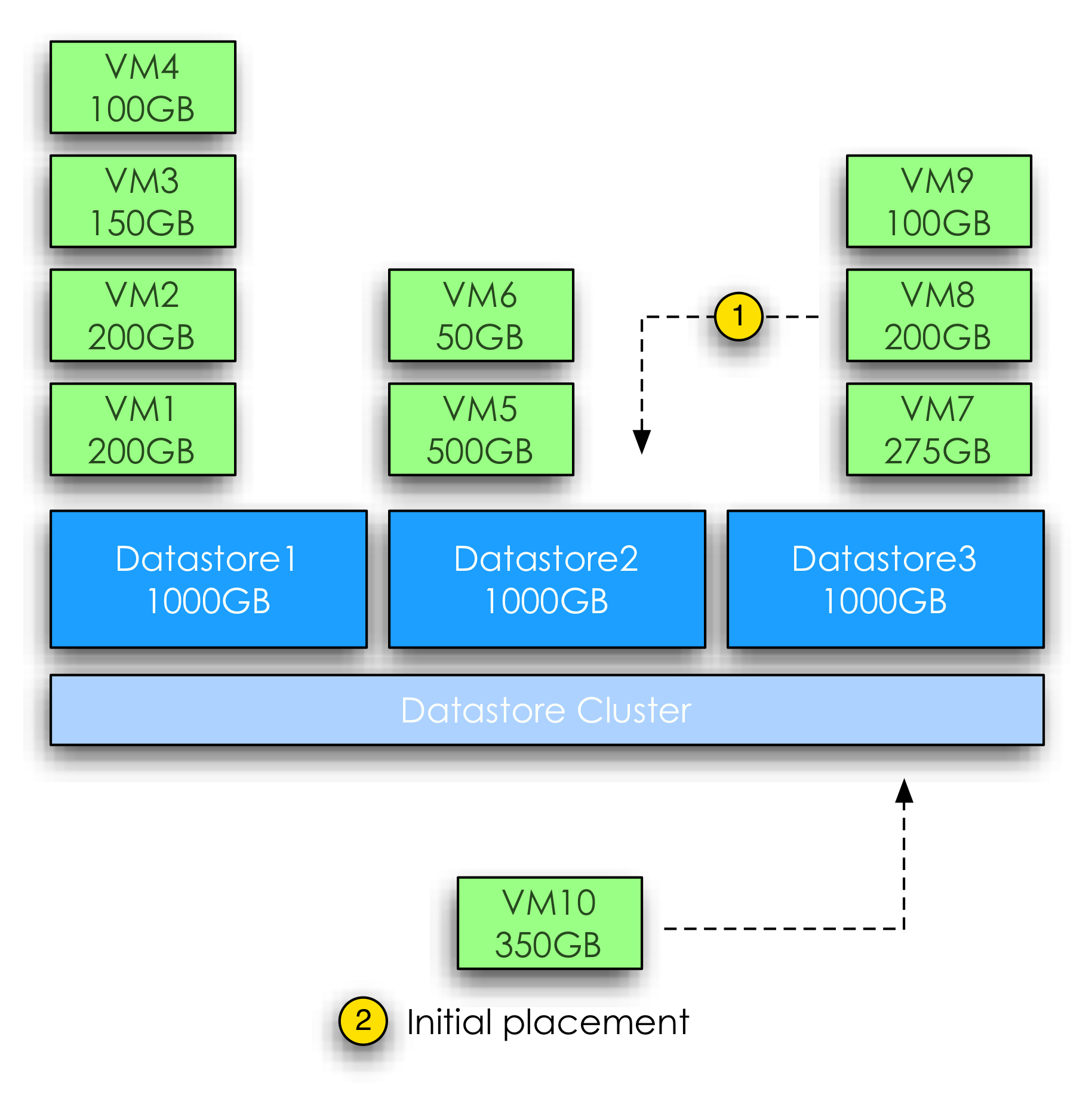
Datastore 3 generates a single prerequisite migration. By migrating VM8 from Datastore 3 to Datastore 2 it will free up enough space to allow placement of VM10. Selecting VM9 would not free up enough space and migrating VM7 generates more cost than migrating VM8. By default Storage DRS attempts to migrate the virtual machine or virtual machine disk which size is closest to the required space.

The prerequisite migration process with least number of migrations to fit the virtual machine on to datastore 3 looks as follows:

Step 1: VM8 from Datastore 3 to Datastore 2
Place new virtual machine on Datastore 3

After analyzing the cost and benefit of the three search results Storage DRS will assign the highest goodness factor to the migration set of Datastore3. Although each search result can provide enough free space after moves, recommendation set of Datastore 3 will result in the lowest number of moves and migrates the lowest amount of data. All three results will be shown; the recommended set will be placed at the top
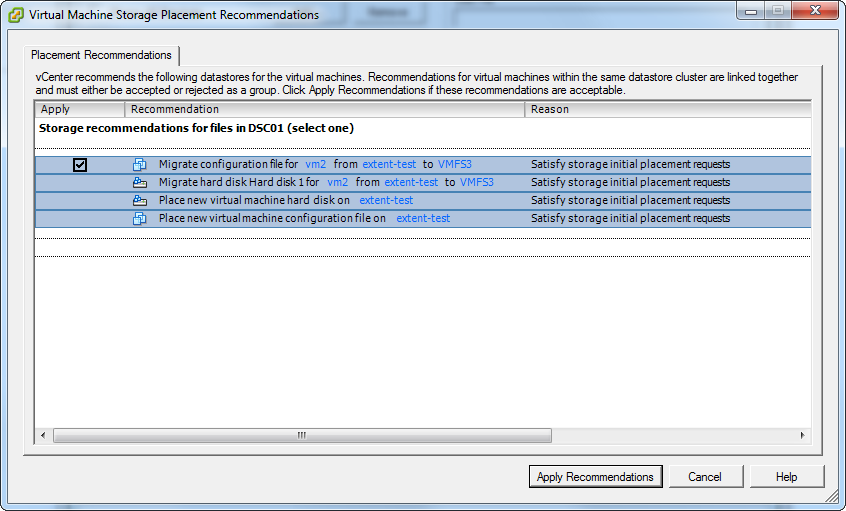
A example placement recommendation screen is displayed, note that you can only apply the complete recommendation set. Applying the recommendation results in triggering the prerequisite migrations before the initial placement of the virtual machine occurs.

Filed Under: Storage DRS Tagged With: Initial Placement, Storage DRS

Storage DRS and Multi-extents datastores

January 17, 2012 by frankdenneman

Somebody asked me if VMFS3 multi-extents datastores are supported by Storage DRS. Although they are supported and fully operational in Storage DRS, one must ask if this construct of large datastores should be used in a datastore cluster.
Resource aggregation and flexibility
Storage DRS Datastore clusters offer flexibility in adding and removing datastores dynamically and allow the administrator to focus on macro management by reducing the number of entities to be managed.
By using datastore cluster, micro management of single datastores is something from the past, such as the tedious task of virtual machine placement. The administrator no longer needs to find a datastore that provide adequate space, while still ensuring that placement of the virtual machine will not result in an I/O bottleneck. Let alone monitoring the current workload next to the ever-expanding workload; application lifecycles are changing drastically and virtual machine server sprawl is still one of the top concerns of the modern administrator. Keeping track and managing such an environment is very challenging. By allowing Storage DRS to manage (initial) placement of virtual machines, the administrator only needs to monitor overall available space and IO performance of the datastore cluster itself.
If the cluster requires more space of more IO performance the administrator can dynamically add more datastores to the datastore cluster and allow Storage DRS to find an optimal distribution of the current workload. The option “Run Storage now” in the datastore cluster view allows the administrator to trigger a Storage DRS invocation immediately.
Using Storage DRS and particularly space load-balancing can reduce the need of multi-extents as well. By allowing Storage DRS to monitor space utilization, the free space used as a safety buffer can be greatly reduced. Each ESXi host reports the virtual machine space utilization and the datastore utilization; Storage DRS will trigger an invocation if the configured space utilization is violated. A common practice is to assign a big chunk of space as safety buffer to avoid out of space situation of a datastore, which might lead to downtime of the active virtual machines. I’ve seen organization using requirements of 30% free space on datastores. By reducing slack space, a higher consolidation ratio can be achieved (if IO performance allows this), or a reduction in LUN sizes. Reducing LUN sizes can be used to provision additional datastores to the datastore cluster. More datastores benefits Storage DRS by offering more load balancing options, more datastores increase the number of queues, which benefits IO management at ESXi level and at SIOC at cluster level. Essentially this configuration is the complete opposite of VMFS extends. However if larger size datastores are necessary, vSphere 5 offers VMFS5.
VMFS5
VMFS5 allows datastores up to 64 terabyte of contiguous space. ESXi 5.0 allows a VMDK size up to 2 terabyte of space, providing sufficient space for most virtual machines configurations. If the virtual machine requires more than 32 virtual machine disks of 2 terabyte it’s recommended to disable the default affinity rule (keep all disks together) and allow Storage DRS to distribute the virtual machine disk files across all datastores inside the datastore cluster. This granularity allows Storage DRS to find a suitable datastore for each virtual disk that aligns with the performance requirements of that specific virtual disk.

Filed Under: Storage DRS Tagged With: Extends, Storage DRS, VMFS5

vSphere 4.1 HA and DRS book for only $19.95

January 9, 2012 by frankdenneman

We lowered the price of the vSphere 4.1 HA and DRS technical Deepdive book permanently. As of this week you can obtain one of the coolest books in the virtualization section at Amazon for only $19.95. 30 5-star reviews couldn’t be wrong. Here is just a random selection of two of those 5-star reviews:

B. Riley: The term “deepdive” is regularly abused in the technology world these days. There’s nothing more disheartening than walking into a one hour session at a conference entitled deepdive, and finding out that it’s neither deep, nor a dive. It ends up being more like sitting in a couple inches of warm water in a plastic kiddie pool.
When these guys say deepdive, they mean it. This book is packed with helpful information from the first, to the last page. Somehow, they even manage to read minds. They know what you’re thinking as a VMware administrator, and they’ll tell you the why, and the best practice.
Lots of books have good overviews of HA and DRS, but none goes as deep as this. It’s very well-written, and highly recommended for anyone who is running, or thinking about running an HA/DRS environment.
This book is, as Jeremy Clarkson would say, “absolutely brilliant”!

Chris Dearden: Ever had a series of discombobulated thoughts and ideas that have suddenly clicked into place & the plans come into focus? That’s exactly what happened when I read Frank & Duncan’s book. Even though I have a fair few years experience with Enterprise virtualisation , my knowledge of what’s deeply under the covers of the availability options of vSphere was made up of blog posts I’d read , anecdotes from colleagues and a few slides from trainers. It was enough to get me by, but there was always that nagging feeling that I wasn’t fully in control of what was happening.
After reading the book ( in a morning – for a tech book it’s one that you can work though in a short amount of time and still get value from ) I had a real epiphany / light bulb moment / matrix moment / and all of those concepts and ideas suddenly had a deeper meaning and the big picture was visible. For anyone who thinks they know about HA / DRS : read this and *really* know about it.

Get your copy now at: vSphere 4.1 HA and DRS technical deepdive Amazon page

Filed Under: Uncategorized

  • « Go to Previous Page
  • Page 1
  • Interim pages omitted …
  • Page 62
  • Page 63
  • Page 64
  • Page 65
  • Page 66
  • Interim pages omitted …
  • Page 83
  • Go to Next Page »

Copyright © 2026 · SquareOne Theme on Genesis Framework · WordPress · Log in