• Skip to primary navigation
  • Skip to main content

frankdenneman.nl

  • AI/ML
  • NUMA
  • About Me
  • Privacy Policy

Disable ballooning?

November 29, 2010 by frankdenneman

Recently, Paul Meehan submitted this question via a comment on the “Memory reclamation, when and how” article:

Hi,
we are currently considering virtualising some pretty significant SQL workloads. While the VMware best practices documents for SQL server inside VMware recommend turning on ballooning, a colleague who attended a deep dive with a SQL Microsoft MVP came back and the SQL guy strongly suggested that ballooning should always be turned off for SQL workloads. We have 165 SQL instances, some of which will need 5-10000 IOPS so performance and memory management is critical. Do you guys have a view on this from experience?
Thx,
Paul

I receive this kind of question a lot, whether it is SQL, Oracle or Citrix. And there always seem to be expert that is recommending disabling ballooning. Now this statement can be interpreted in two ways.
1. Disable the memory reclaimation mechanism by adding a particular parameter (sched.mem.maxmemctl) in the settings of the virtual machine.
– or –
2. Ensure that enough physical memory resources are available to the virtual machine to keep the VMkernel from reclaiming memory of that particular virtual machine.
I always hope that they mean guarantee enough memory to the virtual machine to stop the VMkernel from reclaiming memory from that specific VM. But unfortunately most specialists insist on disabling the mechanism.
Why is disabling the ballooning mechanism bad?
Many organizations that deploy virtual infrastructures rely on memory overcommitment to reach a higher consolidation ratio and higher memory utilization. In a virtual infrastructure not every virtual machine is actively using its assigned memory at the same time and not every virtual machine is making use of its configured memory footprint. To allow memory overcommitment, the VMkernel uses different virtual machine memory reclamation mechanisms.
1. Transparent Page Sharing
2. Ballooning
3. Memory compression
4. Host swapping
Except from Transparent Page Sharing, all memory reclamation techniques only become active when the ESX host experiences memory contention. The VMkernel will use a specific memory reclamation technique depending on the level of the host free memory. When the ESX host has 6% or less free memory available it will use the balloon driver to reclaim idle memory from virtual machines. The VMkernel selects the virtual machines with the largest amounts of idle memory (detected by the idle memory tax process) and will ask the virtual machine to select idle memory pages.
Now to fully understand the beauty of the balloon driver, it’s crucial to understand that the VMkernel is not aware of the Guest OS internal memory management mechanisms. Guest OS’s commonly use an allocated memory list and a free memory list. When a guest OS makes a request for a page, ESX will back that page with physical memory. When the Guest OS stops using the page internally, it will remove the page from the allocated memory list and place it on the free memory list. Because no data is changed, ESX will keep storing this data in physical memory.
When the Balloon driver is utilized, the balloon driver request the guest OS to allocated a certain amount of pages. Typically the Guest OS will allocate memory that has been idle or registered in the Guest OS free list. If the virtual machine has enough idle pages no guest-level paging or even worse kernel level paging is necessary. Scott Drummonds tested an Oracle database VM against an OLTP load generation tool and researched the (lack of) impact of the balloon driver on the performance of the virtual machine. The results are displayed in this image:
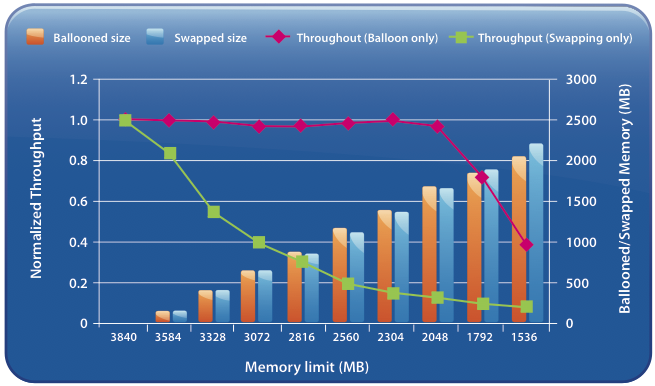
Impact on performance: Ballooning versus swapping

Scott’s explanation:

Results of two experiments are shown on this graph: in one memory is reclaimed only through ballooning and in the other memory is reclaimed only through host swapping. The bars show the amount of memory reclaimed by ESX and the line shows the workload performance. The steadily falling green line reveals a predictable deterioration of performance due to host swapping. The red line demonstrates that as the balloon driver inflates, kernel compile performance is unchanged.
So the beauty of ballooning lies in the fact that it allows the guest OS itself to make the hard decision about which pages to be paged out without the hypervisor’s involvement. Because the Guest OS is fully aware of the memory state, the virtual machine will keep on performing as long as it has idle or free pages.

When ballooning is disabled
When we follow the recommendations of Non-VMware experts we would disable ballooning resulting in the following available memory reclamation techniques:
1. Transparent Page Sharing
2. Memory compression
3. Host-level swapping (.vswp)
Memory compression
Memory compression is offered in vSphere 4.1. The VMkernel will always try to compress memory before swapping. This feature is very helpful and a lot faster than swapping. However, the VMkernel will only compress a memory page if the compression ratio is 50% or more, otherwise the page will be swapped. Furthermore, the default size of the compression cache is 10%, if the compression cache is full, one compressed page must be replaced in order to make room for a new page. The older page will be swapped out. During heavy contention memory compression will become the first stop before ultimately ending up as a swapped page.
Increasing the memory compression cache can have a contradictive effect, as the memory compression cache is a part of the virtual machine memory usage, introducing memory pressure or contention due to configuring large memory compression caches.
Host-level Swapping
In contrast to ballooning, host-level swapping does not communicate with the Guest OS. The VMkernel has no knowledge about the status of the page in the Guest OS only that the physical page belongs to a specific virtual machine. Because the VMkernel is unaware of the content of the stored data inside the page and its significance to the Guest OS, it could happen that the VMkernel decides to swap out specific Guest OS kernel pages. Guest OS kernel pages will never be swapped by the Guest OS itself as they are crucial to maintaining kernel performance.
So by disabling ballooning, you have just deactivated the the most intelligent memory reclamation technique. Leaving the VMkernel with the option to either compress a memory page or just rip out complete random (and maybe crucial) page, significantly increasing the possibility of deteriorating the virtual machine performance. Which to me does not sound something worth recommending.
Alternative to disabling the balloon driver while guaranteeing performance?
The best option to guarantee performance is to use the resource allocation settings; shares and reservations.
Use shares to define priority levels and use reservations to guarantee physical resources even when the VMkernel is experiencing resource contention.
How reservations work are described in the articles: Setting reservations does have impact on the virtual infrastructure, described in the articles “Impact of Memory reservations” and “Resource Pools memory reservations” and “Reservations and CPU scheduling”.
However setting reservations will impact the virtual infrastructure, a well know impact of setting a reservation is on the HA slot size if the cluster is configured with “Host failures cluster tolerates”. More info on HA can be found in the HA deep dive on yellow-bricks. To circumvent this impact one might choose to configure the HA cluster with the HA policy “Percentage of cluster resources reserved as fail over spare capacity”. Due to the HA-DRS integration introduced in vSphere 4.1 the main caveat of dealing with defragmented clusters is dissolved.
Disabling the balloon-driver will likely worsen the performance of the virtual machine when the ESX host experiences resource contention. I suspect that the advice given by other-vendor-experts is to avoid memory reclamation and the only two build-in recommended mechanisms to help avoid memory reclaimation are the resource allocation unit settings: Shares and Reservations.

Filed Under: Memory

The impact of QoS network traffic on VM performance

November 18, 2010 by frankdenneman

A lot of interesting material is written about configuring Quality of Service (QoS) on 10GB (converged) networks in Virtual Infrastructures. With the release of vSphere 4.1, VMware introduced a network QoS mechanism called Network I/O Control (NetIOC). The two most popular Blade systems; HP with Flex10 technology and Cisco UCS both offer traffic shaping mechanisms at hardware level.
Both NetIOC and Cisco UCS approach network Quality of Service with a sharing perspective, guaranteeing a minimum amount of bandwidth opposed to the HP Flex-10 technology, which isolates the available bandwidth and dedicate an X amount of bandwidth to a specified NIC.
When allocating bandwidths to the various network traffic streams most admins try to stay on the safe side and over-allocate bandwidth to virtual machine traffic. Obviously it is essential to guarantee enough bandwidth to virtual machines but bandwidth is finite, resulting in less bandwidth available to other types of traffic such as vMotion. Unfortunately by reducing the available bandwidth used for vMotion traffic can ultimately have negative effect on the performance of the virtual machines.
MaxMovesPerHost
In vSphere 4.1 DRS uses an adaptive technique called MaxMovesPerHost. This technique allows DRS to decide the optimum concurrent vMotions per ESX host for Load-Balancing operations. DRS will adapt the maximum concurrent vMotions per host (8) based upon the average migration time observed from previous migrations. Decreasing bandwidth available for vMotion traffic can result in a lower number of allowed concurrent vMotions.In turn the amount of allowed concurrent vMotions affects the number of migration recommendations generated by DRS. DRS will only calculate and generate the amount of migration recommendation is believes it can complete before the next DRS invocation. It limits the amount of generated migration recommendations, as there is no advantage in generating recommending migrations that cannot be complement before the next DRS invocation. During the next re-evaluation cycle, virtual machine resource demand can have changed rendering the previous recommendations obsolete
By limiting the amount of bandwidth available to vMotion, it can decrease the maximum amount of concurrent vMotions per host and could risk leaving the cluster imbalanced for a longer period of time.
Both NetIOC and Cisco UCS Class of Service (COS) Quality of Service can be used to guarantee a minimum amount of bandwidth available to vMotion during contention. Both techniques allow vMotion traffic to use all the available bandwidth if no contention occurs. HP uses a different approach, isolating and dedicating a specific amount of bandwidth to an adapter and thereby possible restricting specific workloads.
Bred Hedlund wrote an article explaining the fundamental differences in how bandwidth is handled between HP Flex-10 and Cisco UCS.
Cisco UCS intelligent QoS vs. HP Virtual Connect rate limiting
Recommendations for Flex-10
Due to the restrictive behavior of Flex-10, it is recommended to specifically take the adaptive nature of DRS into account and not restricting vMotion traffic too much when shaping network bandwidth for the configured FlexNics. It is recommended to monitor the bandwidth requirements of the virtual machines and adjust the rate limit for virtual machine traffic and vMotion traffic accordingly, reducing the possibility of delaying DRS to reach a steady state when a significant load imbalance in the cluster exits.
Recommendations for NetIOC and UCS QoS
Fortunately the sharing nature of NetIOC and UCS allow other network streams allocate bandwidth during periods without bandwidth contention. Despite this “plays well with other” nature, it is recommended to assign a minimum guarantee amount of bandwidth for vMotion traffic (NetIOC) or a custom Class of Service to the vMotion vNICs (UCS). Chances are that if virtual machines saturate the network, virtual machines are experiencing a high workload and DRS will try to provide the resources the virtual machines are entitled to.

Filed Under: DRS Tagged With: NetIOC, QoS, UCS

vSwitch Failback and High Availability

October 22, 2010 by frankdenneman

One setting most admins get caught off-guard is vSwitch Failback setting in combination with HA. If the management network vSwitch is configured with Active/Standby NICs and the HA isolation response is set to “Shutdown” VM or “Power-off” VM it is advised to set the vSwitch Failback mode to No. If left at default (Yes), all the ESX hosts in the cluster or entire virtual infrastructure might issue an Isolation response if one of the management network physical switches is rebooted. Here’s why:
Just a quick rehash:
Active\Standby
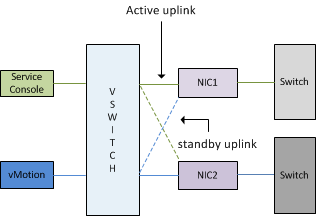
One NIC (vmnic0) is assigned as active to the management\service console portgroup, the second NIC (vmnic1) is configured as standby. The vMotion portgroup is configured with the first NIC (vmnic0) in standby mode and the second NIC as Active (vmnic1).

Active Standby setup management network vSwitch0

Failback
The Failback setting determines if the VMkernel will return the uplink (NIC) to active duty after recovery of a downed link or failed NIC. If the Failback setting is set to Yes the NIC will return to active duty, when Failback is set to No the failed NIC is assigned the Standby role and the administrator must manually reconfigure the NIC to the active state.

Effect of Failback yes setting on environment

When using the default setting of Failback unexpected behavior can occur during maintenance of a physical switch. Most switches, like those from Cisco, initiate the port after boot, so called Lights on. The port is active but is still unable to receive or transmitting data. The process from Lights-on to forwarding mode can take up to 50 seconds; unfortunately ESX is not able to distinguish between Lights-on status and forwarding mode, there for treating the link as usable and will return the NIC to active status again.
High Availability will proceed to transmit heartbeats and expect to receive heartbeats, after missing 13 seconds of heartbeats HA will try to ping its Isolation Address, due to the specified Isolation respond it will shut down or power-off the virtual machines two seconds later to allow other ESX hosts to power-up the virtual machines. But because it is common – recommended even – to configure each host in the cluster in an identical manner, each active NIC used by the management network of every ESX host connect to the same physical switch. Due to this design, once the switch is booted, a cluster wide Isolation response occurs resulting in a cluster wide outage.
To allow switch maintenance, it’s better to set the vSwitch failback mode to No. Selecting this setting introduces an increase of manual operations after failure or certain maintenance operations, but will reduce the change of “false positives” and cluster-wide isolation responses.

Filed Under: Networking Tagged With: Failover, HA, VMware, vswitch

Best practices

October 21, 2010 by frankdenneman

Last week at VMworld and the VCDX defense panels I heard the term “Best Practices” a lot. The term best practice makes me feel happy, shudder and laugh at the same time. Now when it comes to applying best practice I always use the analogy of crossing the road:

I am born and raised in the Netherlands and best practice is to look left first, then to the right and finally check left again before crossing the road. This best practice served me well and it helped me avoid being hit by a car/truck/crazy people on bikes and even trams and trolleys. But I ask you does this best practice still apply when I try to cross the street in London?
Don’t get me wrong, best practice are useful and very valuable, but to apply a best practice blindly won’t be as lethal as my analogy but it can get you into a lot of trouble.

Filed Under: Miscellaneous

VMworld vCloud Director Labs

October 12, 2010 by frankdenneman

Yesterday the VMworld Labs opened up to the public and if you want to take vCloud Director for a spin I’m recommending doing the following labs:
Private cloud – Management:
Lab 13 VMware vCloud Director Install and Config
Lab 18 VMware vCloud Director Networking
Private Cloud – Security:
Lab20 VMware vShield
Its best to complete Lab 18 vCloud Director Networking before doing VMware vShield Lab (Lab 20) because the terms and knowledge gained in Lab 18 will prepare you for Lab 20.
Today the VMworld 2010 speaker sessions started and I strongly recommend Duncan’s session “BC7803 – Planning and Designing an HA Cluster that Maximizes VM Uptime” and Kit Colbert’s “ TA7750 – Understanding Virtualization Memory Management Concepts”.
Go check it out.

Filed Under: Uncategorized

  • « Go to Previous Page
  • Page 1
  • Interim pages omitted …
  • Page 71
  • Page 72
  • Page 73
  • Page 74
  • Page 75
  • Interim pages omitted …
  • Page 83
  • Go to Next Page »

Copyright © 2026 · SquareOne Theme on Genesis Framework · WordPress · Log in