• Skip to primary navigation
  • Skip to main content

frankdenneman.nl

  • AI/ML
  • NUMA
  • About Me
  • Privacy Policy

VCDX- You cannot abstract your way out of things indefinitely

November 11, 2014 by frankdenneman

The amount of abstraction in IT is amazing. Every level in the software and hardware stack attempts to abstract operations and details. And the industry is craving for more. Look at the impact “All Things Software Defined” has on todays datacenter. It touches almost every aspect, from design to operations. The user provides the bare minimum of inputs and the underlying structure automagically tunes itself to a working solution. Brilliant! However sometimes I get the feeling that this level of abstraction becomes an excuse to not understand the underlying technology. As an architect you need to do your due diligence. You need to understand the wheels and cogs that are turning when dialing a specific knob at the abstracted layer.
But sometimes it seems that the abstraction level becomes the right to refuse to answer questions. This was always an interesting discussion during a VCDX defense session. When candidates argued that they weren’t aware of the details because other groups were responsible for that design. I tend to disagree
What level of abstraction is sufficient?
I am in the lucky position to work with PernixData R&D engineers and before that VMware R&D engineers. They tend to go deep, right down to the core of things. Discussing every little step of a process. Is this the necessary level of understanding the applied technology and solutions for an architect? I don’t think so. It’s interesting to know, but on a day-to-day basis you don’t have to understand the function of ceiling when DRS calculates priority levels of recommendations. What is interesting is to understand what happens if you place a virtual machine at the same hierarchical level as a resource pool filled with virtual machines. What is the impact on the service levels of these various entities?
Something in the middle might be the NFS series of Josh Odgers. Josh goes in-depth about the technology involved using NFS datastores. Virtual SCSI Hard Drives are presented to virtual machines, even when ESXi is connected to an NFS datastore. How does this impact the integrity of I/O’s? How does the SCSI protocol emulation process affect write ordering and of I/O’s of business critical applications. You as the virtual datacenter architect should be able to discuss the impact of using this technology with application owners. You should understand the potential impact a selected technology has on the various levels throughout the stack and what impact it has on the service it provides.
Recently I published a series on databases and what impact their workload characteristics have on storage architecture design. Understanding the position of a solution in the business process allows an architect to design a suitable solution. Lets use the OLTP example. Typically OLTP databases are at the front of the process, customer-facing process, dramatically put they are in the line of fire. When the OLTP database is performing slow or is unavailable it will typically impact revenue-generating processes. This means that latency is a priority but also concurrency and availability. You can then tailor your design to provide the best services to this application. This is just a simplified example, but it shows that you have to understand multiple aspects of the technology. Not just the behavior of a single component. The idea is to get a holistic view and then design your environment to cater the needs of the business, cause that’s why we get hired.
Circling back to the abstraction and the power of software defined, I though the post from Bart Heungens was interesting. Bart argues that Software Defined Storage is not the panacea for all storage related challenges. Which is true. Bart illustrates an architecture that is comprised of heterogeneous components. In his example, he illustrates what happens when you combine two servers HP DL380, but from different generations. Different generations primarily noticeable from a storage controller perspective and especially the way software behave. This is interesting on so many levels, and it would be a very interesting discussion if this were a VCDX defense session.
SDS abstracts many things, but it still relies on the underlying structure to provide the services. From a VCDX defense perspective, Bart has a constraint. And that is the already available hardware and the requirement to use these different generation hardware in his design. VCDX is not about providing the ideal design, but showing how you deal with constrains, requirements and demonstrating your expertise on technology how it impacts the requested solution. He didn’t solve the problem entirely, but by digging in deeper he managed to squeeze out performance to provide a better architecture to service the customers applications. He states the following:

Conclusion: the design and the components of the solution is very important to make this SDS based SAN a success. I hear often companies and people telling that hardware is more and more commodity and so not important in the Software Defined Datacenter, well I am not convinced at all.
I like the idea of VMware that states that, to enable VSAN, you need and SAS and SSD storage (HCL is quite restricted), just to be sure that they can guarantee performance. The HP VSA however is much more open and has lower requirements, however do not start complaining that your SAN is slow. Because you should understand this is not the fault of the VSA but from your hardware.

So be cognizant about the fact that while you are not responsible for every decision being made when creating an architecture for a virtual datacenter, you should be able to understand the impact various components, software settings and business requirements have on your part of the design. We are moving faster and faster towards abstracting everything. However this abstraction process does not exonerate you from understanding the potential impact it has on your area of responsibility

Filed Under: VCDX

MS Word style formatting shortcut keys for Mac

October 27, 2014 by frankdenneman

Recently I started to spend a lot of time in MS word again, and as a stickler for details I dislike a mishmash of font types throughout my document. I spend a lot of time on configuring the styles of the document, yet when I paste something from other documents, MS word tend to ignore these. Correcting the format burns a lot of time and it simply annoys the crap out of me.
To avoid this further, I started to dig around to find some font and style related shortcut keys. Yesterday I tweeted the shortcut key to apply the normal style and by the looks of retweets many of you are facing the same challenge.
Below is a short list of shortcut keys that I use. There are many more, share the common ones you like to use. As I use Mac I listed the Mac shortcut combination. Replace CTRL for CMD if you are using MS Word on a windows machine.
Select text:
Select all: CTRL+A
Select sentence: CMD + click
Select word: Double click
Select paragraph: Triple click
Formatting:
Clear formatting: CTRL+spacebar
Apply Normal Style: Shift+CMD+N
Header 1: CMD+ALT+1
Header 2: CMD+ALT+2
Header 3: CMD+ALT+3
Change Case: CMD+Option+C (repeat combination to cycle through options)
Indent paragraph: CTRL+Shift+M
Remove indent: CMD+Shift+M
Find and replace: F5

Filed Under: Miscellaneous

99 cents Promo to celebrate a major milestone of the vSphere Clustering Deepdive series

October 9, 2014 by frankdenneman

This week Duncan was looking at the sales numbers of the vSphere Clustering Deep Dive series and he noticed that we hit a major milestone in September. In September 2014 we passed the 45000 copies distributed of the vSphere Clustering Deep Dive. Duncan and I never ever expected this or even dared to dream to hit this milestone.
vSphere-clustering-booksWhen we first started writing the 4.1 book we had discussions around what to expect from a sales point of view and we placed a bet, I was happy if we sold 100 books, Duncan was more ambitious with 400 books. Needless to say we reset our expectations many times since then… We didn’t really follow it closely in the last 12-18 months, and as today we were discussing a potentially update of the book we figured it was time to look at the numbers again just to get an idea. 45000 copies distributed (ebook + printed) is just remarkable.
We’ve noticed that the ebook is still very popular, and decided to do a promo. As of Monday the 13th of October the 5.1 e-book will be available for only $ 0.99 for 72 hours, then after 72 hours the price will go up to $ 3.99 and then after 72 hours it will be back to the normal price. So make sure to get it while it is low priced!
Pick it up here on Amazon.com! The only other kindle store we could open the promotion up for was amazon.co.uk, so that is also an option!

Filed Under: VMware

Database workload characteristics and their impact on storage architecture design – part 3 – Ancillary structures for tuning databases

September 29, 2014 by frankdenneman

Welcome to part 3 of the Database workload characteristics series. Databases are considered to be one of the biggest I/O consumers in the virtual infrastructure. Database operations and database design are a study upon themselves, but I thought it might be interested to take a small peak underneath the surface of database design land. I turned to our resident Database expert Bala Narasimhan, PernixData’s director of products to provide some insights about the database designs and their I/O preferences.
Previous instalments of the series:

  1. Part 1 – Database Structures
  2. Part 2 – Data pipelines
Question 3: You’ve talked about ancillary structures for tuning databases, what are they and what role does FVP play here?

It goes without saying that database performance, whether OLTP or data warehousing, is critical for the business. As a result, DBA use ancillary structures to enhance database performance. Examples of such ancillary structures include indexes and Materialized Views (MV). MV are called Indexed Views on SQL Server.
Index
An index is an ancillary structure that allows a table to be sorted in multiple ways. This helps with quick lookups and operations, such as Merge Joins, that require that the data be sorted. Imagine a table with many columns in it. This table can be sorted in only one way on disk. For example, consider the Customer table shown below
CREATE TABLE Customer (
CustID int,
Name Char(20),
Zipcode int,
PRIMARY KEY (CustID));

The customer ID column, CustID, is the primary key in this table. This means that all customers can be uniquely identified by their CustID value. The table will most probably be sorted on this column.
Now imagine you ran a query that wanted to find out the number of customers in ZIP code 95051. Since the table is not sorted on ZIP code you will need to scan every single row in the table, see whether its ZIP code value is 95051 and add up the number of such rows. This can be extremely expensive. Instead what you can do is build an index on the ZIP code column. This index will be sorted on ZIP code and you can do a potentially faster lookup because of this.
Materialized View
A Materialized View (MV) is different from an index because an MV is a database object that contains the results of a query. If you know that a query will be run repeatedly then you can simply cache the results of that query in an MV and return the results as opposed to running the query itself each time. Example syntax to create an MV is as follows:
CREATE MATERIALIZED VIEW FOO AS SELECT * FROM BAZ WHERE BAZ.id = ‘11’;
In the SQL statement above the materialized view FOO stores the results of the query ‘SELECT * FROM BAZ WHERE BAZ.id = 11’. So, when someone executes the query ‘SELECT * FROM BAZ WHERE BAZ.id = 11’ you can simply return the rows in FOO instead because the results of the query are already saved in FOO. Now, this example is very simplistic but you can imagine that the query can be arbitrarily complex and storing its results in an MV can therefore be hugely beneficial.
Based on this explanation, one thing is apparent about both indexes and MV. Both indexes and MV are not ephemeral structures. This means that both of them need to be persisted on disk just like the tables in a database are. This means they consume disk space but more importantly it means that accessing them requires one to potentially do a lot of I/O. Good storage performance is therefore key to making these ancillary structures do their job.
These ancillary structures also come with a number of limitations. Firstly, they consume a lot of disk space. Sometimes they consume as much space as the underlying table and so it becomes more of an overhead than a benefit. Secondly, especially in the case of the MV, refresh rates make a huge difference. What do I mean by this?
Consider my example MV above. Let’s say that everyday I load new rows into the table BAZ and some of these rows have the value ‘11’ for the column id. In other words, there are new rows being added to BAZ every day where BAZ.id = 11. Once these new rows are added the MV foo has become stale because it is no longer storing the correct rows anymore. So, each time a new row is inserted into BAZ where BAZ.id = 11 not only must we do a write into the base table BAZ but we must also refresh the MV foo that sits on it. One I/O therefore ends up becoming multiple I/O! And, now if someone tries to query the MV foo when it is being refreshed you have all sorts of storage performance problems.
Note that both of these ancillary structures are great if you know what queries you are going to run. If so, you can both create the required indexes and MV. If, however, you run a query that cannot leverage these structures you get severe performance problems. And the truth of the matter is that it is seldom that case that you know all the queries you will run up front. So, ancillary structures can take you only so far sometimes.

How can FVP help?
  • When using server-side resources such as flash and RAM not only will writes to the underlying base table go faster in Write Back mode, but, refreshes on the MV sitting on top of those base tables will go much faster too. This means better query performance, higher concurrency and better scalability.
  • FVP will allow you to run ad-hoc queries at high speed. Even if you cannot leverage the existing indexes or MV for your query, accesses to the underlying base tables will be much faster owing to the fact that FVP will use server side flash and RAM for those base tables.
  • The above point means you do not need to create as many indexes or MV as you used to. This results in both tremendous savings from a storage capacity perspective and from an operational perspective of managing and running the database.

Part 4 coming soon!

Filed Under: Miscellaneous

Database workload characteristics and their impact on storage architecture design – part 2 – Data pipelines

September 24, 2014 by frankdenneman

Welcome to part 2 of the Database workload characteristics series. Databases are considered to be one of the biggest I/O consumers in the virtual infrastructure. Database operations and database design are a study upon themselves, but I thought it might be interested to take a small peak underneath the surface of database design land. I turned to our resident Database expert Bala Narasimhan, PernixData’s director of products to provide some insights about the database designs and their I/O preferences.

Question 2: You mentioned data pipelines in your previous podcast, what do you mean by this?

What I meant by data pipeline is the process by which this data flows in the enterprise. Data is not a static entity in the enterprise; it flows through the enterprise continuously and at various points is used for different things. As mentioned in part 1 of this series, data usually enters the pipeline via OLTP databases and this can be from numerous sources. For example, retailers may have Point of Sale (POS) databases that record all transactions (purchases, returns etc.). Similarly, manufacturers may have sensors that are continuously sending data about health of the machines to an OLTP database. It is very important that this data enter the system as fast as possible. In addition, these databases must be highly available, have support for high concurrency and have consistent performance. Low latency transactions are the name of the game in this part of the pipeline.
At some point, the business may be interested in analyzing this data to make better decisions. For example, a product manager at the retailer may want to analyze the Point of Sale data to better understand what products are selling at each store and why. In order to do this, he will need to run reports and analytics on the data. But as we discussed earlier, these reports and analytics are usually throughput bound and ad-hoc in nature. If we run these reports and analytics on the same OLTP database that is ingesting the low latency Point of Sale transactions then this will impact the performance of the OLTP database. Since OLTP databases are usually customer facing and interactive, a performance impact can have severe negative outcomes for the business.
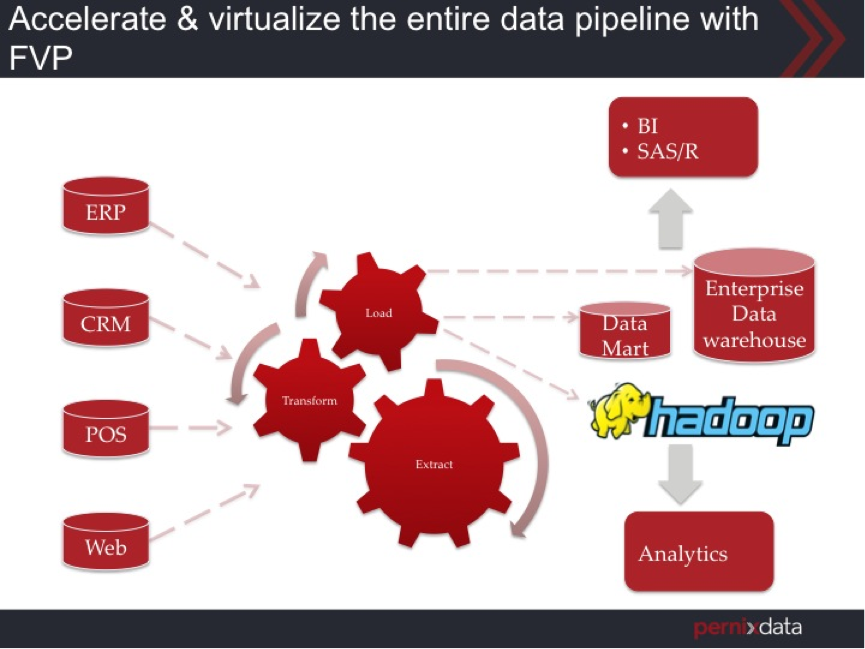
As a result what enterprises usually do is Extract the data from the OLTP database, Transform the data into a new shape and Load it into another database, usually a data warehouse. This is known as the ETL process. In order to do the ETL, customers use a solution such as Informatica (ETL) (3) or Hadoop (4) between your OLTP database and data warehouse. Some times customers will simply suck in all the data of the OLTP database (Read intensive, larger block size, throughput sensitive query) and than do the ETL inside the data warehouse itself. Transforming the data into a different shape requires reading the data, modifying it, and writing the data into new tables. You’ve most probably heard of nightly loads that happen into the data warehouse. This process is what is being referring to!
As we discussed before, OLTP databases may have a normalized schema and the data warehouse may have a more denormalized schema such as a Star schema. As a result, you can’t simply do a nightly load of the data directly from the OLTP database into the data warehouse as is. Instead you have to Extract the data from the OLTP database, Transform it from a normalized schema to a Star schema and then Load it into the data warehouse. This is the data pipeline. Here is an image that explains this:
ETL
In addition, there can also be continuous small feeds of data into the data warehouse by trickle loading small subsets of data, such as most recent or freshest data. By using the freshest data in your data warehouse you make sure that the reports you run or the analytics you do is not stale and is up to date and therefore enables the most accurate decisions.
As mentioned earlier, the ETL process and the data warehouse are typically throughput bound. Server side flash and RAM can play a huge role here because the ETL process and the data warehouse can now leverage the throughput capabilities of these server side resources.

Using PernixData FVP

Some specific, key benefits of using FVP with the data pipeline include:

  • OLTP databases can leverage the low latency characteristics of server side flash & RAM. This means more transactions per second and higher levels of concurrency all while providing protection against data loss via FVP’s write back replication capabilities.
  • Trickle loads of data into the data warehouse will get tremendously faster in Write Back mode because the new rows will be added to the table as soon as it touches the server side flash or RAM.
  • The reports and analytics may execute joins, aggregations, sorts etc. These require rapid access to large volumes of data and can also generate large intermediate results. High read and write throughput are therefore beneficial and having this done on the server right next to the database will help performance tremendously. Again, Write Back is a huge win.
  • Analytics can be ad-hoc and any tuning that the DBA have done may not help. Having the base tables on flash via FVP can help performance tremendously for ad-hoc queries.
  • Analytics workloads tend to create and leverage temporary tables within the database. Using server side resources for read enhances performance on these temporary tables and write accesses to them.
  • In addition, there is also a huge operational benefit. We can now virtualize the entire data pipeline (OLTP databases, ETL, data warehouse, data marts etc.) because we are able to provide high performance and consistent performance via server side resources and FVP. This brings together the best of both workloads. Leverage the operational benefits of a virtualization platform, such as vSphere HA, DRS and vMotion, and standardize the entire data pipeline on it without sacrificing performance at all.

Other parts of this series:

  1. Part 1 – Database Structures
  2. Part 3 – Ancillary structures for tuning databases

Filed Under: Miscellaneous

  • « Go to Previous Page
  • Page 1
  • Interim pages omitted …
  • Page 31
  • Page 32
  • Page 33
  • Page 34
  • Page 35
  • Interim pages omitted …
  • Page 83
  • Go to Next Page »

Copyright © 2026 · SquareOne Theme on Genesis Framework · WordPress · Log in